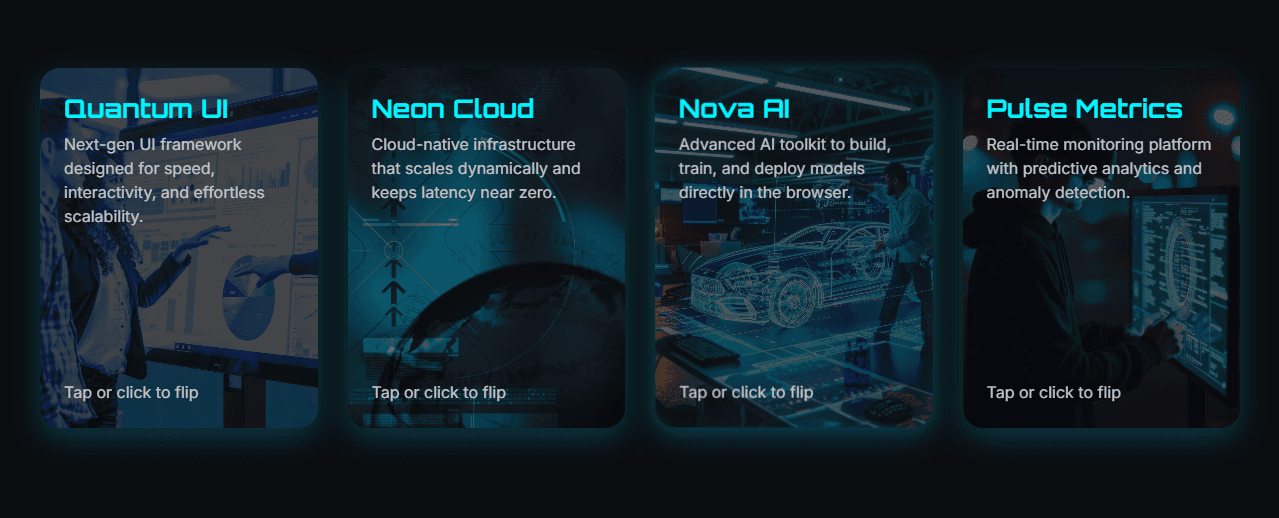
3D Interactive Flip Cards with Tilt and Bounce Animation using HTML, CSS & JavaScript
CodewithLord
October 4, 2025
Experience smooth 3D flip animations with realistic tilt and bounce effects using just HTML, CSS, and JavaScript
🧠 Description
Experience smooth 3D flip animations with realistic tilt and bounce effects using just HTML, CSS, and JavaScript.
Each card flips on click (or tap) to reveal more details on the back and tilts dynamically with mouse movement for a futuristic, interactive experience.
Perfect for portfolios, product showcases, or feature highlights, this project combines modern UI design with subtle motion effects to create an engaging user interface.
💻 HTML Code
1<!DOCTYPE html>2<htmllang="en">34<head>5<metacharset="UTF-8">6<title>3D Interactive Cards with Tilt & Bounce</title>7<linkrel="stylesheet"href="./style.css">89</head>1011<body>12<divclass="card-grid">1314<!-- Card 1 -->15<divclass="card">16<divclass="card-inner">17<divclass="card-face card-front one">18<div>19<h2>Quantum UI</h2>20<p>Next-gen UI framework designed for speed, interactivity, and effortless scalability.</p>21</div>22<p>Tap or click to flip</p>23</div>24<divclass="card-face card-back">25<div>26<h3>Features</h3>27<ulclass="features">28<li>Lightning-fast rendering</li>29<li>Modular component system</li>30<li>Seamless API integration</li>31<li>AI-powered UI suggestions</li>32</ul>33</div>34<divclass="cta-buttons">35<ahref="#"class="primary">Get Started</a>36<ahref="#"class="secondary">Learn More</a>37</div>38</div>39</div>40</div>4142<!-- Card 2 -->43<divclass="card">44<divclass="card-inner">45<divclass="card-face card-front two">46<div>47<h2>Neon Cloud</h2>48<p>Cloud-native infrastructure that scales dynamically and keeps latency near zero.</p>49</div>50<p>Tap or click to flip</p>51</div>52<divclass="card-face card-back">53<div>54<h3>Advantages</h3>55<ulclass="features">56<li>Auto-scaling engine</li>57<li>low-latency network</li>58<li>Zero-downtime</li>59<li>Built-in analytics</li>60</ul>61</div>62<divclass="cta-buttons">63<ahref="#"class="primary">Deploy Now</a>64<ahref="#"class="secondary">Docs</a>65</div>66</div>67</div>68</div>6970<!-- Card 3 -->71<divclass="card">72<divclass="card-inner">73<divclass="card-face card-front three">74<div>75<h2>Nova AI</h2>76<p>Advanced AI toolkit to build, train, and deploy models directly in the browser.</p>77</div>78<p>Tap or click to flip</p>79</div>80<divclass="card-face card-back">81<div>82<h3>What's Inside</h3>83<ulclass="features">84<li>In-browser training engine</li>85<li>Model visualization tools</li>86<li>Secure model hosting</li>87<li>Dataset builder</li>88</ul>89</div>90<divclass="cta-buttons">91<ahref="#"class="primary">Try Nova</a>92<ahref="#"class="secondary">Explore API</a>93</div>94</div>95</div>96</div>9798<!-- Card 4 -->99<divclass="card">100<divclass="card-inner">101<divclass="card-face card-front four">102<div>103<h2>Pulse Metrics</h2>104<p>Real-time monitoring platform with predictive analytics and anomaly detection.</p>105</div>106<p>Tap or click to flip</p>107</div>108<divclass="card-face card-back">109<div>110<h3>Highlights</h3>111<ulclass="features">112<li>Live dashboards</li>113<li>Predictive forecasting</li>114<li>Custom alerts & triggers</li>115<li>AI-based anomaly tracking</li>116</ul>117</div>118<divclass="cta-buttons">119<ahref="#"class="primary">Start Free</a>120<ahref="#"class="secondary">View Demo</a>121</div>122</div>123</div>124</div>125126</div>127<scriptsrc="./script.js"></script>128129</body>130131</html>132
.card-grid — A responsive grid container that holds all the cards.
.card — Each individual card element that reacts to user interaction.
.card-inner — The 3D container that flips between front and back.
.card-face — Two sides of the card:
.card-front → visible by default.
.card-back → revealed when flipped (rotated 180°).
Each card includes titles, short descriptions, feature lists, and CTA (Call To Action) buttons.