Back to Components
Animated 404 Error Page – Swinging Text and Cloak Effect using @property CSS
Component

Animated 404 Error Page – Swinging Text and Cloak Effect using @property CSS

CodewithLord
October 4, 2025

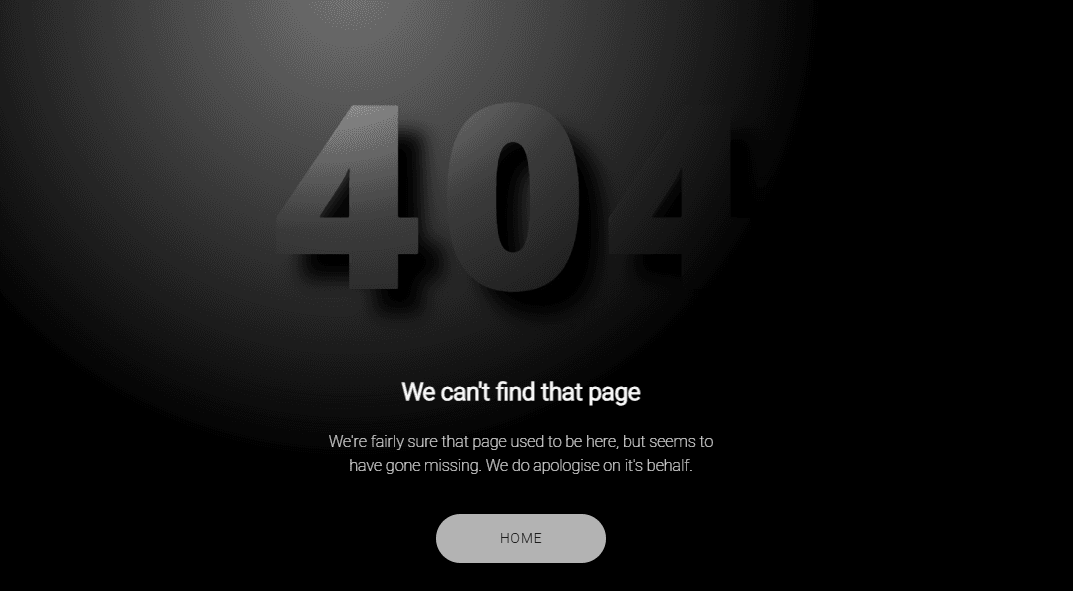
This creative 404 Error Page Concept combines advanced CSS features like the @property rule, custom variables, and keyframe animations to produce a smooth swinging 3D text effect and dynamic cloak lighting animation.

🧠 Description

This creative 404 Error Page Concept combines advanced CSS features like the @property rule, custom variables, and keyframe animations to produce a smooth swinging 3D text effect and dynamic cloak lighting animation. It provides a futuristic “missing page” design that’s minimal yet visually stunning — no external JavaScript animation library required. The effect gives the illusion of the “404” text swinging in space with light shadows moving behind it, representing the “lost” or “missing” theme of the page.


💻 HTML Code


1 2<!DOCTYPE html> 3<html lang="en"> 4 5 <head> 6 <meta charset="UTF-8"> 7 <title>404 Concept Page @property</title> 8 <link rel="stylesheet" href="https://public.codepenassets.com/css/normalize-5.0.0.min.css"> 9<link rel="stylesheet" href="./style.css"> 10 11 </head> 12 13 <body> 14 <h1>404</h1> 15<div class="cloak__wrapper"> 16 <div class="cloak__container"> 17 <div class="cloak"></div> 18 </div> 19</div> 20<div class="info"> 21 <h2>We can't find that page</h2> 22 <p>We're fairly sure that page used to be here, but seems to have gone missing. We do apologise on it's behalf.</p><a href="https://jhey.dev" target="_blank" rel="noreferrer noopener">Home</a> 23</div> 24 <script src="./script.js"></script> 25 26 </body> 27 28</html> 29

The HTML provides a clean and simple layout for the 404 page:

The "h1" element displays the large “404” error code.

A div structure (.cloak__wrapper, .cloak__container, .cloak) creates the animated shadow cloak, which gives depth and movement behind the main text.

The .info section contains the error message, description, and a Home button ("a" link) to navigate back to the homepage.

This structure separates main visual content (404 animation) from informational content (message and navigation).


CSS Code


1@import url("https://fonts.googleapis.com/css2?family=Open+Sans:wght@800&family=Roboto:wght@100;300&display=swap"); 2:root { 3 --button: #b3b3b3; 4 --button-color: #0a0a0a; 5 --shadow: #000; 6 --bg: #737373; 7 --header: #7a7a7a; 8 --color: #fafafa; 9 --lit-header: #e6e6e6; 10 --speed: 2s; 11} 12* { 13 box-sizing: border-box; 14 transform-style: preserve-3d; 15} 16@property --swing-x { 17 initial-value: 0; 18 inherits: false; 19 syntax: '<integer>'; 20} 21@property --swing-y { 22 initial-value: 0; 23 inherits: false; 24 syntax: '<integer>'; 25} 26body { 27 min-height: 100vh; 28 display: flex; 29 font-family: 'Roboto', sans-serif; 30 flex-direction: column; 31 align-items: center; 32 justify-content: center; 33 background: var(--bg); 34 color: var(--color); 35 perspective: 1200px; 36} 37a { 38 text-transform: uppercase; 39 text-decoration: none; 40 background: var(--button); 41 color: var(--button-color); 42 padding: 1rem 4rem; 43 border-radius: 4rem; 44 font-size: 0.875rem; 45 letter-spacing: 0.05rem; 46} 47p { 48 font-weight: 100; 49} 50h1 { 51 -webkit-animation: swing var(--speed) infinite alternate ease-in-out; 52 animation: swing var(--speed) infinite alternate ease-in-out; 53 font-size: clamp(5rem, 40vmin, 20rem); 54 font-family: 'Open Sans', sans-serif; 55 margin: 0; 56 margin-bottom: 1rem; 57 letter-spacing: 1rem; 58 transform: translate3d(0, 0, 0vmin); 59 --x: calc(50% + (var(--swing-x) * 0.5) * 1%); 60 background: radial-gradient(var(--lit-header), var(--header) 45%) var(--x) 100%/200% 200%; 61 -webkit-background-clip: text; 62 color: transparent; 63} 64h1:after { 65 -webkit-animation: swing var(--speed) infinite alternate ease-in-out; 66 animation: swing var(--speed) infinite alternate ease-in-out; 67 content: "404"; 68 position: absolute; 69 top: 0; 70 left: 0; 71 color: var(--shadow); 72 filter: blur(1.5vmin); 73 transform: scale(1.05) translate3d(0, 12%, -10vmin) translate(calc((var(--swing-x, 0) * 0.05) * 1%), calc((var(--swing-y) * 0.05) * 1%)); 74} 75.cloak { 76 animation: swing var(--speed) infinite alternate-reverse ease-in-out; 77 height: 100%; 78 width: 100%; 79 transform-origin: 50% 30%; 80 transform: rotate(calc(var(--swing-x) * -0.25deg)); 81 background: radial-gradient(40% 40% at 50% 42%, transparent, #000 35%); 82} 83.cloak__wrapper { 84 position: fixed; 85 top: 0; 86 left: 0; 87 bottom: 0; 88 right: 0; 89 overflow: hidden; 90} 91.cloak__container { 92 height: 250vmax; 93 width: 250vmax; 94 position: absolute; 95 top: 50%; 96 left: 50%; 97 transform: translate(-50%, -50%); 98} 99.info { 100 text-align: center; 101 line-height: 1.5; 102 max-width: clamp(16rem, 90vmin, 25rem); 103} 104.info > p { 105 margin-bottom: 3rem; 106} 107@-webkit-keyframes swing { 108 0% { 109 --swing-x: -100; 110 --swing-y: -100; 111 } 112 50% { 113 --swing-y: 0; 114 } 115 100% { 116 --swing-y: -100; 117 --swing-x: 100; 118 } 119} 120@keyframes swing { 121 0% { 122 --swing-x: -100; 123 --swing-y: -100; 124 } 125 50% { 126 --swing-y: 0; 127 } 128 100% { 129 --swing-y: -100; 130 --swing-x: 100; 131 } 132} 133

This is the core of the project — the animations, colors, and 3D illusion are entirely driven by modern CSS.

Here’s how it works:

Custom CSS Variables & @property: The code defines --swing-x and --swing-y custom properties using the new @property feature, allowing smooth animation of CSS variables across keyframes.

Text Animation: The “404” text uses: radial-gradient for light reflection across the text.

Animated background shifting to simulate light moving.

A blurred duplicate (h1::after) acting as a shadow layer, slightly offset to create a glowing motion effect.

Cloak Animation: The .cloak element rotates based on the --swing-x value, simulating a moving light cloak around the “404”. The gradient background of the cloak darkens the edges and brightens the center to give a depth illusion.

Keyframes: The @keyframes swing animation continuously updates --swing-x and --swing-y values, making both the text and cloak swing left-to-right and up-down in sync.

Typography & Layout: The page uses flexbox for centering, Google Fonts for modern typography, and clamp() for responsive scaling of text and container sizes.

The result is a smooth swinging 3D animation entirely powered by CSS — no JavaScript motion required.

Javascipt Code


1// 404 2

In this project, the JavaScript file (script.js) is included, but the animation itself is purely handled by CSS. If used, the script may simply:

Handle navigation back to home.

Add interactivity (like showing extra messages or logging analytics).

Essentially, JavaScript is optional here — the main functionality relies on CSS-driven animations and @property transitions.

Love this component?

Explore more components and build amazing UIs.

View All Components