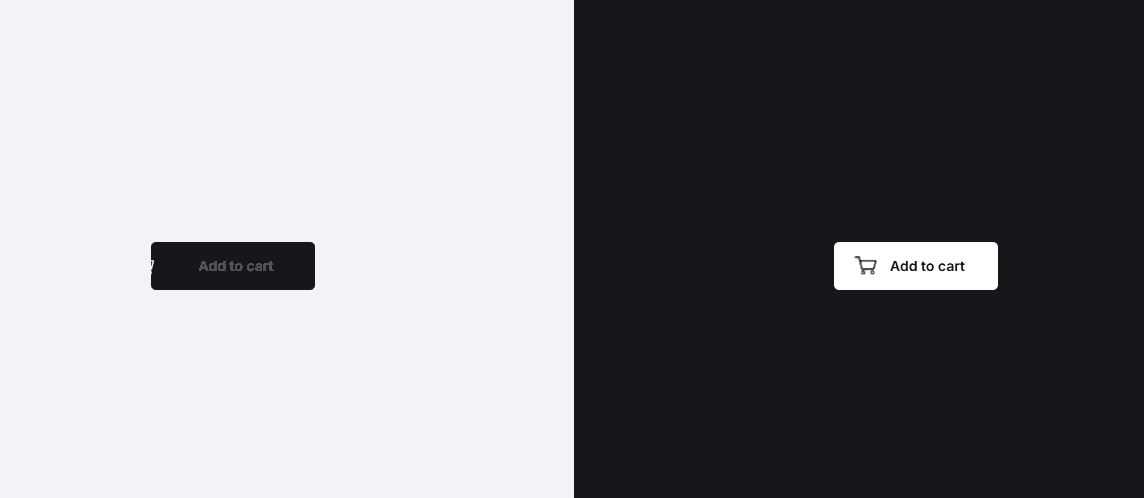
🧠 Description
This project showcases a high-quality Add to Cart button animation using GSAP + MorphSVGPlugin.
On click, the button performs a sequence of micro-interactions including icon morphing, cart movement, shirt animation, and elastic easing — creating a delightful e-commerce experience.
Why This Animation Feels Premium
- Smooth GSAP-driven micro-interactions
- SVG morphing using MorphSVGPlugin
- CSS variables controlled via JavaScript
- Elastic & physics-based easing
- Button state management (
active) - Works in both light & dark themes
- Ideal for modern e-commerce UI
Core Concept
The animation is powered by:
- CSS Custom Properties → Dynamic styling & transforms
- GSAP Keyframes → Timeline-like control without timelines
- MorphSVGPlugin → Shape-to-shape SVG transitions
- Pointer & Click events → Responsive interaction handling
Everything runs smoothly without layout shifts.
💻 Step 1: HTML Structure
Complete HTML Code
1<!DOCTYPE html>
2<html lang="en" >
3<head>
4 <meta charset="UTF-8">
5 <title>Add To Cart Button</title>
6 <link rel="stylesheet" href="https://cdnjs.cloudflare.com/ajax/libs/meyer-reset/2.0/reset.min.css">
7<link rel='stylesheet' href='https://fonts.googleapis.com/css?family=Inter:400,500,600,700&display=swap'>
8<link rel="stylesheet" href="./style.css">
9
10</head>
11<body>
12
13<!-- HTML Coding Start... -->
14
15<div class="white">
16
17 <button class="add-to-cart">
18 <span>Add to cart</span>
19 <svg class="morph" viewBox="0 0 64 13">
20 <path d="M0 12C6 12 17 12 32 12C47.9024 12 58 12 64 12V13H0V12Z" />
21 </svg>
22 <div class="shirt">
23 <svg class="first" viewBox="0 0 24 24">
24 <path d="M4.99997 3L8.99997 1.5C8.99997 1.5 10.6901 3 12 3C13.3098 3 15 1.5 15 1.5L19 3L22.5 8L19.5 10.5L19 9.5L17.1781 18.6093C17.062 19.1901 16.778 19.7249 16.3351 20.1181C15.4265 20.925 13.7133 22.3147 12 23C10.2868 22.3147 8.57355 20.925 7.66487 20.1181C7.22198 19.7249 6.93798 19.1901 6.82183 18.6093L4.99997 9.5L4.5 10.5L1.5 8L4.99997 3Z" />
25 <g>
26 <path d="M16.3516 9.65383H14.3484V7.83652H14.1742V9.8269H16.5258V7.83652H16.3516V9.65383Z" />
27 <path d="M14.5225 6.01934V7.66357H14.6967V7.4905H14.8186V7.66357H14.9928V6.01934H14.8186V7.31742H14.6967V6.01934H14.5225Z" />
28 <path d="M14.1742 5.67319V7.66357H14.3484V5.84627H16.3516V7.66357H16.5258V5.67319H14.1742Z" />
29 <path d="M15.707 9.48071H15.8812V9.28084L16.0032 9.4807V9.48071H16.1774V7.83648H16.0032V9.14683L15.8812 8.94697V7.83648H15.707V9.48071Z" />
30 <path d="M15.5852 6.01931H15.1149V6.19238H15.5852V6.01931Z" />
31 <path d="M15.707 6.01934V7.66357H15.8812V7.46371L16.0032 7.66357H16.1774V6.01934H16.0032V7.32969L15.8812 7.12984V6.01934H15.707Z" />
32 <path d="M15.411 7.31742H15.2891V6.53857H15.411V7.31742ZM15.1149 7.66357H15.2891V7.4905H15.411V7.66357H15.5852V6.3655H15.1149V7.66357Z" />
33 <path d="M14.5225 8.69756L14.8186 9.18291V9.30763H14.6967V9.13455H14.5225V9.48071H14.9928V9.13456V9.13455L14.6967 8.64917V8.00956H14.8186V8.6586H14.9928V7.83648H14.5225V8.69756Z" />
34 <path d="M15.411 9.30763H15.2891V8.00956H15.411V9.30763ZM15.1149 9.48071H15.5852V7.83648H15.1149V9.48071Z" />
35 </g>
36 </svg>
37 <svg class="second" viewBox="0 0 24 24">
38 <path d="M4.99997 3L8.99997 1.5C8.99997 1.5 10.6901 3 12 3C13.3098 3 15 1.5 15 1.5L19 3L22.5 8L19.5 10.5L19 9.5L17.1781 18.6093C17.062 19.1901 16.778 19.7249 16.3351 20.1181C15.4265 20.925 13.7133 22.3147 12 23C10.2868 22.3147 8.57355 20.925 7.66487 20.1181C7.22198 19.7249 6.93798 19.1901 6.82183 18.6093L4.99997 9.5L4.5 10.5L1.5 8L4.99997 3Z" />
39 <g>
40 <path d="M16.3516 9.65383H14.3484V7.83652H14.1742V9.8269H16.5258V7.83652H16.3516V9.65383Z" />
41 <path d="M14.5225 6.01934V7.66357H14.6967V7.4905H14.8186V7.66357H14.9928V6.01934H14.8186V7.31742H14.6967V6.01934H14.5225Z" />
42 <path d="M14.1742 5.67319V7.66357H14.3484V5.84627H16.3516V7.66357H16.5258V5.67319H14.1742Z" />
43 <path d="M15.707 9.48071H15.8812V9.28084L16.0032 9.4807V9.48071H16.1774V7.83648H16.0032V9.14683L15.8812 8.94697V7.83648H15.707V9.48071Z" />
44 <path d="M15.5852 6.01931H15.1149V6.19238H15.5852V6.01931Z" />
45 <path d="M15.707 6.01934V7.66357H15.8812V7.46371L16.0032 7.66357H16.1774V6.01934H16.0032V7.32969L15.8812 7.12984V6.01934H15.707Z" />
46 <path d="M15.411 7.31742H15.2891V6.53857H15.411V7.31742ZM15.1149 7.66357H15.2891V7.4905H15.411V7.66357H15.5852V6.3655H15.1149V7.66357Z" />
47 <path d="M14.5225 8.69756L14.8186 9.18291V9.30763H14.6967V9.13455H14.5225V9.48071H14.9928V9.13456V9.13455L14.6967 8.64917V8.00956H14.8186V8.6586H14.9928V7.83648H14.5225V8.69756Z" />
48 <path d="M15.411 9.30763H15.2891V8.00956H15.411V9.30763ZM15.1149 9.48071H15.5852V7.83648H15.1149V9.48071Z" />
49 </g>
50 </svg>
51 </div>
52 <div class="cart">
53 <svg viewBox="0 0 36 26">
54 <path d="M1 2.5H6L10 18.5H25.5L28.5 7.5L7.5 7.5" class="shape" />
55 <path d="M11.5 25C12.6046 25 13.5 24.1046 13.5 23C13.5 21.8954 12.6046 21 11.5 21C10.3954 21 9.5 21.8954 9.5 23C9.5 24.1046 10.3954 25 11.5 25Z" class="wheel" />
56 <path d="M24 25C25.1046 25 26 24.1046 26 23C26 21.8954 25.1046 21 24 21C22.8954 21 22 21.8954 22 23C22 24.1046 22.8954 25 24 25Z" class="wheel" />
57 <path d="M14.5 13.5L16.5 15.5L21.5 10.5" class="tick" />
58 </svg>
59 </div>
60 </button>
61
62</div>
63
64<div class="dark">
65
66 <button class="add-to-cart">
67 <span>Add to cart</span>
68 <svg class="morph" viewBox="0 0 64 13">
69 <path d="M0 12C6 12 17 12 32 12C47.9024 12 58 12 64 12V13H0V12Z" />
70 </svg>
71 <div class="shirt">
72 <svg class="first" viewBox="0 0 24 24">
73 <path d="M4.99997 3L8.99997 1.5C8.99997 1.5 10.6901 3 12 3C13.3098 3 15 1.5 15 1.5L19 3L22.5 8L19.5 10.5L19 9.5L17.1781 18.6093C17.062 19.1901 16.778 19.7249 16.3351 20.1181C15.4265 20.925 13.7133 22.3147 12 23C10.2868 22.3147 8.57355 20.925 7.66487 20.1181C7.22198 19.7249 6.93798 19.1901 6.82183 18.6093L4.99997 9.5L4.5 10.5L1.5 8L4.99997 3Z" />
74 <g>
75 <path d="M16.3516 9.65383H14.3484V7.83652H14.1742V9.8269H16.5258V7.83652H16.3516V9.65383Z" />
76 <path d="M14.5225 6.01934V7.66357H14.6967V7.4905H14.8186V7.66357H14.9928V6.01934H14.8186V7.31742H14.6967V6.01934H14.5225Z" />
77 <path d="M14.1742 5.67319V7.66357H14.3484V5.84627H16.3516V7.66357H16.5258V5.67319H14.1742Z" />
78 <path d="M15.707 9.48071H15.8812V9.28084L16.0032 9.4807V9.48071H16.1774V7.83648H16.0032V9.14683L15.8812 8.94697V7.83648H15.707V9.48071Z" />
79 <path d="M15.5852 6.01931H15.1149V6.19238H15.5852V6.01931Z" />
80 <path d="M15.707 6.01934V7.66357H15.8812V7.46371L16.0032 7.66357H16.1774V6.01934H16.0032V7.32969L15.8812 7.12984V6.01934H15.707Z" />
81 <path d="M15.411 7.31742H15.2891V6.53857H15.411V7.31742ZM15.1149 7.66357H15.2891V7.4905H15.411V7.66357H15.5852V6.3655H15.1149V7.66357Z" />
82 <path d="M14.5225 8.69756L14.8186 9.18291V9.30763H14.6967V9.13455H14.5225V9.48071H14.9928V9.13456V9.13455L14.6967 8.64917V8.00956H14.8186V8.6586H14.9928V7.83648H14.5225V8.69756Z" />
83 <path d="M15.411 9.30763H15.2891V8.00956H15.411V9.30763ZM15.1149 9.48071H15.5852V7.83648H15.1149V9.48071Z" />
84 </g>
85 </svg>
86 <svg class="second" viewBox="0 0 24 24">
87 <path d="M4.99997 3L8.99997 1.5C8.99997 1.5 10.6901 3 12 3C13.3098 3 15 1.5 15 1.5L19 3L22.5 8L19.5 10.5L19 9.5L17.1781 18.6093C17.062 19.1901 16.778 19.7249 16.3351 20.1181C15.4265 20.925 13.7133 22.3147 12 23C10.2868 22.3147 8.57355 20.925 7.66487 20.1181C7.22198 19.7249 6.93798 19.1901 6.82183 18.6093L4.99997 9.5L4.5 10.5L1.5 8L4.99997 3Z" />
88 <g>
89 <path d="M16.3516 9.65383H14.3484V7.83652H14.1742V9.8269H16.5258V7.83652H16.3516V9.65383Z" />
90 <path d="M14.5225 6.01934V7.66357H14.6967V7.4905H14.8186V7.66357H14.9928V6.01934H14.8186V7.31742H14.6967V6.01934H14.5225Z" />
91 <path d="M14.1742 5.67319V7.66357H14.3484V5.84627H16.3516V7.66357H16.5258V5.67319H14.1742Z" />
92 <path d="M15.707 9.48071H15.8812V9.28084L16.0032 9.4807V9.48071H16.1774V7.83648H16.0032V9.14683L15.8812 8.94697V7.83648H15.707V9.48071Z" />
93 <path d="M15.5852 6.01931H15.1149V6.19238H15.5852V6.01931Z" />
94 <path d="M15.707 6.01934V7.66357H15.8812V7.46371L16.0032 7.66357H16.1774V6.01934H16.0032V7.32969L15.8812 7.12984V6.01934H15.707Z" />
95 <path d="M15.411 7.31742H15.2891V6.53857H15.411V7.31742ZM15.1149 7.66357H15.2891V7.4905H15.411V7.66357H15.5852V6.3655H15.1149V7.66357Z" />
96 <path d="M14.5225 8.69756L14.8186 9.18291V9.30763H14.6967V9.13455H14.5225V9.48071H14.9928V9.13456V9.13455L14.6967 8.64917V8.00956H14.8186V8.6586H14.9928V7.83648H14.5225V8.69756Z" />
97 <path d="M15.411 9.30763H15.2891V8.00956H15.411V9.30763ZM15.1149 9.48071H15.5852V7.83648H15.1149V9.48071Z" />
98 </g>
99 </svg>
100 </div>
101 <div class="cart">
102 <svg viewBox="0 0 36 26">
103 <path d="M1 2.5H6L10 18.5H25.5L28.5 7.5L7.5 7.5" class="shape" />
104 <path d="M11.5 25C12.6046 25 13.5 24.1046 13.5 23C13.5 21.8954 12.6046 21 11.5 21C10.3954 21 9.5 21.8954 9.5 23C9.5 24.1046 10.3954 25 11.5 25Z" class="wheel" />
105 <path d="M24 25C25.1046 25 26 24.1046 26 23C26 21.8954 25.1046 21 24 21C22.8954 21 22 21.8954 22 23C22 24.1046 22.8954 25 24 25Z" class="wheel" />
106 <path d="M14.5 13.5L16.5 15.5L21.5 10.5" class="tick" />
107 </svg>
108 </div>
109 </button>
110
111</div>
112
113
114<!-- partial -->
115 <script src='https://cdnjs.cloudflare.com/ajax/libs/gsap/3.4.0/gsap.min.js'></script>
116<script src='https://s3-us-west-2.amazonaws.com/s.cdpn.io/16327/MorphSVGPlugin3.min.js'></script><script src="./script.js"></script>
117
118</body>
119</html>
120HTML Breakdown
.add-to-cart → Main interactive button
.morph → Animated background SVG underline
.shirt → Product animation using SVG morphing
.cart → Shopping cart motion + tick animation
SVGs → Vector-based, crisp & animatable
GSAP & MorphSVG loaded via CDN
🎨 Step 2: CSS – Layout & Visual Styling
CSS Code
1 2/* CSS Coding Start... */ 3 4.add-to-cart { 5 --background-default: #17171B; 6 --background-hover: #0A0A0C; 7 --background-scale: 1; 8 --text-color: #fff; 9 --text-o: 1; 10 --text-x: 12px; 11 --cart: #fff; 12 --cart-x: -48px; 13 --cart-y: 0px; 14 --cart-rotate: 0deg; 15 --cart-scale: .75; 16 --cart-clip: 0px; 17 --cart-clip-x: 0px; 18 --cart-tick-offset: 10px; 19 --cart-tick-color: #FF328B; 20 --shirt-y: -16px; 21 --shirt-scale: 0; 22 --shirt-color: #17171B; 23 --shirt-logo: #fff; 24 --shirt-second-y: 24px; 25 --shirt-second-color: #fff; 26 --shirt-second-logo: #17171B; 27 -webkit-tap-highlight-color: transparent; 28 -webkit-appearance: none; 29 outline: none; 30 background: none; 31 border: none; 32 padding: 12px 0; 33 width: 164px; 34 margin: 0; 35 cursor: pointer; 36 position: relative; 37 font-family: inherit; 38} 39.add-to-cart:before { 40 content: ""; 41 display: block; 42 position: absolute; 43 top: 0; 44 right: 0; 45 bottom: 0; 46 left: 0; 47 border-radius: 5px; 48 transition: background 0.25s; 49 background: var(--background, var(--background-default)); 50 transform: scaleX(var(--background-scale)) translateZ(0); 51} 52.add-to-cart:not(.active):hover { 53 --background: var(--background-hover); 54} 55.add-to-cart span { 56 display: block; 57 text-align: center; 58 position: relative; 59 z-index: 1; 60 font-size: 14px; 61 font-weight: 600; 62 line-height: 24px; 63 color: var(--text-color); 64 opacity: var(--text-o); 65 transform: translateX(var(--text-x)) translateZ(0); 66} 67.add-to-cart svg { 68 display: block; 69 width: var(--svg-width, 24px); 70 height: var(--svg-height, 24px); 71 position: var(--svg-position, relative); 72 left: var(--svg-left, 0); 73 top: var(--svg-top, 0); 74 stroke-linecap: round; 75 stroke-linejoin: round; 76} 77.add-to-cart svg path { 78 fill: var(--svg-fill, none); 79 stroke: var(--svg-stroke, none); 80 stroke-width: var(--svg-stroke-width, 2); 81} 82.add-to-cart .morph { 83 --svg-width: 64px; 84 --svg-height: 13px; 85 --svg-left: 50%; 86 --svg-top: -12px; 87 --svg-position: absolute; 88 --svg-fill: var(--background, var(--background-default)); 89 transition: fill 0.25s; 90 pointer-events: none; 91 margin-left: -32px; 92} 93.add-to-cart .shirt, 94.add-to-cart .cart { 95 pointer-events: none; 96 position: absolute; 97 left: 50%; 98} 99.add-to-cart .shirt { 100 margin: -12px 0 0 -12px; 101 top: 0; 102 transform-origin: 50% 100%; 103 transform: translateY(var(--shirt-y)) 104 scale(var(--shirt-scale)); 105} 106.add-to-cart .shirt svg { 107 --svg-fill: var(--shirt-color); 108} 109.add-to-cart .shirt svg g { 110 --svg-fill: var(--svg-g-fill, var(--shirt-logo)); 111} 112.add-to-cart .shirt svg.second { 113 --svg-fill: var(--shirt-second-color); 114 --svg-g-fill: var(--shirt-second-logo); 115 --svg-position: absolute; 116 -webkit-clip-path: polygon(0 var(--shirt-second-y), 24px var(--shirt-second-y), 24px 24px, 0 24px); 117 clip-path: polygon(0 var(--shirt-second-y), 24px var(--shirt-second-y), 24px 24px, 0 24px); 118} 119.add-to-cart .cart { 120 --svg-width: 36px; 121 --svg-height: 26px; 122 --svg-stroke: var(--cart); 123 top: 10px; 124 margin-left: -18px; 125 transform: translate(var(--cart-x), var(--cart-y)) rotate(var(--cart-rotate)) scale(var(--cart-scale)) translateZ(0); 126} 127.add-to-cart .cart:before { 128 content: ""; 129 display: block; 130 width: 22px; 131 height: 12px; 132 position: absolute; 133 left: 7px; 134 top: 7px; 135 background: var(--cart); 136 -webkit-clip-path: polygon(0 0, 22px 0, calc(22px - var(--cart-clip-x)) var(--cart-clip), var(--cart-clip-x) var(--cart-clip)); 137 clip-path: polygon(0 0, 22px 0, calc(22px - var(--cart-clip-x)) var(--cart-clip), var(--cart-clip-x) var(--cart-clip)); 138} 139.add-to-cart .cart path.wheel { 140 --svg-stroke-width: 1.5; 141} 142.add-to-cart .cart path.tick { 143 --svg-stroke: var(--cart-tick-color); 144 stroke-dasharray: 10px; 145 stroke-dashoffset: var(--cart-tick-offset); 146} 147 148.white, 149.dark { 150 width: 100%; 151 display: flex; 152 justify-content: center; 153 align-items: center; 154} 155 156.dark { 157 background: #17171B; 158} 159.dark .add-to-cart { 160 --background-default: #fff; 161 --background-hover: #F2F2F9; 162 --text-color: #17171B; 163 --cart: #17171B; 164 --cart-tick-color: #FF328B; 165 --shirt-color: #fff; 166 --shirt-logo: #17171B; 167 --shirt-second-color: #17171B; 168 --shirt-second-logo: #fff; 169} 170 171html { 172 box-sizing: border-box; 173 -webkit-font-smoothing: antialiased; 174} 175 176* { 177 box-sizing: inherit; 178} 179*:before, *:after { 180 box-sizing: inherit; 181} 182 183body { 184 min-height: 100vh; 185 display: flex; 186 font-family: "Inter", Arial; 187 background: #F2F2F9; 188} 189body .dribbble { 190 position: fixed; 191 display: block; 192 right: 20px; 193 bottom: 20px; 194} 195body .dribbble img { 196 display: block; 197 height: 28px; 198} 199body .twitter { 200 position: fixed; 201 display: block; 202 right: 64px; 203 bottom: 14px; 204} 205body .twitter svg { 206 width: 32px; 207 height: 32px; 208 fill: #1da1f2; 209} 210 211 212/* CSS Coding END... */ 213
CSS Breakdown
Key Techniques Used:
CSS Variables → Entire animation controlled via custom properties
Transform-based animation → GPU-accelerated & smooth
SVG Clip-Path → Shirt reveal effect
Theme Switching → .white & .dark containers
No layout shifts → Pure transforms & opacity
⚙️ Step 3: JavaScript – GSAP Animation Logic
JavaScript Code
1
2/* JavaScript Coding Start... */
3
4gsap.registerPlugin(MorphSVGPlugin)
5
6document.querySelectorAll('.add-to-cart').forEach(button => {
7 let morph = button.querySelector('.morph path'),
8 shirt = button.querySelectorAll('.shirt svg > path')
9 button.addEventListener('pointerdown', e => {
10 if(button.classList.contains('active')) {
11 return
12 }
13 gsap.to(button, {
14 '--background-scale': .97,
15 duration: .15
16 })
17 })
18 button.addEventListener('click', e => {
19 e.preventDefault()
20 if(button.classList.contains('active')) {
21 return
22 }
23 button.classList.add('active')
24 gsap.to(button, {
25 keyframes: [{
26 '--background-scale': .97,
27 duration: .15
28 }, {
29 '--background-scale': 1,
30 delay: .125,
31 duration: 1.2,
32 ease: 'elastic.out(1, .6)'
33 }]
34 })
35 gsap.to(button, {
36 keyframes: [{
37 '--shirt-scale': 1,
38 '--shirt-y': '-42px',
39 '--cart-x': '0px',
40 '--cart-scale': 1,
41 duration: .4,
42 ease: 'power1.in'
43 }, {
44 '--shirt-y': '-40px',
45 duration: .3
46 }, {
47 '--shirt-y': '16px',
48 '--shirt-scale': .9,
49 duration: .25,
50 ease: 'none'
51 }, {
52 '--shirt-scale': 0,
53 duration: .3,
54 ease: 'none'
55 }]
56 })
57 gsap.to(button, {
58 '--shirt-second-y': '0px',
59 delay: .835,
60 duration: .12
61 })
62 gsap.to(button, {
63 keyframes: [{
64 '--cart-clip': '12px',
65 '--cart-clip-x': '3px',
66 delay: .9,
67 duration: .06
68 }, {
69 '--cart-y': '2px',
70 duration: .1
71 }, {
72 '--cart-tick-offset': '0px',
73 '--cart-y': '0px',
74 duration: .2,
75 onComplete() {
76 button.style.overflow = 'hidden'
77 }
78 }, {
79 '--cart-x': '52px',
80 '--cart-rotate': '-15deg',
81 duration: .2
82 }, {
83 '--cart-x': '104px',
84 '--cart-rotate': '0deg',
85 duration: .2,
86 clearProps: true,
87 onComplete() {
88 button.style.overflow = 'hidden'
89 button.style.setProperty('--text-o', 0)
90 button.style.setProperty('--text-x', '0px')
91 button.style.setProperty('--cart-x', '-104px')
92 }
93 }, {
94 '--text-o': 1,
95 '--text-x': '12px',
96 '--cart-x': '-48px',
97 '--cart-scale': .75,
98 duration: .25,
99 clearProps: true,
100 onComplete() {
101 button.classList.remove('active')
102 }
103 }]
104 })
105 gsap.to(button, {
106 keyframes: [{
107 '--text-o': 0,
108 duration: .3
109 }]
110 })
111 gsap.to(morph, {
112 keyframes: [{
113 morphSVG: 'M0 12C6 12 20 10 32 0C43.9024 9.99999 58 12 64 12V13H0V12Z',
114 duration: .25,
115 ease: 'power1.out'
116 }, {
117 morphSVG: 'M0 12C6 12 17 12 32 12C47.9024 12 58 12 64 12V13H0V12Z',
118 duration: .15,
119 ease: 'none'
120 }]
121 })
122 gsap.to(shirt, {
123 keyframes: [{
124 morphSVG: 'M4.99997 3L8.99997 1.5C8.99997 1.5 10.6901 3 12 3C13.3098 3 15 1.5 15 1.5L19 3L23.5 8L20.5 11L19 9.5L18 22.5C18 22.5 14 21.5 12 21.5C10 21.5 5.99997 22.5 5.99997 22.5L4.99997 9.5L3.5 11L0.5 8L4.99997 3Z',
125 duration: .25,
126 delay: .25
127 }, {
128 morphSVG: 'M4.99997 3L8.99997 1.5C8.99997 1.5 10.6901 3 12 3C13.3098 3 15 1.5 15 1.5L19 3L23.5 8L20.5 11L19 9.5L18.5 22.5C18.5 22.5 13.5 22.5 12 22.5C10.5 22.5 5.5 22.5 5.5 22.5L4.99997 9.5L3.5 11L0.5 8L4.99997 3Z',
129 duration: .85,
130 ease: 'elastic.out(1, .5)'
131 }, {
132 morphSVG: 'M4.99997 3L8.99997 1.5C8.99997 1.5 10.6901 3 12 3C13.3098 3 15 1.5 15 1.5L19 3L22.5 8L19.5 10.5L19 9.5L17.1781 18.6093C17.062 19.1901 16.778 19.7249 16.3351 20.1181C15.4265 20.925 13.7133 22.3147 12 23C10.2868 22.3147 8.57355 20.925 7.66487 20.1181C7.22198 19.7249 6.93798 19.1901 6.82183 18.6093L4.99997 9.5L4.5 10.5L1.5 8L4.99997 3Z',
133 duration: 0,
134 delay: 1.25
135 }]
136 })
137 })
138})
139
140/* JavaScript Coding END... */
141JavaScript Breakdown
GSAP.registerPlugin() → Enables SVG morphing
CSS Variable Animation → No direct DOM transforms required
Keyframes API → Timeline-like control without timelines
Button State Locking → Prevents animation overlap
Elastic & Power easing → Natural, premium motion
Animation Flow Explanation
User clicks button
Background compresses slightly
Shirt icon scales & morphs
Cart moves, ticks & exits
Text fades out & reappears
Button resets automatically