Back to Components
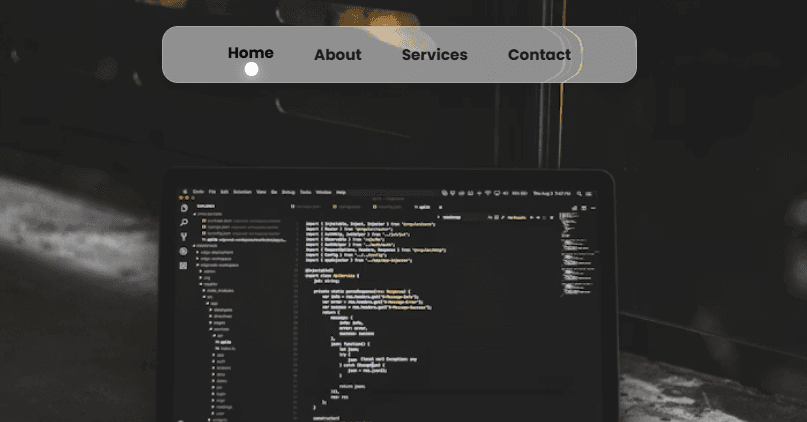
Elastic Nav Bounce – Liquid Glass Navigation Component.
Component

Elastic Nav Bounce – Liquid Glass Navigation Component.

CodewithLord
December 4, 2025

A futuristic, liquid-glass style navigation bar that features elastic bouncing animations, hover reactions, distortion effects, and smooth active-item transitions created using SVG filters, modern CSS, and JavaScript animation logic.

🔥 Description

This component creates a stylish elastic bouncing navigation bar with a liquid glass effect, animated movement indicator, and smooth interaction based on mouse hover and click events. JavaScript handles the easing, the SVG filter creates the distortion wave, and CSS creates the frosted glass styling and layout.


🧠 How the Component Works


📄 HTML Code

1<!DOCTYPE html> 2<html lang="en"> 3 4 <head> 5 <meta charset="UTF-8"> 6 <title>Elastic Nav Bounce - Liquid Glass - ( hover jump )</title> 7 <link rel="stylesheet" href="./style.css"> 8 9 </head> 10 11 <body> 12 <header> 13 <nav> 14 <ul> 15 <li><a href="#section1">Home</a></li> 16 <li><a href="#section2">About</a></li> 17 <li><a href="#section3">Services</a></li> 18 <li><a href="#section4">Contact</a></li> 19 </ul> 20 </nav> 21</header> 22<section class="container" id="section1"> 23 <img src="https://images.unsplash.com/photo-1505238680356-667803448bb6?q=80&w=1170&auto=format&fit=crop&ixlib=rb-4.1.0&ixid=M3wxMjA3fDB8MHxwaG90by1wYWdlfHx8fGVufDB8fHx8fA%3D%3D" alt=""> 24</section> 25<section class="container" id="section2"> 26 <img src="https://images.unsplash.com/photo-1534972195531-d756b9bfa9f2?q=80&w=1170&auto=format&fit=crop&ixlib=rb-4.1.0&ixid=M3wxMjA3fDB8MHxwaG90by1wYWdlfHx8fGVufDB8fHx8fA%3D%3D" alt=""> 27</section> 28<section class="container" id="section3"> 29 <img src="https://images.unsplash.com/photo-1566837945700-30057527ade0?q=80&w=1170&auto=format&fit=crop&ixlib=rb-4.1.0&ixid=M3wxMjA3fDB8MHxwaG90by1wYWdlfHx8fGVufDB8fHx8fA%3D%3D" alt=""> 30</section> 31<section class="container" id="section4"> 32 <img src="https://images.unsplash.com/photo-1624696941338-934bf86c28b4?q=80&w=1170&auto=format&fit=crop&ixlib=rb-4.1.0&ixid=M3wxMjA3fDB8MHxwaG90by1wYWdlfHx8fGVufDB8fHx8fA%3D%3D" alt=""> 33</section> 34 35<svg style="display: none"> 36 <defs> 37 <filter id="wave-distort" x="0%" y="0%" width="100%" height="100%"> 38 <feTurbulence 39 type="fractalNoise" 40 baseFrequency="0.0038 0.0038" 41 numOctaves="1" 42 seed="2" 43 result="roughNoise" 44 /> 45 <feGaussianBlur in="roughNoise" stdDeviation="8.5" result="softNoise" /> 46 <feComposite 47 operator="arithmetic" 48 k1="0" 49 k2="1" 50 k3="2" 51 k4="0" 52 in="softNoise" 53 result="mergedMap" 54 /> 55 <feDisplacementMap 56 in="SourceGraphic" 57 in2="mergedMap" 58 scale="-42" 59 xChannelSelector="G" 60 yChannelSelector="G" 61 /> 62 </filter> 63 </defs> 64</svg> 65 <script src="./script.js"></script> 66 67 </body> 68 69</html> 70

🌐 1️⃣ HTML Explanation

The HTML provides the structure for the navigation effect and the full-page scrolling sections:

✔ Header & Navigation

The nav contains an ul list where each li holds a navigation link (a). This simple list-based structure is used so JavaScript can easily measure each item’s position and animate the indicator under it.

✔ Sections

Four sections (#section1 to #section4) are placed vertically, each containing a full-screen image. This is mainly for demonstrating smooth scrolling and navigation interactions.

✔ SVG Filter

A hidden svg section defines a "wave-distort" filter using:

feTurbulence

feGaussianBlur

feComposite

feDisplacementMap

This filter creates a distorted water/glass reflection effect, applied to the navigation bar using CSS backdrop-filter: url(#wave-distort).

✔ Script

" script src="./script.js" loads the animation logic that controls the bouncing indicator.


🎨 CSS Code

1@import url('https://fonts.googleapis.com/css2?family=Poppins:wght@300;400;500;600;700&display=swap'); 2 3* { 4 margin: 0; 5 padding: 0; 6 box-sizing: border-box; 7} 8body { 9 font-family: 'Poppins', -apple-system, BlinkMacSystemFont, 'Segoe UI', Roboto, sans-serif; 10 -webkit-font-smoothing: antialiased; 11 -moz-osx-font-smoothing: grayscale; 12} 13html, body { 14 scroll-behavior: smooth; 15} 16.container { 17 width: 100%; 18 height: 100vh; 19 display: flex; 20 justify-content: center; 21 background-color: #000; 22 color: #fff; 23 img { 24 width: 100%; 25 height: 100%; 26 object-fit: cover; 27 } 28} 29nav { 30 position: fixed; 31 width: fit-content; 32 inset-inline: 0px; 33 margin: auto; 34 margin-top: 30px; 35 padding: 0 30px; 36 border-radius: 16px; 37 background: rgba(255, 255, 255, 0.5); 38 overflow: hidden; 39 border: 1px solid rgba(255, 255, 255, 0.2); 40 box-shadow: 41 0 8px 32px rgba(0, 0, 0, 0.1), 42 0 4px 16px rgba(0, 0, 0, 0.05); 43 44 &:before { 45 content: ''; 46 position: absolute; 47 inset: 0; 48 width: 100%; 49 height: 100%; 50 backdrop-filter: url(#wave-distort); 51 } 52} 53 54nav > ul { 55 position: relative; 56 list-style: none; 57 display: flex; 58 justify-content: center; 59 height: 55px; 60 isolation: isolate; 61 padding: 0 15px; 62} 63nav > ul::after { 64 content: ''; 65 position: absolute; 66 left: 0; 67 bottom: 6px; 68 width: 12px; 69 height: 12px; 70 background: white; 71 border-radius: 50%; 72 transform: translateX(var(--translate-x, 0)) translateY(var(--translate-y, 0)) rotate(var(--rotate-x, 0deg)); 73 transition: none; 74 opacity: 0; 75 z-index: -1; 76 box-shadow: 77 0 4px 16px rgba(255, 255, 255, 0.4), 78 0 2px 8px rgba(255, 255, 255, 0.3), 79 inset 0 1px 0 rgba(255, 255, 255, 0.8), 80 inset 0 -1px 0 rgba(0, 0, 0, 0.1); 81 border: 1px solid rgba(255, 255, 255, 0.6); 82} 83nav > ul li, 84nav > ul li a { 85 position: relative; 86 width: 100%; 87 height: 100%; 88 display: flex; 89 justify-content: center; 90 align-items: center; 91 color: #1a1a1a; 92 text-decoration: none; 93 font-weight: bold; 94 font-size: 0.95rem; 95} 96nav > ul li a { 97 padding-inline: 20px; 98 transition: all 0.3s cubic-bezier(0.4, 0, 0.2, 1); 99} 100nav > ul li a:hover { 101 color: #000000; 102 transform: translateY(-2px); 103} 104nav > ul li a:focus { 105 outline: none; 106} 107nav > ul li a.active { 108 color: #000000; 109 transform: translateY(-2px); 110} 111nav > ul.show-indicator::after { 112 opacity: 1; 113} 114nav > ul li a:active { 115 transform: translateY(-2px); 116}

🎨 2️⃣ CSS Explanation

The CSS handles all visual appearance, layout behavior, and the liquid-glass effect.

✔ Global Reset

Resets margins, paddings, and enables smooth scrolling.

✔ Full-Screen Sections

.container is styled to fill the full viewport height with centered content. Images use object-fit: cover to maintain quality across screen sizes.

✔ Frosted Glass Navigation

The nav is:

Centered horizontally

Given a blurred, semi-transparent, glass-like background

Surrounded by a soft shadow

Distorted using the custom SVG filter

This creates a "liquid glass" floating bar.

✔ Indicator Animation Styles

nav > ul::after creates the circular glowing indicator:

White glowing spot

Moves elastically based on CSS variables set by JavaScript

Appears only when .show-indicator is added

It visually "jumps" between items when hovered.

✔ Link Hover/Active Styles

Links:

Rise slightly upward when hovered

Become bold and darker

Have smooth cubic-bezier transitions for natural movement

✔ Responsive Glass

The nav uses overflow: hidden; and backdrop-filter so the distortion effect applies only inside the glass area.


🧠 JavaScript Code

1// Min/Max Slider 2document.addEventListener('DOMContentLoaded', () => { 3 const nav = document.querySelector('nav > ul'); 4 const items = document.querySelectorAll('nav > ul li a'); 5 let anim = null; 6 let currentActiveItem = null; 7 8 const animate = (from, to) => { 9 if (anim) clearInterval(anim); 10 11 const start = Date.now(); 12 anim = setInterval(() => { 13 const p = Math.min((Date.now() - start) / 500, 1); 14 const e = 1 - Math.pow(1 - p, 3); 15 16 const x = from + (to - from) * e; 17 const y = -40 * (4 * e * (1 - e)); 18 const r = 200 * Math.sin(p * Math.PI); 19 20 nav.style.setProperty('--translate-x', `${x}px`); 21 nav.style.setProperty('--translate-y', `${y}px`); 22 nav.style.setProperty('--rotate-x', `${r}deg`); 23 24 if (p >= 1) { 25 clearInterval(anim); 26 anim = null; 27 nav.style.setProperty('--translate-y', '0px'); 28 nav.style.setProperty('--rotate-x', '0deg'); 29 } 30 }, 16); 31 }; 32 33 const getCurrentPosition = () => parseFloat(nav.style.getPropertyValue('--translate-x')) || 0; 34 35 const getItemCenter = (item) => { 36 return item.getBoundingClientRect().left + item.offsetWidth / 2 - nav.getBoundingClientRect().left - 5; 37 }; 38 39 const moveToItem = (item) => { 40 const current = getCurrentPosition(); 41 const center = getItemCenter(item); 42 animate(current, center); 43 nav.classList.add('show-indicator'); 44 }; 45 46 const setActiveItem = (item) => { 47 if (currentActiveItem) { 48 currentActiveItem.classList.remove('active'); 49 } 50 51 currentActiveItem = item; 52 item.classList.add('active'); 53 moveToItem(item); 54 }; 55 56 const handleMouseLeave = () => { 57 if (currentActiveItem) { 58 moveToItem(currentActiveItem); 59 } else { 60 nav.classList.remove('show-indicator'); 61 if (anim) clearInterval(anim); 62 } 63 }; 64 65 items.forEach(item => { 66 item.addEventListener('mouseenter', () => moveToItem(item)); 67 item.addEventListener('mouseleave', handleMouseLeave); 68 item.addEventListener('click', () => setActiveItem(item)); 69 }); 70 71 nav.addEventListener('mouseleave', handleMouseLeave); 72 73 if (items.length > 0) { 74 setTimeout(() => { 75 setActiveItem(items[0]); 76 }, 100); 77 } 78});


⚙️ 3️⃣ JavaScript Explanation

JavaScript is responsible for the elastic bounce animation and dynamic indicator movement.

✔ Element Selection

JavaScript selects:

The ul inside nav

All the a items

Stores active item state and animation control variables

✔ Custom Easing Animation

A custom animation loop moves the indicator using:

Cubic easing

Vertical bounce (-40 * (4 * e * (1 - e)))

Rotation effect (200 * Math.sin(p * Math.PI))

These create the "jump + bounce + spin" behavior of the indicator.

✔ getItemCenter()

Calculates the exact center of each menu item relative to the nav bar. This ensures the indicator always aligns perfectly under each link.

✔ moveToItem()

Moves the indicator to the hovered or active item’s position by triggering the animation.

✔ setActiveItem()

Adds or removes the .active class to links, visually marking the selected section.

✔ Mouse Enter / Leave Events

On hover → indicator jumps On leave → indicator returns to the last active item

✔ Initial Activation

On page load, the first item ("Home") automatically becomes active after a slight delay.

Love this component?

Explore more components and build amazing UIs.

View All Components