Back to Components
3D Hovering Tourist Cards
Component

3D Hovering Tourist Cards

CodewithLord
December 3, 2025

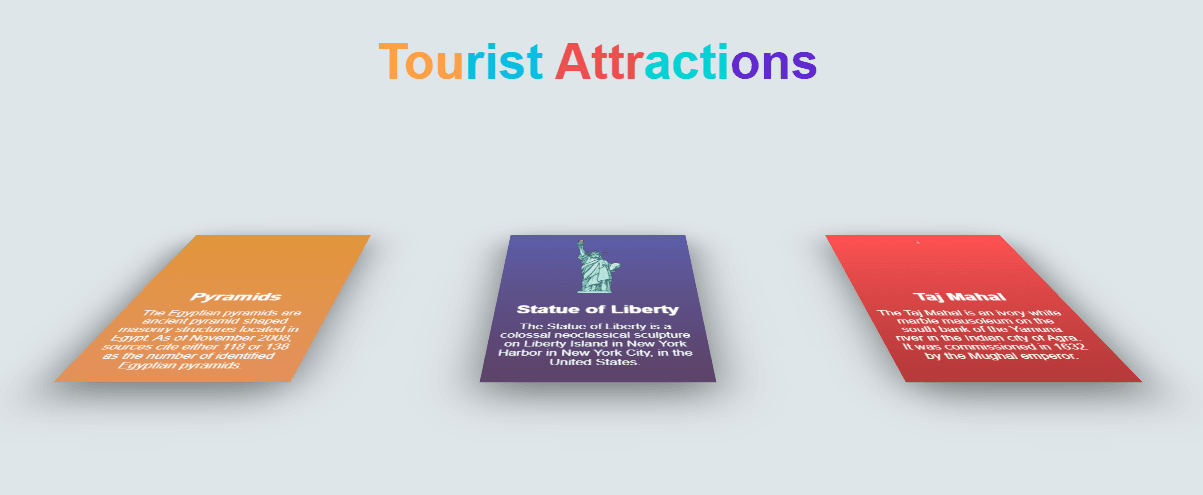
A visually engaging UI component that displays three tourist attraction cards with 3D perspective, tilt animations, hover effects, and color-themed gradients.

🔥 Description

A visually engaging UI component that displays three tourist attraction cards with 3D perspective, tilt animations, hover effects, and color-themed gradients. Each card lifts up from a 3D transformed state to a flat, elevated display when hovered. Designed using HTML and CSS only.


🧠 How the Component Works


📄 HTML Code

1<!DOCTYPE html> 2<html lang="en"> 3 4 <head> 5 <meta charset="UTF-8"> 6 <title>hovering cards</title> 7 <link rel="stylesheet" href="./style.css"> 8 9 </head> 10 11 <body> 12 <div class="title"> 13 <h1><span style="color: #ff9f43">Tou</span><span style="color: #0abde3">rist</span> <span style="color: #ee5253">Attr</span><span style="color: #00d2d3">acti<span><span style="color: #5f27cd">ons<span></h1> 14</div> 15<div class="card1"> 16 <img src="http://www.pngmart.com/files/5/Pyramids-PNG-HD.png" alt=""> 17 <h3>Pyramids</h3> 18 <p>The Egyptian pyramids are ancient pyramid-shaped masonry structures located in Egypt. As of November 2008, sources cite either 118 or 138 as the number of identified Egyptian pyramids.</p> 19</div> 20 21<div class="card2"> 22 <img src="https://wallazee.global.ssl.fastly.net/images/dynamic/items/383-1024.png" alt="Eiffel Tower"> 23 <h3>Statue of Liberty</h3> 24 <p>The Statue of Liberty is a colossal neoclassical sculpture on Liberty Island in New York Harbor in New York City, in the United States.</p> 25</div> 26 27<div class="card3"> 28 <img src="http://pluspng.com/img-png/download-taj-mahal-png-images-transparent-gallery-advertisement-1185.png" alt=""> 29 <h3>Taj Mahal</h3> 30 <p>The Taj Mahal is an ivory-white marble mausoleum on the south bank of the Yamuna river in the Indian city of Agra. It was commissioned in 1632 by the Mughal emperor.</p> 31</div> 32<div class="footer"> 33</div> 34 35 </body> 36 37</html> 38 39

🌐 1️⃣ HTML Explanation

The HTML creates the structure for three tourist attraction cards and the title.

The document begins with the DOCTYPE declaration and sets the language to English. Inside the head section, metadata and a link to the external CSS file are defined. The body contains a main title inside a div where each part of the text is styled with a different color using inline span styling.

Below the title, there are three separate card containers named card1, card2, and card3. Each card contains an image tag for displaying the attraction, a heading for the site name, and a paragraph describing the location. These divs act as the base blocks that CSS later transforms into 3D hover cards.

At the end of the document, there is a footer div to reserve space for future footer text.


🎨 CSS Code

1@import url('https://fonts.googleapis.com/css?family=Exo:700'); 2@import url('https://fonts.googleapis.com/css?family=Abel'); 3body { 4 background-color: #dfe6e9; 5 -webkit-transform: perspective(900px); 6 -webkit-transform-style: preserve-3d; 7} 8.title{ 9 width:100%; 10 text-align: center; 11} 12.title h1{ 13 font-size:50px; 14 font-family: 'Exo', sans-serif; 15} 16.card1 { 17 text-align:center; 18 position: absolute; 19 left: 100px; 20 width: 250px; 21 height: 350px; 22 margin-top: 10px; 23 margin-bottom: 10px; 24 background: linear-gradient(rgb(225,150,58),rgb(227,144,91)); 25 transition:.6s; 26 27 transform: rotatex(75deg) translatey(-200px) translatez(-100px); 28 box-shadow: 0px 20px 60px rgba(0,0,0, 0.5); 29} 30.card1:hover{ 31 transform: rotatex(0deg); 32 transform: rotatez(0deg); 33 transition:.6s; 34 box-shadow: 0px 0px 20px rgba(0, 0, 0, 0.3); 35} 36.card1 img{ 37 transform: translateY(15px); 38 width:200px; 39 height:120px; 40} 41h3{ 42 font-size:25px; 43 font-family: 'Abel', sans-serif; 44 color:rgb(255,255,255); 45 text-shadow: 0 0 2px rgb(255,255,255); 46 transform: translatey(10px); 47} 48 49p{ 50 51 font-family: 'Abel', sans-serif; 52 color: white; 53 text-align:center; 54 width:220px; 55 transform: translatex(12px); 56} 57 58 59.card2 { 60 text-align:center; 61 position: absolute; 62 left: 550px; 63 width: 250px; 64 height: 350px; 65 margin-top: 10px; 66 margin-bottom: 10px; 67 background: linear-gradient(rgb(93,94,170),rgb(93,66,103)); 68 animation: animate 1s linear infinite; 69 transition:.6s; 70 71 transform: rotatex(75deg) translatey(-200px) translatez(-100px); 72 box-shadow: 0px 20px 60px rgba(0, 0, 0, 0.5); 73} 74.card2:hover{ 75 transform: rotatex(0deg); 76 transition:.6s; 77 box-shadow: 0px 0px 20px rgba(0, 0, 0, 0.3); 78} 79.card2 img{ 80 transform: translateY(15px); 81 width:180px; 82 height:150px; 83} 84.card3 { 85 text-align:center; 86 position: absolute; 87 left: 1000px; 88 width: 250px; 89 height: 350px; 90 margin-top: 10px; 91 margin-bottom: 10px; 92 background: linear-gradient(#ff5252, #b33939); 93 transition:.6s; 94 95 transform: rotatex(75deg) translatey(-200px) translatez(-100px); 96 box-shadow: 0px 20px 60px rgba(0, 0, 0, 0.5); 97} 98.card3:hover{ 99 transform: rotatex(0deg); 100 transition:.6s; 101 box-shadow: 0px 0px 20px rgba(0, 0, 0, 0.3); 102} 103.card3 img{ 104 transform: translateY(15px); 105 width:200px; 106 height:120px; 107} 108.footer{ 109 position: absolute; 110 top: 500px; 111 marging: 10px; 112 width: 100%; 113 text-align: center; 114} 115.footer h2{ 116 font-size:18px; 117 font-family: 'Exo', sans-serif; 118 119}

🎨 2️⃣ CSS Explanation

The CSS begins by importing two Google Fonts, Exo and Abel, used for the title and card text. The body has a light gray background and is given 3D rendering properties using perspective and transform-style to enable the dramatic hover motion.

The title section centers the heading and applies large, bold typography. Each card has absolute positioning to place them horizontally across the screen. The cards have a fixed width and height and use linear gradients for colorful backgrounds. A shadow is added to create depth.

To create the 3D effect, each card is rotated on the X-axis by 75 degrees and moved forward and upward using translateY and translateZ. This makes them appear as if they are lying flat in the distance.

On hover, the transform is reset to a 0-degree rotation, making the card stand upright. The transition smooths the animation, and the shadow is softened to give a glowing appearance. Each card uses slightly different styling and sizing for its images. The second card has an infinite animation assigned, although no keyframes are defined in the provided code, meaning the animation has no visible effect until keyframes are added.

The global h3 heading and p text styles are applied to all cards. Text alignment, color, and spacing are adjusted to ensure readability against the gradient backgrounds.

The footer is positioned lower on the page with centered alignment.

Love this component?

Explore more components and build amazing UIs.

View All Components