Back to Components
Interactive Focus Cards | Responsive Image Grid with Blur & Hover Effects using HTML, CSS & JavaScript
Component

Interactive Focus Cards | Responsive Image Grid with Blur & Hover Effects using HTML, CSS & JavaScript

CodewithLord
October 14, 2025

This project showcases a modern and responsive focus card grid that highlights user interaction through smooth hover animations.

🧠 Description

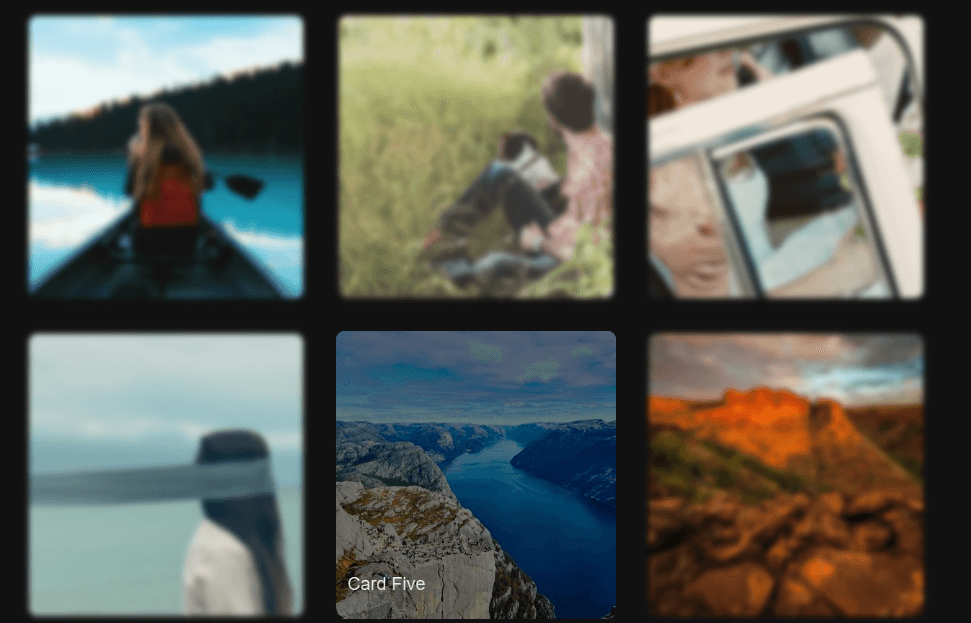
This project showcases a modern and responsive focus card grid that highlights user interaction through smooth hover animations. Built using HTML, CSS, and JavaScript, the layout dynamically generates image cards that blur out when one is hovered over, keeping focus on the active card with a glowing overlay and title. It’s ideal for showcasing portfolios, photo galleries, or product grids with minimal code and an elegant, professional look.


💻 HTML Code


1<!DOCTYPE html> 2<html lang="en"> 3<head> 4 <meta charset="UTF-8"> 5 <meta name="viewport" content="width=device-width, initial-scale=1.0"> 6 <title>CodewithLord - Focus Cards</title> 7 <link rel="stylesheet" href="style.css"> 8</head> 9<body> 10 <div class="cards-grid" id="cardsGrid"> 11 <!-- Cards will be injected via JS --> 12 </div> 13 14 <script src="script.js"></script> 15</body> 16</html> 17

The HTML serves as the foundation for the card grid layout. It contains a simple page structure with a container div named cardsGrid, where all the image cards will be inserted dynamically using JavaScript. The page includes a link to an external CSS file for styling and a script tag that links to the JavaScript file that populates and animates the cards. By keeping the HTML minimal and using JavaScript for rendering, the design becomes flexible and easy to scale with more cards or dynamic content.


CSS Code


1body { 2 margin: 0; 3 padding: 2rem; 4 background: #111; 5 font-family: sans-serif; 6 color: #fff; 7 display: flex; 8 justify-content: center; 9} 10 11.cards-grid { 12 display: grid; 13 grid-template-columns: repeat(1, 1fr); 14 gap: 2.5rem; 15 max-width: 1200px; 16 width: 100%; 17} 18 19@media (min-width: 768px) { 20 .cards-grid { 21 grid-template-columns: repeat(3, 1fr); 22 } 23} 24 25.card { 26 position: relative; 27 height: 15rem; 28 overflow: hidden; 29 border-radius: 0.75rem; 30 transition: transform 0.3s ease-out, filter 0.3s ease-out; 31 cursor: pointer; 32 background: #222; 33} 34 35@media (min-width: 768px) { 36 .card { 37 height: 24rem; 38 } 39} 40 41.card img { 42 position: absolute; 43 inset: 0; 44 width: 100%; 45 height: 100%; 46 object-fit: cover; 47} 48 49.card.blur { 50 filter: blur(4px); 51 transform: scale(0.98); 52} 53 54.card-overlay { 55 position: absolute; 56 inset: 0; 57 background: rgba(0, 0, 0, 0.5); 58 display: flex; 59 align-items: flex-end; 60 padding: 2rem 1rem; 61 opacity: 0; 62 transition: opacity 0.3s ease; 63} 64 65.card-overlay.active { 66 opacity: 1; 67} 68 69.card-title { 70 font-size: 1.25rem; 71 font-weight: 500; 72 background: linear-gradient(to bottom, #fff, #ccc); 73 -webkit-background-clip: text; 74 -webkit-text-fill-color: transparent; 75} 76 77@media (min-width: 768px) { 78 .card-title { 79 font-size: 1.5rem; 80 } 81} 82 83

The CSS defines the visual style and animation behavior of the focus cards. The page background is dark, with centered content and generous spacing for a clean, modern aesthetic. The cards-grid uses a CSS Grid layout, switching from a single-column structure on small screens to a three-column layout on larger devices, ensuring responsiveness. Each .card has a rounded, dark background and smooth transitions for transform and filter effects. When a card is hovered, it remains sharp and highlighted, while other cards are slightly blurred and scaled down, directing attention to the focused one. The .card-overlay adds a subtle dark gradient and reveals the card’s title during hover using a fade-in transition. The gradient text styling on .card-title gives a polished, modern effect, matching the project’s sleek UI.

Javascipt Code


1 2 3// Sample cards data 4const cards = [ 5 { title: "Card One", src: "https://picsum.photos/id/1011/600/400" }, 6 { title: "Card Two", src: "https://picsum.photos/id/1012/600/400" }, 7 { title: "Card Three", src: "https://picsum.photos/id/1013/600/400" }, 8 { title: "Card Four", src: "https://picsum.photos/id/1014/600/400" }, 9 { title: "Card Five", src: "https://picsum.photos/id/1015/600/400" }, 10 { title: "Card Six", src: "https://picsum.photos/id/1016/600/400" }, 11]; 12 13const cardsGrid = document.getElementById("cardsGrid"); 14 15let hoveredIndex = null; 16 17// Render cards 18cards.forEach((card, index) => { 19 const cardDiv = document.createElement("div"); 20 cardDiv.classList.add("card"); 21 22 cardDiv.innerHTML = ` 23 <img src="${card.src}" alt="${card.title}"> 24 <div class="card-overlay"> 25 <div class="card-title">${card.title}</div> 26 </div> 27 `; 28 29 // Mouse enter 30 cardDiv.addEventListener("mouseenter", () => { 31 hoveredIndex = index; 32 updateHoverEffects(); 33 }); 34 35 // Mouse leave 36 cardDiv.addEventListener("mouseleave", () => { 37 hoveredIndex = null; 38 updateHoverEffects(); 39 }); 40 41 cardsGrid.appendChild(cardDiv); 42}); 43 44function updateHoverEffects() { 45 const allCards = document.querySelectorAll(".card"); 46 allCards.forEach((card, index) => { 47 const overlay = card.querySelector(".card-overlay"); 48 if (hoveredIndex === null) { 49 card.classList.remove("blur"); 50 overlay.classList.remove("active"); 51 } else if (index === hoveredIndex) { 52 card.classList.remove("blur"); 53 overlay.classList.add("active"); 54 } else { 55 card.classList.add("blur"); 56 overlay.classList.remove("active"); 57 } 58 }); 59} 60// Sample cards data 61const cards = [ 62 { title: "Card One", src: "https://picsum.photos/id/1011/600/400" }, 63 { title: "Card Two", src: "https://picsum.photos/id/1012/600/400" }, 64 { title: "Card Three", src: "https://picsum.photos/id/1013/600/400" }, 65 { title: "Card Four", src: "https://picsum.photos/id/1014/600/400" }, 66 { title: "Card Five", src: "https://picsum.photos/id/1015/600/400" }, 67 { title: "Card Six", src: "https://picsum.photos/id/1016/600/400" }, 68]; 69 70const cardsGrid = document.getElementById("cardsGrid"); 71 72let hoveredIndex = null; 73 74// Render cards 75cards.forEach((card, index) => { 76 const cardDiv = document.createElement("div"); 77 cardDiv.classList.add("card"); 78 79 cardDiv.innerHTML = ` 80 <img src="${card.src}" alt="${card.title}"> 81 <div class="card-overlay"> 82 <div class="card-title">${card.title}</div> 83 </div> 84 `; 85 86 // Mouse enter 87 cardDiv.addEventListener("mouseenter", () => { 88 hoveredIndex = index; 89 updateHoverEffects(); 90 }); 91 92 // Mouse leave 93 cardDiv.addEventListener("mouseleave", () => { 94 hoveredIndex = null; 95 updateHoverEffects(); 96 }); 97 98 cardsGrid.appendChild(cardDiv); 99}); 100 101function updateHoverEffects() { 102 const allCards = document.querySelectorAll(".card"); 103 allCards.forEach((card, index) => { 104 const overlay = card.querySelector(".card-overlay"); 105 if (hoveredIndex === null) { 106 card.classList.remove("blur"); 107 overlay.classList.remove("active"); 108 } else if (index === hoveredIndex) { 109 card.classList.remove("blur"); 110 overlay.classList.add("active"); 111 } else { 112 card.classList.add("blur"); 113 overlay.classList.remove("active"); 114 } 115 }); 116} 117

The JavaScript file controls how cards are created, displayed, and interact when hovered. It begins by defining an array of card data, each containing a title and image URL. Using forEach, it dynamically creates and injects cards into the HTML grid, each consisting of an image and overlay with text. Event listeners track when a user hovers over a card (mouseenter) or moves away (mouseleave), updating which card is currently focused. The updateHoverEffects() function handles the visual response — applying the blur effect to all non-hovered cards while activating the overlay and text on the hovered one. This logic creates a seamless and intuitive focus transition without requiring complex animations.

Love this component?

Explore more components and build amazing UIs.

View All Components