Back to Components
GSAP Scroll Motion Path Animation
Component

GSAP Scroll Motion Path Animation

CodewithLord
January 30, 2026

An interactive scroll-triggered animation using GSAP MotionPathPlugin that animates an element along a custom motion path defined by multiple waypoints. Features smooth scroll synchronization with ScrollTrigger and dynamic responsive calculations.

🧠 Description

This project showcases an elegant scroll-triggered animation powered by GSAP (GreenSock Animation Platform) and its MotionPathPlugin.

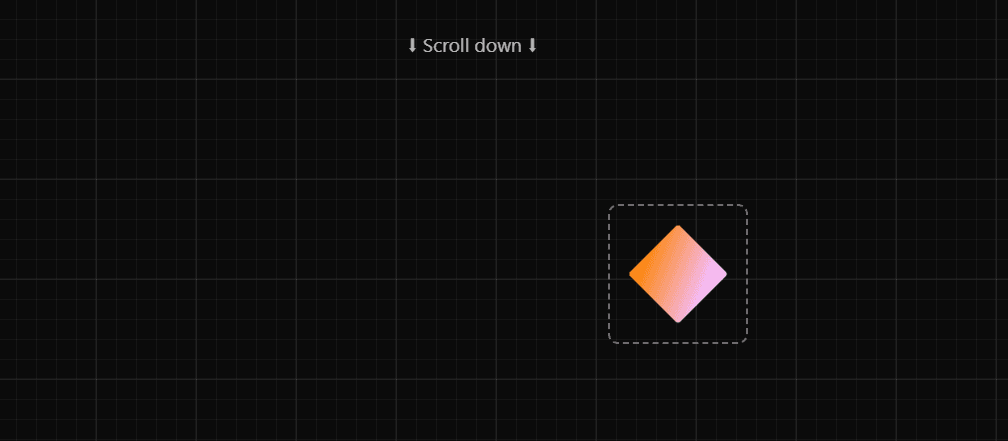
The animation allows an element to smoothly travel along a custom motion path defined by multiple waypoint markers positioned throughout the page.

As users scroll down the page, the animated element follows the motion path in real-time, creating a seamless visual connection between scroll progress and element movement.

The design uses GSAP's ScrollTrigger to synchronize the animation with scroll position and MotionPathPlugin to calculate smooth curves connecting all waypoints.

Perfect for interactive storytelling, guided tours, and creative scroll experiences.


💻 HTML Code


1<!DOCTYPE html> 2<html lang="en"> 3<head> 4 <meta charset="UTF-8" /> 5 <title>GSAP Scroll Motion Path</title> 6 <meta name="viewport" content="width=device-width, initial-scale=1.0" /> 7 8 <!-- GSAP CDN --> 9 <script src="https://unpkg.com/gsap@3/dist/gsap.min.js"></script> 10 <script src="https://unpkg.com/gsap@3/dist/ScrollTrigger.min.js"></script> 11 <script src="https://unpkg.com/gsap@3/dist/MotionPathPlugin.min.js"></script> 12 13 <style> 14 :root { 15 --color-surface50: rgba(255, 255, 255, 0.4); 16 } 17 18 body { 19 min-height: 100vh; 20 font-family: system-ui, sans-serif; 21 color: white; 22 background-color: #0b0b0b; 23 background-image: 24 linear-gradient(rgba(255, 255, 255, 0.05) 2px, transparent 2px), 25 linear-gradient(90deg, rgba(255, 255, 255, 0.05) 2px, transparent 2px), 26 linear-gradient(rgba(255, 255, 255, 0.04) 1px, transparent 1px), 27 linear-gradient(90deg, rgba(255, 255, 255, 0.04) 1px, transparent 1px); 28 background-size: 100px 100px, 100px 100px, 20px 20px, 20px 20px; 29 background-position: -2px -2px, -2px -2px, -1px -1px, -1px -1px; 30 } 31 32 * { 33 margin: 0; 34 padding: 0; 35 box-sizing: border-box; 36 } 37 38 .spacer { 39 height: 20vh; 40 display: flex; 41 justify-content: center; 42 align-items: center; 43 font-size: 1.2rem; 44 opacity: 0.7; 45 } 46 47 .main { 48 position: relative; 49 height: 300vh; 50 } 51 52 .container { 53 position: absolute; 54 width: 140px; 55 height: 140px; 56 border: 2px dashed var(--color-surface50); 57 border-radius: 10px; 58 display: flex; 59 justify-content: center; 60 align-items: center; 61 } 62 63 /* Start point */ 64 .initial { 65 left: 60%; 66 top: 5%; 67 } 68 69 /* Down-the-page markers */ 70 .second { 71 left: 10%; 72 top: 25%; 73 } 74 75 .third { 76 right: 10%; 77 top: 45%; 78 } 79 80 .fourth { 81 left: 20%; 82 top: 65%; 83 } 84 85 .fifth { 86 left: 60%; 87 top: 80%; 88 } 89 90 .sixth { 91 left: 15%; 92 top: 95%; 93 } 94 95 .marker { 96 width: 100px; 97 height: 100px; 98 border-radius: 10px; 99 background: rgba(255, 255, 255, 0.1); 100 } 101 102 .box { 103 width: 100px; 104 height: 100px; 105 z-index: 10; 106 border-radius: 10px; 107 background-image: url("https://assets.codepen.io/16327/flair-26.png"); 108 background-size: contain; 109 background-repeat: no-repeat; 110 background-position: center; 111 background-color: transparent; 112 } 113 </style> 114</head> 115 116<body> 117 118 <div class="spacer">⬇ Scroll down ⬇</div> 119 120 <div class="main"> 121 <div class="container initial"> 122 <div class="box"></div> 123 </div> 124 125 <div class="container second"> 126 <div class="marker"></div> 127 </div> 128 129 <div class="container third"> 130 <div class="marker"></div> 131 </div> 132 133 <div class="container fourth"> 134 <div class="marker"></div> 135 </div> 136 137 <div class="container fifth"> 138 <div class="marker"></div> 139 </div> 140 141 <div class="container sixth"> 142 <div class="marker"></div> 143 </div> 144 </div> 145 146 <div class="spacer final">⬆ End ⬆</div> 147 148 <script> 149 console.clear(); 150 gsap.registerPlugin(ScrollTrigger, MotionPathPlugin); 151 152 let ctx; 153 154 function createTimeline() { 155 ctx && ctx.revert(); 156 157 ctx = gsap.context(() => { 158 const box = document.querySelector(".box"); 159 const boxStartRect = box.getBoundingClientRect(); 160 161 // All containers except the first 162 const containers = gsap.utils.toArray(".container:not(.initial)"); 163 164 // Collect motion points 165 const points = containers.map(container => { 166 const marker = container.querySelector(".marker") || container; 167 const r = marker.getBoundingClientRect(); 168 169 return { 170 x: r.left + r.width / 2 - (boxStartRect.left + boxStartRect.width / 2), 171 y: r.top + r.height / 2 - (boxStartRect.top + boxStartRect.height / 2) 172 }; 173 }); 174 175 gsap.timeline({ 176 scrollTrigger: { 177 trigger: ".container.initial", 178 start: "clamp(top center)", 179 endTrigger: ".final", 180 end: "clamp(top center)", 181 scrub: 1 182 } 183 }).to(".box", { 184 duration: 1, 185 ease: "none", 186 motionPath: { 187 path: points, 188 curviness: 1.5 189 } 190 }); 191 }); 192 } 193 194 createTimeline(); 195 window.addEventListener("resize", createTimeline); 196 </script> 197 198</body> 199</html>

HTML Structure Explanation

The HTML is structured around a scrollable layout with motion path markers:

Key Elements:

  • .spacer - Top and bottom spacer sections to enable scrolling
  • .main - Container with 300vh height to provide scrollable area
  • .container.initial - Starting position containing the animated .box element
  • .container.second/third/fourth/fifth/sixth - Waypoint markers that define the motion path
  • .marker - Visual indicators for each waypoint
  • .box - The element that will animate along the motion path

The layout uses absolute positioning to place markers at strategic locations throughout the scrollable area.

GSAP plugins (ScrollTrigger and MotionPathPlugin) are loaded via CDN for animation functionality.


🎨 CSS Code


1:root { 2 --color-surface50: rgba(255, 255, 255, 0.4); 3} 4 5body { 6 min-height: 100vh; 7 font-family: system-ui, sans-serif; 8 color: white; 9 background-color: #0b0b0b; 10 background-image: 11 linear-gradient(rgba(255, 255, 255, 0.05) 2px, transparent 2px), 12 linear-gradient(90deg, rgba(255, 255, 255, 0.05) 2px, transparent 2px), 13 linear-gradient(rgba(255, 255, 255, 0.04) 1px, transparent 1px), 14 linear-gradient(90deg, rgba(255, 255, 255, 0.04) 1px, transparent 1px); 15 background-size: 100px 100px, 100px 100px, 20px 20px, 20px 20px; 16 background-position: -2px -2px, -2px -2px, -1px -1px, -1px -1px; 17} 18 19* { 20 margin: 0; 21 padding: 0; 22 box-sizing: border-box; 23} 24 25.spacer { 26 height: 20vh; 27 display: flex; 28 justify-content: center; 29 align-items: center; 30 font-size: 1.2rem; 31 opacity: 0.7; 32} 33 34.main { 35 position: relative; 36 height: 300vh; 37} 38 39.container { 40 position: absolute; 41 width: 140px; 42 height: 140px; 43 border: 2px dashed var(--color-surface50); 44 border-radius: 10px; 45 display: flex; 46 justify-content: center; 47 align-items: center; 48} 49 50/* Start point */ 51.initial { 52 left: 60%; 53 top: 5%; 54} 55 56/* Down-the-page markers */ 57.second { 58 left: 10%; 59 top: 25%; 60} 61 62.third { 63 right: 10%; 64 top: 45%; 65} 66 67.fourth { 68 left: 20%; 69 top: 65%; 70} 71 72.fifth { 73 left: 60%; 74 top: 80%; 75} 76 77.sixth { 78 left: 15%; 79 top: 95%; 80} 81 82.marker { 83 width: 100px; 84 height: 100px; 85 border-radius: 10px; 86 background: rgba(255, 255, 255, 0.1); 87} 88 89.box { 90 width: 100px; 91 height: 100px; 92 z-index: 10; 93 border-radius: 10px; 94 background-image: url("https://assets.codepen.io/16327/flair-26.png"); 95 background-size: contain; 96 background-repeat: no-repeat; 97 background-position: center; 98 background-color: transparent; 99}

CSS Breakdown

Grid Background

Multiple layered gradients create a subtle grid pattern for visual interest.

Custom CSS variables store reusable color values.

Responsive Layout

Flexbox centers spacer content for visual cues.

Absolute positioning allows precise marker placement.

Visual Indicators

Dashed borders on .container elements show waypoint locations.

Subtle opacity values (0.1, 0.4, 0.7) create depth perception.

Animated Element Styling

.box uses background-image for visual representation.

Border-radius creates rounded corners for polish.

Z-index ensures the animated element stays above markers.

Spacer Sections

20vh height provides visual breathing room and scrollable space.

The grid background fills the entire viewport for continuity.


⚙️ JavaScript Code


1console.clear(); 2gsap.registerPlugin(ScrollTrigger, MotionPathPlugin); 3 4let ctx; 5 6function createTimeline() { 7 ctx && ctx.revert(); 8 9 ctx = gsap.context(() => { 10 const box = document.querySelector(".box"); 11 const boxStartRect = box.getBoundingClientRect(); 12 13 // All containers except the first 14 const containers = gsap.utils.toArray(".container:not(.initial)"); 15 16 // Collect motion points 17 const points = containers.map(container => { 18 const marker = container.querySelector(".marker") || container; 19 const r = marker.getBoundingClientRect(); 20 21 return { 22 x: r.left + r.width / 2 - (boxStartRect.left + boxStartRect.width / 2), 23 y: r.top + r.height / 2 - (boxStartRect.top + boxStartRect.height / 2) 24 }; 25 }); 26 27 gsap.timeline({ 28 scrollTrigger: { 29 trigger: ".container.initial", 30 start: "clamp(top center)", 31 endTrigger: ".final", 32 end: "clamp(top center)", 33 scrub: 1 34 } 35 }).to(".box", { 36 duration: 1, 37 ease: "none", 38 motionPath: { 39 path: points, 40 curviness: 1.5 41 } 42 }); 43 }); 44} 45 46createTimeline(); 47window.addEventListener("resize", createTimeline);

JavaScript Breakdown

GSAP Plugin Registration

gsap.registerPlugin(ScrollTrigger, MotionPathPlugin) - Enables scroll-triggered animations and motion path calculations.

Context Management

gsap.context() - Creates a scoped context for animations, allowing proper cleanup with ctx.revert().

Prevents memory leaks by reverting animations on resize or page updates.

Element Selection & Position Calculation

Retrieves the animated .box element and calculates its viewport position.

Selects all waypoint .container elements except the initial one.

Motion Points Array

Dynamically calculates relative positions of each waypoint using getBoundingClientRect().

Converts absolute viewport coordinates to relative coordinates (offset from box's starting position).

The points array stores x, y coordinates for each waypoint the element will visit.

ScrollTrigger Configuration

trigger: ".container.initial" - Animation starts when initial container enters viewport.

start: "clamp(top center)" - Prevents over-scrolling; clamps to visible area.

endTrigger: ".final" - Animation ends when final spacer section is reached.

scrub: 1 - Directly syncs animation progress with scroll position (1 = 1 second delay).

MotionPath Animation

motionPath: { path: points, curviness: 1.5 } - Animates the box along the calculated path.

curviness: 1.5 - Smoothness of curve (0 = straight lines, higher = more curved).

ease: "none" - Linear easing ensures consistent motion tied to scroll speed.

Responsive Behavior

window.addEventListener("resize", createTimeline) - Recalculates waypoints on window resize.

Ensures motion path stays accurate as viewport dimensions change.

The timeline automatically updates to track new marker positions.

This combination creates a smooth, synchronized scroll experience where the element follows a perfectly curved path through all waypoints as users scroll the page.

Love this component?

Explore more components and build amazing UIs.

View All Components