Back to Components
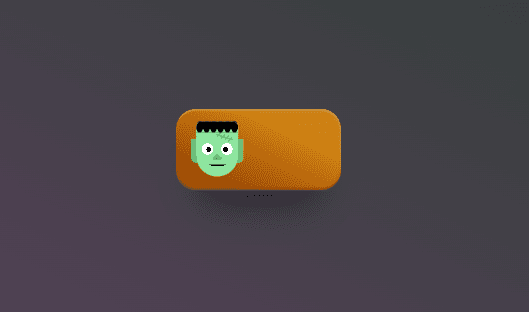
Frankenstein’s Monster Toggle Switch | CSS Halloween-Themed Interactive Button
Component

Frankenstein’s Monster Toggle Switch | CSS Halloween-Themed Interactive Button

CodewithLord
October 14, 2025

This project creates a Frankenstein-inspired toggle switch using pure HTML and CSS, without any JavaScript.

🧠 Description

This project creates a Frankenstein-inspired toggle switch using pure HTML and CSS, without any JavaScript. The switch visually transforms between states (ON/OFF) with animated facial movements, glowing colors, and clever use of CSS gradients. It’s a creative example of how advanced CSS features like custom properties, gradients, and pseudo-elements can be used to draw complex artwork and interactivity directly in the browser.


💻 HTML Code


1<!DOCTYPE html> 2<html lang="en"> 3<head> 4 <meta charset="UTF-8"> 5 <meta name="viewport" content="width=device-width, initial-scale=1.0"> 6 <title>CodewithLord - Playful Todo List Animation</title> 7 <link rel="stylesheet" href="style.css"> 8</head> 9<body> 10 <div class="todo-container"> 11 <div class="todo-item"> 12 <input type="checkbox" id="item1" class="checkbox"> 13 <label for="item1">Code in Assembly 💾</label> 14 <svg class="line" width="340" height="32" viewBox="0 0 340 32"> 15 <path 16 d="M 10 16.91 s 79.8 -11.36 98.1 -11.34 c 22.2 0.02 -47.82 14.25 -33.39 22.02 c 12.61 6.77 124.18 -27.98 133.31 -17.28 c 7.52 8.38 -26.8 20.02 4.61 22.05 c 24.55 1.93 113.37 -20.36 113.37 -20.36" 17 stroke="#111" 18 stroke-width="2" 19 fill="none" 20 stroke-linecap="round" 21 stroke-miterlimit="10" 22 /> 23 </svg> 24 </div> 25 26 <div class="divider"></div> 27 28 <div class="todo-item"> 29 <input type="checkbox" id="item2" class="checkbox"> 30 <label for="item2">Present a bug as a feature 🪲</label> 31 <svg class="line" width="340" height="32" viewBox="0 0 340 32"> 32 <path 33 d="M 10 16.91 s 79.8 -11.36 98.1 -11.34 c 22.2 0.02 -47.82 14.25 -33.39 22.02 c 12.61 6.77 124.18 -27.98 133.31 -17.28 c 7.52 8.38 -26.8 20.02 4.61 22.05 c 24.55 1.93 113.37 -20.36 113.37 -20.36" 34 stroke="#111" 35 stroke-width="2" 36 fill="none" 37 stroke-linecap="round" 38 stroke-miterlimit="10" 39 /> 40 </svg> 41 </div> 42 43 <div class="divider"></div> 44 45 <div class="todo-item"> 46 <input type="checkbox" id="item3" class="checkbox"> 47 <label for="item3">Push to prod on a Friday 🚀</label> 48 <svg class="line" width="340" height="32" viewBox="0 0 340 32"> 49 <path 50 d="M 10 16.91 s 79.8 -11.36 98.1 -11.34 c 22.2 0.02 -47.82 14.25 -33.39 22.02 c 12.61 6.77 124.18 -27.98 133.31 -17.28 c 7.52 8.38 -26.8 20.02 4.61 22.05 c 24.55 1.93 113.37 -20.36 113.37 -20.36" 51 stroke="#111" 52 stroke-width="2" 53 fill="none" 54 stroke-linecap="round" 55 stroke-miterlimit="10" 56 /> 57 </svg> 58 </div> 59 </div> 60 61 <script src="script.js"></script> 62</body> 63</html>

Container: "div class="todo-container"" wraps all tasks in a card-like box.

To-Do Item: Each task has a checkbox, label, and SVG line "(path)" below it.

SVG Path: The curvy path simulates a playful hand-drawn strike-through effect.

Divider:" div class="divider" div" separates each task for better readability.

CSS Code


1body { 2 background: #000000; 3 color: #000000; 4 font-family: 'Poppins', sans-serif; 5 display: flex; 6 justify-content: center; 7 align-items: center; 8 height: 100vh; 9} 10 11.todo-container { 12 background: #fff; 13 border-radius: 16px; 14 padding: 20px 30px; 15 box-shadow: 0 4px 20px rgba(0,0,0,0.1); 16 width: 380px; 17} 18 19.todo-item { 20 position: relative; 21 display: flex; 22 align-items: center; 23 gap: 10px; 24} 25 26.checkbox { 27 width: 18px; 28 height: 18px; 29 cursor: pointer; 30 accent-color: #007bff; 31} 32 33.line { 34 position: absolute; 35 left: 0; 36 top: 50%; 37 transform: translateY(-50%); 38 pointer-events: none; 39} 40 41.line path { 42 stroke-dasharray: 700; 43 stroke-dashoffset: 700; 44 transition: stroke-dashoffset 1s ease-in-out, opacity 0.3s ease; 45 opacity: 0; 46} 47 48.checkbox:checked ~ .line path { 49 stroke-dashoffset: 0; 50 opacity: 1; 51} 52 53.divider { 54 border-top: 1px solid #ccc; 55 margin: 15px 0; 56} 57

Body Styling: Centers the list on a dark background.

Container: White rounded box with shadow for clean contrast.

Checkbox: Uses accent-color to apply a custom blue tick color.

SVG Line: Initially invisible (opacity: 0 and stroke-dashoffset: 700), then animates to visible when checked.

Transition: Creates a smooth “line-drawing” effect when toggled.

Divider: Adds a subtle line between tasks for visual spacing.

Javascipt Code


1document.querySelectorAll('.checkbox').forEach((checkbox) => { 2 const path = checkbox.parentElement.querySelector('.line path'); 3 4 checkbox.addEventListener('change', () => { 5 if (checkbox.checked) { 6 path.style.strokeDashoffset = '0'; 7 path.style.opacity = '1'; 8 } else { 9 path.style.strokeDashoffset = '700'; 10 path.style.opacity = '0'; 11 } 12 }); 13}); 14

Selector: Targets every element with the .checkbox class.

Path Reference: Finds the SVG "path" inside the same todo item.

Event Listener: When checkbox state changes (checked or not):

strokeDashoffset = 0: draws the line across the label.

strokeDashoffset = 700: hides it again when unchecked.

Opacity: Smoothly fades in or out the line for extra polish.

Love this component?

Explore more components and build amazing UIs.

View All Components