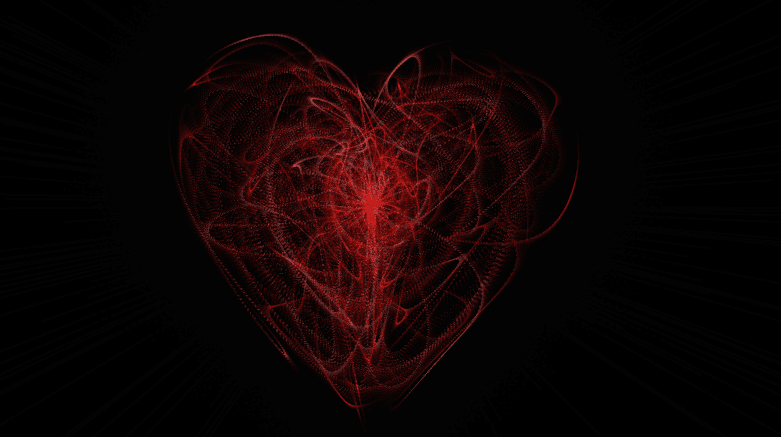
❤️ Description
This project showcases a pulsing heart animation built using HTML Canvas and vanilla JavaScript . Hundreds of tiny particles dynamically move to form a heart shape, creating a smooth breathing / heartbeat effect.
The animation is fully responsive, performance-optimized, and works beautifully across desktop and mobile devices.
Why This Animation Feels Magical
Heart shape generated mathematically (no images)
Smooth pulse animation synced with sine waves
Particle trails create a dreamy effect
Fully responsive canvas
Mobile-friendly performance tuning
Perfect for Valentine projects, love pages, and creative demos
Core Concept
A heart curve equation generates target points
Particles are attracted toward these points
Pulse effect scales the heart in real time
Motion trails are drawn using alpha blending
requestAnimationFrame ensures smooth rendering
💻 Step 1: HTML Structure
Complete HTML Code
HTML Breakdown
Single <canvas> fills the entire viewport
No DOM elements required for animation
JavaScript controls all rendering logic
🎨 Step 2: CSS – Canvas Styling
CSS Code
CSS Breakdown
Canvas covers full screen
Semi-transparent background enables trail effect
Absolute positioning prevents layout shifts
⚙️ Step 3: JavaScript – Heart & Particle Logic
JavaScript Code
Copy window .requestAnimationFrame =
window .__requestAnimationFrame ||
window .requestAnimationFrame ||
window .webkitRequestAnimationFrame ||
window .mozRequestAnimationFrame ||
window .oRequestAnimationFrame ||
window .msRequestAnimationFrame ||
( function ( ) {
return function ( callback, element ) {
var lastTime = element.__lastTime;
if (lastTime === undefined ) {
lastTime = 0 ;
}
var currTime = Date .now();
var timeToCall = Math .max( 1 , 33 - (currTime - lastTime));
window .setTimeout(callback, timeToCall);
element.__lastTime = currTime + timeToCall;
};
})();
window .isDevice = ( /android|webos|iphone|ipad|ipod|blackberry|iemobile|opera mini/i .test(((navigator.userAgent || navigator.vendor || window .opera)).toLowerCase()));
var loaded = false ;
var init = function ( ) {
if (loaded) return ;
loaded = true ;
var mobile = window .isDevice;
var koef = mobile ? 0.5 : 1 ;
var canvas = document .getElementById( 'heart' );
var ctx = canvas.getContext( '2d' );
var width = canvas.width = koef * innerWidth;
var height = canvas.height = koef * innerHeight;
var rand = Math .random;
ctx.fillStyle = "rgba(0,0,0,1)" ;
ctx.fillRect( 0 , 0 , width, height);
var heartPosition = function ( rad ) {
//return [Math.sin(rad), Math.cos(rad)];
return [ Math .pow( Math .sin(rad), 3 ), -( 15 * Math .cos(rad) - 5 * Math .cos( 2 * rad) - 2 * Math .cos( 3 * rad) - Math .cos( 4 * rad))];
};
var scaleAndTranslate = function ( pos, sx, sy, dx, dy ) {
return [dx + pos[ 0 ] * sx, dy + pos[ 1 ] * sy];
};
window .addEventListener( 'resize' , function ( ) {
width = canvas.width = koef * innerWidth;
height = canvas.height = koef * innerHeight;
ctx.fillStyle = "rgba(0,0,0,1)" ;
ctx.fillRect( 0 , 0 , width, height);
});
var traceCount = mobile ? 20 : 50 ;
var pointsOrigin = [];
var i;
var dr = mobile ? 0.3 : 0.1 ;
for (i = 0 ; i < Math .PI * 2 ; i += dr) pointsOrigin.push(scaleAndTranslate(heartPosition(i), 210 , 13 , 0 , 0 ));
for (i = 0 ; i < Math .PI * 2 ; i += dr) pointsOrigin.push(scaleAndTranslate(heartPosition(i), 150 , 9 , 0 , 0 ));
for (i = 0 ; i < Math .PI * 2 ; i += dr) pointsOrigin.push(scaleAndTranslate(heartPosition(i), 90 , 5 , 0 , 0 ));
var heartPointsCount = pointsOrigin.length;
var targetPoints = [];
var pulse = function ( kx, ky ) {
for (i = 0 ; i < pointsOrigin.length; i++) {
targetPoints[i] = [];
targetPoints[i][ 0 ] = kx * pointsOrigin[i][ 0 ] + width / 2 ;
targetPoints[i][ 1 ] = ky * pointsOrigin[i][ 1 ] + height / 2 ;
}
};
var e = [];
for (i = 0 ; i < heartPointsCount; i++) {
var x = rand() * width;
var y = rand() * height;
e[i] = {
vx : 0 ,
vy : 0 ,
R : 2 ,
speed : rand() + 5 ,
q : ~~(rand() * heartPointsCount),
D : 2 * (i % 2 ) - 1 ,
force : 0.2 * rand() + 0.7 ,
f : "hsla(0," + ~~( 40 * rand() + 100 ) + "%," + ~~( 60 * rand() + 20 ) + "%,.3)" ,
trace : []
};
for ( var k = 0 ; k < traceCount; k++) e[i].trace[k] = { x : x, y : y };
}
var config = {
traceK : 0.4 ,
timeDelta : 0.01
};
var time = 0 ;
var loop = function ( ) {
var n = - Math .cos(time);
pulse(( 1 + n) * .5 , ( 1 + n) * .5 );
time += (( Math .sin(time)) < 0 ? 9 : (n > 0.8 ) ? .2 : 1 ) * config.timeDelta;
ctx.fillStyle = "rgba(0,0,0,.1)" ;
ctx.fillRect( 0 , 0 , width, height);
for (i = e.length; i--;) {
var u = e[i];
var q = targetPoints[u.q];
var dx = u.trace[ 0 ].x - q[ 0 ];
var dy = u.trace[ 0 ].y - q[ 1 ];
var length = Math .sqrt(dx * dx + dy * dy);
if ( 10 > length) {
if ( 0.95 < rand()) {
u.q = ~~(rand() * heartPointsCount);
}
else {
if ( 0.99 < rand()) {
u.D *= - 1 ;
}
u.q += u.D;
u.q %= heartPointsCount;
if ( 0 > u.q) {
u.q += heartPointsCount;
}
}
}
u.vx += -dx / length * u.speed;
u.vy += -dy / length * u.speed;
u.trace[ 0 ].x += u.vx;
u.trace[ 0 ].y += u.vy;
u.vx *= u.force;
u.vy *= u.force;
for (k = 0 ; k < u.trace.length - 1 ;) {
var T = u.trace[k];
var N = u.trace[++k];
N.x -= config.traceK * (N.x - T.x);
N.y -= config.traceK * (N.y - T.y);
}
ctx.fillStyle = u.f;
for (k = 0 ; k < u.trace.length; k++) {
ctx.fillRect(u.trace[k].x, u.trace[k].y, 1 , 1 );
}
}
//ctx.fillStyle = "rgba(255,255,255,1)";
//for (i = u.trace.length; i--;) ctx.fillRect(targetPoints[i][0], targetPoints[i][1], 2, 2);
window .requestAnimationFrame(loop, canvas);
};
loop();
};
var s = document .readyState;
if (s === 'complete' || s === 'loaded' || s === 'interactive' ) init();
else document .addEventListener( 'DOMContentLoaded' , init, false );
<br>

## JavaScript Breakdown

<br>

### Key Concepts Used

<br>

**Heart Equation**
→ Mathematical formula generates heart shape

**Particle System**
→ Each particle follows a target heart point

**Pulse Animation**
→ Heart scales using sine & cosine waves

**Trails Effect**
→ Semi-transparent redraw creates motion blur

**requestAnimationFrame**
→ Smooth 60fps animation loop

<br>

## ❤️ Animation Flow

<br>

- Calculate heart curve points
- Assign particles random starting positions
- Pull particles toward heart shape
- Apply pulsing scale transformation
- Render trails frame-by-frame

<br>

## 📱 Responsive Behavior

<br>

- Canvas resizes on window resize
- Reduced particle density on mobile devices
- Performance-friendly calculations

<br>

## 🚀 Use Cases

<br>

- Valentine landing pages ❤️
- Love proposals & surprises
- Creative coding portfolios
- YouTube Shorts / Instagram Reels visuals
- Canvas animation tutorials

<br>

## 💡 Enhancement Ideas

<br>

- Add mouse interaction
- Sync pulse with music
- Change heart color dynamically
- Export as background animation

<br>

---

✨ **A perfect blend of math, art, and emotion — powered by JavaScript Canvas.**