🧠 Description
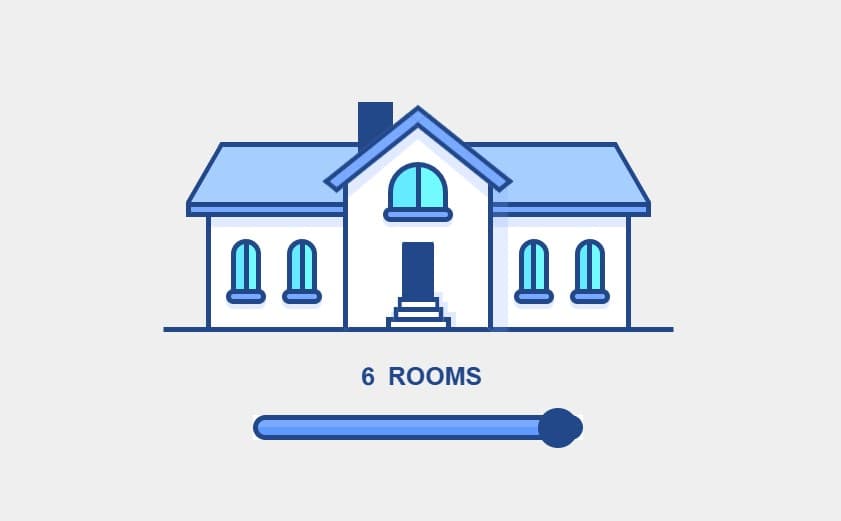
This interactive 3D house visualization demonstrates advanced web animation techniques by creating a responsive, animated house that morphs and transforms based on room count selection. Users can slide a range input to change the number of rooms (3-6), and the entire house architecture dynamically adjusts with smooth, coordinated animations.
What Makes This Project Exceptional?
Visual Features:
- Fully 3D rendered house using CSS transforms
- Dynamic resizing and repositioning of house elements
- Animated roof, windows, door, chimney, and facade
- Sparkle animations when rooms are added/removed
- Smooth number label animations (scales and slides)
- Multiple synchronized animations coordinated across elements
Technical Innovation:
- FLIP Animation Technique for high-performance transitions
- RxJS Reactive Programming for event handling and data flow
- CSS 3D Transforms with skew, rotate, and scale effects
- Data-driven HTML using data attributes for state management
- Advanced CSS Keyframes with room-specific animations
- Hardware-accelerated animations for 60fps performance
- Complex CSS Grid and positioning for 3D perspective
The Concept
The house is a complete 3D structure with:
- Walls (wings) - Left and right sections with windows
- Roof - Angled with proper perspective
- Front Facade - Main facing with door and large window
- Chimney - Architectural detail
- Sparkles - Visual feedback when rooms change
- Responsive scaling - All elements scale proportionally
As you move the slider, the house doesn't just scale—each individual element animates uniquely, creating a cohesive, realistic transformation effect.
💻 Step 1: HTML Structure
Complete HTML Code
HTML Structure Breakdown
Document Setup:
- Doctype: HTML5 standard
- Language: English for accessibility
- Viewport: Mobile responsive design
- Title: Descriptive for SEO
Main House Container:
- id="house": JavaScript reference
- data-rooms="6": Tracks current room count
- Class: Styling and responsive sizing
The house element is the root container that CSS will size based on the data-rooms attribute.
House Wings (Left & Right Walls):
Three-layer structure:
-
house-left-wing: Left side of house with windows
- Windows (2 per side)
- Sparkle element (animates when rooms added)
-
house-right-wing: Right side mirroring left
- Same structure as left wing
- Animations happen opposite direction
-
house-roof: Connects both wings
- Triangular roof structure
- Animates with wing scaling
data-flip-key="wings": Marks this element for FLIP animation tracking.
House Front (Main Facade):
Components:
- Chimney: Architectural detail that rotates during animation
- Facade: 3D perspective using CSS skew transforms
- Front Window: Large central window with sparkle animation
- Doorway: Door plus stairs leading to entrance
- Gable: Triangular front roof
data-flip-key="front": Separate FLIP tracking for front section.
Interactive Controls:
- Label: Shows current room count with animated transitions
- Range Input: Slider controlling rooms (3-6)
- Initial Value: 6 rooms
- Step: 1 room per increment
External Libraries:
These libraries enable:
- FLIP: High-performance animations
- RxJS: Reactive event handling
- Custom JS: Application logic
HTML Best Practices Used
✅ Semantic HTML: Proper structure with clear element hierarchy
✅ Data Attributes: State management via data-* attributes
✅ ARIA Labels: Accessibility for range input
✅ Mobile-First: Viewport meta tag and responsive design
✅ Performance: Minimal DOM, no unnecessary elements
✅ Organization: Logical nesting and clear relationships
✅ Accessibility: Form labels properly associated with inputs
🎨 Step 2: CSS – Advanced 3D Styling & Animations
CSS Overview & Architecture
The CSS is extremely complex because it:
- Creates 3D perspective and transforms
- Handles 4 different room configurations (3, 4, 5, 6 rooms)
- Generates unique animations for each configuration
- Manages width scaling and positioning
- Coordinates dozens of simultaneous animations
- Uses advanced selectors and attribute-based styling
Key CSS Sections
1. Reset & Layout Foundation
Purpose:
- Center content vertically and horizontally
- Full-height layout
- Pseudo-elements initialized (for decorative elements)
- Border-box sizing for predictable layout
2. Range Slider Styling
Customization:
- Removes default browser styling (
-webkit-appearance: none) - Custom track with gradient background
- Circular thumb button
- Browser prefixes for webkit and moz
3. Room Configuration System
How It Works:
- Each room count (3, 4, 5, 6) has different widths
- Custom properties define sizes
- Centered positioning using calc()
- CSS automatically adapts when
data-roomschanges
Size Progression:
- 6 rooms: Wings 425px, Front 150px (widest)
- 5 rooms: Wings 355px, Front 150px
- 4 rooms: Wings 300px, Front 125px
- 3 rooms: Wings 240px, Front 150px (narrowest)
4. House Label Animation
Dynamic Content:
- :before: Shows previous room count
- :after: Shows new room count
- Content from data attributes
- Pseudo-elements animated simultaneously
For 6 Rooms (decreasing):
Decreasing (negative delta):
- Old number slides up and scales
- New number enters from bottom
- Smooth easing function
For 6 Rooms (increasing):
Increasing (positive delta):
- Old number slides down and scales
- New number enters from top
- Delayed start (70ms) for effect
5. Keyframe Animations (Room Count Labels)
prev-label-up-6:
- Slides up (translateY(-100%))
- Scales to 1.5x
- Fades to transparent
label-up-6:
- Starts from bottom (translateY(100%))
- Grows to 1.5x scale at midpoint
- Settles back to normal size
- Duration: 1000ms (twice prev-label)
4 Room Variants:
- Each room count (3-6) has unique keyframes
- Different timing and intensity
- Creates varied animation feel
6. House Structure Styling
House Wings Structure:
:before= White wall with shadow:after= Bottom ledge/trim
Roof:
Roof Details:
- Two angled sides using skewX
- Transform origin at bottom for realistic pitch
- Different borders for visual clarity
- Color: Light blue (#A6CFFF)
7. Window Styling
Window Features:
- Arched top (border-radius)
- Gradient fill (light cyan)
- Vertical mullion (:before)
- Window sill (:after)
8. House Component Animations
Animation Technique:
- Changes transform-origin mid-animation
- Moves roof up and rotates
- Returns to neutral state
- Creates "breathing" effect
Multiple Animations:
- wing-roof-: Roof animation
- front-roof-: Front gable animation
- house-: Main structure scaling
- facade-: Front wall animation
- chimney-: Chimney rotation/movement
Each has variants for rooms 3, 4, 5, 6.
9. Sparkle Animation (New Rooms)
Sparkle Effect:
- Circle with colored quarters
- Scales and fades out
- Only shows when rooms change
- Creates celebratory visual feedback
10. Door & Stairs
Door:
- Dark blue rectangular door
- Arched top
- Positioned above stairs
Stairs:
- Three-step ascending pattern
- Each step scaled smaller (perspective)
- Shadow for depth
⚙️ Step 3: JavaScript – RxJS & FLIP Animation
Complete JavaScript Code
JavaScript Architecture Explanation
1. RxJS Fundamentals
What is RxJS?
RxJS (Reactive Extensions for JavaScript) is a library for reactive programming using observables. It simplifies event handling and asynchronous operations.
Observable Pattern:
Flow:
User moves slider
    ↓
Input event fires
    ↓
fromEvent() captures event
    ↓
map() extracts value
    ↓
startWith() provides initial value
    ↓
subscribe() calls update() function
    ↓
House animates to new room count
Why RxJS Here?
- Declarative event handling
- Easy to add/modify logic
- Built-in operators (map, filter, etc.)
- Chainable and testable
2. FLIP Animation Technique
What is FLIP?
FLIP is a performance optimization technique for animations:
F - First: Record initial state L - Last: Apply changes, record new state I - Invert: Apply inverse transforms P - Play: Animate to final state
Why FLIP?