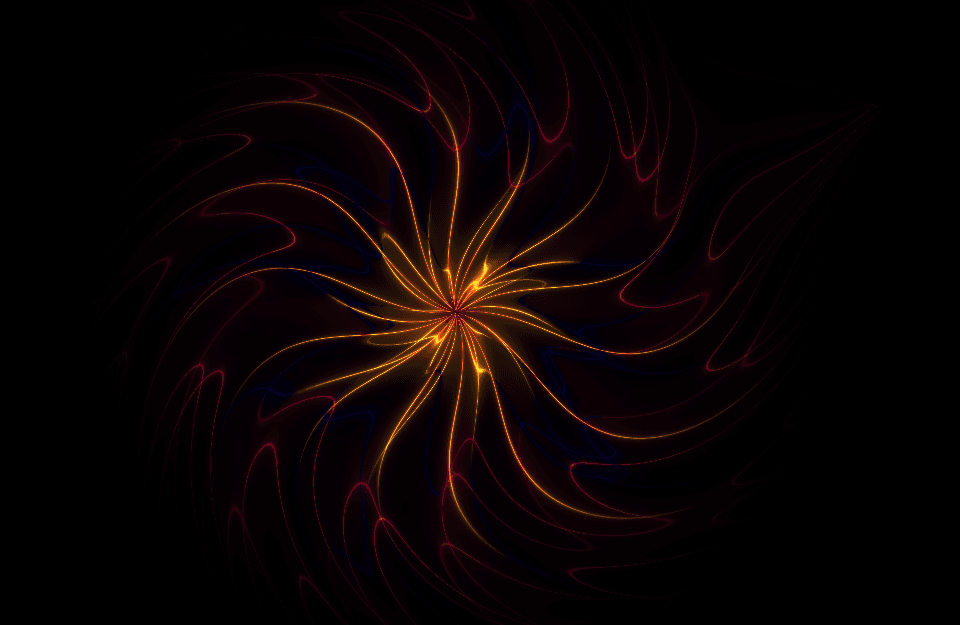
Description
The animation uses GLSL fragment shaders to create dynamic, flame-like spirals that react to mouse movement. The system relies purely on WebGL, GLSL, and JavaScript, without any HTML elements included in this file.
Vertex Shader Purpose:
Defines a fullscreen quad by passing raw vertex positions directly to clip space.
No transformations are applied; fragment shader does all the heavy lifting.
Fire Color Palette Function (GLSL) Purpose:
Generates fiery tones using oscillating sine/cosine combinations.
Creates heat variation effects based on distance and time.
Fragment Shader Core Logic
Normalizes pixel coordinates to –1 to 1 range.
Adjusts aspect ratio to prevent stretching.
Computes mouse attraction force.
Creates a warping displacement around the mouse pointer.
Applies a time-based twisting field.
Produces swirling, spiral-like distortion.
Multi‑Layer Spiral Loop Purpose:
Runs multiple layers of spirals, each rotating at different speeds.
Adds depth, glow, and fire-like complexity.
Uses exponential and sinusoidal warping for dynamic shapes.
Final Output:
JavaScript Logic
Shader Compilation
Compiles GLSL vertex and fragment shaders.
Program Linking
Links both shaders into a single GPU program.
Full Screen Quad Setup
Creates square covering entire screen.
Uniform Updates
Continuously feeds time, resolution, and mouse data to GPU.
Render Loop
Redraws animation every frame.
Produces smooth real-time animation at 60fps.
Canvas Resize System
Adjusts drawing buffer for high DPI displays.
Keeps shader output crisp on all screen sizes.
Summary
This WebGL fire spiral animation combines:
GLSL shaders for visual outputMouse interaction for warp effectsRecursive spiral logic for complex fire patternsHigh DPI adaptive rendering
The result is a high‑performance GPU-powered fire spiral that reacts fluidly to user input.
Full Code:
Copy <!DOCTYPE html >
< html lang = "en" >
< head >
< meta charset = "UTF-8" >
< title > Interactive GLSL Shader Fire Spiral Animation in WebGL </ title >
</ head >
< body >
< style >
body , html {
height : 100vh ;
margin : 0 ;
overflow : hidden;
background-color : #000 ;
}
canvas {
display : block;
}
</ style >
< canvas id = "glcanvas" > </ canvas >
< script id = "vertex-shader" type = "x-shader/x-vertex" >
attribute vec2 a_position;
void main ( ) {
gl_Position = vec4(a_position, 0.0 , 1.0 );
}
</ script >
< script id = "fragment-shader" type = "x-shader/x-fragment" >
#ifdef GL_ES
precision highp float;
#endif
uniform vec2 u_resolution;
uniform vec2 u_mouse;
uniform float u_time;
vec3 palette_fire ( float t, float factor ) {
vec3 a = vec3( 0.5 , 0.1 , 0.0 );
vec3 b = vec3( 0.6 , 0.3 , 0.1 );
vec3 c = vec3( 1.0 , 1.0 , 0.0 );
vec3 d = vec3( 0.8 , 0.7 , 0.2 );
a += 0.1 * sin(vec3( 0.1 , 0.2 , 0.3 ) * factor);
b += 0.2 * cos(vec3( 0.2 , 0.3 , 0.1 ) * factor);
return a + b * cos( 6.28318 * (c * t + d));
}
void main ( ) {
vec2 st = (gl_FragCoord.xy / u_resolution.xy) * 2.0 - 1.0 ;
st.x *= u_resolution.x/u_resolution.y;
vec3 color = vec3( 0.0 );
vec2 mouse_st = vec2(u_mouse.x, u_resolution.y - u_mouse.y) / u_resolution.xy;
mouse_st = (mouse_st * 2.0 - 1.0 ) * vec2( 1.0 , - 1.0 );
mouse_st.x *= u_resolution.x / u_resolution.y;
vec2 mouse_vec = st - mouse_st;
float mouse_dist = length(mouse_vec);
float mouse_push = smoothstep( 0.7 , 0.0 , mouse_dist) * 0.5 ;
if (u_mouse.x > 0.0 ) {
st += normalize(mouse_vec) * mouse_push;
}
float R_global = length(st);
float angle_global = atan(st.y, st.x);
float twist = 0.5 * sin(R_global * 3.0 - u_time * 0.4 );
st *= mat2(cos(twist), sin(twist), -sin(twist), cos(twist));
for (float i = 1.0 ; i < 6.0 ; i++) {
vec2 st0 = st;
float sgn = 1.0 - 2.0 * mod(i, 2.0 );
float t = u_time * 0.02 - float(i);
st0 *= mat2(cos(t), sin(t), -sin(t), cos(t));
float R = length(st0);
float d = R * i;
float angle = atan(st0.y, st0.x);
float num_arms = 4.0 + 3.0 * sin(u_time * 0.1 + i);
float angle_warped = angle * num_arms;
float dist_warp_factor = 1.0 + 0.3 * sin(angle * 12.0 + u_time * 0.5 - i);
float d_warped = d * dist_warp_factor;
vec3 pal = palette_fire(-exp((length(d_warped) * - 0.9 )), abs(d_warped) * 0.4 );
float radial = exp(-R);
radial *= smoothstep( 1.2 , 0.5 , R);
pal *= radial;
float phase = -(d_warped + sgn * angle_warped) + u_time * 0.3 ;
float v = sin(phase);
v = max(abs(v), 0.01 );
float w = pow( 0.02 / v, 0.8 );
color += pal * w;
}
gl_FragColor = vec4(color, 1.0 );
}
</ script >
< script >
const canvas = document .getElementById( 'glcanvas' );
const gl = canvas.getContext( 'webgl' );
if (!gl) {
console .error( "WebGL not supported, falling back on experimental-webgl" );
gl = canvas.getContext( "experimental-webgl" );
}
if (!gl) {
alert( "Your browser does not support WebGL" );
}
function getShaderSource ( id ) {
return document .getElementById(id).textContent;
}
const vertexShaderSource = getShaderSource( 'vertex-shader' );
const fragmentShaderSource = getShaderSource( 'fragment-shader' );
function createShader ( gl, type, source ) {
const shader = gl.createShader(type);
gl.shaderSource(shader, source);
gl.compileShader(shader);
if (!gl.getShaderParameter(shader, gl.COMPILE_STATUS)) {
console .error( 'An error occurred compiling the shaders:' , gl.getShaderInfoLog(shader));
gl.deleteShader(shader);
return null ;
}
return shader;
}
function createProgram ( gl, vertexShader, fragmentShader ) {
const program = gl.createProgram();
gl.attachShader(program, vertexShader);
gl.attachShader(program, fragmentShader);
gl.linkProgram(program);
if (!gl.getProgramParameter(program, gl.LINK_STATUS)) {
console .error( 'Unable to initialize the shader program:' , gl.getProgramInfoLog(program));
return null ;
}
return program;
}
const vertexShader = createShader(gl, gl.VERTEX_SHADER, vertexShaderSource);
const fragmentShader = createShader(gl, gl.FRAGMENT_SHADER, fragmentShaderSource);
const program = createProgram(gl, vertexShader, fragmentShader);
const positionBuffer = gl.createBuffer();
gl.bindBuffer(gl.ARRAY_BUFFER, positionBuffer);
const positions = [
- 1.0 , - 1.0 ,
1.0 , - 1.0 ,
- 1.0 , 1.0 ,
1.0 , 1.0 ,
];
gl.bufferData(gl.ARRAY_BUFFER, new Float32Array (positions), gl.STATIC_DRAW);
const positionLocation = gl.getAttribLocation(program, 'a_position' );
gl.enableVertexAttribArray(positionLocation);
gl.vertexAttribPointer(positionLocation, 2 , gl.FLOAT, false , 0 , 0 );
gl.useProgram(program);
const resolutionLocation = gl.getUniformLocation(program, 'u_resolution' );
const timeLocation = gl.getUniformLocation(program, 'u_time' );
const mouseLocation = gl.getUniformLocation(program, 'u_mouse' );
let mouseX = - 1.0 ;
let mouseY = - 1.0 ;
let devicePixelRatio = Math .min( window .devicePixelRatio || 1 , 2 );
window .addEventListener( 'mousemove' , ( e ) => {
mouseX = e.clientX;
mouseY = e.clientY;
});
function render ( time ) {
gl.uniform2f(resolutionLocation, canvas.width, canvas.height);
gl.uniform1f(timeLocation, time * 0.001 );
gl.uniform2f(mouseLocation, mouseX * devicePixelRatio, mouseY * devicePixelRatio);
gl.clearColor( 0 , 0 , 0 , 1 );
gl.clear(gl.COLOR_BUFFER_BIT);
gl.drawArrays(gl.TRIANGLE_STRIP, 0 , 4 );
requestAnimationFrame(render);
}
function resize ( ) {
devicePixelRatio = Math .min( window .devicePixelRatio || 1 , 2 );
canvas.width = Math .floor( window .innerWidth * devicePixelRatio);
canvas.height = Math .floor( window .innerHeight * devicePixelRatio);
gl.viewport( 0 , 0 , gl.drawingBufferWidth, gl.drawingBufferHeight);
canvas.style.width = window .innerWidth + "px" ;
canvas.style.height = window .innerHeight + "px" ;
}
resize();
window .addEventListener( 'resize' , resize);
requestAnimationFrame(render);
</ script >
</ body >
</ html >