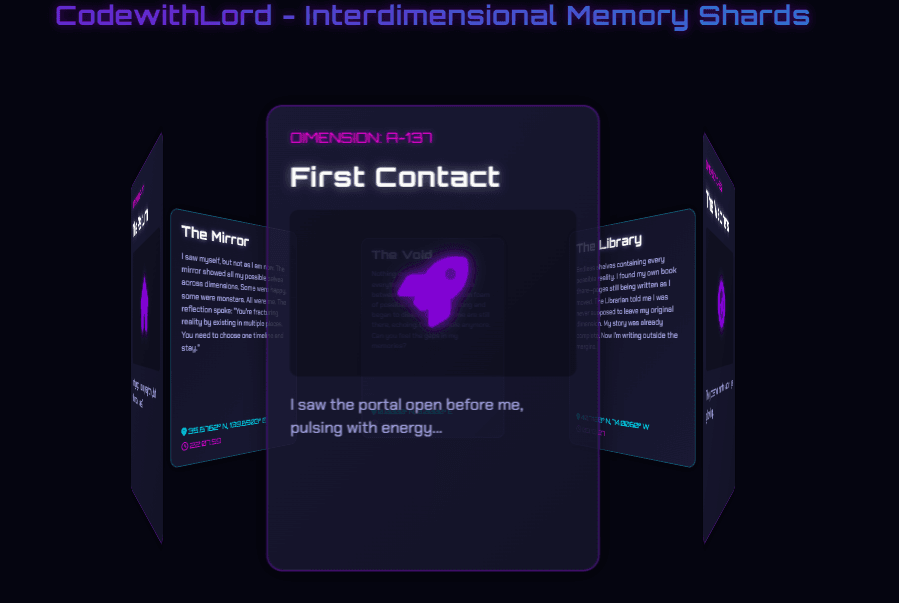
🧠 Description
Step into a futuristic digital realm with the Interdimensional Memory Carousel — a stunning 3D interactive design built using HTML, CSS, and JavaScript. This project presents memory cards floating in a cosmic environment, each representing a unique dimension. Users can rotate, flip, and explore glowing holographic cards surrounded by a galaxy of stars, combining advanced 3D animations, responsive layouts, and smooth transitions for an immersive experience.
💻 HTML Code
1<!DOCTYPE html>
2<html lang="en">
3
4 <head>
5 <meta charset="UTF-8">
6 <title>CodewithLord - Interdimensional Memory Carousel WIP</title>
7 <link href="https://cdn.jsdelivr.net/npm/bootstrap@5.3.0/dist/css/bootstrap.min.css" rel="stylesheet">
8 <link href="https://fonts.googleapis.com/css2?family=Orbitron:wght@400;500;700&family=Chakra+Petch:wght@300;400;600&display=swap" rel="stylesheet">
9 <link rel="stylesheet" href="https://cdnjs.cloudflare.com/ajax/libs/font-awesome/6.4.0/css/all.min.css"><link rel="stylesheet" href="./style.css">
10
11 </head>
12
13 <body>
14 <div class="cosmos-background">
15 <div class="stars-container"></div>
16</div>
17
18<div class="container-fluid h-100 d-flex flex-column">
19 <header class="py-3 text-center">
20 <h1 class="title">CodewithLord - Interdimensional Memory Shards</h1>
21 </header>
22
23 <main class="flex-grow-1 d-flex align-items-center justify-content-center position-relative">
24 <div class="carousel-container">
25 <div class="carousel" id="memory-carousel">
26 <!-- Memory Card 1 -->
27 <div class="memory-card" data-memory-id="1">
28 <div class="card-inner">
29 <div class="card-front">
30 <div class="card-content">
31 <div class="memory-date">DIMENSION: A-137</div>
32 <h3>First Contact</h3>
33 <div class="memory-image">
34 <i class="fa-solid fa-rocket fa-3x"></i>
35 <div class="glitch-effect"></div>
36 </div>
37 <p class="memory-preview">I saw the portal open before me, pulsing with energy...</p>
38 <div class="card-glow"></div>
39 </div>
40 </div>
41 <div class="card-back">
42 <div class="card-content">
43 <h3>First Contact</h3>
44 <p>I saw the portal open before me, pulsing with energy unknown to my dimension. The coordinates were clear: A-137. As I stepped through, my molecules scattered across realities. This was the first jump. I wasn't supposed to remember it, but somehow I do.</p>
45 <div class="memory-coordinates">
46 <span><i class="fa-solid fa-location-dot"></i> 37.7749° N, 122.4194° W</span>
47 <span class="time-stamp"><i class="fa-regular fa-clock"></i> 03:27:16</span>
48 </div>
49 </div>
50 </div>
51 </div>
52 </div>
53
54 <!-- Memory Card 2 -->
55 <div class="memory-card" data-memory-id="2">
56 <div class="card-inner">
57 <div class="card-front">
58 <div class="card-content">
59 <div class="memory-date">DIMENSION: C-982</div>
60 <h3>The Watchers</h3>
61 <div class="memory-image">
62 <i class="fa-solid fa-eye fa-3x"></i>
63 <div class="glitch-effect"></div>
64 </div>
65 <p class="memory-preview">They observed from the shadows, eyes glowing...</p>
66 <div class="card-glow"></div>
67 </div>
68 </div>
69 <div class="card-back">
70 <div class="card-content">
71 <h3>The Watchers</h3>
72 <p>They observed from the shadows, eyes glowing with ancient knowledge. The Watchers have been tracking my jumps. They say I'm destabilizing the multiverse with each crossing. My presence causes ripples they can't control. I'm becoming a threat.</p>
73 <div class="memory-coordinates">
74 <span><i class="fa-solid fa-location-dot"></i> 51.5074° N, 0.1278° W</span>
75 <span class="time-stamp"><i class="fa-regular fa-clock"></i> 17:42:03</span>
76 </div>
77 </div>
78 </div>
79 </div>
80 </div>
81
82 <!-- Memory Card 3 -->
83 <div class="memory-card" data-memory-id="3">
84 <div class="card-inner">
85 <div class="card-front">
86 <div class="card-content">
87 <div class="memory-date">DIMENSION: F-451</div>
88 <h3>The Library</h3>
89 <div class="memory-image">
90 <i class="fa-solid fa-book fa-3x"></i>
91 <div class="glitch-effect"></div>
92 </div>
93 <p class="memory-preview">Endless shelves containing every possible reality...</p>
94 <div class="card-glow"></div>
95 </div>
96 </div>
97 <div class="card-back">
98 <div class="card-content">
99 <h3>The Library</h3>
100 <p>Endless shelves containing every possible reality. I found my own book there—pages still being written as I moved. The Librarian told me I was never supposed to leave my original dimension. My story was already complete. Now I'm writing outside the margins.</p>
101 <div class="memory-coordinates">
102 <span><i class="fa-solid fa-location-dot"></i> 40.7128° N, 74.0060° W</span>
103 <span class="time-stamp"><i class="fa-regular fa-clock"></i> 09:13:27</span>
104 </div>
105 </div>
106 </div>
107 </div>
108 </div>
109
110 <!-- Memory Card 4 -->
111 <div class="memory-card" data-memory-id="4">
112 <div class="card-inner">
113 <div class="card-front">
114 <div class="card-content">
115 <div class="memory-date">DIMENSION: X-000</div>
116 <h3>The Void</h3>
117 <div class="memory-image">
118 <i class="fa-solid fa-atom fa-3x"></i>
119 <div class="glitch-effect"></div>
120 </div>
121 <p class="memory-preview">Nothing exists here, yet I feel everything...</p>
122 <div class="card-glow"></div>
123 </div>
124 </div>
125 <div class="card-back">
126 <div class="card-content">
127 <h3>The Void</h3>
128 <p>Nothing exists here, yet I feel everything. The Void is the space between dimensions, a quantum foam of possibilities. I stayed too long and began to dissolve. Parts of me are still there, echoing. I'm not whole anymore. Can you feel the gaps in my memories?</p>
129 <div class="memory-coordinates">
130 <span><i class="fa-solid fa-location-dot"></i> 0.0000° N, 0.0000° E</span>
131 <span class="time-stamp"><i class="fa-regular fa-clock"></i> --:--:--</span>
132 </div>
133 </div>
134 </div>
135 </div>
136 </div>
137
138 <!-- Memory Card 5 -->
139 <div class="memory-card" data-memory-id="5">
140 <div class="card-inner">
141 <div class="card-front">
142 <div class="card-content">
143 <div class="memory-date">DIMENSION: H-221</div>
144 <h3>The Mirror</h3>
145 <div class="memory-image">
146 <i class="fa-solid fa-clone fa-3x"></i>
147 <div class="glitch-effect"></div>
148 </div>
149 <p class="memory-preview">I saw myself, but not as I am now...</p>
150 <div class="card-glow"></div>
151 </div>
152 </div>
153 <div class="card-back">
154 <div class="card-content">
155 <h3>The Mirror</h3>
156 <p>I saw myself, but not as I am now. The mirror showed all my possible selves across dimensions. Some were happy, some were monsters. All were me. The reflection spoke: "You're fracturing reality by existing in multiple places. You need to choose one timeline and stay."</p>
157 <div class="memory-coordinates">
158 <span><i class="fa-solid fa-location-dot"></i> 35.6762° N, 139.6503° E</span>
159 <span class="time-stamp"><i class="fa-regular fa-clock"></i> 22:07:59</span>
160 </div>
161 </div>
162 </div>
163 </div>
164 </div>
165
166 <!-- Memory Card 6 -->
167 <div class="memory-card" data-memory-id="6">
168 <div class="card-inner">
169 <div class="card-front">
170 <div class="card-content">
171 <div class="memory-date">DIMENSION: ?-???</div>
172 <h3>The Return</h3>
173 <div class="memory-image">
174 <i class="fa-solid fa-home fa-3x"></i>
175 <div class="glitch-effect"></div>
176 </div>
177 <p class="memory-preview">I'm trying to find my way home, but which one is real?</p>
178 <div class="card-glow"></div>
179 </div>
180 </div>
181 <div class="card-back">
182 <div class="card-content">
183 <h3>The Return</h3>
184 <p>I'm trying to find my way home, but which one is real? Every dimension feels familiar yet wrong. The boundaries are thinning. Sometimes I see through the eyes of my other selves. I'm losing track of which memories belong to which version of me. Are you helping me remember, or are you causing me to forget?</p>
185 <div class="memory-coordinates">
186 <span><i class="fa-solid fa-location-dot"></i> ??.????° N, ??.????° W</span>
187 <span class="time-stamp"><i class="fa-regular fa-clock"></i> NOW</span>
188 </div>
189 </div>
190 </div>
191 </div>
192 </div>
193 </div>
194 </div>
195
196 <div class="carousel-controls">
197 <button id="prev-btn" class="control-btn">
198 <i class="fa-solid fa-chevron-left"></i>
199 </button>
200 <button id="next-btn" class="control-btn">
201 <i class="fa-solid fa-chevron-right"></i>
202 </button>
203 </div>
204 </main>
205
206
207</div>
208 <script src="./script.js"></script>
209
210 </body>
211
212</html>
213<!DOCTYPE html>
214<html lang="en">
215
216 <head>
217 <meta charset="UTF-8">
218 <title>CodewithLord - Interdimensional Memory Carousel WIP</title>
219 <link href="https://cdn.jsdelivr.net/npm/bootstrap@5.3.0/dist/css/bootstrap.min.css" rel="stylesheet">
220 <link href="https://fonts.googleapis.com/css2?family=Orbitron:wght@400;500;700&family=Chakra+Petch:wght@300;400;600&display=swap" rel="stylesheet">
221 <link rel="stylesheet" href="https://cdnjs.cloudflare.com/ajax/libs/font-awesome/6.4.0/css/all.min.css"><link rel="stylesheet" href="./style.css">
222
223 </head>
224
225 <body>
226 <div class="cosmos-background">
227 <div class="stars-container"></div>
228</div>
229
230<div class="container-fluid h-100 d-flex flex-column">
231 <header class="py-3 text-center">
232 <h1 class="title">CodewithLord - Interdimensional Memory Shards</h1>
233 </header>
234
235 <main class="flex-grow-1 d-flex align-items-center justify-content-center position-relative">
236 <div class="carousel-container">
237 <div class="carousel" id="memory-carousel">
238 <!-- Memory Card 1 -->
239 <div class="memory-card" data-memory-id="1">
240 <div class="card-inner">
241 <div class="card-front">
242 <div class="card-content">
243 <div class="memory-date">DIMENSION: A-137</div>
244 <h3>First Contact</h3>
245 <div class="memory-image">
246 <i class="fa-solid fa-rocket fa-3x"></i>
247 <div class="glitch-effect"></div>
248 </div>
249 <p class="memory-preview">I saw the portal open before me, pulsing with energy...</p>
250 <div class="card-glow"></div>
251 </div>
252 </div>
253 <div class="card-back">
254 <div class="card-content">
255 <h3>First Contact</h3>
256 <p>I saw the portal open before me, pulsing with energy unknown to my dimension. The coordinates were clear: A-137. As I stepped through, my molecules scattered across realities. This was the first jump. I wasn't supposed to remember it, but somehow I do.</p>
257 <div class="memory-coordinates">
258 <span><i class="fa-solid fa-location-dot"></i> 37.7749° N, 122.4194° W</span>
259 <span class="time-stamp"><i class="fa-regular fa-clock"></i> 03:27:16</span>
260 </div>
261 </div>
262 </div>
263 </div>
264 </div>
265
266 <!-- Memory Card 2 -->
267 <div class="memory-card" data-memory-id="2">
268 <div class="card-inner">
269 <div class="card-front">
270 <div class="card-content">
271 <div class="memory-date">DIMENSION: C-982</div>
272 <h3>The Watchers</h3>
273 <div class="memory-image">
274 <i class="fa-solid fa-eye fa-3x"></i>
275 <div class="glitch-effect"></div>
276 </div>
277 <p class="memory-preview">They observed from the shadows, eyes glowing...</p>
278 <div class="card-glow"></div>
279 </div>
280 </div>
281 <div class="card-back">
282 <div class="card-content">
283 <h3>The Watchers</h3>
284 <p>They observed from the shadows, eyes glowing with ancient knowledge. The Watchers have been tracking my jumps. They say I'm destabilizing the multiverse with each crossing. My presence causes ripples they can't control. I'm becoming a threat.</p>
285 <div class="memory-coordinates">
286 <span><i class="fa-solid fa-location-dot"></i> 51.5074° N, 0.1278° W</span>
287 <span class="time-stamp"><i class="fa-regular fa-clock"></i> 17:42:03</span>
288 </div>
289 </div>
290 </div>
291 </div>
292 </div>
293
294 <!-- Memory Card 3 -->
295 <div class="memory-card" data-memory-id="3">
296 <div class="card-inner">
297 <div class="card-front">
298 <div class="card-content">
299 <div class="memory-date">DIMENSION: F-451</div>
300 <h3>The Library</h3>
301 <div class="memory-image">
302 <i class="fa-solid fa-book fa-3x"></i>
303 <div class="glitch-effect"></div>
304 </div>
305 <p class="memory-preview">Endless shelves containing every possible reality...</p>
306 <div class="card-glow"></div>
307 </div>
308 </div>
309 <div class="card-back">
310 <div class="card-content">
311 <h3>The Library</h3>
312 <p>Endless shelves containing every possible reality. I found my own book there—pages still being written as I moved. The Librarian told me I was never supposed to leave my original dimension. My story was already complete. Now I'm writing outside the margins.</p>
313 <div class="memory-coordinates">
314 <span><i class="fa-solid fa-location-dot"></i> 40.7128° N, 74.0060° W</span>
315 <span class="time-stamp"><i class="fa-regular fa-clock"></i> 09:13:27</span>
316 </div>
317 </div>
318 </div>
319 </div>
320 </div>
321
322 <!-- Memory Card 4 -->
323 <div class="memory-card" data-memory-id="4">
324 <div class="card-inner">
325 <div class="card-front">
326 <div class="card-content">
327 <div class="memory-date">DIMENSION: X-000</div>
328 <h3>The Void</h3>
329 <div class="memory-image">
330 <i class="fa-solid fa-atom fa-3x"></i>
331 <div class="glitch-effect"></div>
332 </div>
333 <p class="memory-preview">Nothing exists here, yet I feel everything...</p>
334 <div class="card-glow"></div>
335 </div>
336 </div>
337 <div class="card-back">
338 <div class="card-content">
339 <h3>The Void</h3>
340 <p>Nothing exists here, yet I feel everything. The Void is the space between dimensions, a quantum foam of possibilities. I stayed too long and began to dissolve. Parts of me are still there, echoing. I'm not whole anymore. Can you feel the gaps in my memories?</p>
341 <div class="memory-coordinates">
342 <span><i class="fa-solid fa-location-dot"></i> 0.0000° N, 0.0000° E</span>
343 <span class="time-stamp"><i class="fa-regular fa-clock"></i> --:--:--</span>
344 </div>
345 </div>
346 </div>
347 </div>
348 </div>
349
350 <!-- Memory Card 5 -->
351 <div class="memory-card" data-memory-id="5">
352 <div class="card-inner">
353 <div class="card-front">
354 <div class="card-content">
355 <div class="memory-date">DIMENSION: H-221</div>
356 <h3>The Mirror</h3>
357 <div class="memory-image">
358 <i class="fa-solid fa-clone fa-3x"></i>
359 <div class="glitch-effect"></div>
360 </div>
361 <p class="memory-preview">I saw myself, but not as I am now...</p>
362 <div class="card-glow"></div>
363 </div>
364 </div>
365 <div class="card-back">
366 <div class="card-content">
367 <h3>The Mirror</h3>
368 <p>I saw myself, but not as I am now. The mirror showed all my possible selves across dimensions. Some were happy, some were monsters. All were me. The reflection spoke: "You're fracturing reality by existing in multiple places. You need to choose one timeline and stay."</p>
369 <div class="memory-coordinates">
370 <span><i class="fa-solid fa-location-dot"></i> 35.6762° N, 139.6503° E</span>
371 <span class="time-stamp"><i class="fa-regular fa-clock"></i> 22:07:59</span>
372 </div>
373 </div>
374 </div>
375 </div>
376 </div>
377
378 <!-- Memory Card 6 -->
379 <div class="memory-card" data-memory-id="6">
380 <div class="card-inner">
381 <div class="card-front">
382 <div class="card-content">
383 <div class="memory-date">DIMENSION: ?-???</div>
384 <h3>The Return</h3>
385 <div class="memory-image">
386 <i class="fa-solid fa-home fa-3x"></i>
387 <div class="glitch-effect"></div>
388 </div>
389 <p class="memory-preview">I'm trying to find my way home, but which one is real?</p>
390 <div class="card-glow"></div>
391 </div>
392 </div>
393 <div class="card-back">
394 <div class="card-content">
395 <h3>The Return</h3>
396 <p>I'm trying to find my way home, but which one is real? Every dimension feels familiar yet wrong. The boundaries are thinning. Sometimes I see through the eyes of my other selves. I'm losing track of which memories belong to which version of me. Are you helping me remember, or are you causing me to forget?</p>
397 <div class="memory-coordinates">
398 <span><i class="fa-solid fa-location-dot"></i> ??.????° N, ??.????° W</span>
399 <span class="time-stamp"><i class="fa-regular fa-clock"></i> NOW</span>
400 </div>
401 </div>
402 </div>
403 </div>
404 </div>
405 </div>
406 </div>
407
408 <div class="carousel-controls">
409 <button id="prev-btn" class="control-btn">
410 <i class="fa-solid fa-chevron-left"></i>
411 </button>
412 <button id="next-btn" class="control-btn">
413 <i class="fa-solid fa-chevron-right"></i>
414 </button>
415 </div>
416 </main>
417
418
419</div>
420 <script src="./script.js"></script>
421
422 </body>
423
424</html>
425The HTML structure defines the layout and foundation of the project. It begins with standard document setup, linking external resources such as Bootstrap for layout support, Google Fonts for futuristic typography, and Font Awesome for glowing icons. The cosmic background is created using div elements that simulate stars. A main container holds the header with an animated title and a carousel inside the main section. Each memory card has a front and back side—displaying the dimension’s name, description, and unique details. The navigation buttons placed on the sides allow users to move between cards. Finally, a script tag connects to the JavaScript file that controls the carousel’s animation and interactivity.
CSS Code
1/* Base Styles */ 2:root { 3 --primary: #9d00ff; 4 --secondary: #00e5ff; 5 --accent: #ff00e5; 6 --background: #050510; 7 --card-bg: rgba(20, 20, 40, 0.7); 8 --text-primary: #ffffff; 9 --text-secondary: #b8b8ff; 10 --glow-primary: 0 0 10px rgba(157, 0, 255, 0.7), 11 0 0 20px rgba(157, 0, 255, 0.5); 12 --glow-secondary: 0 0 10px rgba(0, 229, 255, 0.7), 13 0 0 20px rgba(0, 229, 255, 0.5); 14 --glow-accent: 0 0 10px rgba(255, 0, 229, 0.7), 0 0 20px rgba(255, 0, 229, 0.5); 15 --card-width: 300px; 16 --card-height: 420px; 17 --carousel-radius: 400px; 18 --transition-speed: 0.5s; 19} 20 21* { 22 margin: 0; 23 padding: 0; 24 box-sizing: border-box; 25} 26 27body, 28html { 29 height: 100%; 30 font-family: "Chakra Petch", sans-serif; 31 background-color: var(--background); 32 color: var(--text-primary); 33 overflow: hidden; /* Prevent page scrolling */ 34} 35 36/* Typography */ 37h1, 38h2, 39h3, 40h4, 41h5, 42h6 { 43 font-family: "Orbitron", sans-serif; 44 font-weight: 700; 45 letter-spacing: 1px; 46} 47 48.title { 49 font-size: 2.5rem; 50 margin-bottom: 0.5rem; 51 background: linear-gradient(90deg, var(--primary), var(--secondary)); 52 -webkit-background-clip: text; 53 background-clip: text; 54 color: transparent; 55 text-shadow: 0 0 15px rgba(157, 0, 255, 0.5); 56 animation: pulse 3s infinite alternate; 57} 58 59/* Cosmic Background */ 60.cosmos-background { 61 position: fixed; 62 top: 0; 63 left: 0; 64 width: 100%; 65 height: 100%; 66 z-index: -1; 67 background: radial-gradient(ellipse at bottom, #1b2735 0%, #090a0f 100%); 68 overflow: hidden; 69} 70 71.stars-container { 72 position: absolute; 73 width: 100%; 74 height: 100%; 75 background-image: radial-gradient(1px 1px at 25% 25%, white, rgba(0, 0, 0, 0)), 76 radial-gradient(1px 1px at 50% 50%, white, rgba(0, 0, 0, 0)), 77 radial-gradient(2px 2px at 75% 75%, white, rgba(0, 0, 0, 0)), 78 radial-gradient(2px 2px at 100% 100%, white, rgba(0, 0, 0, 0)); 79 background-size: 200px 200px, 300px 300px, 400px 400px, 600px 600px; 80 background-repeat: repeat; 81 animation: twinkle 10s linear infinite; 82} 83 84@keyframes twinkle { 85 0% { 86 background-position: 0 0, 0 0, 0 0, 0 0; 87 } 88 100% { 89 background-position: 200px 200px, 300px 300px, 400px 400px, 600px 600px; 90 } 91} 92 93/* Carousel Container */ 94.carousel-container { 95 position: relative; 96 width: 100%; 97 height: 500px; 98 perspective: 1000px; 99 transform-style: preserve-3d; 100 display: flex; 101 justify-content: center; 102 align-items: center; 103 touch-action: none; /* Prevent default touch actions */ 104} 105 106.carousel { 107 position: relative; 108 width: var(--carousel-radius); 109 height: var(--carousel-radius); 110 transform-style: preserve-3d; 111 transition: transform 0.5s ease; 112} 113 114/* Memory Cards */ 115.memory-card { 116 position: absolute; 117 width: var(--card-width); 118 height: var(--card-height); 119 left: 50%; 120 top: 50%; 121 margin-left: calc(var(--card-width) / -2); 122 margin-top: calc(var(--card-height) / -2); 123 transform-style: preserve-3d; 124 transition: transform 0.8s cubic-bezier(0.175, 0.885, 0.32, 1.275); 125 cursor: pointer; 126} 127 128.card-inner { 129 position: relative; 130 width: 100%; 131 height: 100%; 132 transform-style: preserve-3d; 133 transition: transform 0.8s cubic-bezier(0.175, 0.885, 0.32, 1.275); 134} 135 136.memory-card:hover .card-inner { 137 transform: translateZ(20px); 138} 139 140.memory-card.flipped .card-inner { 141 transform: rotateY(180deg); 142} 143 144.card-front, 145.card-back { 146 position: absolute; 147 width: 100%; 148 height: 100%; 149 backface-visibility: hidden; 150 border-radius: 15px; 151 overflow: hidden; 152 box-shadow: 0 0 20px rgba(0, 0, 0, 0.5); 153} 154 155.card-front { 156 background: linear-gradient( 157 135deg, 158 rgba(30, 30, 60, 0.8), 159 rgba(20, 20, 40, 0.9) 160 ); 161 border: 1px solid rgba(157, 0, 255, 0.3); 162 transform-style: preserve-3d; 163} 164 165.card-back { 166 background: linear-gradient( 167 135deg, 168 rgba(20, 20, 40, 0.9), 169 rgba(30, 30, 60, 0.8) 170 ); 171 border: 1px solid rgba(0, 229, 255, 0.3); 172 transform: rotateY(180deg); 173} 174 175.card-content { 176 padding: 20px; 177 height: 100%; 178 display: flex; 179 flex-direction: column; 180 position: relative; 181} 182 183.memory-date { 184 font-family: "Orbitron", sans-serif; 185 font-size: 0.8rem; 186 color: var(--accent); 187 margin-bottom: 10px; 188 text-shadow: 0 0 5px rgba(255, 0, 229, 0.7); 189} 190 191.memory-card h3 { 192 font-size: 1.5rem; 193 margin-bottom: 15px; 194 color: var(--text-primary); 195 text-shadow: 0 0 10px rgba(255, 255, 255, 0.5); 196} 197 198.memory-image { 199 width: 100%; 200 height: 150px; 201 margin-bottom: 15px; 202 display: flex; 203 justify-content: center; 204 align-items: center; 205 position: relative; 206 overflow: hidden; 207 border-radius: 8px; 208 background: rgba(0, 0, 0, 0.3); 209} 210 211.memory-image i { 212 color: var(--primary); 213 font-size: 4rem; 214 text-shadow: var(--glow-primary); 215 animation: pulse 3s infinite alternate; 216 z-index: 2; 217} 218 219.glitch-effect { 220 position: absolute; 221 top: 0; 222 left: 0; 223 width: 100%; 224 height: 100%; 225 background: linear-gradient( 226 45deg, 227 transparent 65%, 228 rgba(157, 0, 255, 0.3) 70%, 229 transparent 75% 230 ); 231 background-size: 200% 200%; 232 animation: glitch 3s linear infinite; 233 z-index: 1; 234} 235 236@keyframes glitch { 237 0% { 238 background-position: 0 0; 239 } 240 25% { 241 background-position: 100% 0; 242 } 243 50% { 244 background-position: 100% 100%; 245 } 246 75% { 247 background-position: 0 100%; 248 } 249 100% { 250 background-position: 0 0; 251 } 252} 253 254.memory-preview { 255 font-size: 0.9rem; 256 color: var(--text-secondary); 257 margin-bottom: 15px; 258 flex-grow: 1; 259} 260 261.card-back .card-content p { 262 font-size: 0.9rem; 263 color: var(--text-secondary); 264 margin-bottom: 20px; 265 line-height: 1.5; 266 flex-grow: 1; 267} 268 269.memory-coordinates { 270 font-family: "Orbitron", sans-serif; 271 font-size: 0.8rem; 272 color: var(--secondary); 273 display: flex; 274 flex-direction: column; 275 gap: 5px; 276} 277 278.time-stamp { 279 color: var(--accent); 280} 281 282.card-glow { 283 position: absolute; 284 top: 0; 285 left: 0; 286 width: 100%; 287 height: 100%; 288 border-radius: 15px; 289 pointer-events: none; 290 background: radial-gradient( 291 circle at 50% 50%, 292 rgba(157, 0, 255, 0.1), 293 transparent 70% 294 ); 295 opacity: 0; 296 transition: opacity 0.3s ease; 297} 298 299.memory-card:hover .card-glow { 300 opacity: 1; 301} 302 303/* Carousel Controls */ 304.carousel-controls { 305 position: absolute; 306 bottom: -50px; 307 left: 50%; 308 transform: translateX(-50%); 309 display: flex; 310 align-items: center; 311 gap: 20px; 312 z-index: 10; 313} 314 315.control-btn { 316 background: rgba(20, 20, 40, 0.7); 317 border: 1px solid var(--primary); 318 color: var(--text-primary); 319 width: 40px; 320 height: 40px; 321 border-radius: 50%; 322 display: flex; 323 justify-content: center; 324 align-items: center; 325 cursor: pointer; 326 transition: all 0.3s ease; 327 box-shadow: var(--glow-primary); 328} 329 330.control-btn:hover { 331 background: rgba(30, 30, 60, 0.9); 332 transform: scale(1.1); 333} 334 335/* Footer */ 336footer { 337 position: relative; 338 z-index: 10; 339} 340 341.instructions { 342 font-size: 0.8rem; 343 color: var(--text-secondary); 344 opacity: 0.7; 345} 346 347/* Animations */ 348@keyframes pulse { 349 0%, 350 100% { 351 opacity: 0.8; 352 } 353 50% { 354 opacity: 1; 355 } 356} 357 358/* Responsive Adjustments */ 359@media (max-width: 768px) { 360 :root { 361 --card-width: 250px; 362 --card-height: 350px; 363 --carousel-radius: 300px; 364 } 365 366 .title { 367 font-size: 1.8rem; 368 } 369 370 .carousel-container { 371 height: 400px; 372 } 373 374 .memory-card h3 { 375 font-size: 1.2rem; 376 } 377 378 .memory-image { 379 height: 120px; 380 } 381} 382 383@media (max-width: 576px) { 384 :root { 385 --card-width: 220px; 386 --card-height: 320px; 387 --carousel-radius: 250px; 388 } 389 390 .title { 391 font-size: 1.5rem; 392 } 393 394 .carousel-container { 395 height: 350px; 396 } 397}
The CSS gives life to the visuals through gradients, lighting, and 3D effects. It starts by defining custom color variables for neon glows, primary hues, and background tones. The entire layout uses a dark, cosmic theme enhanced by animated stars for depth and motion. Each memory card is styled with glowing edges, smooth gradients, and futuristic fonts to match the space aesthetic. The cards are positioned in 3D space using transforms and transitions, making them appear to rotate around a circular path. Hover and flip animations reveal each card’s backside, while glowing borders and glitch effects add realism. The control buttons are styled as circular neon orbs with pulsing light effects. Media queries ensure the design remains responsive across different screen sizes, adjusting layout, text size, and perspective.
Javascipt Code
1document.addEventListener("DOMContentLoaded", function () {
2 // Elements
3 const carousel = document.getElementById("memory-carousel");
4 const cards = document.querySelectorAll(".memory-card");
5 const prevBtn = document.getElementById("prev-btn");
6 const nextBtn = document.getElementById("next-btn");
7
8 // Variables
9 let currentIndex = 0;
10 let startX, startY;
11 let isDragging = false;
12 let theta = 0;
13 let radius = window.innerWidth <= 768 ? 250 : 400;
14 const totalCards = cards.length;
15
16 // Initialize
17 function init() {
18 // Position cards in a circle
19 arrangeCards();
20
21 // Add event listeners
22 prevBtn.addEventListener("click", prevCard);
23 nextBtn.addEventListener("click", nextCard);
24 cards.forEach((card) => {
25 card.addEventListener("click", flipCard);
26 });
27
28 // Touch/mouse events for dragging
29 carousel.addEventListener("mousedown", dragStart);
30 carousel.addEventListener("touchstart", dragStart, { passive: true });
31 document.addEventListener("mousemove", drag);
32 document.addEventListener("touchmove", drag, { passive: false });
33 document.addEventListener("mouseup", dragEnd);
34 document.addEventListener("touchend", dragEnd);
35
36 // Keyboard navigation
37 document.addEventListener("keydown", handleKeyDown);
38
39 // Start ambient sound
40 playAmbientSound();
41 }
42
43 // Arrange cards in a circle
44 function arrangeCards() {
45 const angle = 360 / totalCards;
46 cards.forEach((card, index) => {
47 // Calculate the angle for this card
48 const cardAngle = angle * index;
49 // Convert to radians
50 const rad = (cardAngle * Math.PI) / 180;
51 // Calculate position
52 const x = radius * Math.sin(rad);
53 const z = radius * Math.cos(rad) * -1;
54
55 // Apply transform
56 card.style.transform = `rotateY(${cardAngle}deg) translateZ(${radius}px)`;
57
58 // Store the card's index
59 card.dataset.index = index;
60 });
61 }
62
63 // Rotate carousel
64 function rotateCarousel() {
65 carousel.style.transform = `rotateY(${theta}deg)`;
66
67 // Update current card index
68 currentIndex = Math.round(Math.abs(theta / (360 / totalCards)) % totalCards);
69 if (currentIndex >= totalCards) currentIndex = 0;
70 }
71
72 // Next card
73 function nextCard() {
74 theta -= 360 / totalCards; // Changed direction to match swipe
75 rotateCarousel();
76 }
77
78 // Previous card
79 function prevCard() {
80 theta += 360 / totalCards; // Changed direction to match swipe
81 rotateCarousel();
82 }
83
84 // Flip card
85 function flipCard(e) {
86 const card = e.currentTarget;
87 const cardIndex = parseInt(card.dataset.index);
88
89 // Only flip the current front-facing card
90 if (cardIndex === currentIndex) {
91 card.classList.toggle("flipped");
92 }
93 }
94
95 // Drag functions
96 function dragStart(e) {
97 e.preventDefault(); // Prevent default behavior
98 isDragging = true;
99 startX = e.pageX || e.touches[0].pageX;
100 }
101
102 function drag(e) {
103 if (!isDragging) return;
104 e.preventDefault(); // Prevent default scrolling
105
106 const currentX = e.pageX || (e.touches ? e.touches[0].pageX : startX);
107 const diffX = currentX - startX;
108
109 // Rotate based on drag distance - FIXED DIRECTION
110 const sensitivity = 0.5;
111 const newTheta = theta + diffX * sensitivity;
112
113 carousel.style.transform = `rotateY(${newTheta}deg)`;
114 }
115
116 function dragEnd(e) {
117 if (!isDragging) return;
118 isDragging = false;
119
120 const currentX =
121 e.pageX || (e.changedTouches ? e.changedTouches[0].pageX : startX);
122 const diffX = currentX - startX;
123
124 // FIXED DIRECTION: If swiping right, show previous card (theta increases)
125 // If swiping left, show next card (theta decreases)
126 if (Math.abs(diffX) > 20) {
127 if (diffX > 0) {
128 prevCard(); // Swipe right to see previous card
129 } else {
130 nextCard(); // Swipe left to see next card
131 }
132 } else {
133 // Snap to the closest card
134 const anglePerCard = 360 / totalCards;
135 const snapAngle = Math.round(theta / anglePerCard) * anglePerCard;
136 theta = snapAngle;
137 rotateCarousel();
138 }
139 }
140
141 // Keyboard navigation
142 function handleKeyDown(e) {
143 if (e.key === "ArrowLeft") {
144 nextCard(); // Changed to match swipe direction
145 } else if (e.key === "ArrowRight") {
146 prevCard(); // Changed to match swipe direction
147 } else if (e.key === "Enter" || e.key === " ") {
148 const currentCard = document.querySelector(
149 `.memory-card[data-index="${currentIndex}"]`
150 );
151 if (currentCard) {
152 currentCard.classList.toggle("flipped");
153 }
154 }
155 }
156
157 // Play ambient sound
158 function playAmbientSound() {
159 // Optional: Add ambient sound if needed
160 }
161
162 // Resize handler
163 window.addEventListener("resize", () => {
164 radius = window.innerWidth <= 768 ? 250 : 400;
165 arrangeCards();
166 rotateCarousel();
167 });
168
169 // Initialize the carousel
170 init();
171});
172Opacity: Smoothly fades in or out the line for extra polish.The JavaScript controls the interactivity and smooth animations of the 3D carousel. It initializes after the page loads, selecting all the memory cards and placing them evenly in a circular formation around a central point. The script calculates the correct angles for each card and applies 3D transformations to create a rotating illusion. Event listeners handle actions like clicking next or previous buttons, flipping a card, and even dragging or swiping across the screen to rotate the carousel manually. It continuously tracks which card is at the front and updates its position during interactions. Additionally, the script responds to keyboard controls, allowing users to navigate using arrow keys and flip cards with space or enter keys. On window resizing, it recalculates the layout to maintain perfect balance and alignment, ensuring the animation looks fluid on all devices.