Back to Components
Animated Login Form with Glowing Input Effect
Component

Animated Login Form with Glowing Input Effect

CodewithLord
January 20, 2026

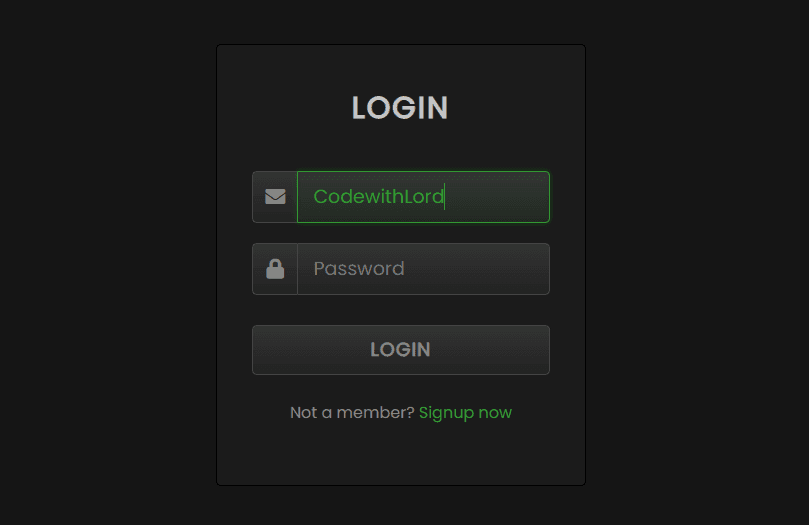
A modern dark-themed animated login form featuring glowing input fields, smooth focus animations, Font Awesome icons, and a clean UI built using pure HTML and CSS.

🧠 Description

This project presents a dark-themed animated login form designed using pure HTML and CSS, enhanced with glowing input effects and smooth transitions.

When users focus on input fields, a neon-green glow animation activates, providing instant visual feedback and a futuristic UI feel. The layout is clean, centered, and minimal — ideal for modern dashboards, admin panels, and authentication screens.

The design uses Font Awesome icons, gradient backgrounds, and CSS keyframes to create an engaging yet lightweight login experience.


💻 HTML Code


1<!DOCTYPE html> 2<html lang="en"> 3 4<head> 5 <meta charset="UTF-8"> 6 <title>Animated Login Form with Glowing Input | CodewithLord</title> 7 <link rel='stylesheet' href='https://cdnjs.cloudflare.com/ajax/libs/font-awesome/5.15.3/css/all.min.css'> 8 <link rel="stylesheet" href="./style.css"> 9</head> 10 11<body> 12 13 <div class="login-form"> 14 <div class="text"> 15 LOGIN 16 </div> 17 <form> 18 <div class="field"> 19 <div class="fas fa-envelope"></div> 20 <input type="text" placeholder="Email or Phone"> 21 </div> 22 <div class="field"> 23 <div class="fas fa-lock"></div> 24 <input type="password" placeholder="Password"> 25 </div> 26 <button>LOGIN</button> 27 <div class="link"> 28 Not a member? 29 <a href="#">Signup now</a> 30 </div> 31 </form> 32 </div> 33 34</body> 35</html>

HTML Structure Explanation

.login-form acts as the main card container.

.text displays the form title.

Each .field wraps an icon and input together for aligned styling.

Font Awesome icons visually represent email and password fields.

A simple CTA button and signup link complete the authentication UI.

This structure keeps the markup semantic, clean, and easy to style.


🎨 CSS Code


1@import url("https://fonts.googleapis.com/css?family=Poppins&display=swap"); 2 3* { 4 margin: 0; 5 padding: 0; 6 font-family: "Poppins", sans-serif; 7} 8 9body { 10 display: flex; 11 height: 100vh; 12 text-align: center; 13 align-items: center; 14 justify-content: center; 15 background: #151515; 16} 17 18.login-form { 19 position: relative; 20 width: 370px; 21 height: auto; 22 background: #1b1b1b; 23 padding: 40px 35px 60px; 24 box-sizing: border-box; 25 border: 1px solid black; 26 border-radius: 5px; 27 box-shadow: inset 0 0 1px #272727; 28} 29 30.text { 31 font-size: 30px; 32 color: #c7c7c7; 33 font-weight: 600; 34 letter-spacing: 2px; 35} 36 37form { 38 margin-top: 40px; 39} 40 41form .field { 42 margin-top: 20px; 43 display: flex; 44} 45 46.field .fas { 47 height: 50px; 48 width: 60px; 49 color: #868686; 50 font-size: 20px; 51 line-height: 50px; 52 border: 1px solid #444; 53 border-right: none; 54 border-radius: 5px 0 0 5px; 55 background: linear-gradient(#333, #222); 56} 57 58.field input, 59form button { 60 height: 50px; 61 width: 100%; 62 outline: none; 63 font-size: 19px; 64 color: #868686; 65 padding: 0 15px; 66 border-radius: 0 5px 5px 0; 67 border: 1px solid #444; 68 caret-color: #339933; 69 background: linear-gradient(#333, #222); 70} 71 72input:focus { 73 color: #339933; 74 box-shadow: 0 0 5px rgba(0, 255, 0, 0.2), inset 0 0 5px rgba(0, 255, 0, 0.1); 75 background: linear-gradient(#333933, #222922); 76 animation: glow 0.8s ease-out infinite alternate; 77} 78 79@keyframes glow { 80 0% { 81 border-color: #339933; 82 box-shadow: 0 0 5px rgba(0, 255, 0, 0.2), inset 0 0 5px rgba(0, 0, 0, 0.1); 83 } 84 85 100% { 86 border-color: #6f6; 87 box-shadow: 0 0 20px rgba(0, 255, 0, 0.6), 88 inset 0 0 10px rgba(0, 255, 0, 0.4); 89 } 90} 91 92button { 93 margin-top: 30px; 94 border-radius: 5px !important; 95 font-weight: 600; 96 letter-spacing: 1px; 97 cursor: pointer; 98} 99 100button:hover { 101 color: #339933; 102 border: 1px solid #339933; 103 box-shadow: 0 0 5px rgba(0, 255, 0, 0.3), 0 0 10px rgba(0, 255, 0, 0.2), 104 0 0 15px rgba(0, 255, 0, 0.1), 0 2px 0 black; 105} 106 107.link { 108 margin-top: 25px; 109 color: #868686; 110} 111 112.link a { 113 color: #339933; 114 text-decoration: none; 115} 116 117.link a:hover { 118 text-decoration: underline; 119}

CSS Breakdown

Dark Theme

Uses dark gradients and subtle borders for a modern UI look.

Glowing Input Animation

@keyframes glow creates a pulsing neon effect on focus.

Enhances accessibility by clearly indicating active fields.

Icon Integration

Icons are styled as part of the input group for seamless alignment.

Hover & Focus States

Button hover effects and input focus styles add polish without JS.

The result is a smooth, visually rich login form powered entirely by CSS.

Love this component?

Explore more components and build amazing UIs.

View All Components