Back to Components
Rock Paper Scissors Game using HTML, CSS & JavaScript
Component

Rock Paper Scissors Game using HTML, CSS & JavaScript

CodewithLord
February 1, 2026

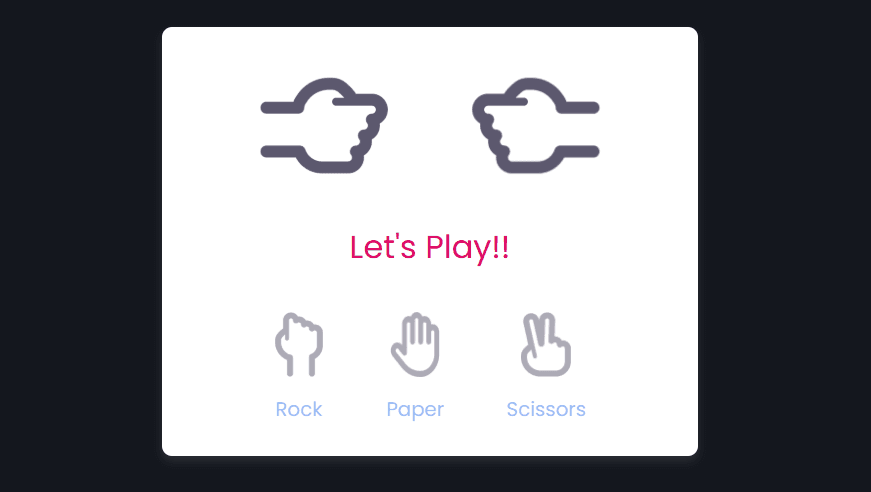
A fun and interactive Rock Paper Scissors game built with HTML, CSS, and JavaScript, featuring animated hand effects, smooth UI transitions, and real-time game logic.


Rock Paper Scissors Game


This component demonstrates a classic Rock Paper Scissors game built using pure front-end technologies, featuring:

  • Interactive user vs CPU gameplay
  • Animated hand-shake effect before result
  • Dynamic image switching
  • Clean and responsive UI
  • Simple yet effective game logic

Code

1<!DOCTYPE html> 2<html lang="en" > 3<head> 4 <meta charset="UTF-8"> 5 <title>CodePen - Rock Paper Scissors Game</title> 6 <link rel="stylesheet" href="./style.css"> 7 8</head> 9<body> 10<!-- partial:index.partial.html --> 11<section class="container"> 12 <div class="result_field"> 13 <div class="result_images"> 14 <span class="user_result"> 15 <img src="images/rock.png" alt="Rock Image" /> 16 </span> 17 <span class="cpu_result"> 18 <img src="images/rock.png" alt="Rock Image" /> 19 </span> 20 </div> 21 <div class="result">Let's Play!!</div> 22 </div> 23 24 <div class="option_images"> 25 <span class="option_image"> 26 <img src="images/rock.png" alt="Rock Image" /> 27 <p>Rock</p> 28 </span> 29 <span class="option_image"> 30 <img src="images/paper.png" alt="Paper Image" /> 31 <p>Paper</p> 32 </span> 33 <span class="option_image"> 34 <img src="images/Scissors.png" alt="Scissors Image" /> 35 <p>Scissors</p> 36 </span> 37 </div> 38</section> 39<!-- partial --> 40 <script src="./script.js"></script> 41 42</body> 43</html>

CSS code


1/* Import Google font - Poppins */ 2@import url("https://fonts.googleapis.com/css2?family=Poppins:wght@200;300;400;500;600;700&display=swap"); 3* { 4 margin: 0; 5 padding: 0; 6 box-sizing: border-box; 7 font-family: "Poppins", sans-serif; 8} 9body { 10 height: 100vh; 11 display: flex; 12 align-items: center; 13 justify-content: center; 14 background: #14171e; 15} 16::selection { 17 color: #fff; 18 background-color: #000; 19} 20.container { 21 padding: 2rem 7rem; 22 border-radius: 10px; 23 background: #fff; 24 box-shadow: 0 5px 10px rgba(255, 255, 255, 0.1); 25} 26.result_images { 27 display: flex; 28 column-gap: 7rem; 29} 30.container.start .user_result { 31 transform-origin: left; 32 animation: userShake 0.7s ease infinite; 33} 34@keyframes userShake { 35 50% { 36 transform: rotate(10deg); 37 } 38} 39 40.container.start .cpu_result { 41 transform-origin: right; 42 animation: cpuShake 0.7s ease infinite; 43} 44@keyframes cpuShake { 45 50% { 46 transform: rotate(-10deg); 47 } 48} 49.result_images img { 50 width: 100px; 51} 52.user_result img { 53 transform: rotate(90deg); 54} 55.cpu_result img { 56 transform: rotate(-90deg) rotateY(180deg); 57} 58.result { 59 text-align: center; 60 font-size: 2rem; 61 color: #de0d64; 62 margin-top: 1.5rem; 63} 64 65.option_image img { 66 width: 50px; 67} 68.option_images { 69 display: flex; 70 align-items: center; 71 margin-top: 2.5rem; 72 justify-content: space-between; 73} 74.container.start .option_images { 75 pointer-events: none; 76} 77.option_image { 78 display: flex; 79 flex-direction: column; 80 align-items: center; 81 opacity: 0.5; 82 cursor: pointer; 83 transition: opacity 0.3s ease; 84} 85.option_image:hover { 86 opacity: 1; 87} 88.option_image.active { 89 opacity: 1; 90} 91.option_image img { 92 pointer-events: none; 93} 94.option_image p { 95 color: #3477eb; 96 font-size: 1.235rem; 97 margin-top: 1rem; 98 pointer-events: none; 99}

Explanation of the Code


HTML & CSS

Structured layout using semantic containers.

Google Font Poppins for a clean, modern look.

Flexbox used for alignment and spacing.

Game UI


Separate areas for results, player hand, and CPU hand.

Option buttons with icons and labels.

Active state highlights selected option.

Animations
Hand shake animation before result display.

CSS keyframes create realistic movement.

Disabled interaction during animation phase.

Javascript Code


1// Get to DOM elements 2const gameContainer = document.querySelector(".container"), 3 userResult = document.querySelector(".user_result img"), 4 cpuResult = document.querySelector(".cpu_result img"), 5 result = document.querySelector(".result"), 6 optionImages = document.querySelectorAll(".option_image"); 7 8// Loop through each option image element 9optionImages.forEach((image, index) => { 10 image.addEventListener("click", (e) => { 11 image.classList.add("active"); 12 13 userResult.src = cpuResult.src = 14 "http://codingstella.com/wp-content/uploads/2024/01/download.png"; 15 result.textContent = "Wait..."; 16 17 // Loop through each option image again 18 optionImages.forEach((image2, index2) => { 19 // If the current index doesn't match the clicked index 20 // Remove the "active" class from the other option images 21 index !== index2 && image2.classList.remove("active"); 22 }); 23 24 gameContainer.classList.add("start"); 25 26 // Set a timeout to delay the result calculation 27 let time = setTimeout(() => { 28 gameContainer.classList.remove("start"); 29 30 // Get the source of the clicked option image 31 let imageSrc = e.target.querySelector("img").src; 32 // Set the user image to the clicked option image 33 userResult.src = imageSrc; 34 35 // Generate a random number between 0 and 2 36 let randomNumber = Math.floor(Math.random() * 3); 37 // Create an array of CPU image options 38 let cpuImages = [ 39 "http://codingstella.com/wp-content/uploads/2024/01/download.png", 40 "http://codingstella.com/wp-content/uploads/2024/01/download-1.png", 41 "http://codingstella.com/wp-content/uploads/2024/01/download-2.png" 42 ]; 43 // Set the CPU image to a random option from the array 44 cpuResult.src = cpuImages[randomNumber]; 45 46 // Assign a letter value to the CPU option (R for rock, P for paper, S for scissors) 47 let cpuValue = ["R", "P", "S"][randomNumber]; 48 // Assign a letter value to the clicked option (based on index) 49 let userValue = ["R", "P", "S"][index]; 50 51 // Create an object with all possible outcomes 52 let outcomes = { 53 RR: "Draw", 54 RP: "Cpu", 55 RS: "User", 56 PP: "Draw", 57 PR: "User", 58 PS: "Cpu", 59 SS: "Draw", 60 SR: "Cpu", 61 SP: "User" 62 }; 63 64 // Look up the outcome value based on user and CPU options 65 let outComeValue = outcomes[userValue + cpuValue]; 66 67 // Display the result 68 result.textContent = 69 userValue === cpuValue ? "Match Draw" : `${outComeValue} Won!!`; 70 }, 2500); 71 }); 72});

JavaScript Logic


Handles user input and CPU random selection.

Maps outcomes using a simple object-based logic table.

Updates images and result text dynamically.

Gameplay Flow
User selects Rock, Paper, or Scissors

Animation starts (Wait...)

CPU randomly chooses
Winner is calculated and displayed

Responsive Behavior

Automatically adapts to different screen sizes.

No external libraries required.

Lightweight and beginner-friendly project.


Preview Image 1 Preview Image 2 Preview Image 3

Love this component?

Explore more components and build amazing UIs.

View All Components