Back to Components
Scooter Animation with GSAP ScrollTrigger – Advanced Scroll-Driven Timeline Animation (Liberty 150)
Component

Scooter Animation with GSAP ScrollTrigger – Advanced Scroll-Driven Timeline Animation (Liberty 150)

CodewithLord
December 15, 2025

A complete technical breakdown of an interactive scooter product showcase using GSAP ScrollTrigger. Features coordinated scroll-driven animations, SVG clipping, timeline sequencing, and dynamic product reveals with specifications.


🧠 Description


This interactive scooter product showcase demonstrates advanced scroll-driven animation techniques using GSAP (GreenSock Animation Platform) and ScrollTrigger plugin. The page creates an engaging, narrative-driven experience where scrolling reveals product details, specifications, and characteristics through coordinated animations and dynamic content transitions.


What Makes This Project Exceptional?


Visual Features:

  • Complex multi-timeline animation system
  • SVG masking with dynamic clipping paths
  • Product image that morphs and repositions during scroll
  • Staggered text animations (fade, scale, slide)
  • Specifications and characteristics panels reveal progressively
  • Smooth viewport pinning for controlled scrolling
  • Header transitions and background animations
  • Intro logo animations with parallax effects

Technical Innovation:

  • GSAP Timeline Management: 8 coordinated timelines working in sequence
  • ScrollTrigger Integration: Precise scroll-based animation control
  • Scrub Property: Smooth animation synchronization with scroll velocity
  • SVG Clipping: Dynamic mask path manipulation
  • Stagger Animations: Synchronized multi-element transitions
  • Programmatic Sequencing: Hierarchical animation control
  • Easing Functions: Sophisticated timing curves (expo.out, sine.out)

The Concept


Narrative-Driven Experience:

The animation tells a story as user scrolls:

  1. Intro (0-700px): Welcome screen with logo and tagline
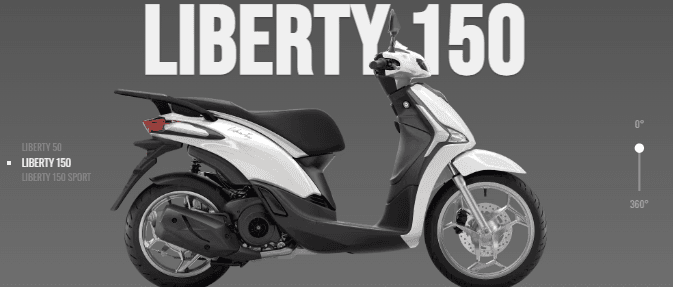
  2. Product Introduction (700-1500px): Product name and model variants appear
  3. Transition (1500-2500px): Product image scales and positions shift
  4. Specifications (2500-3800px): Engine specs slide in from left
  5. Characteristics (3800-4600px): Physical specs slide in from right
  6. Outro (4600-5700px): Price and call-to-action button
  7. Total Scroll Distance: 5700px of coordinated animations

Each section uses dedicated timelines synchronized to scroll position, creating a seamless, choreographed experience.


πŸ’» Step 1: HTML Structure


Complete HTML Code


1<!DOCTYPE html> 2<html lang="en"> 3 4<head> 5 <meta charset="UTF-8"> 6 <meta name="viewport" content="width=device-width, initial-scale=1.0"> 7 <title>Scooter Animation | Liberty 150 Product Showcase</title> 8 <meta name="description" content="Interactive GSAP ScrollTrigger animation showcasing the Piaggio Liberty 150 scooter with specifications and product details."> 9 10 <!-- Custom Stylesheet --> 11 <link rel="stylesheet" href="./style.css"> 12</head> 13 14<body> 15 16 <!-- ==================================== 17 MAIN CONTAINER & WRAPPER 18 ===================================== --> 19 <div class="container" id="container"> 20 21 <div class="wrapper" id="wrapper"> 22 23 <!-- ==================================== 24 HEADER SECTION 25 ===================================== --> 26 <div class="header"> 27 <!-- Filter Icon --> 28 <svg viewBox="0 0 24 24"> 29 <line x1="12" y1="20" x2="12" y2="10"></line> 30 <line x1="18" y1="20" x2="18" y2="4"></line> 31 <line x1="6" y1="20" x2="6" y2="16"></line> 32 </svg> 33 34 <div> 35 <!-- Search Icon --> 36 <svg viewBox="0 0 24 24"> 37 <circle cx="11" cy="11" r="8"></circle> 38 <line x1="21" y1="21" x2="16.65" y2="16.65"></line> 39 </svg> 40 41 <!-- Menu Grid Icon --> 42 <svg viewBox="0 0 24 24"> 43 <rect x="3" y="3" width="7" height="7"></rect> 44 <rect x="14" y="3" width="7" height="7"></rect> 45 <rect x="14" y="14" width="7" height="7"></rect> 46 <rect x="3" y="14" width="7" height="7"></rect> 47 </svg> 48 </div> 49 </div> 50 51 <!-- ==================================== 52 MAIN PANEL - CONTENT & ANIMATIONS 53 ===================================== --> 54 <div class="panel"> 55 56 <!-- INTRO SECTION --> 57 <div class="intro" id="intro"> 58 <!-- Brand Logo --> 59 <img id="logo" src="./Image/logo.png" alt="Piaggio logo"> 60 61 <!-- Main Heading --> 62 <h1 id="intro-h1">Ready to Cruise</h1> 63 64 <!-- Tagline --> 65 <h3 id="intro-h3">Relax and enjoy the ride</h3> 66 </div> 67 68 <!-- PRODUCT IMAGE (SCOOTER) --> 69 <!-- This element animates throughout the entire scroll experience --> 70 <img id="liberty" src="./Image/scooter.png" alt="Liberty 150 scooter"> 71 72 <!-- PRODUCT NAME HEADING --> 73 <h1 id="panel-h1">Liberty 150</h1> 74 75 <!-- MODEL VARIANTS LIST --> 76 <ul class="models"> 77 <li>Liberty 50</li> 78 <li>Liberty 150</li> 79 <li>Liberty 150 Sport</li> 80 </ul> 81 82 <!-- ROTATION INDICATOR (360Β° View) --> 83 <div class="rotator"> 84 <p>0Β°</p> 85 <svg viewBox="0 0 10 30"> 86 <path d="M5 5.663V40" fill="none" stroke="#999" stroke-width="1" /> 87 <circle cx="5" cy="7" r="2.5" fill="#fff" /> 88 </svg> 89 <p>360Β°</p> 90 </div> 91 92 <!-- ==================================== 93 ENGINE SPECIFICATIONS SECTION 94 ===================================== --> 95 <div class="specs"> 96 <h2>Engine</h2> 97 98 <!-- First Column of Engine Specs --> 99 <dl> 100 <dt>Bore x Stroke</dt> 101 <dd>58mm x 58.6mm</dd> 102 103 <dt>Clutch</dt> 104 <dd>Automatic centrifugal dry clutch</dd> 105 106 <dt>Consumption</dt> 107 <dd>36.8 Km/I</dd> 108 109 <dt>Cooling</dt> 110 <dd>Air</dd> 111 112 <dt>CO2 Emissions</dt> 113 <dd>65 g/Km</dd> 114 115 <dt>Distribution</dt> 116 <dd>SOHC, 3 valves</dd> 117 118 <dt>Engine</dt> 119 <dd>Single cylinder 4-stroke i-get</dd> 120 </dl> 121 122 <!-- Second Column of Engine Specs --> 123 <dl> 124 <dt>Engine Capacity</dt> 125 <dd>155cc</dd> 126 127 <dt>Fuel system</dt> 128 <dd>Electronic injection</dd> 129 130 <dt>Lubrication</dt> 131 <dd>Oil with wet sump</dd> 132 133 <dt>Max Power</dt> 134 <dd>12.9hp @ 7750 rpm</dd> 135 136 <dt>Max Torque</dt> 137 <dd>13 Nm @ 5250 rpm</dd> 138 139 <dt>Transmission</dt> 140 <dd>Automatic CVT</dd> 141 142 <dt>Starter</dt> 143 <dd>Electric</dd> 144 </dl> 145 </div> 146 147 <!-- ==================================== 148 PHYSICAL CHARACTERISTICS SECTION 149 ===================================== --> 150 <div class="chars"> 151 <h2>Characteristics</h2> 152 153 <!-- First Column of Characteristics --> 154 <dl> 155 <dt>Frame</dt> 156 <dd>High resistance steel</dd> 157 158 <dt>Front tyre</dt> 159 <dd>90/80 - 16"</dd> 160 161 <dt>Rear brake</dt> 162 <dd>140mm drum</dd> 163 164 <dt>Seat height</dt> 165 <dd>31.1" (790mm)</dd> 166 167 <dt>Front suspension</dt> 168 <dd>Hydraulic fork</dd> 169 170 <dt>Rear tyre</dt> 171 <dd>100/80 - 14"</dd> 172 173 <dt>ABS</dt> 174 <dd>Front ABS</dd> 175 </dl> 176 177 <!-- Second Column of Characteristics --> 178 <dl> 179 <dt>Fuel Tank</dt> 180 <dd>6 liters</dd> 181 182 <dt>Rear suspension</dt> 183 <dd>Hydraulic shock absorber</dd> 184 185 <dt>Front brake</dt> 186 <dd>Disc 240mm</dd> 187 188 <dt>Dimensions</dt> 189 <dd>76.5" Γ— 27.1" Γ— 52.7"</dd> 190 191 <dt>Emission</dt> 192 <dd>EPA / CARB</dd> 193 </dl> 194 </div> 195 196 <!-- ==================================== 197 OUTRO/CALL-TO-ACTION SECTION 198 ===================================== --> 199 <div class="outro"> 200 <h2>Piaggio Liberty 150</h2> 201 <p>$2999.00</p> 202 <button>Learn More</button> 203 </div> 204 </div> 205 206 <!-- ==================================== 207 BACKGROUND LAYER 208 ===================================== --> 209 <!-- Gradient background with SVG clipping mask --> 210 <div class="bkg"></div> 211 212 </div> 213 214 <!-- ==================================== 215 SVG CLIPPING MASK 216 ===================================== --> 217 <!-- Defines dynamic clip path that animates during scroll --> 218 <svg id="mask"> 219 <defs> 220 <clipPath id="wrapMask"> 221 <!-- Rectangle that expands/contracts during animation --> 222 <rect id="wrapWin" width="1000" height="800" /> 223 </clipPath> 224 </defs> 225 </svg> 226 227 </div> 228 229 <!-- ==================================== 230 EXTERNAL JAVASCRIPT LIBRARIES 231 ===================================== --> 232 233 <!-- GSAP Core Library (v3.12.2) --> 234 <script src="https://cdnjs.cloudflare.com/ajax/libs/gsap/3.12.2/gsap.min.js"></script> 235 236 <!-- GSAP ScrollTrigger Plugin (v3.12.2) --> 237 <!-- Enables scroll-driven animations --> 238 <script src="https://cdnjs.cloudflare.com/ajax/libs/gsap/3.12.2/ScrollTrigger.min.js"></script> 239 240 <!-- Custom Animation Script --> 241 <script src="./script.js"></script> 242 243</body> 244 245</html>

βœ… Semantic Elements: Proper heading hierarchy, list structure βœ… ID/Class Naming: Clear, descriptive identifiers for JavaScript targeting βœ… Accessibility: Alt text for images, semantic HTML βœ… Performance: Minimal nested elements, optimized structure βœ… Organization: Logical grouping of related content βœ… Comments: Clear section demarcation with comments βœ… Mobile-Ready: Viewport meta tag for responsive design


🎨 Step 2: CSS – Layout, Styling & Positioning


Complete CSS Code


1/* ==================================== 2 FONT IMPORTS & RESET 3 ==================================== */ 4 5@import url("https://fonts.googleapis.com/css2?family=Bebas+Neue&family=Oswald&display=swap"); 6 7/* Universal Reset */ 8* { 9 margin: 0; 10 padding: 0; 11 box-sizing: border-box; 12} 13 14/* ==================================== 15 BODY & GLOBAL STYLES 16 ==================================== */ 17 18body { 19 height: 100vh; 20 width: 100vw; 21 font-family: "Oswald", sans-serif; 22 background-color: #ffffff; 23 background-image: url("/Image/bg.png"); 24 25 /* Hide scrollbar (GSAP ScrollTrigger handles scroll) */ 26 -ms-overflow-style: none; 27 scrollbar-width: none; 28} 29 30/* Webkit browsers (Chrome, Safari) */ 31::-webkit-scrollbar { 32 width: 0; 33 height: 0; 34} 35 36/* ==================================== 37 TYPOGRAPHY 38 ==================================== */ 39 40h1, 41h2, 42h3 { 43 font-family: "Bebas Neue", sans-serif; 44 text-transform: uppercase; 45 color: #f0f0f0; 46 letter-spacing: 2px; 47 text-shadow: 0px 1px 3px rgba(0, 0, 0, 0.3); 48} 49 50ul { 51 list-style: none; 52} 53 54/* ==================================== 55 CONTAINER & WRAPPER LAYOUT 56 ==================================== */ 57 58.container { 59 width: 100%; 60 height: 100%; 61 display: grid; 62 place-items: center; 63} 64 65.wrapper { 66 width: 90%; 67 max-width: 900px; 68 height: 100%; 69 max-height: 700px; 70 overflow: hidden; 71 border-radius: 20px; 72 position: relative; 73 background: #f0f0f0; 74} 75 76/* ==================================== 77 BACKGROUND LAYER WITH SVG CLIPPING 78 ==================================== */ 79 80.bkg { 81 width: 100%; 82 height: 100%; 83 background: #a4a4a4; 84 background: linear-gradient(0deg, #797979, #494949 100%); 85 position: absolute; 86 top: 0; 87 left: 0; 88 z-index: 1; 89 90 /* Apply SVG clipping mask --> 91 /* Height of clip-path animates via #wrapWin rect --> 92 -webkit-clip-path: url("#wrapMask"); 93 clip-path: url("#wrapMask"); 94} 95 96/* ==================================== 97 HEADER SECTION 98 ==================================== */ 99 100.header { 101 position: absolute; 102 left: 0; 103 top: 0; 104 z-index: 4; 105 width: 100%; 106 padding: 1.5em; 107 display: grid; 108 grid-template-columns: 1fr 16%; 109} 110 111.header svg { 112 width: 18px; 113 stroke: #f0f0f0; 114 stroke-width: 2; 115 fill: none; 116 stroke-linecap: round; 117} 118 119/* Rotate filter icon 90 degrees --> 120.header svg:nth-child(1) { 121 transform: rotateZ(90deg); 122} 123 124/* Right-align search and menu icons --> 125.header div { 126 text-align: right; 127} 128 129.header div svg { 130 margin-left: 20px; 131} 132 133/* ==================================== 134 PANEL - MAIN CONTENT AREA 135 ==================================== */ 136 137.panel { 138 width: 100%; 139 height: 100%; 140 display: grid; 141 place-items: center; 142 position: relative; 143} 144 145/* ==================================== 146 PRODUCT IMAGE (SCOOTER) 147 ==================================== */ 148 149.panel img#liberty { 150 width: 95%; 151 position: absolute; 152 z-index: 10; 153 left: 50%; 154 bottom: -250px; /* Positioned below viewport initially --> 155 transform: translateX(-50%); 156} 157 158/* ==================================== 159 PRODUCT NAME HEADING 160 ==================================== */ 161 162.panel h1#panel-h1 { 163 width: 100%; 164 text-align: center; 165 position: absolute; 166 z-index: 9; 167 top: 140px; 168 font-size: 8rem; 169 left: 50%; 170 transform: translateX(-50%); 171} 172 173/* ==================================== 174 INTRO SECTION 175 ==================================== */ 176 177.intro { 178 z-index: 6; 179 text-align: center; 180 transform: translateY(-60px); 181} 182 183.intro h1 { 184 font-size: 4rem; 185} 186 187.intro h3 { 188 font-size: 2.4rem; 189 margin-top: -16px; 190} 191 192.intro img { 193 width: 50px; 194 opacity: 0.6; 195} 196 197/* ==================================== 198 MODEL VARIANTS LIST 199 ==================================== */ 200 201.models { 202 position: absolute; 203 top: 50%; 204 left: 2em; 205 z-index: 11; 206} 207 208.models li { 209 text-transform: uppercase; 210 font-size: 0.8rem; 211 color: #8a8a8a; 212} 213 214/* Highlight active model --> 215.models li:nth-child(2) { 216 color: #f0f0f0; 217 font-size: 0.9rem; 218 list-style-type: square; 219} 220 221/* ==================================== 222 360Β° ROTATION INDICATOR 223 ==================================== */ 224 225.rotator { 226 position: absolute; 227 top: 45%; 228 right: 2em; 229 z-index: 12; 230} 231 232.rotator p { 233 text-align: center; 234 font-size: 0.8rem; 235 color: #a4a4a4; 236 text-transform: uppercase; 237 padding: 5px 0; 238} 239 240/* ==================================== 241 SPECIFICATIONS & CHARACTERISTICS 242 ==================================== */ 243 244.specs, 245.chars { 246 position: absolute; 247 top: 15%; 248 width: 50%; 249 z-index: 20; 250 padding: 1em; 251 display: grid; 252 grid-template-columns: 1fr 1fr; 253 grid-template-rows: 10% 1fr; 254} 255 256/* Section headings span both columns --> 257.specs h2, 258.chars h2 { 259 grid-column: 1/3; 260 grid-row: 1/2; 261 color: #4b4b4b; 262 text-shadow: none; 263} 264 265/* Definition lists fill grid cells --> 266.specs dl:nth-child(0), 267.chars dl:nth-child(0) { 268 grid-column: 1/2; 269 grid-row: 2/3; 270} 271 272.specs dl:nth-child(1), 273.chars dl:nth-child(1) { 274 grid-column: 2/3; 275 grid-row: 2/3; 276} 277 278/* Definition styling --> 279.specs dl dt, 280.chars dl dt { 281 text-transform: uppercase; 282 margin-bottom: 5px; 283} 284 285.specs dl dd, 286.chars dl dd { 287 margin-bottom: 10px; 288 font-size: 0.9rem; 289 color: #717171; 290} 291 292/* ==================================== 293 OUTRO / CALL-TO-ACTION SECTION 294 ==================================== */ 295 296.outro { 297 width: 100%; 298 position: absolute; 299 bottom: 0; 300 left: 50%; 301 transform: translateX(-50%); 302 z-index: 30; 303 text-align: center; 304 padding: 1em; 305} 306 307.outro h2 { 308 font-size: 3rem; 309} 310 311.outro p { 312 font-size: 1.7rem; 313 color: #f0f0f0; 314 text-shadow: 0px 1px 3px rgba(0, 0, 0, 0.3); 315} 316 317/* ==================================== 318 BUTTON STYLING 319 ==================================== */ 320 321.outro button { 322 margin: 20px 0; 323 border: 1px solid #9b9b9b; 324 background: #646464; 325 padding: 5px 10px; 326 outline: none; 327 cursor: pointer; 328 color: #d7d7d7; 329 font-size: 1.2rem; 330 font-family: "Bebas Neue", sans-serif; 331 transition: all 0.3s ease; 332} 333 334.outro button:hover { 335 background: #7a7a7a; 336 border-color: #d7d7d7; 337} 338 339/* ==================================== 340 SVG MASK ELEMENT 341 ==================================== */ 342 343#mask { 344 display: block; 345 position: absolute; 346 z-index: 40; 347} 348 349/* ==================================== 350 FIREFOX-SPECIFIC FIX 351 ==================================== */ 352 353@-moz-document url-prefix() { 354 .rotator svg { 355 width: 100%; 356 height: 60px; 357 } 358}

CSS Architecture Explanation


1. Grid-Based Layout


1.container { 2 width: 100%; 3 height: 100%; 4 display: grid; 5 place-items: center; 6} 7 8.wrapper { 9 max-width: 900px; 10 max-height: 700px; 11 position: relative; 12}

Purpose:

  • grid with place-items: center centers wrapper
  • Wrapper has fixed max dimensions for consistent animation
  • position: relative creates stacking context for absolute positioning

2. SVG Clipping Mask System


1.bkg { 2 clip-path: url("#wrapMask"); 3} 4 5/* In HTML: <rect id="wrapWin" width="1000" height="800" /> -->

How It Works:

  1. .bkg applies clip-path from SVG mask
  2. #wrapWin rect height animates from 80 to 800
  3. Gradient background clips to animated rectangle
  4. Creates reveal/masking effect

JavaScript animates:

1gsap.to("#wrapWin", { 2 height: 800, // Expands from 80 3 duration: 2, 4 scrollTrigger: { start: 300, end: 500 } 5})

3. Absolute Positioning Strategy


1.panel img#liberty { 2 position: absolute; 3 z-index: 10; 4 left: 50%; 5 bottom: -250px; /* Below viewport initially --> 6 transform: translateX(-50%); 7} 8 9.intro { 10 z-index: 6; /* Below product --> 11} 12 13.outro { 14 z-index: 30; /* Above all --> 15}

Z-Index Hierarchy:

  • 1: Background gradient
  • 4: Header
  • 6: Intro section
  • 9: Panel heading
  • 10: Product image
  • 11: Model list
  • 12: Rotator
  • 20: Specs/Chars
  • 30: Outro
  • 40: SVG mask

Layout Result:

β”Œβ”€β”€β”€β”€β”€β”€β”€β”€β”€β”€β”€β”€β”€β”€β”€β”€β”€β”
β”‚   Engine (h2)   β”‚  ← Spans 2 columns
β”œβ”€β”€β”€β”€β”€β”€β”€β”€β”¬β”€β”€β”€β”€β”€β”€β”€β”€β”€
β”‚ Specs1 β”‚ Specs2 β”‚  ← Two-column specs
β””β”€β”€β”€β”€β”€β”€β”€β”€β”΄β”€β”€β”€β”€β”€β”€β”€β”€β”˜

5. Typography & Color Hierarchy


1h1, h2, h3 { 2 font-family: "Bebas Neue", sans-serif; /* Display font --> 3 color: #f0f0f0; /* Light on dark --> 4 text-shadow: 0px 1px 3px rgba(0, 0, 0, 0.3); 5} 6 7body { 8 font-family: "Oswald", sans-serif; /* Body font --> 9}

Color Scheme:

  • #f0f0f0: Light headings (high contrast)
  • #717171: Body text (readable on light background)
  • #8a8a8a: Inactive labels
  • #4b4b4b: Section headings


βš™οΈ Step 3: JavaScript – GSAP Timeline Animation


Complete JavaScript Code & Explanation


1/* ==================================== 2 GSAP SETUP & PLUGIN REGISTRATION 3 ==================================== */ 4 5// Register ScrollTrigger plugin with GSAP 6gsap.registerPlugin("ScrollTrigger"); 7 8/* ==================================== 9 TIMELINE DECLARATIONS 10 ==================================== */ 11 12// Create 8 separate timelines for different sections 13let scene = gsap.timeline(); // Master timeline 14let intro_tl = gsap.timeline(); // Intro section (0-700px) 15let part1_tl = gsap.timeline(); // Part 1 (700-1500px) 16let part2_tl = gsap.timeline(); // Part 2 (1500-2500px) 17let part3_tl = gsap.timeline(); // Part 3 (2500-3800px) 18let part4_tl = gsap.timeline(); // Part 4 (3800-4600px) 19let part5_tl = gsap.timeline(); // Part 5 (4600-5700px) 20let outro_tl = gsap.timeline(); // Outro section 21 22/* ==================================== 23 SCROLLTRIGGER SETUP - PIN CONTAINER 24 ==================================== */ 25 26ScrollTrigger.create({ 27 trigger: "#container", 28 pin: true, // Pin container while scrolling 29 start: "top top", // Start when top reaches top 30 end: "+=5700" // Total scroll distance: 5700px 31}); 32 33/* 34 How pinning works: 35 1. User scrolls down 5700px total 36 2. #container stays pinned to viewport 37 3. Animations synchronized to scroll position 38 4. Creates immersive, fixed viewport experience 39*/ 40 41/* ==================================== 42 INITIAL STATE SETUP (gsap.set) 43 ==================================== */ 44 45// These properties start hidden/off-screen 46// Animations will reveal them 47 48gsap.set(".specs", { 49 x: -160, // Off-screen left 50 opacity: 0 // Invisible 51}); 52 53gsap.set(".chars", { 54 x: 260 // Off-screen right 55 // Note: opacity not set, will fade in via animation 56}); 57 58// Initialize model list items as invisible 59part2_tl.set(".models li", { 60 opacity: 0 61}); 62 63// Initialize spec details as invisible 64part3_tl.set(".specs dt", { 65 opacity: 0 66}); 67 68part3_tl.set(".specs dd", { 69 opacity: 0 70}); 71 72// Initialize characteristics details as invisible 73part4_tl.set(".chars h2", { 74 opacity: 0 75}); 76 77part4_tl.set(".chars dt", { 78 opacity: 0 79}); 80 81part4_tl.set(".chars dd", { 82 opacity: 0 83}); 84 85/* ==================================== 86 INTRO TIMELINE (0-700px) 87 =================================== 88 89 The intro reveals the scooter image 90 and fades out welcome message 91*/ 92 93intro_tl 94 //


Images used in the above program


Piaggio Logo used in GSAP scooter animation
Brand Logo
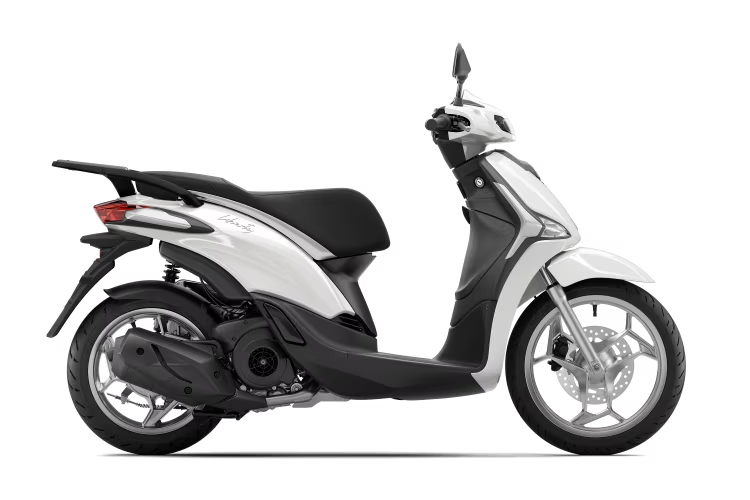
Liberty 150 Scooter image used in animation
Scooter Product Image
Background image used with SVG clipping mask
Animated Background

Love this component?

Explore more components and build amazing UIs.

View All Components