Back to Components
Social Media Icons Tooltip Hover Animation
Component

Social Media Icons Tooltip Hover Animation

CodewithLord
February 9, 2026

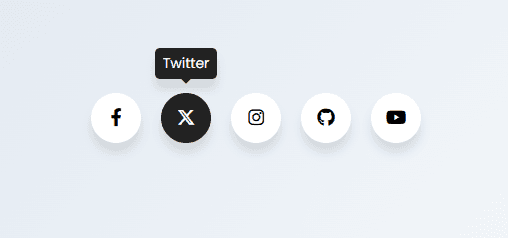
A clean and modern social media icons UI with smooth tooltip popups using pure HTML and CSS. Perfect for portfolios, landing pages, and interactive UI demos.


📌 Overview


This project showcases a minimal yet elegant social media icons UI where each icon reveals a smooth tooltip popup on hover. The interaction is lightweight, visually pleasing, and built using pure HTML and CSS — no JavaScript required.

It’s a great addition to:

  • Portfolio websites
  • Landing pages
  • Footer social sections
  • UI/UX micro-interaction demos


🧠 Core Concept


  • Circular social media icons
  • Tooltip that slides upward on hover
  • Platform-specific brand colors
  • Smooth cubic-bezier animations
  • Fully responsive and lightweight


💻 Code


HTML


1<!DOCTYPE html> 2<html lang="en"> 3 4<head> 5 <meta charset="UTF-8"> 6 <title>Social Media Icons Popups | CodewithLord</title> 7 <link rel='stylesheet' href='https://cdnjs.cloudflare.com/ajax/libs/font-awesome/6.4.2/css/all.min.css'> 8 <link rel="stylesheet" href="./style.css"> 9 10</head> 11 12<body> 13 14 <ul class="wrapper"> 15 <li class="icon facebook"> 16 <span class="tooltip">Facebook</span> 17 <span><i class="fab fa-facebook-f"></i></span> 18 </li> 19 <li class="icon twitter"> 20 <span class="tooltip">Twitter</span> 21 <span><i class="fab fa-x-twitter"></i></span> 22 </li> 23 <li class="icon instagram"> 24 <span class="tooltip">Instagram</span> 25 <span><i class="fab fa-instagram"></i></span> 26 </li> 27 <li class="icon github"> 28 <span class="tooltip">Github</span> 29 <span><i class="fab fa-github"></i></span> 30 </li> 31 <li class="icon youtube"> 32 <span class="tooltip">Youtube</span> 33 <span><i class="fab fa-youtube"></i></span> 34 </li> 35 </ul> 36 37</body> 38 39</html>


CSS


1@import url("https://fonts.googleapis.com/css2?family=Poppins&display=swap"); 2 3* { 4 margin: 0; 5 padding: 0; 6 box-sizing: border-box; 7} 8 9*:focus, 10*:active { 11 outline: none !important; 12 -webkit-tap-highlight-color: transparent; 13} 14 15html, 16body { 17 display: flex; 18 justify-content: center; 19 align-items: center; 20 min-height: 100vh; 21 min-width: 100vw; 22 margin: 0; 23 font-family: "Poppins", sans-serif; 24 background: linear-gradient(315deg, #ffffff, #d7e1ec); 25} 26 27.wrapper { 28 display: inline-flex; 29 list-style: none; 30 padding: 0; 31} 32 33.wrapper .icon { 34 position: relative; 35 background: #ffffff; 36 border-radius: 50%; 37 padding: 15px; 38 margin: 10px; 39 width: 50px; 40 height: 50px; 41 font-size: 18px; 42 display: flex; 43 justify-content: center; 44 align-items: center; 45 flex-direction: column; 46 box-shadow: 0 10px 10px rgba(0, 0, 0, 0.1); 47 cursor: pointer; 48 transition: all 0.2s cubic-bezier(0.68, -0.55, 0.265, 1.55); 49} 50 51.wrapper .tooltip { 52 position: absolute; 53 top: 0; 54 font-size: 14px; 55 background: #ffffff; 56 color: #ffffff; 57 padding: 5px 8px; 58 border-radius: 5px; 59 box-shadow: 0 10px 10px rgba(0, 0, 0, 0.1); 60 opacity: 0; 61 pointer-events: none; 62 transition: all 0.3s cubic-bezier(0.68, -0.55, 0.265, 1.55); 63} 64 65.wrapper .tooltip::before { 66 position: absolute; 67 content: ""; 68 height: 8px; 69 width: 8px; 70 background: #ffffff; 71 bottom: -3px; 72 left: 50%; 73 transform: translate(-50%) rotate(45deg); 74 transition: all 0.3s cubic-bezier(0.68, -0.55, 0.265, 1.55); 75} 76 77.wrapper .icon:hover .tooltip { 78 top: -45px; 79 opacity: 1; 80 visibility: visible; 81 pointer-events: auto; 82} 83 84.wrapper .icon:hover span, 85.wrapper .icon:hover .tooltip { 86 text-shadow: 0px -1px 0px rgba(0, 0, 0, 0.1); 87} 88 89.wrapper .facebook:hover, 90.wrapper .facebook:hover .tooltip, 91.wrapper .facebook:hover .tooltip::before { 92 background: #1877f2; 93 color: #ffffff; 94} 95 96.wrapper .twitter:hover, 97.wrapper .twitter:hover .tooltip, 98.wrapper .twitter:hover .tooltip::before { 99 background: #222222; 100 color: #ffffff; 101} 102 103.wrapper .instagram:hover, 104.wrapper .instagram:hover .tooltip, 105.wrapper .instagram:hover .tooltip::before { 106 background: #e4405f; 107 color: #ffffff; 108} 109 110.wrapper .github:hover, 111.wrapper .github:hover .tooltip, 112.wrapper .github:hover .tooltip::before { 113 background: #833ab4; 114 color: #ffffff; 115} 116 117.wrapper .youtube:hover, 118.wrapper .youtube:hover .tooltip, 119.wrapper .youtube:hover .tooltip::before { 120 background: #cd201f; 121 color: #ffffff; 122}


🔍 Explanation of the Code


HTML Structure


  • Uses an unordered list as the container
  • Each list item represents a social platform
  • Tooltip text is placed inside a <span>
  • Font Awesome icons provide brand logos

CSS Styling


  • Flexbox centers everything perfectly
  • Circular icons created using border-radius: 50%
  • Tooltip positioned absolutely above the icon
  • Custom cubic-bezier easing for playful motion

Hover Interaction


  • Tooltip moves upward and fades in
  • Background and tooltip color switch to brand colors
  • Small pseudo-element creates the tooltip arrow


✨ Key Features


  • No JavaScript required
  • Lightweight and fast
  • Fully responsive
  • Clean and reusable component
  • Brand-accurate hover colors


📱 Use Cases


  • Portfolio website footer
  • Landing page social links
  • UI animation demos
  • Beginner CSS hover effect tutorials


🚀 Enhancement Ideas


  • Add click ripple effect
  • Convert to vertical layout
  • Add dark mode support
  • Animate icons individually


Love this component?

Explore more components and build amazing UIs.

View All Components