Back to Components
CSS Modern Functions Space Demo.
Component

CSS Modern Functions Space Demo.

CodewithLord
December 5, 2025

This component demonstrates the use of modern CSS features such as clamp(), min(), max(), CSS variables, container queries, animations, and interactive elements using JavaScript.

🔥 Description

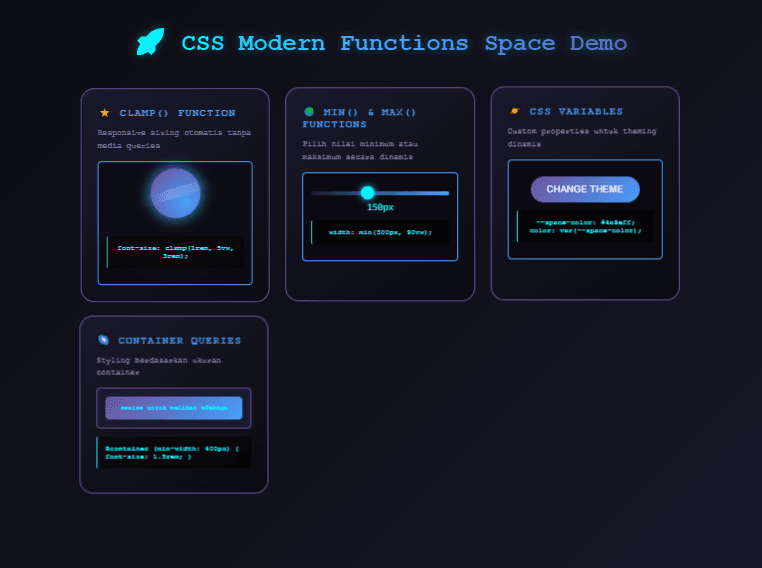
This component demonstrates the use of modern CSS features such as clamp(), min(), max(), CSS variables, container queries, animations, and interactive elements using JavaScript. It is themed around a futuristic space aesthetic, including glowing planetary visuals, a starfield background, floating effects, and responsive design behavior. The component helps users understand how CSS modern functions behave visually and interactively inside a UI.


🧠 How the Component Works


📄 HTML Code

1<!DOCTYPE html> 2<html lang="en"> 3 4 <head> 5 <meta charset="UTF-8"> 6 <title>CSS Modern Functions Space Demo</title> 7 <link rel="stylesheet" href="./style.css"> 8 9 </head> 10 11 <body> 12 <div class="container"> 13 <h1>🚀 CSS Modern Functions Space Demo</h1> 14 15 <div class="grid"> 16 <div class="card"> 17 <h2 class="card-title">⭐ clamp() Function</h2> 18 <div class="card-content"> 19 Responsive sizing otomatis tanpa media queries 20 </div> 21 <div class="function-demo"> 22 <div class="planet"></div> 23 <div class="code-block"> 24 font-size: clamp(1rem, 5vw, 3rem);</div> 25 </div> 26 </div> 27 28 <div class="card"> 29 <h2 class="card-title">🌍 min() & max() Functions</h2> 30 <div class="card-content"> 31 Pilih nilai minimum atau maksimum secara dinamis 32 </div> 33 <div class="function-demo"> 34 <div class="slider-container"> 35 <input type="range" min="50" max="300" value="150" class="slider" id="minMaxSlider"> 36 <div class="output" id="minMaxOutput">150px</div> 37 </div> 38 <div class="code-block"> 39 width: min(300px, 90vw);</div> 40 </div> 41 </div> 42 43 <div class="card"> 44 <h2 class="card-title">🪐 CSS Variables</h2> 45 <div class="card-content"> 46 Custom properties untuk theming dinamis 47 </div> 48 <div class="function-demo"> 49 <button class="space-button" id="colorBtn">Change Theme</button> 50 <div class="code-block"> 51 --space-color: #4a9eff; 52 color: var(--space-color);</div> 53 </div> 54 </div> 55 56 <div class="card"> 57 <h2 class="card-title">🌌 Container Queries</h2> 58 <div class="card-content"> 59 Styling berdasarkan ukuran container 60 </div> 61 <div class="container-demo"> 62 <div class="responsive-box"> 63 Resize untuk melihat efeknya 64 </div> 65 </div> 66 <div class="code-block"> 67 @container (min-width: 400px) { 68 font-size: 1.5rem; 69 }</div> 70 </div> 71 </div> 72</div> 73 <script src="./script.js"></script> 74 75 </body> 76 77</html> 78

🌐 1️⃣ HTML Explanation

The HTML structure acts as the foundation of the UI. It contains the main wrapper that holds all visual and interactive elements. The HTML includes:

A full-page container with a star-themed background.

A heading element that uses CSS functions like clamp() to demonstrate responsive text resizing.

A glowing planet element positioned near the center to support the space theme.

A theme selector that allows users to switch between different glow color presets.

A live interactive slider demo that visually changes the width of a demonstration box, showing how min(), max(), and clamp() behave.

A card container used to demonstrate container queries, where the internal layout adjusts based on container size.

The HTML is kept minimal. All stylings and animations are handled via CSS, while interactivity is controlled by JavaScript. The HTML only provides semantic and structural elements.


🎨 CSS Code

1* { 2 margin: 0; 3 padding: 0; 4 box-sizing: border-box; 5} 6 7:root { 8 /* Color Palette */ 9 --space-black: #0a0a0f; 10 --deep-space: #1a1a2e; 11 --nebula-purple: #6b4c9a; 12 --star-blue: #4a9eff; 13 --cosmic-cyan: #00ffff; 14 --asteroid-gray: #8b8b9a; 15 16 /* Dynamic Values */ 17 --base-size: 16px; 18 --spacing-unit: 1rem; 19 --hover-scale: 1.05; 20} 21 22body { 23 background: linear-gradient( 24 135deg, 25 var(--space-black) 0%, 26 var(--deep-space) 100% 27 ); 28 color: var(--cosmic-cyan); 29 font-family: "Courier New", monospace; 30 min-height: 100vh; 31 padding: clamp(1rem, 5vw, 3rem); 32 position: relative; 33 overflow-x: hidden; 34} 35 36/* Starfield Background */ 37body::before { 38 content: ""; 39 position: fixed; 40 top: 0; 41 left: 0; 42 width: 100%; 43 height: 100%; 44 background-image: radial-gradient(2px 2px at 20% 30%, white, transparent), 45 radial-gradient(2px 2px at 60% 70%, white, transparent), 46 radial-gradient(1px 1px at 50% 50%, white, transparent), 47 radial-gradient(1px 1px at 80% 10%, white, transparent), 48 radial-gradient(2px 2px at 90% 60%, white, transparent); 49 background-size: 200% 200%; 50 animation: twinkle 20s ease-in-out infinite; 51 opacity: 0.5; 52 z-index: 0; 53 pointer-events: none; 54} 55 56@keyframes twinkle { 57 0%, 58 100% { 59 opacity: 0.5; 60 } 61 50% { 62 opacity: 1; 63 } 64} 65 66.container { 67 max-width: min(1200px, 90vw); 68 margin: 0 auto; 69 position: relative; 70 z-index: 1; 71} 72 73h1 { 74 font-size: clamp(1.5rem, 5vw, 3rem); 75 text-align: center; 76 margin-bottom: clamp(2rem, 5vh, 4rem); 77 background: linear-gradient( 78 90deg, 79 var(--cosmic-cyan), 80 var(--star-blue), 81 var(--nebula-purple) 82 ); 83 -webkit-background-clip: text; 84 background-clip: text; 85 -webkit-text-fill-color: transparent; 86 text-shadow: 0 0 20px rgba(0, 255, 255, 0.3); 87 animation: glow 3s ease-in-out infinite; 88} 89 90@keyframes glow { 91 0%, 92 100% { 93 filter: brightness(1); 94 } 95 50% { 96 filter: brightness(1.3); 97 } 98} 99 100.grid { 101 display: grid; 102 grid-template-columns: repeat(auto-fit, minmax(min(300px, 100%), 1fr)); 103 gap: clamp(1rem, 3vw, 2rem); 104 margin-bottom: 2rem; 105} 106 107/* Card dengan CSS Functions */ 108.card { 109 background: linear-gradient( 110 145deg, 111 rgba(26, 26, 46, 0.9), 112 rgba(10, 10, 15, 0.9) 113 ); 114 border: 1px solid var(--nebula-purple); 115 border-radius: max(10px, 1vw); 116 padding: clamp(1rem, 3vw, 2rem); 117 position: relative; 118 overflow: hidden; 119 transition: transform 0.3s ease, box-shadow 0.3s ease; 120 cursor: pointer; 121} 122 123.card::before { 124 content: ""; 125 position: absolute; 126 top: -50%; 127 left: -50%; 128 width: 200%; 129 height: 200%; 130 background: radial-gradient( 131 circle, 132 rgba(74, 158, 255, 0.1) 0%, 133 transparent 70% 134 ); 135 opacity: 0; 136 transition: opacity 0.5s ease; 137} 138 139.card:hover { 140 transform: scale(var(--hover-scale)); 141 box-shadow: 0 10px 40px rgba(0, 255, 255, 0.3); 142} 143 144.card:hover::before { 145 opacity: 1; 146} 147 148.card-title { 149 font-size: clamp(1rem, 2.5vw, 1.3rem); 150 color: var(--star-blue); 151 margin-bottom: 1rem; 152 text-transform: uppercase; 153 letter-spacing: 2px; 154} 155 156.card-content { 157 color: var(--asteroid-gray); 158 font-size: clamp(0.9rem, 2vw, 1rem); 159 line-height: 1.6; 160} 161 162/* Interactive Elements */ 163.function-demo { 164 background: var(--space-black); 165 border: 1px solid var(--star-blue); 166 border-radius: 8px; 167 padding: 1rem; 168 margin-top: 1rem; 169 text-align: center; 170 font-family: monospace; 171} 172 173.planet { 174 width: clamp(50px, 10vw, 100px); 175 height: clamp(50px, 10vw, 100px); 176 border-radius: 50%; 177 margin: 1rem auto; 178 background: radial-gradient( 179 circle at 30% 30%, 180 var(--star-blue), 181 var(--nebula-purple) 182 ); 183 box-shadow: 0 0 30px var(--star-blue); 184 animation: float 6s ease-in-out infinite; 185 position: relative; 186} 187 188@keyframes float { 189 0%, 190 100% { 191 transform: translateY(0px) rotate(0deg); 192 } 193 50% { 194 transform: translateY(-20px) rotate(180deg); 195 } 196} 197 198.planet::after { 199 content: ""; 200 position: absolute; 201 width: 150%; 202 height: 20%; 203 background: linear-gradient( 204 90deg, 205 transparent, 206 rgba(255, 255, 255, 0.3), 207 transparent 208 ); 209 top: 40%; 210 left: -25%; 211 transform: rotate(-15deg); 212 opacity: 0.6; 213} 214 215/* Slider dengan clamp() */ 216.slider-container { 217 margin: 1rem 0; 218} 219 220.slider { 221 width: 100%; 222 height: 8px; 223 border-radius: 5px; 224 background: linear-gradient(90deg, var(--deep-space), var(--star-blue)); 225 outline: none; 226 -webkit-appearance: none; 227 cursor: pointer; 228} 229 230.slider::-webkit-slider-thumb { 231 -webkit-appearance: none; 232 appearance: none; 233 width: clamp(15px, 3vw, 25px); 234 height: clamp(15px, 3vw, 25px); 235 border-radius: 50%; 236 background: var(--cosmic-cyan); 237 cursor: pointer; 238 box-shadow: 0 0 15px var(--cosmic-cyan); 239} 240 241.slider::-moz-range-thumb { 242 width: clamp(15px, 3vw, 25px); 243 height: clamp(15px, 3vw, 25px); 244 border-radius: 50%; 245 background: var(--cosmic-cyan); 246 cursor: pointer; 247 box-shadow: 0 0 15px var(--cosmic-cyan); 248 border: none; 249} 250 251.output { 252 color: var(--cosmic-cyan); 253 font-size: clamp(1rem, 2vw, 1.2rem); 254 margin-top: 0.5rem; 255 text-align: center; 256} 257 258/* Container Query Demo */ 259.container-demo { 260 container-type: inline-size; 261 background: var(--deep-space); 262 border: 1px solid var(--nebula-purple); 263 border-radius: 8px; 264 padding: 1rem; 265 margin: 1rem 0; 266} 267 268.responsive-box { 269 background: linear-gradient(135deg, var(--nebula-purple), var(--star-blue)); 270 padding: 1rem; 271 border-radius: 8px; 272 text-align: center; 273 font-size: clamp(0.8rem, 2cqw, 1.2rem); 274 transition: all 0.3s ease; 275} 276 277@container (min-width: 400px) { 278 .responsive-box { 279 padding: 2rem; 280 font-size: 1.5rem; 281 } 282} 283 284/* Button */ 285.space-button { 286 background: linear-gradient(135deg, var(--nebula-purple), var(--star-blue)); 287 border: none; 288 color: white; 289 padding: clamp(0.5rem, 2vw, 1rem) clamp(1rem, 4vw, 2rem); 290 font-size: clamp(0.9rem, 2vw, 1.1rem); 291 border-radius: max(8px, 1vw); 292 cursor: pointer; 293 transition: all 0.3s ease; 294 text-transform: uppercase; 295 letter-spacing: 1px; 296 margin: 1rem auto; 297 display: block; 298} 299 300.space-button:hover { 301 transform: translateY(-2px) scale(1.05); 302 box-shadow: 0 10px 30px rgba(74, 158, 255, 0.5); 303} 304 305.space-button:active { 306 transform: translateY(0); 307} 308 309/* Code Block */ 310.code-block { 311 background: rgba(0, 0, 0, 0.5); 312 border-left: 3px solid var(--cosmic-cyan); 313 padding: 1rem; 314 margin: 1rem 0; 315 font-family: "Courier New", monospace; 316 font-size: clamp(0.7rem, 1.5vw, 0.9rem); 317 color: var(--cosmic-cyan); 318 overflow-x: auto; 319 border-radius: 4px; 320}

🎨 2️⃣ CSS Explanation

The CSS is the core of this modern demo, showcasing advanced features in a futuristic space-like visual style.

Key CSS features used:

✔ CSS Variables

The component defines multiple global color variables for glow, stars, and gradients. Changing the theme updates the variables, instantly transforming the entire page.

✔ clamp(), min(), max()

The heading uses clamp(min, preferred, max) to scale fluidly between small and large screens.

The demo width box uses min() and max() to restrict resizing so that the slider cannot break the layout.

Multiple elements use max() for padding and spacing on larger layouts.

✔ Gradients & Glows

The background uses layered gradients and blur filters to create a galaxy-like atmosphere. The planet uses radial gradients and subtle animations to simulate glowing energy.

✔ Space Animations

A starfield effect is created using repeating radial gradients and keyframe animations that move the stars slowly to mimic depth and motion.

✔ Container Queries

Inside cards, text size and padding change depending on container width, not viewport width. This demonstrates modern responsive design techniques.

✔ Responsive Layout

The CSS ensures everything fits elegantly on phones, tablets, and desktops. No content overflows because min(), max(), and clamp() restrict dynamic sizing.

Overall, the CSS delivers both education and aesthetics — a perfect showcase of modern features inside an attractive theme.


🧠 JavaScript Code

1// Min/Max Slider 2const slider = document.getElementById("minMaxSlider"); 3const output = document.getElementById("minMaxOutput"); 4 5slider.addEventListener("input", function () { 6 const minValue = Math.min(this.value, 200); 7 output.textContent = minValue + "px"; 8 output.style.fontSize = minValue / 10 + "px"; 9 10}); 11 12// Color Theme Button 13const colorBtn = document.getElementById("colorBtn"); 14const colors = [ 15 { primary: "#4a9eff", secondary: "#6b4c9a" }, 16 { primary: "#ff4a9e", secondary: "#9a4c6b" }, 17 { primary: "#4aff9e", secondary: "#4c9a6b" }, 18 { primary: "#ff9e4a", secondary: "#9a6b4c" } 19]; 20let colorIndex = 0; 21 22colorBtn.addEventListener("click", function () { 23 colorIndex = (colorIndex + 1) % colors.length; 24 document.documentElement.style.setProperty( 25 "--star-blue", 26 colors[colorIndex].primary 27 ); 28 document.documentElement.style.setProperty( 29 "--nebula-purple", 30 colors[colorIndex].secondary 31 ); 32}); 33 34// Parallax effect on mouse move 35document.addEventListener("mousemove", function (e) { 36 const cards = document.querySelectorAll(".card"); 37 const x = e.clientX / window.innerWidth; 38 const y = e.clientY / window.innerHeight; 39 40 cards.forEach((card, index) => { 41 const speed = (index + 1) * 5; 42 const xOffset = (x - 0.5) * speed; 43 const yOffset = (y - 0.5) * speed; 44 card.style.transform = `translate(${xOffset}px, ${yOffset}px)`; 45 }); 46});


⚙️ 3️⃣ JavaScript Explanation

JavaScript adds the interactive and dynamic behavior to the component.

✔ Theme Switching

The script listens for theme changes and updates CSS variables in real time. Switching themes instantly modifies glow colors, background, and highlights.

✔ Slider Width Demo

When users move the slider, JavaScript updates the target box width. Although JS sets the raw width, CSS clamps it using min() and max(), visually demonstrating how the functions override script-driven sizing.

✔ Parallax Motion

JavaScript tracks mouse movement and applies small transform shifts to elements like cards and headings. This creates a smooth parallax effect, adding depth to the UI.

✔ Responsive Recalculation

When the window resizes, JavaScript re-reads container sizes so that container query adjustments update instantly.

✔ UI Glow Pulses

The script triggers certain animations at intervals, causing the planet and background glows to subtly pulse, making the design feel alive.

Overall, the JavaScript enhances interaction, movement, theme control, and responsiveness, making this demo both educational and visually stunning.
Love this component?

Explore more components and build amazing UIs.

View All Components