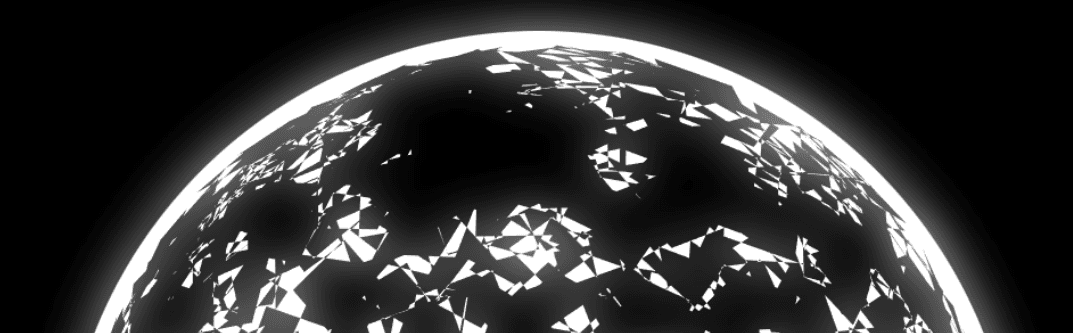
🧠 Description
This project showcases an interactive sphere of squares animation rendered on an HTML <canvas> element using pure JavaScript.ActionScript 3 (AS3) 3D logic by implementing a custom 4×4 matrix system for rotations, scaling, and translations.
Thousands of small squares are positioned in 3D space to form a spherical structure.
A blur + screen blend effect adds a soft glowing aesthetic, giving the animation a modern and visually appealing look — perfect for creative coding showcases, portfolios, or experimental visuals.
💻 HTML Code
HTML Explanation
A single <canvas> element acts as the rendering surface.
The canvas is sized to 1200×1200 pixels to provide high-resolution visuals.
External CSS handles layout and scaling.
JavaScript drives all animation, interaction, and rendering logic.
🎨 CSS Code
CSS Explanati
The CSS ensures the canvas remains centered and visually optimized.
The background is set to pure black for strong contrast.
Overflow is hidden to prevent scrollbars during animation.
The canvas is scaled down while maintaining a large internal resolution, improving visual sharpness.
Transform origin is adjusted to allow precise scaling control.
Copy /* looks like Gemini 3 is now able to port as3 stuff that it failed on a few months back :tada:
- is the code good? /Not really :P
- does it work? /Yes
- can any AI use DOMMatrix instead of a custom matrix thing? /Nope - LLMs still struggle with DOMMatrix sometimes
*/
/**
* RECREATION OF AS3 LOGIC (Orthographic Update)
*/
// --- Setup ---
const canvas = document .getElementById( "stage" );
const ctx = canvas.getContext( "2d" );
// Offscreen buffer for the blur effect
const bufferCanvas = document .createElement( "canvas" );
bufferCanvas.width = 1200 ;
bufferCanvas.height = 1200 ;
const bufferCtx = bufferCanvas.getContext( "2d" );
// Variables from AS3
const squareNum = 1000 ;
const stageWidth = 1200 ;
const stageHeight = 1200 ;
const hw = stageWidth / 2 ;
const hh = stageHeight / 2 ;
// verts defines a single square
const baseVerts = [- 40 , 0 , 0 , 40 , 0 , 0 , 40 , 0 , 80 , - 40 , 0 , 80 , - 40 , 0 , 0 ];
// Storage for vertices
let newVerts = [];
const radius = 400 ;
// Mouse easing
let dx = 0 ;
let dy = 0 ;
let mouseX = 0 ;
let mouseY = 0 ;
canvas.addEventListener( "mousemove" , ( e ) => {
const rect = canvas.getBoundingClientRect();
mouseX = e.clientX - rect.left;
mouseY = e.clientY - rect.top;
});
// --- Matrix Helper Class ---
class Matrix3D {
constructor ( ) {
this .identity();
}
identity ( ) {
this .d = [ 1 , 0 , 0 , 0 , 0 , 1 , 0 , 0 , 0 , 0 , 1 , 0 , 0 , 0 , 0 , 1 ];
}
appendScale ( x, y, z ) {
this .append([x, 0 , 0 , 0 , 0 , y, 0 , 0 , 0 , 0 , z, 0 , 0 , 0 , 0 , 1 ]);
}
appendTranslation ( x, y, z ) {
this .append([ 1 , 0 , 0 , 0 , 0 , 1 , 0 , 0 , 0 , 0 , 1 , 0 , x, y, z, 1 ]);
}
appendRotation ( deg, axis ) {
const rad = (deg * Math .PI) / 180 ;
const c = Math .cos(rad);
const s = Math .sin(rad);
let m = [ 1 , 0 , 0 , 0 , 0 , 1 , 0 , 0 , 0 , 0 , 1 , 0 , 0 , 0 , 0 , 1 ];
if (axis === "X" ) {
m[ 5 ] = c;
m[ 6 ] = s;
m[ 9 ] = -s;
m[ 10 ] = c;
} else if (axis === "Y" ) {
m[ 0 ] = c;
m[ 2 ] = -s;
m[ 8 ] = s;
m[ 10 ] = c;
} else if (axis === "Z" ) {
m[ 0 ] = c;
m[ 1 ] = s;
m[ 4 ] = -s;
m[ 5 ] = c;
}
this .append(m);
}
append ( b ) {
const a = this .d;
const out = [];
for ( let i = 0 ; i < 4 ; i++) {
for ( let j = 0 ; j < 4 ; j++) {
let sum = 0 ;
for ( let k = 0 ; k < 4 ; k++) {
sum += a[i * 4 + k] * b[k * 4 + j];
}
out[i * 4 + j] = sum;
}
}
this .d = out;
}
// Standard 3D transformation
transformVectors ( inVerts, outVerts ) {
const m = this .d;
for ( let i = 0 ; i < inVerts.length; i += 3 ) {
const x = inVerts[i];
const y = inVerts[i + 1 ];
const z = inVerts[i + 2 ];
outVerts.push(
x * m[ 0 ] + y * m[ 4 ] + z * m[ 8 ] + m[ 12 ],
x * m[ 1 ] + y * m[ 5 ] + z * m[ 9 ] + m[ 13 ],
x * m[ 2 ] + y * m[ 6 ] + z * m[ 10 ] + m[ 14 ]
);
}
}
}
// --- Initialization ---
const m = new Matrix3D();
// Generate the sphere of squares
for ( let i = 0 ; i < squareNum; i++) {
m.identity();
const s = Math .random() * 0.5 + 0.5 ;
m.appendScale(s, s, s);
m.appendRotation( 90 , "X" );
m.appendTranslation( 0 , 0 , radius);
m.appendRotation( Math .random() * 360 , "X" );
m.appendRotation( Math .random() * 360 , "Y" );
m.appendRotation( Math .random() * 360 , "Z" );
m.transformVectors(baseVerts, newVerts);
}
let down;
onpointerdown = ( e ) => {
down = true ;
};
onpointerup = ( e ) => {
down = false ;
};
// --- Main Loop ---
let ox = (oy = 0 );
function onLoop ( ) {
dx += (mouseX + ox - dx) / 14 ;
dy += (mouseY + oy - dy) / 14 ;
if (!down) {
ox += 0.3 ;
oy += 0.3 ;
}
// View Matrix
m.identity();
m.appendRotation(dx, "Z" );
m.appendRotation(dy, "X" );
m.appendTranslation(hw, hh, 0 );
const mat = m.d;
const pVerts = []; // projected vertices
// Project Vectors
// The original AS3 code used Utils3D.projectVectors with a standard transformation matrix.
// Without specific Perspective adjustments, this results in an Orthographic projection.
// Objects are rotated and moved to screen center, but z-depth does not affect scale.
for ( let i = 0 ; i < newVerts.length; i += 3 ) {
const x = newVerts[i];
const y = newVerts[i + 1 ];
const z = newVerts[i + 2 ];
// Apply Matrix Transform (Rotate + Translate to center)
const vx = x * mat[ 0 ] + y * mat[ 4 ] + z * mat[ 8 ] + mat[ 12 ];
const vy = x * mat[ 1 ] + y * mat[ 5 ] + z * mat[ 9 ] + mat[ 13 ];
// Z is calculated but ignored for scaling in orthographic projection
pVerts.push(vx, vy);
}
// --- Rendering ---
bufferCtx.clearRect( 0 , 0 , stageWidth, stageHeight);
// 1. Draw Background Circle (White)
// Radius + 10 (210px) vs Sphere Radius (200px) creates the border
bufferCtx.fillStyle = "#FFFFFF" ;
bufferCtx.beginPath();
bufferCtx.arc(hw, hh, radius + 20 , 0 , Math .PI * 2 );
bufferCtx.fill();
// 2. Draw Squares (Black)
bufferCtx.fillStyle = "#000000" ;
bufferCtx.beginPath();
for ( let i = 0 ; i < pVerts.length; i += 10 ) {
bufferCtx.moveTo(pVerts[i], pVerts[i + 1 ]);
bufferCtx.lineTo(pVerts[i + 2 ], pVerts[i + 3 ]);
bufferCtx.lineTo(pVerts[i + 4 ], pVerts[i + 5 ]);
bufferCtx.lineTo(pVerts[i + 6 ], pVerts[i + 7 ]);
bufferCtx.lineTo(pVerts[i + 8 ], pVerts[i + 9 ]);
}
bufferCtx.fill();
// --- Compositing ---
// Fill background black
ctx.globalCompositeOperation = "source-over" ;
ctx.filter = "none" ;
ctx.fillStyle = "#000000" ;
ctx.fillRect( 0 , 0 , stageWidth, stageHeight);
// Draw sharp version
ctx.drawImage(bufferCanvas, 0 , 0 );
// Draw blurred version (Screen Blend)
ctx.globalCompositeOperation = "screen" ;
ctx.filter = "blur(20px)" ;
ctx.drawImage(bufferCanvas, 0 , 0 );
// Reset
ctx.filter = "none" ;
ctx.globalCompositeOperation = "source-over" ;
requestAnimationFrame(onLoop);
}
requestAnimationFrame(onLoop);
Custom 3D matrix math (no libraries)
Orthographic 3D projection
Mouse-driven rotation with easing
Glow & blur compositing effect
AS3-style logic recreated in JavaScript
High-performance canvas rendering