🧠 Description
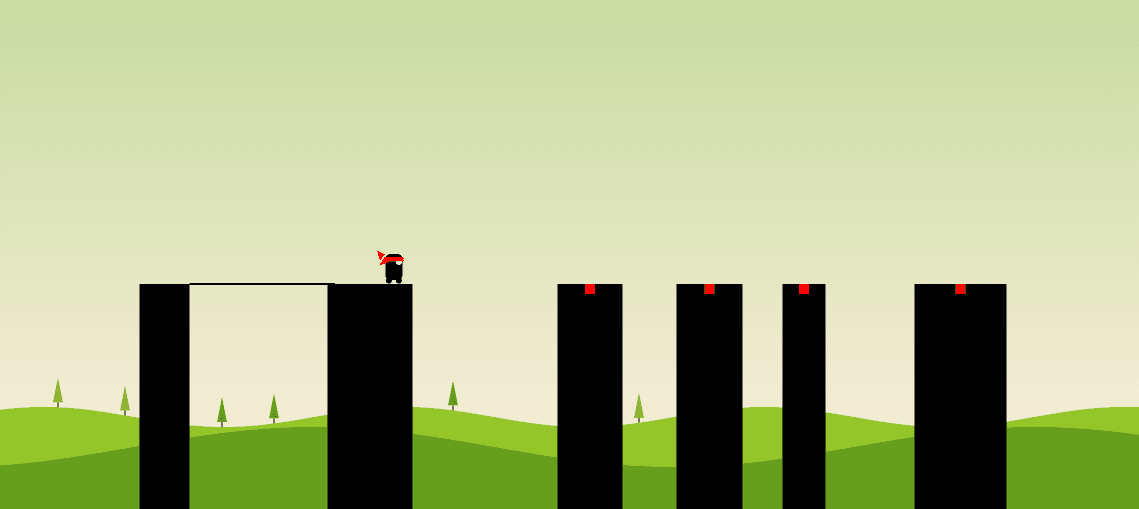
Build a Stick Hero-style game from scratch using HTML, CSS, and JavaScript with the Canvas API. This fun and interactive project demonstrates animation, collision logic, background rendering, and responsive game control — all without external libraries.
💻 HTML Code
The HTML defines all the necessary game elements:
A (canvas) element (id="game") used to draw the platforms, hero, and background.
Text overlays for:
Score counter (#score)
Instructions (#introduction)
Perfect hit indicator (#perfect)
A Restart button (#restart) shown when the player fails.
A YouTube link that leads to the original video tutorial.
This minimal structure allows the game visuals to be rendered dynamically via the Canvas API.
CSS Code
The CSS focuses on layout, positioning, and interface styling:
The entire game centers inside a .container, filling the viewport.
The scoreboard, instructions, and restart button are absolutely positioned for visibility.
The restart button is circular, red, and appears only after failure.
Transitions (like fading text or hover scaling) make the interface smooth.
A YouTube logo appears at the bottom for users on taller screens, created purely using CSS shapes and pseudo-elements (::before, ::after).
The CSS makes the game visually clean and responsive across screen sizes.
Javascipt Code
Copy /*
If you want to know how this game was made, check out this video, that explains how it's made:
https://youtu.be/eue3UdFvwPo
Follow me on twitter for more: https://twitter.com/HunorBorbely
*/
// Extend the base functionality of JavaScript
Array .prototype.last = function ( ) {
return this [ this .length - 1 ];
};
// A sinus function that acceps degrees instead of radians
Math .sinus = function ( degree ) {
return Math .sin((degree / 180 ) * Math .PI);
};
// Game data
let phase = "waiting" ; // waiting | stretching | turning | walking | transitioning | falling
let lastTimestamp; // The timestamp of the previous requestAnimationFrame cycle
let heroX; // Changes when moving forward
let heroY; // Only changes when falling
let sceneOffset; // Moves the whole game
let platforms = [];
let sticks = [];
let trees = [];
// Todo: Save high score to localStorage (?)
let score = 0 ;
// Configuration
const canvasWidth = 375 ;
const canvasHeight = 375 ;
const platformHeight = 100 ;
const heroDistanceFromEdge = 10 ; // While waiting
const paddingX = 100 ; // The waiting position of the hero in from the original canvas size
const perfectAreaSize = 10 ;
// The background moves slower than the hero
const backgroundSpeedMultiplier = 0.2 ;
const hill1BaseHeight = 100 ;
const hill1Amplitude = 10 ;
const hill1Stretch = 1 ;
const hill2BaseHeight = 70 ;
const hill2Amplitude = 20 ;
const hill2Stretch = 0.5 ;
const stretchingSpeed = 4 ; // Milliseconds it takes to draw a pixel
const turningSpeed = 4 ; // Milliseconds it takes to turn a degree
const walkingSpeed = 4 ;
const transitioningSpeed = 2 ;
const fallingSpeed = 2 ;
const heroWidth = 17 ; // 24
const heroHeight = 30 ; // 40
const canvas = document .getElementById( "game" );
canvas.width = window .innerWidth; // Make the Canvas full screen
canvas.height = window .innerHeight;
const ctx = canvas.getContext( "2d" );
const introductionElement = document .getElementById( "introduction" );
const perfectElement = document .getElementById( "perfect" );
const restartButton = document .getElementById( "restart" );
const scoreElement = document .getElementById( "score" );
// Initialize layout
resetGame();
// Resets game variables and layouts but does not start the game (game starts on keypress)
function resetGame ( ) {
// Reset game progress
phase = "waiting" ;
lastTimestamp = undefined ;
sceneOffset = 0 ;
score = 0 ;
introductionElement.style.opacity = 1 ;
perfectElement.style.opacity = 0 ;
restartButton.style.display = "none" ;
scoreElement.innerText = score;
// The first platform is always the same
// x + w has to match paddingX
platforms = [{ x : 50 , w : 50 }];
generatePlatform();
generatePlatform();
generatePlatform();
generatePlatform();
sticks = [{ x : platforms[ 0 ].x + platforms[ 0 ].w, length : 0 , rotation : 0 }];
trees = [];
generateTree();
generateTree();
generateTree();
generateTree();
generateTree();
generateTree();
generateTree();
generateTree();
generateTree();
generateTree();
heroX = platforms[ 0 ].x + platforms[ 0 ].w - heroDistanceFromEdge;
heroY = 0 ;
draw();
}
function generateTree ( ) {
const minimumGap = 30 ;
const maximumGap = 150 ;
// X coordinate of the right edge of the furthest tree
const lastTree = trees[trees.length - 1 ];
let furthestX = lastTree ? lastTree.x : 0 ;
const x =
furthestX +
minimumGap +
Math .floor( Math .random() * (maximumGap - minimumGap));
const treeColors = [ "#6D8821" , "#8FAC34" , "#98B333" ];
const color = treeColors[ Math .floor( Math .random() * 3 )];
trees.push({ x, color });
}
function generatePlatform ( ) {
const minimumGap = 40 ;
const maximumGap = 200 ;
const minimumWidth = 20 ;
const maximumWidth = 100 ;
// X coordinate of the right edge of the furthest platform
const lastPlatform = platforms[platforms.length - 1 ];
let furthestX = lastPlatform.x + lastPlatform.w;
const x =
furthestX +
minimumGap +
Math .floor( Math .random() * (maximumGap - minimumGap));
const w =
minimumWidth + Math .floor( Math .random() * (maximumWidth - minimumWidth));
platforms.push({ x, w });
}
resetGame();
// If space was pressed restart the game
window .addEventListener( "keydown" , function ( event ) {
if (event.key == " " ) {
event.preventDefault();
resetGame();
return ;
}
});
window .addEventListener( "mousedown" , function ( event ) {
if (phase == "waiting" ) {
lastTimestamp = undefined ;
introductionElement.style.opacity = 0 ;
phase = "stretching" ;
window .requestAnimationFrame(animate);
}
});
window .addEventListener( "mouseup" , function ( event ) {
if (phase == "stretching" ) {
phase = "turning" ;
}
});
window .addEventListener( "resize" , function ( event ) {
canvas.width = window .innerWidth;
canvas.height = window .innerHeight;
draw();
});
window .requestAnimationFrame(animate);
// The main game loop
function animate ( timestamp ) {
if (!lastTimestamp) {
lastTimestamp = timestamp;
window .requestAnimationFrame(animate);
return ;
}
switch (phase) {
case "waiting" :
return ; // Stop the loop
case "stretching" : {
sticks.last().length += (timestamp - lastTimestamp) / stretchingSpeed;
break ;
}
case "turning" : {
sticks.last().rotation += (timestamp - lastTimestamp) / turningSpeed;
if (sticks.last().rotation > 90 ) {
sticks.last().rotation = 90 ;
const [nextPlatform, perfectHit] = thePlatformTheStickHits();
if (nextPlatform) {
// Increase score
score += perfectHit ? 2 : 1 ;
scoreElement.innerText = score;
if (perfectHit) {
perfectElement.style.opacity = 1 ;
setTimeout ( () => (perfectElement.style.opacity = 0 ), 1000 );
}
generatePlatform();
generateTree();
generateTree();
}
phase = "walking" ;
}
break ;
}
case "walking" : {
heroX += (timestamp - lastTimestamp) / walkingSpeed;
const [nextPlatform] = thePlatformTheStickHits();
if (nextPlatform) {
// If hero will reach another platform then limit it's position at it's edge
const maxHeroX = nextPlatform.x + nextPlatform.w - heroDistanceFromEdge;
if (heroX > maxHeroX) {
heroX = maxHeroX;
phase = "transitioning" ;
}
} else {
// If hero won't reach another platform then limit it's position at the end of the pole
const maxHeroX = sticks.last().x + sticks.last().length + heroWidth;
if (heroX > maxHeroX) {
heroX = maxHeroX;
phase = "falling" ;
}
}
break ;
}
case "transitioning" : {
sceneOffset += (timestamp - lastTimestamp) / transitioningSpeed;
const [nextPlatform] = thePlatformTheStickHits();
if (sceneOffset > nextPlatform.x + nextPlatform.w - paddingX) {
// Add the next step
sticks.push({
x : nextPlatform.x + nextPlatform.w,
length : 0 ,
rotation : 0
});
phase = "waiting" ;
}
break ;
}
case "falling" : {
if (sticks.last().rotation < 180 )
sticks.last().rotation += (timestamp - lastTimestamp) / turningSpeed;
heroY += (timestamp - lastTimestamp) / fallingSpeed;
const maxHeroY =
platformHeight + 100 + ( window .innerHeight - canvasHeight) / 2 ;
if (heroY > maxHeroY) {
restartButton.style.display = "block" ;
return ;
}
break ;
}
default :
throw Error ( "Wrong phase" );
}
draw();
window .requestAnimationFrame(animate);
lastTimestamp = timestamp;
}
// Returns the platform the stick hit (if it didn't hit any stick then return undefined)
function thePlatformTheStickHits ( ) {
if (sticks.last().rotation != 90 )
throw Error ( `Stick is ${sticks.last().rotation} °` );
const stickFarX = sticks.last().x + sticks.last().length;
const platformTheStickHits = platforms.find(
( platform ) => platform.x < stickFarX && stickFarX < platform.x + platform.w
);
// If the stick hits the perfect area
if (
platformTheStickHits &&
platformTheStickHits.x + platformTheStickHits.w / 2 - perfectAreaSize / 2 <
stickFarX &&
stickFarX <
platformTheStickHits.x + platformTheStickHits.w / 2 + perfectAreaSize / 2
)
return [platformTheStickHits, true ];
return [platformTheStickHits, false ];
}
function draw ( ) {
ctx.save();
ctx.clearRect( 0 , 0 , window .innerWidth, window .innerHeight);
drawBackground();
// Center main canvas area to the middle of the screen
ctx.translate(
( window .innerWidth - canvasWidth) / 2 - sceneOffset,
( window .innerHeight - canvasHeight) / 2
);
// Draw scene
drawPlatforms();
drawHero();
drawSticks();
// Restore transformation
ctx.restore();
}
restartButton.addEventListener( "click" , function ( event ) {
event.preventDefault();
resetGame();
restartButton.style.display = "none" ;
});
function drawPlatforms ( ) {
platforms.forEach( ( { x, w } ) => {
// Draw platform
ctx.fillStyle = "black" ;
ctx.fillRect(
x,
canvasHeight - platformHeight,
w,
platformHeight + ( window .innerHeight - canvasHeight) / 2
);
// Draw perfect area only if hero did not yet reach the platform
if (sticks.last().x < x) {
ctx.fillStyle = "red" ;
ctx.fillRect(
x + w / 2 - perfectAreaSize / 2 ,
canvasHeight - platformHeight,
perfectAreaSize,
perfectAreaSize
);
}
});
}
function drawHero ( ) {
ctx.save();
ctx.fillStyle = "black" ;
ctx.translate(
heroX - heroWidth / 2 ,
heroY + canvasHeight - platformHeight - heroHeight / 2
);
// Body
drawRoundedRect(
-heroWidth / 2 ,
-heroHeight / 2 ,
heroWidth,
heroHeight - 4 ,
5
);
// Legs
const legDistance = 5 ;
ctx.beginPath();
ctx.arc(legDistance, 11.5 , 3 , 0 , Math .PI * 2 , false );
ctx.fill();
ctx.beginPath();
ctx.arc(-legDistance, 11.5 , 3 , 0 , Math .PI * 2 , false );
ctx.fill();
// Eye
ctx.beginPath();
ctx.fillStyle = "white" ;
ctx.arc( 5 , - 7 , 3 , 0 , Math .PI * 2 , false );
ctx.fill();
// Band
ctx.fillStyle = "red" ;
ctx.fillRect(-heroWidth / 2 - 1 , - 12 , heroWidth + 2 , 4.5 );
ctx.beginPath();
ctx.moveTo(- 9 , - 14.5 );
ctx.lineTo(- 17 , - 18.5 );
ctx.lineTo(- 14 , - 8.5 );
ctx.fill();
ctx.beginPath();
ctx.moveTo(- 10 , - 10.5 );
ctx.lineTo(- 15 , - 3.5 );
ctx.lineTo(- 5 , - 7 );
ctx.fill();
ctx.restore();
}
function drawRoundedRect ( x, y, width, height, radius ) {
ctx.beginPath();
ctx.moveTo(x, y + radius);
ctx.lineTo(x, y + height - radius);
ctx.arcTo(x, y + height, x + radius, y + height, radius);
ctx.lineTo(x + width - radius, y + height);
ctx.arcTo(x + width, y + height, x + width, y + height - radius, radius);
ctx.lineTo(x + width, y + radius);
ctx.arcTo(x + width, y, x + width - radius, y, radius);
ctx.lineTo(x + radius, y);
ctx.arcTo(x, y, x, y + radius, radius);
ctx.fill();
}
function drawSticks ( ) {
sticks.forEach( ( stick ) => {
ctx.save();
// Move the anchor point to the start of the stick and rotate
ctx.translate(stick.x, canvasHeight - platformHeight);
ctx.rotate(( Math .PI / 180 ) * stick.rotation);
// Draw stick
ctx.beginPath();
ctx.lineWidth = 2 ;
ctx.moveTo( 0 , 0 );
ctx.lineTo( 0 , -stick.length);
ctx.stroke();
// Restore transformations
ctx.restore();
});
}
function drawBackground ( ) {
// Draw sky
var gradient = ctx.createLinearGradient( 0 , 0 , 0 , window .innerHeight);
gradient.addColorStop( 0 , "#BBD691" );
gradient.addColorStop( 1 , "#FEF1E1" );
ctx.fillStyle = gradient;
ctx.fillRect( 0 , 0 , window .innerWidth, window .innerHeight);
// Draw hills
drawHill(hill1BaseHeight, hill1Amplitude, hill1Stretch, "#95C629" );
drawHill(hill2BaseHeight, hill2Amplitude, hill2Stretch, "#659F1C" );
// Draw trees
trees.forEach( ( tree ) => drawTree(tree.x, tree.color));
}
// A hill is a shape under a stretched out sinus wave
function drawHill ( baseHeight, amplitude, stretch, color ) {
ctx.beginPath();
ctx.moveTo( 0 , window .innerHeight);
ctx.lineTo( 0 , getHillY( 0 , baseHeight, amplitude, stretch));
for ( let i = 0 ; i < window .innerWidth; i++) {
ctx.lineTo(i, getHillY(i, baseHeight, amplitude, stretch));
}
ctx.lineTo( window .innerWidth, window .innerHeight);
ctx.fillStyle = color;
ctx.fill();
}
function drawTree ( x, color ) {
ctx.save();
ctx.translate(
(-sceneOffset * backgroundSpeedMultiplier + x) * hill1Stretch,
getTreeY(x, hill1BaseHeight, hill1Amplitude)
);
const treeTrunkHeight = 5 ;
const treeTrunkWidth = 2 ;
const treeCrownHeight = 25 ;
const treeCrownWidth = 10 ;
// Draw trunk
ctx.fillStyle = "#7D833C" ;
ctx.fillRect(
-treeTrunkWidth / 2 ,
-treeTrunkHeight,
treeTrunkWidth,
treeTrunkHeight
);
// Draw crown
ctx.beginPath();
ctx.moveTo(-treeCrownWidth / 2 , -treeTrunkHeight);
ctx.lineTo( 0 , -(treeTrunkHeight + treeCrownHeight));
ctx.lineTo(treeCrownWidth / 2 , -treeTrunkHeight);
ctx.fillStyle = color;
ctx.fill();
ctx.restore();
}
function getHillY ( windowX, baseHeight, amplitude, stretch ) {
const sineBaseY = window .innerHeight - baseHeight;
return (
Math .sinus((sceneOffset * backgroundSpeedMultiplier + windowX) * stretch) *
amplitude +
sineBaseY
);
}
function getTreeY ( x, baseHeight, amplitude ) {
const sineBaseY = window .innerHeight - baseHeight;
return Math .sinus(x) * amplitude + sineBaseY;
}
The JavaScript controls every aspect of gameplay using Canvas rendering, event listeners, and frame-by-frame animation.
Let’s break down the logic flow:
a. Game Initialization
The script sets up variables for:
Game state (phase) — determines whether the player is waiting, stretching, walking, etc.
Canvas dimensions and constants like hero size, platform height, and animation speeds.
Arrays for platforms, sticks, and trees that make up the scene.
The function resetGame() initializes everything, generates starting platforms and trees, and draws the first frame.
b. Game Phases
The game operates through several phases:
Waiting — the hero stands still.
Stretching — when the mouse is held down, the stick grows longer.
Turning — on mouse release, the stick rotates 90° to fall horizontally.
Walking — the hero walks along the stick.
Transitioning — when a platform is reached, the scene scrolls forward.
Falling — if the stick is too short or too long, the hero falls, and the restart button appears.
Each phase is updated frame-by-frame in the animate() loop via requestAnimationFrame().
c. Gameplay Mechanics
Stick Length: increases while the mouse is pressed.
Stick Rotation: animated when released until it’s horizontal.
Collision Detection: checks if the stick end lands within a platform’s boundaries (thePlatformTheStickHits()).
Perfect Hit: if the stick lands exactly in the small red “perfect area”, the player gets double points.
Scoring: displayed in the top-right corner and updated live.
Restart Button: restarts the game when clicked.
d. Canvas Drawing
The game uses several custom drawing functions:
drawPlatforms() — renders black platforms and red perfect zones.
drawHero() — draws the character using shapes and arcs.
drawSticks() — visualizes the stick growing, rotating, or falling.
drawBackground() — creates dynamic sky, hills, and trees with parallax movement for depth.
The background uses sinusoidal curves (Math.sinus) to generate smooth rolling hills.
e. Animations
The continuous animation loop:
Calculates time difference since the last frame.
Updates object positions (stick rotation, hero movement, background shift).
Clears and redraws the entire scene using ctx.clearRect().
Repeats using requestAnimationFrame() for smooth 60 FPS visuals.