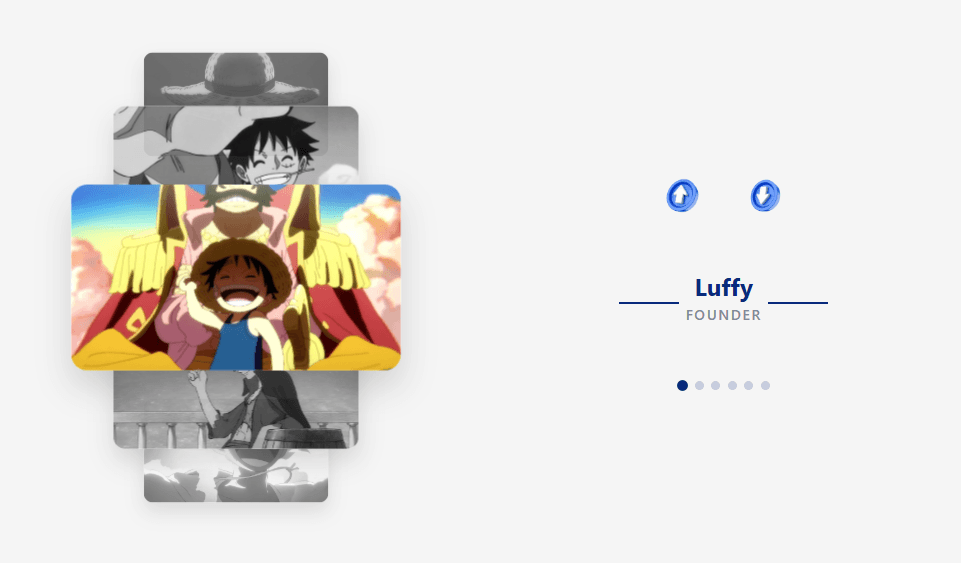
🧠 Description
Build a stunning 3D team carousel that lets users scroll, click, or swipe through team members with smooth animations. This project uses only HTML, CSS, and JavaScript — no frameworks — featuring depth effects, transitions, and adaptive mobile controls.
💻 HTML Code
1<!DOCTYPE html>
2<html lang="en">
3
4 <head>
5 <meta charset="UTF-8">
6 <title>Team Carousel - by CodewithLord</title>
7 <link rel="stylesheet" href="./style.css">
8
9 </head>
10
11 <body>
12 <!DOCTYPE html>
13<html lang="en">
14<head>
15 <meta charset="UTF-8">
16 <meta name="viewport" content="width=device-width, initial-scale=1.0">
17 <title>Team Carousel</title>
18 <link rel="stylesheet" href="styles.css">
19</head>
20<body>
21 <div class="main-container">
22 <div class="carousel-section">
23 <div class="carousel-container">
24 <button class="nav-arrow up">
25 <img src="assets/top.png" alt="Up">
26 </button>
27 <div class="carousel-track">
28 <div class="card" data-index="0">
29 <img src="https://ik.imagekit.io/gopichakradhar/luffy/o1.jpeg?updatedAt=1754289569411" alt="Team Member 1">
30 </div>
31 <div class="card" data-index="1">
32 <img src="https://ik.imagekit.io/gopichakradhar/luffy/o2.jpeg?updatedAt=1754289569307" alt="Team Member 2">
33 </div>
34 <div class="card" data-index="2">
35 <img src="https://ik.imagekit.io/gopichakradhar/luffy/o4.jpeg?updatedAt=1754289569398" alt="Team Member 3">
36 </div>
37 <div class="card" data-index="3">
38 <img src="https://ik.imagekit.io/gopichakradhar/luffy/o3.jpeg?updatedAt=1754289569422" alt="Team Member 4">
39 </div>
40 <div class="card" data-index="4">
41 <img src="https://ik.imagekit.io/gopichakradhar/luffy/o5.jpeg?updatedAt=1754289569406" alt="Team Member 5">
42 </div>
43 <div class="card" data-index="5">
44 <img src="https://ik.imagekit.io/gopichakradhar/luffy/o6.jpeg?updatedAt=1754289569438" alt="Team Member 6">
45 </div>
46 </div>
47 <button class="nav-arrow down">
48 <img src="https://ik.imagekit.io/gopichakradhar/icons/down.png?updatedAt=1754290523249" alt="Down">
49 </button>
50 </div>
51 </div>
52
53 <div class="controls-section">
54 <div class="nav-controls">
55 <button class="nav-arrow up">
56 <img src="https://ik.imagekit.io/gopichakradhar/icons/top.png?updatedAt=1754290522765" alt="Up">
57 </button>
58 <button class="nav-arrow down">
59 <img src="https://ik.imagekit.io/gopichakradhar/icons/down.png?updatedAt=1754290523249" alt="Down">
60 </button>
61 </div>
62
63 <div class="member-info">
64 <h2 class="member-name">Emily Kim</h2>
65 <p class="member-role">Founder</p>
66 </div>
67
68 <div class="dots">
69 <div class="dot active" data-index="0"></div>
70 <div class="dot" data-index="1"></div>
71 <div class="dot" data-index="2"></div>
72 <div class="dot" data-index="3"></div>
73 <div class="dot" data-index="4"></div>
74 <div class="dot" data-index="5"></div>
75 </div>
76 </div>
77 </div>
78
79<script src="scripts.js"></script>
80 <!-- Floating button with image -->
81
82</body>
83</html>
84 <script src="./script.js"></script>
85
86 </body>
87
88</html>
89The HTML defines two main sections inside .main-container:
carousel-section — holds the rotating stack of cards (each showing a team member image).
controls-section — displays navigation arrows, team member details (name & role), and pagination dots.
Each .card in .carousel-track represents a team member’s image, and the structure ensures only one card is centered at a time. The buttons (.nav-arrow.up and .nav-arrow.down) and .dot elements are connected to the carousel for navigation control.
CSS Code
1* { 2 margin: 0; 3 padding: 0; 4 box-sizing: border-box; 5 font-family: -apple-system, BlinkMacSystemFont, "Segoe UI", Roboto, sans-serif; 6} 7/* Floating image button styles */ 8#super-btn { 9 position: fixed; 10 right: 32px; 11 bottom: 32px; 12 z-index: 1000; 13 display: inline-block; 14 border-radius: 18px; 15 overflow: hidden; 16 box-shadow: 0 2px 12px rgba(0,0,0,0.18); 17 width: 56px; 18 height: 56px; 19 background: #fff; 20 transition: box-shadow 0.2s, transform 0.2s; 21} 22#super-btn:hover { 23 box-shadow: 0 4px 24px rgba(0,0,0,0.28); 24 transform: scale(1.07); 25} 26#super-btn img { 27 width: 100%; 28 height: 100%; 29 object-fit: cover; 30 border-radius: 16px; 31 display: block; 32} 33body { 34 min-height: 100vh; 35 display: flex; 36 flex-direction: column; 37 align-items: center; 38 justify-content: center; 39 background-color: #f5f5f5; 40 overflow: hidden; 41 scroll-behavior: smooth; 42 margin: 0; 43 padding: 20px 0; 44} 45 46.main-container { 47 display: flex; 48 width: 100%; 49 max-width: 1200px; 50 height: 80vh; 51 gap: 60px; 52 align-items: center; 53 justify-content: center; 54} 55 56.carousel-section { 57 flex: 1; 58 display: flex; 59 justify-content: center; 60 align-items: center; 61} 62 63.controls-section { 64 flex: 1; 65 display: flex; 66 flex-direction: column; 67 justify-content: center; 68 align-items: center; 69 gap: 40px; 70 padding-left: 40px; 71} 72 73.carousel-container { 74 width: 100%; 75 max-width: 500px; 76 height: 70vh; 77 position: relative; 78 perspective: 1000px; 79 display: flex; 80 flex-direction: column; 81 align-items: center; 82} 83 84.carousel-container .nav-arrow { 85 display: none; 86} 87 88.carousel-track { 89 width: 450px; 90 height: 100%; 91 display: flex; 92 flex-direction: column; 93 justify-content: center; 94 align-items: center; 95 position: relative; 96 transform-style: preserve-3d; 97 transition: transform 0.8s cubic-bezier(0.25, 0.46, 0.45, 0.94); 98} 99 100.card { 101 position: absolute; 102 width: 400px; 103 height: 225px; 104 background: white; 105 border-radius: 20px; 106 overflow: hidden; 107 box-shadow: 0 20px 40px rgba(0, 0, 0, 0.15); 108 transition: all 0.8s cubic-bezier(0.25, 0.46, 0.45, 0.94); 109 cursor: pointer; 110} 111 112.card img { 113 width: 100%; 114 height: 100%; 115 object-fit: cover; 116 transition: all 0.8s cubic-bezier(0.25, 0.46, 0.45, 0.94); 117} 118 119.card.center { 120 z-index: 10; 121 transform: scale(1.1) translateZ(0); 122} 123 124.card.center img { 125 filter: none; 126} 127 128.card.up-2 { 129 z-index: 1; 130 transform: translateY(-300px) scale(0.8) translateZ(-300px); 131 opacity: 0.7; 132} 133 134.card.up-2 img { 135 filter: grayscale(100%); 136} 137 138.card.up-1 { 139 z-index: 5; 140 transform: translateY(-150px) scale(0.9) translateZ(-100px); 141 opacity: 0.9; 142} 143 144.card.up-1 img { 145 filter: grayscale(100%); 146} 147 148.card.down-1 { 149 z-index: 5; 150 transform: translateY(150px) scale(0.9) translateZ(-100px); 151 opacity: 0.9; 152} 153 154.card.down-1 img { 155 filter: grayscale(100%); 156} 157 158.card.down-2 { 159 z-index: 1; 160 transform: translateY(300px) scale(0.8) translateZ(-300px); 161 opacity: 0.7; 162} 163 164.card.down-2 img { 165 filter: grayscale(100%); 166} 167 168.card.down-2 img { 169 filter: grayscale(100%); 170} 171 172.card.hidden { 173 opacity: 0; 174 pointer-events: none; 175} 176 177.member-info { 178 text-align: center; 179 margin-top: 20px; 180 transition: all 0.5s ease-out; 181} 182 183.member-name { 184 color: rgb(8, 42, 123); 185 font-size: 2rem; 186 font-weight: 700; 187 margin-bottom: 8px; 188 position: relative; 189 display: inline-block; 190} 191 192.member-name::before, 193.member-name::after { 194 content: ""; 195 position: absolute; 196 top: 100%; 197 width: 80px; 198 height: 2px; 199 background: rgb(8, 42, 123); 200} 201 202.member-name::before { 203 left: -100px; 204} 205 206.member-name::after { 207 right: -100px; 208} 209 210.member-role { 211 color: #848696; 212 font-size: 1.2rem; 213 font-weight: 500; 214 opacity: 0.8; 215 text-transform: uppercase; 216 letter-spacing: 0.1em; 217 padding: 5px 0; 218 margin-top: -10px; 219 position: relative; 220} 221.dots { 222 display: flex; 223 justify-content: center; 224 gap: 10px; 225 margin-top: 30px; 226} 227 228.dot { 229 width: 12px; 230 height: 12px; 231 border-radius: 50%; 232 background: rgba(8, 42, 123, 0.2); 233 cursor: pointer; 234 transition: all 0.3s ease; 235} 236 237.dot.active { 238 background: rgb(8, 42, 123); 239 transform: scale(1.2); 240} 241 242.nav-arrow { 243 position: relative; 244 background: transparent; 245 color: white; 246 width: 80px; 247 height: 80px; 248 border-radius: 50%; 249 display: flex; 250 align-items: center; 251 justify-content: center; 252 cursor: pointer; 253 z-index: 20; 254 transition: all 0.3s ease; 255 font-size: 1.5rem; 256 border: none; 257 outline: none; 258 margin: 0; 259 padding: 0; 260 overflow: visible; 261 box-shadow: none; 262} 263 264.nav-arrow:hover { 265 background: transparent; 266 transform: scale(1.2); 267 box-shadow: none; 268 border-color: transparent; 269} 270 271.nav-arrow img { 272 width: 60px; 273 height: 60px; 274 object-fit: contain; 275 filter: none; 276 transition: all 0.3s ease; 277} 278 279.nav-arrow:hover img { 280 filter: none; 281 transform: scale(1.1); 282} 283 284.nav-arrow.up { 285 transform: none; 286} 287 288.nav-arrow.down { 289 transform: none; 290} 291 292.nav-controls { 293 display: flex; 294 flex-direction: row; 295 gap: 30px; 296 align-items: center; 297 justify-content: center; 298} 299 300.scroll-indicator { 301 position: fixed; 302 bottom: 30px; 303 right: 30px; 304 background: rgba(8, 42, 123, 0.8); 305 color: white; 306 padding: 8px 16px; 307 border-radius: 20px; 308 font-size: 0.8rem; 309 text-align: center; 310 z-index: 1000; 311 backdrop-filter: blur(10px); 312 border: 1px solid rgba(255, 255, 255, 0.2); 313 animation: scrollFadeOut 5s ease-in-out forwards; 314 font-weight: 500; 315 line-height: 1; 316} 317 318.scroll-indicator span { 319 font-size: 0.75rem; 320 opacity: 0.9; 321 display: block; 322 margin-top: 2px; 323} 324 325@keyframes scrollFadeOut { 326 0% { 327 opacity: 0; 328 transform: scale(0.8); 329 } 330 10% { 331 opacity: 1; 332 transform: scale(1); 333 } 334 90% { 335 opacity: 1; 336 transform: scale(1); 337 } 338 100% { 339 opacity: 0; 340 transform: scale(0.8); 341 visibility: hidden; 342 } 343} 344 345@media (max-width: 768px) { 346 body { 347 padding: 10px 0; 348 } 349 350 .main-container { 351 flex-direction: column; 352 height: auto; 353 gap: 20px; 354 max-width: 100%; 355 } 356 357 .carousel-section { 358 flex: none; 359 width: 100%; 360 } 361 362 .controls-section { 363 flex: none; 364 width: 100%; 365 padding-left: 0; 366 gap: 20px; 367 } 368 369 .carousel-container { 370 height: 60vh; 371 max-width: 350px; 372 } 373 374 .carousel-container .nav-arrow { 375 display: flex; 376 position: absolute; 377 left: 50%; 378 transform: translateX(-50%); 379 width: 70px; 380 height: 70px; 381 margin: 0; 382 background: transparent; 383 border: none; 384 box-shadow: none; 385 } 386 387 .carousel-container .nav-arrow:hover { 388 transform: translateX(-50%) scale(1.2); 389 background: transparent; 390 box-shadow: none; 391 } 392 393 .carousel-container .nav-arrow.up:hover { 394 transform: translateX(-50%) scale(1.2); 395 } 396 397 .carousel-container .nav-arrow.down:hover { 398 transform: translateX(-50%) scale(1.2); 399 } 400 401 .carousel-container .nav-arrow.up { 402 top: 20px; 403 transform: translateX(-50%); 404 } 405 406 .carousel-container .nav-arrow.down { 407 bottom: 20px; 408 transform: translateX(-50%); 409 } 410 411 .carousel-container .nav-arrow.up img { 412 transform: rotate(-90deg); 413 width: 50px; 414 height: 50px; 415 } 416 417 .carousel-container .nav-arrow.down img { 418 transform: rotate(90deg); 419 width: 50px; 420 height: 50px; 421 } 422 423 .nav-controls { 424 display: none; 425 } 426 427 .card { 428 width: 320px; 429 height: 180px; 430 } 431 432 .carousel-track { 433 width: 350px; 434 } 435 436 .card.up-2 { 437 transform: translateY(-160px) scale(0.8) translateZ(-300px); 438 } 439 440 .card.up-1 { 441 transform: translateY(-80px) scale(0.9) translateZ(-100px); 442 } 443 444 .card.down-1 { 445 transform: translateY(80px) scale(0.9) translateZ(-100px); 446 } 447 448 .card.down-2 { 449 transform: translateY(160px) scale(0.8) translateZ(-300px); 450 } 451 452 .member-name { 453 font-size: 1.8rem; 454 } 455 456 .member-role { 457 font-size: 1rem; 458 } 459 460 .member-name::before, 461 .member-name::after { 462 width: 40px; 463 } 464 465 .member-name::before { 466 left: -60px; 467 } 468 469 .member-name::after { 470 right: -60px; 471 } 472 473 .scroll-indicator { 474 bottom: 20px; 475 right: 20px; 476 padding: 6px 12px; 477 font-size: 0.7rem; 478 } 479 480 .scroll-indicator span { 481 font-size: 0.7rem; 482 } 483}
The CSS provides a 3D layered illusion using transformations and depth effects:
The .carousel-track uses transform-style: preserve-3d and perspective to give real depth to card transitions.
Cards are positioned using custom classes like .up-1, .down-1, .up-2, .down-2, etc., which move and scale them based on their position relative to the active center card.
The center card is highlighted with a larger scale, brighter colors, and a higher z-index.
Grayscale filters are applied to non-active cards for visual contrast.
The right side contains team member information (.member-info) with subtle animations when changing roles or names.
Dots below the member info act as pagination indicators, and their color and size update dynamically based on which card is active.
The design is fully responsive, with a restructured layout and resized cards on smaller screens.
Javascipt Code
1const teamMembers = [
2 { name: "Luffy", role: "Founder" },
3 { name: "Monkey D. Luffy", role: "Creative Director" },
4 { name: "Luffy chan", role: "Lead Developer" },
5 { name: "Lucy", role: "UX Designer" },
6 { name: "Luffy kun", role: "Marketing Manager" },
7 { name: "Monkey chan", role: "Product Manager" }
8];
9
10const cards = document.querySelectorAll(".card");
11const dots = document.querySelectorAll(".dot");
12const memberName = document.querySelector(".member-name");
13const memberRole = document.querySelector(".member-role");
14const upArrows = document.querySelectorAll(".nav-arrow.up");
15const downArrows = document.querySelectorAll(".nav-arrow.down");
16let currentIndex = 0;
17let isAnimating = false;
18
19function updateCarousel(newIndex) {
20 if (isAnimating) return;
21 isAnimating = true;
22
23 currentIndex = (newIndex + cards.length) % cards.length;
24
25 cards.forEach((card, i) => {
26 const offset = (i - currentIndex + cards.length) % cards.length;
27
28 card.classList.remove(
29 "center",
30 "up-1",
31 "up-2",
32 "down-1",
33 "down-2",
34 "hidden"
35 );
36
37 if (offset === 0) {
38 card.classList.add("center");
39 } else if (offset === 1) {
40 card.classList.add("down-1");
41 } else if (offset === 2) {
42 card.classList.add("down-2");
43 } else if (offset === cards.length - 1) {
44 card.classList.add("up-1");
45 } else if (offset === cards.length - 2) {
46 card.classList.add("up-2");
47 } else {
48 card.classList.add("hidden");
49 }
50 });
51
52 dots.forEach((dot, i) => {
53 dot.classList.toggle("active", i === currentIndex);
54 });
55
56 memberName.style.opacity = "0";
57 memberRole.style.opacity = "0";
58
59 setTimeout(() => {
60 memberName.textContent = teamMembers[currentIndex].name;
61 memberRole.textContent = teamMembers[currentIndex].role;
62 memberName.style.opacity = "1";
63 memberRole.style.opacity = "1";
64 }, 300);
65
66 setTimeout(() => {
67 isAnimating = false;
68 }, 800);
69}
70
71upArrows.forEach(arrow => {
72 arrow.addEventListener("click", () => {
73 updateCarousel(currentIndex - 1);
74 });
75});
76
77downArrows.forEach(arrow => {
78 arrow.addEventListener("click", () => {
79 updateCarousel(currentIndex + 1);
80 });
81});
82
83dots.forEach((dot, i) => {
84 dot.addEventListener("click", () => {
85 updateCarousel(i);
86 });
87});
88
89cards.forEach((card, i) => {
90 card.addEventListener("click", () => {
91 updateCarousel(i);
92 });
93});
94
95document.addEventListener("keydown", (e) => {
96 if (e.key === "ArrowUp") {
97 updateCarousel(currentIndex - 1);
98 } else if (e.key === "ArrowDown") {
99 updateCarousel(currentIndex + 1);
100 }
101});
102
103let touchStartX = 0;
104let touchEndX = 0;
105let scrollTimeout;
106let isScrolling = false;
107
108// Scroll event listener
109//if u wnat u can timer to disappear that bottom right scroll button - by gopi
110
111
112
113// Add scroll indicator
114function createScrollIndicator() {
115 const indicator = document.createElement('div');
116 indicator.className = 'scroll-indicator';
117 indicator.innerHTML = 'scroll';
118 document.body.appendChild(indicator);
119}
120
121// Initialize scroll indicator
122createScrollIndicator();
123
124document.addEventListener("touchstart", (e) => {
125 touchStartX = e.changedTouches[0].screenY;
126});
127
128document.addEventListener("touchend", (e) => {
129 touchEndX = e.changedTouches[0].screenY;
130 handleSwipe();
131});
132
133function handleSwipe() {
134 const swipeThreshold = 50;
135 const diff = touchStartX - touchEndX;
136
137 if (Math.abs(diff) > swipeThreshold) {
138 if (diff > 0) {
139 updateCarousel(currentIndex + 1);
140 } else {
141 updateCarousel(currentIndex - 1);
142 }
143 }
144}
145
146updateCarousel(0);avaScript handles all the interactivity and carousel movement logic:
Data Setup: A teamMembers array stores names and roles. The updateCarousel() function updates the UI based on the currently active index.
Card Transitions: The function removes and reassigns position classes (up-1, down-1, etc.) to cards dynamically, creating smooth 3D rotation effects.
Navigation Controls: The carousel responds to:
Clicks on up/down arrows
Keyboard arrow keys
Clicking dots
Touch swipe gestures (for mobile)
Card clicks directly on an image
All these inputs call updateCarousel() with the new index value.
Member Info Animation: The current team member’s name and role fade out and back in as the carousel moves, creating a clean text transition effect.
Scroll Indicator: A small animated “scroll” badge briefly appears at the bottom-right to hint that the carousel can be scrolled or swiped.
Swipe Detection: Touch events capture the vertical drag distance (touchstart and touchend), moving the carousel up or down if the swipe passes a threshold.