Husky Dog Animation CSS
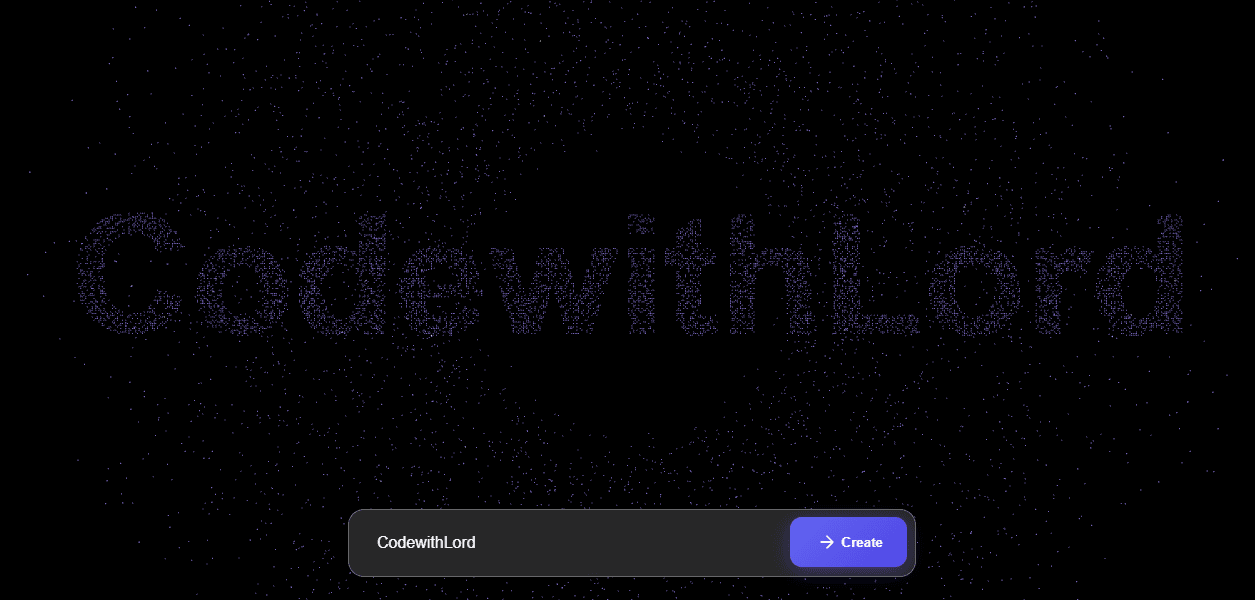
This component is an interactive 3D particle animation using Three.js and GSAP. A sphere made of thousands of particles morphs dynamically into text input by the user and then returns to its spherical shape. The animation is highly visual, responsive, and uses color gradients to give depth and vibrancy to the particles.
Explanation:
3D Particle Sphere: 12,000 particles form a sphere.
Text Morphing: User input text temporarily reshapes the particle sphere into letters.
Color Gradients: Particles use HSL color gradients based on depth for a glowing effect.
Floating & Rotation: Sphere slowly rotates for dynamic visual appeal.
Responsive Input: Users can type and click create or press enter to trigger morphing.
Animation Library: Uses GSAP for smooth transitions of positions and colors.
CSS Code
Copy * {
margin : 0 ;
padding : 0 ;
box-sizing : border-box;
}
body {
background : #000 ;
overflow : hidden;
font-family : 'Inter' , sans-serif;
color : white;
}
#container {
position : fixed;
top : 0 ;
left : 0 ;
width : 100% ;
height : 100% ;
}
.header {
position : fixed;
top : 2rem ;
left : 2rem ;
text-align : left;
z-index : 1 ;
mix-blend-mode: difference;
}
.header h1 {
font-size : 2.5rem ;
font-weight : 900 ;
line-height : 1 ;
text-transform : uppercase;
background : linear-gradient ( 45deg , #ff6e7f , #bfe9ff );
-webkit- background-clip : text;
background-clip : text;
color : transparent;
opacity : 0.9 ;
letter-spacing : - 1px ;
filter : drop-shadow ( 0 0 15px rgba ( 255 , 255 , 255 , 0.3 ));
}
.color-controls {
position : fixed;
top : 2rem ;
right : 2rem ;
z-index : 10 ;
background : rgba ( 0 , 0 , 0 , 0.3 );
padding : 1rem ;
border-radius : 15px ;
backdrop- filter : blur ( 10px );
box-shadow : 0 0 20px rgba ( 0 , 0 , 0 , 0.3 );
}
.color-scheme {
display : flex;
flex-direction : column;
gap: 0.5rem ;
}
.color-scheme button {
display : flex;
align-items : center;
gap: 0.5rem ;
background : rgba ( 255 , 255 , 255 , 0.1 );
border : 1px solid rgba ( 255 , 255 , 255 , 0.2 );
padding : 0.5rem 1rem ;
color : white;
border-radius : 8px ;
cursor : pointer;
transition : all 0.3s ease;
font-size : 0.9rem ;
min-width : 120px ;
}
.color-scheme button :hover {
background : rgba ( 255 , 255 , 255 , 0.2 );
}
.color-scheme button .active {
background : rgba ( 255 , 255 , 255 , 0.3 );
border-color : rgba ( 255 , 255 , 255 , 0.5 );
}
.color-preview {
width : 20px ;
height : 20px ;
border-radius : 50% ;
border : 2px solid rgba ( 255 , 255 , 255 , 0.3 );
}
.color-preview .cosmic {
background : linear-gradient ( 45deg , #ff6e7f , #bfe9ff );
}
.color-preview .neon {
background : linear-gradient ( 45deg , #00ff87 , #60efff );
}
.color-preview .sunset {
background : linear-gradient ( 45deg , #ff8c37 , #ff427a );
}
.color-preview .ocean {
background : linear-gradient ( 45deg , #0082c8 , #00b4db );
}
.controls {
position : fixed;
bottom : 2rem ;
left : 50% ;
transform : translateX (- 50% );
display : flex;
gap: 1rem ;
z-index : 10 ;
background : rgba ( 0 , 0 , 0 , 0.3 );
padding : 1rem ;
border-radius : 50px ;
backdrop- filter : blur ( 10px );
box-shadow : 0 0 20px rgba ( 0 , 0 , 0 , 0.3 );
}
.controls button {
background : rgba ( 255 , 255 , 255 , 0.1 );
border : 1px solid rgba ( 255 , 255 , 255 , 0.2 );
padding : 0.8rem 1.5rem ;
color : white;
border-radius : 25px ;
cursor : pointer;
transition : all 0.3s ease;
text-transform : uppercase;
letter-spacing : 1px ;
font-size : 0.9rem ;
font-weight : 500 ;
min-width : 120px ;
}
.controls button :hover {
background : rgba ( 255 , 255 , 255 , 0.2 );
transform : translateY (- 2px );
box-shadow : 0 5px 15px rgba ( 0 , 0 , 0 , 0.3 );
}
.controls button .active {
background : linear-gradient ( 45deg , #ff6e7f , #bfe9ff );
border : none;
color : #000 ;
}
@keyframes float {
0% {
transform : translate (- 50% , - 50% );
}
50% {
transform : translate (- 50% , - 52% );
}
100% {
transform : translate (- 50% , - 50% );
}
}
.content {
animation : float 4s ease-in-out infinite;
}
.input-container {
position : fixed;
bottom : 2rem ;
left : 50% ;
transform : translateX (- 50% );
z-index : 10 ;
width : 90% ;
max-width : 600px ;
padding : 0 1rem ;
}
.input-wrapper {
background : rgba ( 255 , 255 , 255 , 0.1 );
backdrop- filter : blur ( 10px );
border : 1px solid rgba ( 255 , 255 , 255 , 0.2 );
border-radius : 16px ;
padding : 0.5rem ;
display : flex;
gap: 0.5rem ;
box-shadow : 0 4px 24px - 1px rgba ( 0 , 0 , 0 , 0.2 );
transition : all 0.3s ease;
}
.input-wrapper :hover {
background : rgba ( 255 , 255 , 255 , 0.15 );
border-color : rgba ( 255 , 255 , 255 , 0.3 );
box-shadow : 0 4px 30px - 1px rgba ( 0 , 0 , 0 , 0.3 );
}
input {
flex : 1 ;
background : transparent;
border : none;
padding : 1rem 1.25rem ;
color : white;
font-size : 1rem ;
font-weight : 500 ;
}
input :focus {
outline : none;
}
input ::placeholder {
color : rgba ( 255 , 255 , 255 , 0.5 );
}
button {
background : linear-gradient ( 135deg , #6366f1 0% , #4f46e5 100% );
border : none;
padding : 0.75rem 1.5rem ;
color : white;
border-radius : 12px ;
font-weight : 600 ;
cursor : pointer;
transition : all 0.3s ease;
display : flex;
align-items : center;
gap: 0.5rem ;
}
button :hover {
transform : translateY (- 1px );
box-shadow : 0 4px 20px - 2px rgba ( 79 , 70 , 229 , 0.5 );
}
button :active {
transform : translateY ( 1px );
}
.button-content {
display : flex;
align-items : center;
gap: 0.5rem ;
}
.button-content svg {
width : 20px ;
height : 20px ;
transition : transform 0.3s ease;
}
button :hover .button-content svg {
transform : translateX ( 3px );
}
@media ( max-width : 640px ) {
.input-container {
bottom : 1.5rem ;
padding : 0 0.75rem ;
}
button {
padding : 0.75rem 1.25rem ;
}
.button-content span {
display : none;
}
}
Explanation
Black background and overflow hidden.
#container fills full viewport and holds Three.js canvas.
Input Wrapper:
Semi-transparent blurred background with rounded edges.
Flex layout for input field and button.
Hover effects enhance interactivity.
Button Styles:
Gradient background with hover and active states.
SVG icon animates slightly on hover.
Floating Animation:
@keyframes float gently moves the UI elements to create motion.
Color Controls & UI:
Optional color scheme buttons to change particle colors dynamically.
Buttons highlight active selection with increased opacity.
Javascript Code
Copy let scene, camera, renderer, particles;
const count = 12000 ;
let currentState = 'sphere' ;
function init ( ) {
scene = new THREE.Scene();
camera = new THREE.PerspectiveCamera( 75 , window .innerWidth / window .innerHeight, 0.1 , 1000 );
renderer = new THREE.WebGLRenderer({ antialias : true });
renderer.setSize( window .innerWidth, window .innerHeight);
renderer.setClearColor( 0x000000 );
document .getElementById( 'container' ).appendChild(renderer.domElement);
camera.position.z = 25 ;
createParticles();
setupEventListeners();
animate();
}
function createParticles ( ) {
const geometry = new THREE.BufferGeometry();
const positions = new Float32Array (count * 3 );
const colors = new Float32Array (count * 3 );
function sphericalDistribution ( i ) {
const phi = Math .acos(- 1 + ( 2 * i) / count);
const theta = Math .sqrt(count * Math .PI) * phi;
return {
x : 8 * Math .cos(theta) * Math .sin(phi),
y : 8 * Math .sin(theta) * Math .sin(phi),
z : 8 * Math .cos(phi)
};
}
for ( let i = 0 ; i < count; i++) {
const point = sphericalDistribution(i);
positions[i * 3 ] = point.x + ( Math .random() - 0.5 ) * 0.5 ;
positions[i * 3 + 1 ] = point.y + ( Math .random() - 0.5 ) * 0.5 ;
positions[i * 3 + 2 ] = point.z + ( Math .random() - 0.5 ) * 0.5 ;
const color = new THREE.Color();
const depth = Math .sqrt(point.x * point.x + point.y * point.y + point.z * point.z) / 8 ;
color.setHSL( 0.5 + depth * 0.2 , 0.7 , 0.4 + depth * 0.3 );
colors[i * 3 ] = color.r;
colors[i * 3 + 1 ] = color.g;
colors[i * 3 + 2 ] = color.b;
}
geometry.setAttribute( 'position' , new THREE.BufferAttribute(positions, 3 ));
geometry.setAttribute( 'color' , new THREE.BufferAttribute(colors, 3 ));
const material = new THREE.PointsMaterial({
size : 0.08 ,
vertexColors : true ,
blending : THREE.AdditiveBlending,
transparent : true ,
opacity : 0.8 ,
sizeAttenuation : true
});
if (particles) scene.remove(particles);
particles = new THREE.Points(geometry, material);
particles.rotation.x = 0 ;
particles.rotation.y = 0 ;
particles.rotation.z = 0 ;
scene.add(particles);
}
function setupEventListeners ( ) {
const typeBtn = document .getElementById( 'typeBtn' );
const input = document .getElementById( 'morphText' );
typeBtn.addEventListener( 'click' , () => {
const text = input.value.trim();
if (text) {
morphToText(text);
}
});
input.addEventListener( 'keypress' , ( e ) => {
if (e.key === 'Enter' ) {
const text = input.value.trim();
if (text) {
morphToText(text);
}
}
});
}
function createTextPoints ( text ) {
const canvas = document .createElement( 'canvas' );
const ctx = canvas.getContext( '2d' );
const fontSize = 100 ;
const padding = 20 ;
ctx.font = `bold ${fontSize} px Arial` ;
const textMetrics = ctx.measureText(text);
const textWidth = textMetrics.width;
const textHeight = fontSize;
canvas.width = textWidth + padding * 2 ;
canvas.height = textHeight + padding * 2 ;
ctx.fillStyle = 'white' ;
ctx.font = `bold ${fontSize} px Arial` ;
ctx.textBaseline = 'middle' ;
ctx.textAlign = 'center' ;
ctx.fillText(text, canvas.width / 2 , canvas.height / 2 );
const imageData = ctx.getImageData( 0 , 0 , canvas.width, canvas.height);
const pixels = imageData.data;
const points = [];
const threshold = 128 ;
for ( let i = 0 ; i < pixels.length; i += 4 ) {
if (pixels[i] > threshold) {
const x = (i / 4 ) % canvas.width;
const y = Math .floor((i / 4 ) / canvas.width);
if ( Math .random() < 0.3 ) {
points.push({
x : (x - canvas.width / 2 ) / (fontSize / 10 ),
y : -(y - canvas.height / 2 ) / (fontSize / 10 )
});
}
}
}
return points;
}
function morphToText ( text ) {
currentState = 'text' ;
const textPoints = createTextPoints(text);
const positions = particles.geometry.attributes.position.array;
const targetPositions = new Float32Array (count * 3 );
gsap.to(particles.rotation, {
x : 0 ,
y : 0 ,
z : 0 ,
duration : 0.5
});
for ( let i = 0 ; i < count; i++) {
if (i < textPoints.length) {
targetPositions[i * 3 ] = textPoints[i].x;
targetPositions[i * 3 + 1 ] = textPoints[i].y;
targetPositions[i * 3 + 2 ] = 0 ;
} else {
const angle = Math .random() * Math .PI * 2 ;
const radius = Math .random() * 20 + 10 ;
targetPositions[i * 3 ] = Math .cos(angle) * radius;
targetPositions[i * 3 + 1 ] = Math .sin(angle) * radius;
targetPositions[i * 3 + 2 ] = ( Math .random() - 0.5 ) * 10 ;
}
}
for ( let i = 0 ; i < positions.length; i += 3 ) {
gsap.to(particles.geometry.attributes.position.array, {
[i]: targetPositions[i],
[i + 1 ]: targetPositions[i + 1 ],
[i + 2 ]: targetPositions[i + 2 ],
duration : 2 ,
ease : "power2.inOut" ,
onUpdate : () => {
particles.geometry.attributes.position.needsUpdate = true ;
}
});
}
setTimeout ( () => {
morphToCircle();
}, 4000 );
}
function morphToCircle ( ) {
currentState = 'sphere' ;
const positions = particles.geometry.attributes.position.array;
const targetPositions = new Float32Array (count * 3 );
const colors = particles.geometry.attributes.color.array;
function sphericalDistribution ( i ) {
const phi = Math .acos(- 1 + ( 2 * i) / count);
const theta = Math .sqrt(count * Math .PI) * phi;
return {
x : 8 * Math .cos(theta) * Math .sin(phi),
y : 8 * Math .sin(theta) * Math .sin(phi),
z : 8 * Math .cos(phi)
};
}
for ( let i = 0 ; i < count; i++) {
const point = sphericalDistribution(i);
targetPositions[i * 3 ] = point.x + ( Math .random() - 0.5 ) * 0.5 ;
targetPositions[i * 3 + 1 ] = point.y + ( Math .random() - 0.5 ) * 0.5 ;
targetPositions[i * 3 + 2 ] = point.z + ( Math .random() - 0.5 ) * 0.5 ;
const depth = Math .sqrt(point.x * point.x + point.y * point.y + point.z * point.z) / 8 ;
const color = new THREE.Color();
color.setHSL( 0.5 + depth * 0.2 , 0.7 , 0.4 + depth * 0.3 );
colors[i * 3 ] = color.r;
colors[i * 3 + 1 ] = color.g;
colors[i * 3 + 2 ] = color.b;
}
for ( let i = 0 ; i < positions.length; i += 3 ) {
gsap.to(particles.geometry.attributes.position.array, {
[i]: targetPositions[i],
[i + 1 ]: targetPositions[i + 1 ],
[i + 2 ]: targetPositions[i + 2 ],
duration : 2 ,
ease : "power2.inOut" ,
onUpdate : () => {
particles.geometry.attributes.position.needsUpdate = true ;
}
});
}
for ( let i = 0 ; i < colors.length; i += 3 ) {
gsap.to(particles.geometry.attributes.color.array, {
[i]: colors[i],
[i + 1 ]: colors[i + 1 ],
[i + 2 ]: colors[i + 2 ],
duration : 2 ,
ease : "power2.inOut" ,
onUpdate : () => {
particles.geometry.attributes.color.needsUpdate = true ;
}
});
}
}
function animate ( ) {
requestAnimationFrame(animate);
if (currentState === 'sphere' ) {
particles.rotation.y += 0.002 ;
}
renderer.render(scene, camera);
}
window .addEventListener( 'resize' , () => {
camera.aspect = window .innerWidth / window .innerHeight;
camera.updateProjectionMatrix();
renderer.setSize( window .innerWidth, window .innerHeight);
});
init();
Initialization
Creates Three.js scene, camera, and renderer.
Appends canvas to container div.
Calls createParticles() to generate the initial particle sphere.
Calls setupEventListeners() for user input interactions.
Calls animate() to start the render loop.
Particle Creation (createParticles)
Generates a BufferGeometry with 12,000 points.
Positions are initially distributed in a spherical pattern using sphericalDistribution.
Each particle is assigned a color based on its depth for gradient effect.
Creates PointsMaterial with additive blending and transparency.
Adds particles to the scene.
Event Listeners (setupEventListeners)
Listens for clicks on the “Create” button or pressing Enter in the input field.
Calls morphToText with input text when triggered.
Text Morphing (morphToText)
Converts user input text into a set of points (createTextPoints) using a canvas 2D context.
Animates each particle from its current position to the corresponding text position using GSAP.
Extra particles not needed for text are scattered randomly.
After 4 seconds, automatically calls morphToCircle to return to spherical form.
Return to Sphere (morphToCircle)
Particles smoothly return to a spherical distribution.
Colors are recalculated for depth shading.
GSAP handles smooth transitions of positions and colors.
Animation Loop (animate)
Runs continuously with requestAnimationFrame.
Rotates the particle sphere slowly when in spherical state.
Calls renderer.render(scene, camera) on each frame.
Responsive Behavior
Updates camera aspect ratio and renderer size on window resize.