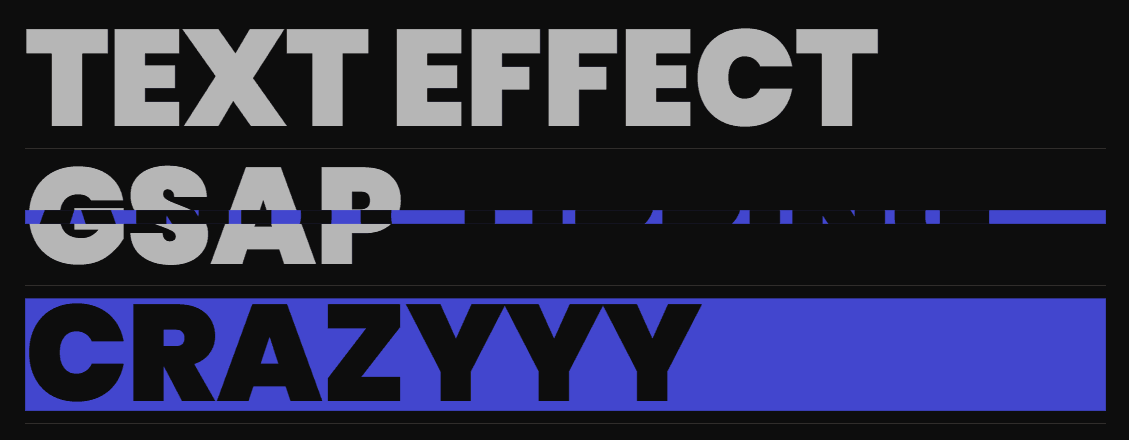
🔥 GSAP Text Scroll & Hover Clip Effect – Complete Explanation
This document explains the full HTML, CSS, and JavaScript setup for the scroll-animated gradient text combined with a hover-activated clipping reveal effect.
🟧 HTML Explanation
The HTML defines the full structure of the animation elements.
1. Fonts & Styles
- Loads Poppins 900 from Google Fonts for bold, impactful headings.
- Links an external
style.cssfile for visual styling.
2. Container Layout
- A
.containerdiv wraps all animated text elements. - Each line of text is created using an
<h1>tag that contains:- Main text
- A
<span>element that appears on hover using clip-path - Optional links inside spans for external references
3. Multiple Animated Text Blocks
Each line looks like:
🟦 CSS Explanation
The CSS handles layout, typography, clipping effects, and hover states.
- Page Setup
Dark background (#0D0D0D)
10% page margin for a centered modern layout
Poppins font for bold headings
- Container Styling
Vertical column layout
200vh height to enable long scroll interaction
Left-aligned text elements
- Text Block Styling
Every .text element is styled to achieve the animated effect:
Font size: 10vw for responsive typography
Color: Transparent gray using background-clip
Gradient Reveal:
Background is a horizontal linear gradient
background-size: 0% initially
On scroll, GSAP animates it to 100%
Layout:
Flex column layout
Border-bottom for separation
Positioned relative to hold the span overlay
- Hover Span Clip Effect
The acts as the hidden layer:
Fully covers the text
Starts with a thin middle line using:
clip-path: polygon(0 50%, 100% 50%, 100% 50%, 0 50%);
On hover, transforms into a full rectangle:
clip-path: polygon(0 0, 100% 0, 100% 100%, 0 100%);
Uses a smooth cubic-bezier easing
Has a blue background (#4246ce) and dark text for contrast
- Link Styling
Links inherit the text color
No underline
They animate as part of the span hover reveal
JavaScript Explanation
The JavaScript controls the scroll-based text gradient animation.
- Register ScrollTrigger
GSAP’s ScrollTrigger plugin is registered at the top.
- Select All Text Elements const textElements = gsap.utils.toArray('.text');
This collects all .text
elements.
- Loop Through Each Text Block
For each text line:
GSAP animates backgroundSize from 0% to 100%
ScrollTrigger ties the animation to scroll movement
- ScrollTrigger Settings
trigger: text: the animation begins when each text block enters viewport
start: 'center 80%': animation starts early for smooth effect
end: 'center 20%': animation ends before the text leaves view
scrub: true: ties scroll position directly to animation progress
- Final Result
As the user scrolls, each text block fills with gradient
Hovering reveals the clipped span layer
Smooth, modern, GSAP-powered scrolling animation