🧠 Description
This fun interactive To-Do List animates a hand-drawn SVG line across each task whenever you check its box.
It combines HTML structure, CSS transitions, and JavaScript DOM manipulation to create a smooth, satisfying animation effect — making your task list feel alive.
You can use it for daily planner UIs, interactive learning projects, or creative portfolio demos.
💻 HTML Code
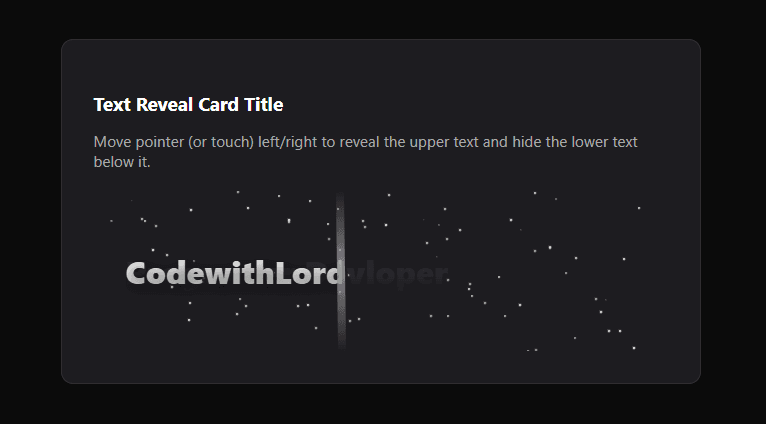
The HTML defines a single .text-reveal-card containing:
A title and description explaining the interaction.
A .text-container that houses:
A stars layer for background animation.
Two overlapping text elements — text-base (bottom) and text-reveal (top).
A vertical divider line that moves with the cursor or touch.
This clean structure allows the top text to be “clipped” dynamically, showing only a portion of it based on user interaction.
CSS Code
The CSS handles the layout, gradients, and animation effects:
:root defines theme variables like colors, gradients, and card size.
.text-reveal-card styles the card with padding, rounded corners, and dark background.
.text-base and .text-reveal sit directly on top of each other with transparent text and gradient backgrounds.
text-base uses a darker gradient.
text-reveal uses a lighter gradient and a clip-path that hides or reveals parts of the text dynamically.
.divider is a glowing vertical line that moves with the cursor, marking the reveal boundary.
.stars and .star elements create twinkling particles using CSS keyframes for subtle motion.
The result is a futuristic card design with elegant motion and lighting effects.
Javascipt Code
The JavaScript adds all the interactivity
It dynamically fills the text using:
It generates 80 stars at random positions for the animated background.
Mouse and touch events (mousemove, touchmove) calculate how far the pointer has moved across the container and adjust:
clip-path: inset(0 ${rightInset}% 0 0) This determines how much of the text-reveal layer is visible.
The divider follows this movement, rotating slightly and fading in/out for smooth visual feedback.
When the user leaves the area or lifts their finger, the reveal resets.