🧠 Description
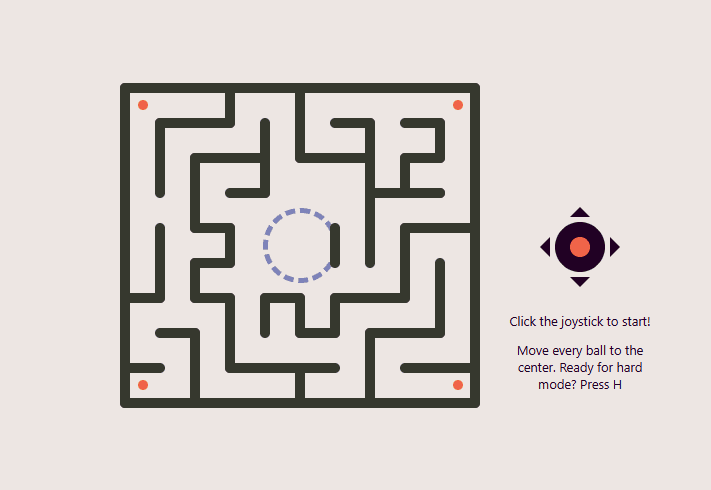
This project showcases an advanced interactive maze game with realistic 3D physics simulation.
Players control a joystick to tilt the maze in all directions, using gravity and physics to roll four balls toward the center goal zone.
The game features sophisticated collision detection with rounded wall caps, gravity simulation, friction, and velocity calculations that create authentic ball rolling physics.
Hard mode introduces black holes as obstacles that must be avoided, adding an extra challenge layer to the gameplay.
Perfect for learning advanced physics simulation, 3D CSS transforms, collision detection algorithms, and interactive game development.
💻 HTML Code
HTML Structure Explanation
The HTML structure is organized in a grid layout that separates the game viewport, controls, and UI elements:
Key Elements:
#center - Main container centering the entire game interface#game - Grid container organizing maze, joystick, and instructions#maze - The game world viewport containing all interactive elements
#end - Target zone (dashed circle) where balls must be rolled
#joystick - Control interface with directional arrows
.joystick-arrow - Four directional indicator arrows (up, down, left, right)#joystick-head - Interactive red circle that responds to mouse movement
#note - Instructions and game status messages displayed dynamically#youtube & #youtube-card - Social links to video tutorial (hidden on small screens)
JavaScript dynamically injects ball elements and wall elements into the #maze div based on game logic.
The grid layout ensures responsive positioning of controls relative to the game area.
🎨 CSS Code
CSS Breakdown
Color System
Custom properties define a cohesive color palette inspired by Coolors.co:
--background-color: #ede6e3 - Light cream background--wall-color: #36382e - Dark gray for maze walls--joystick-color: #210124 - Deep purple for joystick base--joystick-head-color: #f06449 - Red-orange for interactive elements--ball-color: #f06449 - Matches joystick for visual consistency--end-color: #7d82b8 - Blue-purple for goal zone
Layout Structure
#center uses flexbox to center the entire game interface perfectly.
#game uses CSS Grid with 3 rows and 2 columns to organize game sections:
Maze occupies left column spanning all rows
Joystick positioned in center-right, row 2
Instructions positioned bottom-right, row 3
perspective: 600px enables 3D transforms on child elements
Maze Viewport
Fixed 350px × 315px dimensions create consistent playable area.
Flexbox centers the goal zone (#end) in the viewport.
Positioned absolutely for dynamically injected walls and balls.
Joystick Interface
Circular dark background with four directional arrows created using CSS borders.
:nth-of-type() selectors position arrows in cardinal directions.
#joystick-head (the red circle) glows with infinite animation at 0.6s duration.
Starts hidden then animates after 4s delay to draw player attention.
Ball Styling
10px × 10px circular elements with negative margins for proper centering.
Red-orange color matches the interactive joystick for visual feedback.
Positioned absolutely within maze to allow free movement.
Wall Styling
Dark gray background with rounded caps using ::before and ::after pseudo-elements.
Pseudo-elements create 10px circular caps at wall endpoints.
Transform-origin set to top for rotation transformations.
Negative margin ensures proper positioning.
Hard Mode Hazards
.black-hole creates 18px black circles that appear in hard mode.
Negative margins center the visual representation.
Used in collision detection for game-over triggering.
YouTube Social Link
Creatively styled play button using CSS shapes (red background, pseudo-elements).
Hidden by default, visible only on screens taller than 425px.
Hover state creates tooltip with tutorial information.
All created using pure CSS without external images.
Responsive Behavior
Media query ensures social link only appears on adequately tall viewports.
Grid layout automatically adapts to different screen sizes.
Fixed maze dimensions maintain playability across devices.
⚙️ JavaScript Code Overview
Copy
Math .minmax = ( value, limit ) => {
return Math .max( Math .min(value, limit), -limit);
};
const distance2D = ( p1, p2 ) => {
return Math .sqrt((p2.x - p1.x) ** 2 + (p2.y - p1.y) ** 2 );
};
// Angle between the two points
const getAngle = ( p1, p2 ) => {
let angle = Math .atan((p2.y - p1.y) / (p2.x - p1.x));
if (p2.x - p1.x < 0 ) angle += Math .PI;
return angle;
};
// The closest a ball and a wall cap can be
const closestItCanBe = ( cap, ball ) => {
let angle = getAngle(cap, ball);
const deltaX = Math .cos(angle) * (wallW / 2 + ballSize / 2 );
const deltaY = Math .sin(angle) * (wallW / 2 + ballSize / 2 );
return { x : cap.x + deltaX, y : cap.y + deltaY };
};
// Roll the ball around the wall cap
const rollAroundCap = ( cap, ball ) => {
// The direction the ball can't move any further because the wall holds it back
let impactAngle = getAngle(ball, cap);
// The direction the ball wants to move based on it's velocity
let heading = getAngle(
{ x : 0 , y : 0 },
{ x : ball.velocityX, y : ball.velocityY }
);
// The angle between the impact direction and the ball's desired direction
// The smaller this angle is, the bigger the impact
// The closer it is to 90 degrees the smoother it gets (at 90 there would be no collision)
let impactHeadingAngle = impactAngle - heading;
// Velocity distance if not hit would have occurred
const velocityMagnitude = distance2D(
{ x : 0 , y : 0 },
{ x : ball.velocityX, y : ball.velocityY }
);
// Velocity component diagonal to the impact
const velocityMagnitudeDiagonalToTheImpact =
Math .sin(impactHeadingAngle) * velocityMagnitude;
// How far should the ball be from the wall cap
const closestDistance = wallW / 2 + ballSize / 2 ;
const rotationAngle = Math .atan(
velocityMagnitudeDiagonalToTheImpact / closestDistance
);
const deltaFromCap = {
x : Math .cos(impactAngle + Math .PI - rotationAngle) * closestDistance,
y : Math .sin(impactAngle + Math .PI - rotationAngle) * closestDistance
};
const x = ball.x;
const y = ball.y;
const velocityX = ball.x - (cap.x + deltaFromCap.x);
const velocityY = ball.y - (cap.y + deltaFromCap.y);
const nextX = x + velocityX;
const nextY = y + velocityY;
return { x, y, velocityX, velocityY, nextX, nextY };
};
// Decreases the absolute value of a number but keeps it's sign, doesn't go below abs 0
const slow = ( number, difference ) => {
if ( Math .abs(number) <= difference) return 0 ;
if (number > difference) return number - difference;
return number + difference;
};
const mazeElement = document .getElementById( "maze" );
const joystickHeadElement = document .getElementById( "joystick-head" );
const noteElement = document .getElementById( "note" ); // Note element for instructions and game won, game failed texts
let hardMode = false ;
let previousTimestamp;
let gameInProgress;
let mouseStartX;
let mouseStartY;
let accelerationX;
let accelerationY;
let frictionX;
let frictionY;
const pathW = 25 ; // Path width
const wallW = 10 ; // Wall width
const ballSize = 10 ; // Width and height of the ball
const holeSize = 18 ;
const debugMode = false ;
let balls = [];
let ballElements = [];
let holeElements = [];
resetGame();
// Draw balls for the first time
balls.forEach( ( { x, y } ) => {
const ball = document .createElement( "div" );
ball.setAttribute( "class" , "ball" );
ball.style.cssText = `left: ${x} px; top: ${y} px; ` ;
mazeElement.appendChild(ball);
ballElements.push(ball);
});
// Wall metadata
const walls = [
// Border
{ column : 0 , row : 0 , horizontal : true , length : 10 },
{ column : 0 , row : 0 , horizontal : false , length : 9 },
{ column : 0 , row : 9 , horizontal : true , length : 10 },
{ column : 10 , row : 0 , horizontal : false , length : 9 },
// Horizontal lines starting in 1st column
{ column : 0 , row : 6 , horizontal : true , length : 1 },
{ column : 0 , row : 8 , horizontal : true , length : 1 },
// Horizontal lines starting in 2nd column
{ column : 1 , row : 1 , horizontal : true , length : 2 },
{ column : 1 , row : 7 , horizontal : true , length : 1 },
// Horizontal lines starting in 3rd column
{ column : 2 , row : 2 , horizontal : true , length : 2 },
{ column : 2 , row : 4 , horizontal : true , length : 1 },
{ column : 2 , row : 5 , horizontal : true , length : 1 },
{ column : 2 , row : 6 , horizontal : true , length : 1 },
// Horizontal lines starting in 4th column
{ column : 3 , row : 3 , horizontal : true , length : 1 },
{ column : 3 , row : 8 , horizontal : true , length : 3 },
// Horizontal lines starting in 5th column
{ column : 4 , row : 6 , horizontal : true , length : 1 },
// Horizontal lines starting in 6th column
{ column : 5 , row : 2 , horizontal : true , length : 2 },
{ column : 5 , row : 7 , horizontal : true , length : 1 },
// Horizontal lines starting in 7th column
{ column : 6 , row : 1 , horizontal : true , length : 1 },
{ column : 6 , row : 6 , horizontal : true , length : 2 },
// Horizontal lines starting in 8th column
{ column : 7 , row : 3 , horizontal : true , length : 2 },
{ column : 7 , row : 7 , horizontal : true , length : 2 },
// Horizontal lines starting in 9th column
{ column : 8 , row : 1 , horizontal : true , length : 1 },
{ column : 8 , row : 2 , horizontal : true , length : 1 },
{ column : 8 , row : 3 , horizontal : true , length : 1 },
{ column : 8 , row : 4 , horizontal : true , length : 2 },
{ column : 8 , row : 8 , horizontal : true , length : 2 },
// Vertical lines after the 1st column
{ column : 1 , row : 1 , horizontal : false , length : 2 },
{ column : 1 , row : 4 , horizontal : false , length : 2 },
// Vertical lines after the 2nd column
{ column : 2 , row : 2 , horizontal : false , length : 2 },
{ column : 2 , row : 5 , horizontal : false , length : 1 },
{ column : 2 , row : 7 , horizontal : false , length : 2 },
// Vertical lines after the 3rd column
{ column : 3 , row : 0 , horizontal : false , length : 1 },
{ column : 3 , row : 4 , horizontal : false , length : 1 },
{ column : 3 , row : 6 , horizontal : false , length : 2 },
// Vertical lines after the 4th column
{ column : 4 , row : 1 , horizontal : false , length : 2 },
{ column : 4 , row : 6 , horizontal : false , length : 1 },
// Vertical lines after the 5th column
{ column : 5 , row : 0 , horizontal : false , length : 2 },
{ column : 5 , row : 6 , horizontal : false , length : 1 },
{ column : 5 , row : 8 , horizontal : false , length : 1 },
// Vertical lines after the 6th column
{ column : 6 , row : 4 , horizontal : false , length : 1 },
{ column : 6 , row : 6 , horizontal : false , length : 1 },
// Vertical lines after the 7th column
{ column : 7 , row : 1 , horizontal : false , length : 4 },
{ column : 7 , row : 7 , horizontal : false , length : 2 },
// Vertical lines after the 8th column
{ column : 8 , row : 2 , horizontal : false , length : 1 },
{ column : 8 , row : 4 , horizontal : false , length : 2 },
// Vertical lines after the 9th column
{ column : 9 , row : 1 , horizontal : false , length : 1 },
{ column : 9 , row : 5 , horizontal : false , length : 2 }
].map( ( wall ) => ({
x : wall.column * (pathW + wallW),
y : wall.row * (pathW + wallW),
horizontal : wall.horizontal,
length : wall.length * (pathW + wallW)
}));
// Draw walls
walls.forEach( ( { x, y, horizontal, length } ) => {
const wall = document .createElement( "div" );
wall.setAttribute( "class" , "wall" );
wall.style.cssText = `
left: ${x} px;
top: ${y} px;
width: ${wallW} px;
height: ${length} px;
transform: rotate( ${horizontal ? - 90 : 0 } deg);
` ;
mazeElement.appendChild(wall);
});
const holes = [
{ column : 0 , row : 5 },
{ column : 2 , row : 0 },
{ column : 2 , row : 4 },
{ column : 4 , row : 6 },
{ column : 6 , row : 2 },
{ column : 6 , row : 8 },
{ column : 8 , row : 1 },
{ column : 8 , row : 2 }
].map( ( hole ) => ({
x : hole.column * (wallW + pathW) + (wallW / 2 + pathW / 2 ),
y : hole.row * (wallW + pathW) + (wallW / 2 + pathW / 2 )
}));
joystickHeadElement.addEventListener( "mousedown" , function ( event ) {
if (!gameInProgress) {
mouseStartX = event.clientX;
mouseStartY = event.clientY;
gameInProgress = true ;
window .requestAnimationFrame(main);
noteElement.style.opacity = 0 ;
joystickHeadElement.style.cssText = `
animation: none;
cursor: grabbing;
` ;
}
});
window .addEventListener( "mousemove" , function ( event ) {
if (gameInProgress) {
const mouseDeltaX = - Math .minmax(mouseStartX - event.clientX, 15 );
const mouseDeltaY = - Math .minmax(mouseStartY - event.clientY, 15 );
joystickHeadElement.style.cssText = `
left: ${mouseDeltaX} px;
top: ${mouseDeltaY} px;
animation: none;
cursor: grabbing;
` ;
const rotationY = mouseDeltaX * 0.8 ; // Max rotation = 12
const rotationX = mouseDeltaY * 0.8 ;
mazeElement.style.cssText = `
transform: rotateY( ${rotationY} deg) rotateX( ${-rotationX} deg)
` ;
const gravity = 2 ;
const friction = 0.01 ; // Coefficients of friction
accelerationX = gravity * Math .sin((rotationY / 180 ) * Math .PI);
accelerationY = gravity * Math .sin((rotationX / 180 ) * Math .PI);
frictionX = gravity * Math .cos((rotationY / 180 ) * Math .PI) * friction;
frictionY = gravity * Math .cos((rotationX / 180 ) * Math .PI) * friction;
}
});
window .addEventListener( "keydown" , function ( event ) {
// If not an arrow key or space or H was pressed then return
if (![ " " , "H" , "h" , "E" , "e" ].includes(event.key)) return ;
// If an arrow key was pressed then first prevent default
event.preventDefault();
// If space was pressed restart the game
if (event.key == " " ) {
resetGame();
return ;
}
// Set Hard mode
if (event.key == "H" || event.key == "h" ) {
hardMode = true ;
resetGame();
return ;
}
// Set Easy mode
if (event.key == "E" || event.key == "e" ) {
hardMode = false ;
resetGame();
return ;
}
});
function resetGame ( ) {
previousTimestamp = undefined ;
gameInProgress = false ;
mouseStartX = undefined ;
mouseStartY = undefined ;
accelerationX = undefined ;
accelerationY = undefined ;
frictionX = undefined ;
frictionY = undefined ;
mazeElement.style.cssText = `
transform: rotateY(0deg) rotateX(0deg)
` ;
joystickHeadElement.style.cssText = `
left: 0;
top: 0;
animation: glow;
cursor: grab;
` ;
if (hardMode) {
noteElement.innerHTML = `Click the joystick to start!
<p>Hard mode, Avoid black holes. Back to easy mode? Press E</p>` ;
} else {
noteElement.innerHTML = `Click the joystick to start!
<p>Move every ball to the center. Ready for hard mode? Press H</p>` ;
}
noteElement.style.opacity = 1 ;
balls = [
{ column : 0 , row : 0 },
{ column : 9 , row : 0 },
{ column : 0 , row : 8 },
{ column : 9 , row : 8 }
].map( ( ball ) => ({
x : ball.column * (wallW + pathW) + (wallW / 2 + pathW / 2 ),
y : ball.row * (wallW + pathW) + (wallW / 2 + pathW / 2 ),
velocityX : 0 ,
velocityY : 0
}));
if (ballElements.length) {
balls.forEach( ( { x, y }, index ) => {
ballElements[index].style.cssText = `left: ${x} px; top: ${y} px; ` ;
});
}
// Remove previous hole elements
holeElements.forEach( ( holeElement ) => {
mazeElement.removeChild(holeElement);
});
holeElements = [];
// Reset hole elements if hard mode
if (hardMode) {
holes.forEach( ( { x, y } ) => {
const ball = document .createElement( "div" );
ball.setAttribute( "class" , "black-hole" );
ball.style.cssText = `left: ${x} px; top: ${y} px; ` ;
mazeElement.appendChild(ball);
holeElements.push(ball);
});
}
}
function main ( timestamp ) {
// It is possible to reset the game mid-game. This case the look should stop
if (!gameInProgress) return ;
if (previousTimestamp === undefined ) {
previousTimestamp = timestamp;
window .requestAnimationFrame(main);
return ;
}
const maxVelocity = 1.5 ;
// Time passed since last cycle divided by 16
// This function gets called every 16 ms on average so dividing by 16 will result in 1
const timeElapsed = (timestamp - previousTimestamp) / 16 ;
try {
// If mouse didn't move yet don't do anything
if (accelerationX != undefined && accelerationY != undefined ) {
const velocityChangeX = accelerationX * timeElapsed;
const velocityChangeY = accelerationY * timeElapsed;
const frictionDeltaX = frictionX * timeElapsed;
const frictionDeltaY = frictionY * timeElapsed;
balls.forEach( ( ball ) => {
if (velocityChangeX == 0 ) {
// No rotation, the plane is flat
// On flat surface friction can only slow down, but not reverse movement
ball.velocityX = slow(ball.velocityX, frictionDeltaX);
} else {
ball.velocityX = ball.velocityX + velocityChangeX;
ball.velocityX = Math .max( Math .min(ball.velocityX, 1.5 ), - 1.5 );
ball.velocityX =
ball.velocityX - Math .sign(velocityChangeX) * frictionDeltaX;
ball.velocityX = Math .minmax(ball.velocityX, maxVelocity);
}
if (velocityChangeY == 0 ) {
// No rotation, the plane is flat
// On flat surface friction can only slow down, but not reverse movement
ball.velocityY = slow(ball.velocityY, frictionDeltaY);
} else {
ball.velocityY = ball.velocityY + velocityChangeY;
ball.velocityY =
ball.velocityY - Math .sign(velocityChangeY) * frictionDeltaY;
ball.velocityY = Math .minmax(ball.velocityY, maxVelocity);
}
// Preliminary next ball position, only becomes true if no hit occurs
// Used only for hit testing, does not mean that the ball will reach this position
ball.nextX = ball.x + ball.velocityX;
ball.nextY = ball.y + ball.velocityY;
if (debugMode) console .log( "tick" , ball);
walls.forEach( ( wall, wi ) => {
if (wall.horizontal) {
// Horizontal wall
if (
ball.nextY + ballSize / 2 >= wall.y - wallW / 2 &&
ball.nextY - ballSize / 2 <= wall.y + wallW / 2
) {
// Ball got within the strip of the wall
// (not necessarily hit it, could be before or after)
const wallStart = {
x : wall.x,
y : wall.y
};
const wallEnd = {
x : wall.x + wall.length,
y : wall.y
};
if (
ball.nextX + ballSize / 2 >= wallStart.x - wallW / 2 &&
ball.nextX < wallStart.x
) {
// Ball might hit the left cap of a horizontal wall
const distance = distance2D(wallStart, {
x : ball.nextX,
y : ball.nextY
});
if (distance < ballSize / 2 + wallW / 2 ) {
if (debugMode && wi > 4 )
console .warn( "too close h head" , distance, ball);
// Ball hits the left cap of a horizontal wall
const closest = closestItCanBe(wallStart, {
x : ball.nextX,
y : ball.nextY
});
const rolled = rollAroundCap(wallStart, {
x : closest.x,
y : closest.y,
velocityX : ball.velocityX,
velocityY : ball.velocityY
});
Object .assign(ball, rolled);
}
}
if (
ball.nextX - ballSize / 2 <= wallEnd.x + wallW / 2 &&
ball.nextX > wallEnd.x
) {
// Ball might hit the right cap of a horizontal wall
const distance = distance2D(wallEnd, {
x : ball.nextX,
y : ball.nextY
});
if (distance < ballSize / 2 + wallW / 2 ) {
if (debugMode && wi > 4 )
console .warn( "too close h tail" , distance, ball);
// Ball hits the right cap of a horizontal wall
const closest = closestItCanBe(wallEnd, {
x : ball.nextX,
y : ball.nextY
});
const rolled = rollAroundCap(wallEnd, {
x : closest.x,
y : closest.y,
velocityX : ball.velocityX,
velocityY : ball.velocityY
});
Object .assign(ball, rolled);
}
}
if (ball.nextX >= wallStart.x && ball.nextX <= wallEnd.x) {
// The ball got inside the main body of the wall
if (ball.nextY < wall.y) {
// Hit horizontal wall from top
ball.nextY = wall.y - wallW / 2 - ballSize / 2 ;
} else {
// Hit horizontal wall from bottom
ball.nextY = wall.y + wallW / 2 + ballSize / 2 ;
}
ball.y = ball.nextY;
ball.velocityY = -ball.velocityY / 3 ;
if (debugMode && wi > 4 )
console .error( "crossing h line, HIT" , ball);
}
}
} else {
// Vertical wall
if (
ball.nextX + ballSize / 2 >= wall.x - wallW / 2 &&
ball.nextX - ballSize / 2 <= wall.x + wallW / 2
) {
// Ball got within the strip of the wall
// (not necessarily hit it, could be before or after)
const wallStart = {
x : wall.x,
y : wall.y
};
const wallEnd = {
x : wall.x,
y : wall.y + wall.length
};
if (
ball.nextY + ballSize / 2 >= wallStart.y - wallW / 2 &&
ball.nextY < wallStart.y
) {
// Ball might hit the top cap of a horizontal wall
const distance = distance2D(wallStart, {
x : ball.nextX,
y : ball.nextY
});
if (distance < ballSize / 2 + wallW / 2 ) {
if (debugMode && wi > 4 )
console .warn( "too close v head" , distance, ball);
// Ball hits the left cap of a horizontal wall
const closest = closestItCanBe(wallStart, {
x : ball.nextX,
y : ball.nextY
});
const rolled = rollAroundCap(wallStart, {
x : closest.x,
y : closest.y,
velocityX : ball.velocityX,
velocityY : ball.velocityY
});
Object .assign(ball, rolled);
}
}
if (
ball.nextY - ballSize / 2 <= wallEnd.y + wallW / 2 &&
ball.nextY > wallEnd.y
) {
// Ball might hit the bottom cap of a horizontal wall
const distance = distance2D(wallEnd, {
x : ball.nextX,
y : ball.nextY
});
if (distance < ballSize / 2 + wallW / 2 ) {
if (debugMode && wi > 4 )
console .warn( "too close v tail" , distance, ball);
// Ball hits the right cap of a horizontal wall
const closest = closestItCanBe(wallEnd, {
x : ball.nextX,
y : ball.nextY
});
const rolled = rollAroundCap(wallEnd, {
x : closest.x,
y : closest.y,
velocityX : ball.velocityX,
velocityY : ball.velocityY
});
Object .assign(ball, rolled);
}
}
if (ball.nextY >= wallStart.y && ball.nextY <= wallEnd.y) {
// The ball got inside the main body of the wall
if (ball.nextX < wall.x) {
// Hit vertical wall from left
ball.nextX = wall.x - wallW / 2 - ballSize / 2 ;
} else {
// Hit vertical wall from right
ball.nextX = wall.x + wallW / 2 + ballSize / 2 ;
}
ball.x = ball.nextX;
ball.velocityX = -ball.velocityX / 3 ;
if (debugMode && wi > 4 )
console .error( "crossing v line, HIT" , ball);
}
}
}
});
// Detect is a ball fell into a hole
if (hardMode) {
holes.forEach( ( hole, hi ) => {
const distance = distance2D(hole, {
x : ball.nextX,
y : ball.nextY
});
if (distance <= holeSize / 2 ) {
// The ball fell into a hole
holeElements[hi].style.backgroundColor = "red" ;
throw Error ( "The ball fell into a hole" );
}
});
}
// Adjust ball metadata
ball.x = ball.x + ball.velocityX;
ball.y = ball.y + ball.velocityY;
});
// Move balls to their new position on the UI
balls.forEach( ( { x, y }, index ) => {
ballElements[index].style.cssText = `left: ${x} px; top: ${y} px; ` ;
});
}
// Win detection
if (
balls.every(
( ball ) => distance2D(ball, { x : 350 / 2 , y : 315 / 2 }) < 65 / 2
)
) {
noteElement.innerHTML = `Congrats, you did it!
${!hardMode ? "<p>Press H for hard mode</p>" : "" }
>` ;
noteElement.style.opacity = 1 ;
gameInProgress = false ;
} else {
previousTimestamp = timestamp;
window .requestAnimationFrame(main);
}
} catch (error) {
if (error.message == "The ball fell into a hole" ) {
noteElement.innerHTML = `A ball fell into a black hole! Press space to reset the game.
<p>
Back to easy? Press E
</p>` ;
noteElement.style.opacity = 1 ;
gameInProgress = false ;
} else throw error;
}
}
The JavaScript engine implements sophisticated physics simulation and collision detection. Key systems include:
Utility Functions
Math.minmax() - Constrains values to maximum limit while preserving signdistance2D() - Calculates Euclidean distance between two pointsgetAngle() - Determines angle between two points for collision responsesclosestItCanBe() - Calculates closest approach point between ball and wall caprollAroundCap() - Simulates ball rolling around rounded wall cornersslow() - Applies friction while preventing velocity reversal on flat surfaces
Game State Variables
balls - Array tracking all active ball objects with position and velocityballElements - Array of DOM elements corresponding to balls for renderingholeElements - Array of hazard elements in hard modegameInProgress - Boolean flag indicating active gameplayaccelerationX/Y - Current gravitational acceleration from joystick tiltfrictionX/Y - Friction coefficients calculated from tilt angle
Game Initialization
resetGame() function initializes all game statePlaces four balls at maze corners
Loads wall metadata from configuration array
Creates DOM elements for walls using CSS transforms
Sets up holes in hard mode
Displays appropriate instructions based on difficulty level
Joystick Control System
Mouse down on joystick starts game and enables tilt control.
Mouse move calculates:
Mouse delta from starting position (clamped to ±15px)
3D rotation angles (rotationX and rotationY)
Applies 3D transforms to maze for tilting effect
Calculates gravity and friction values from tilt angle
Physics Simulation
Main game loop runs at ~60 FPS using requestAnimationFrame.
For each ball:
Updates velocity based on acceleration and friction
Limits velocity to maximum magnitude (1.5 units)
Calculates next position (nextX, nextY)
Applies flat-surface friction behavior (friction only slows, doesn't reverse)
Tests collisions against all walls
Collision Detection System
Two-phase collision approach:
Wall Strip Testing - Determines if ball is within wall boundariesCap Collision - Detects collision with rounded wall endpoints using distance2DBody Collision - Handles impact when ball enters wall body directly
Wall Cap Collision Handling
Uses rollAroundCap() to simulate realistic rolling physics:
Calculates angle of impact relative to ball velocity
Determines velocity component perpendicular to impact
Rotates ball trajectory around wall cap
Applies energy loss (velocity × 1/3 on rebound)
Wall Body Collision Handling
Direct collision with wall interior:
Repositions ball outside wall boundary
Reverses and dampens velocity (multiplied by 1/3)
Prevents ball from getting stuck in walls
Hard Mode Hazards
Hole detection using distance comparison:
Tests distance between ball and each hole center
If distance < holeSize/2 (9px radius), ball is lost
Changes hole color to red on capture
Throws error to trigger game-over state
Win Condition Detection
Checks if all four balls are within goal zone radius (32.5px from center).
Displays congratulations message with mode toggle option.
Ends game and returns to joystick interaction state.
Keyboard Input Handling
Space key - Resets current game
H key - Switches to hard mode (with hazards)
E key - Switches to easy mode (hazard-free)
Rendering System
Updates ball DOM element positions each frame using CSS left/top properties.
Dynamically creates walls with rotation transforms based on orientation.
Manages hole elements creation/destruction based on difficulty level.
Updates game messages and UI state through noteElement.
Game Loop Architecture
RequestAnimationFrame maintains 60 FPS cadence.
Three-part loop:
Calculate physics (acceleration, velocity, position)
Test collisions and resolve
Render updated positions and check win condition
Graceful error handling catches hazard collisions and displays appropriate messages.
Context resets allow seamless game resets without memory leaks.
Advanced Physics Concepts
The collision system demonstrates:
Vector mathematics for angle calculations
Physics-based rolling simulation with realistic curves
Friction modeling for different surface conditions
Energy conservation with velocity dampening
Multi-body collision resolution
This architecture creates a fully functional maze game with authentic physics that rivals dedicated physics engines while remaining lightweight and performant.