🧠 Description
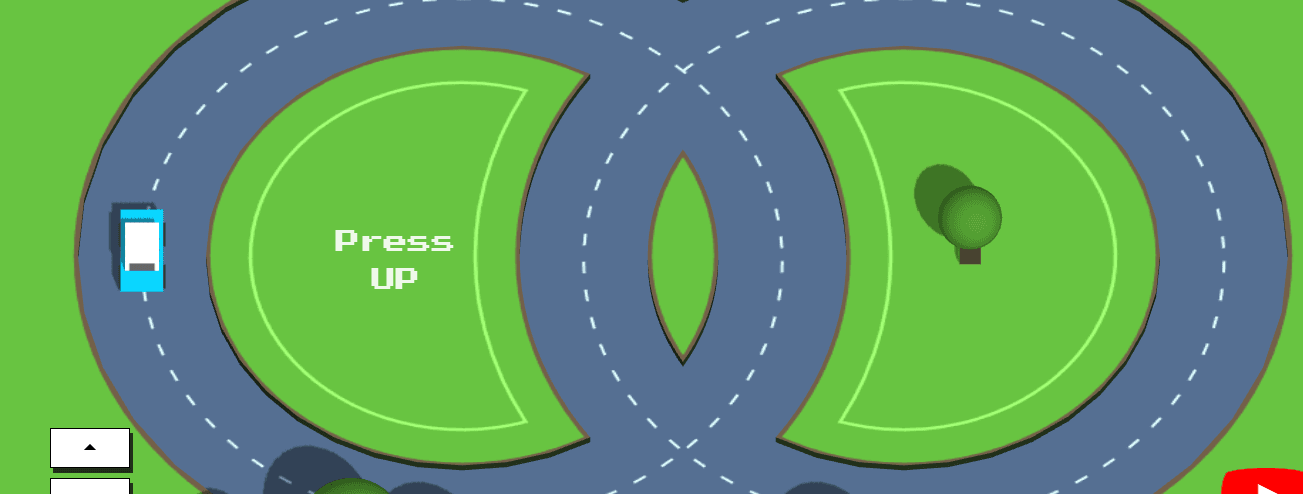
This project showcases a sophisticated 3D racing game built with Three.js, a powerful JavaScript 3D library.
Players navigate a circular dual-track racing circuit, accelerating and decelerating to avoid collisions with randomly spawned traffic vehicles.
The game features an orthographic camera perspective, dynamic AI-controlled cars and trucks with varying speeds, realistic shadow rendering, and procedurally generated textures using HTML Canvas.
The circuit design utilizes complex mathematical curves to create a figure-eight style track with inner and outer lanes, complete with visual lane markings, curbs, and environmental details like trees.
Perfect for learning advanced Three.js concepts including geometries, materials, lighting, shadows, collision detection, and game loop architecture.
💻 HTML Code
HTML Structure Explanation
The HTML structure is minimal, relying on JavaScript to dynamically build the Three.js scene:
Key Elements:
#score - Displays current lap count and game status#controls - Container for control buttons and instructions
#buttons - Contains accelerate and decelerate buttons with SVG arrow icons#instructions - Game controls and tutorial text
#results - Modal overlay displayed when player collides with vehicle
Links to YouTube tutorial for learning
Social media follow link
#youtube-main - Fixed position YouTube logo for video tutorial access#youtube-card - Tooltip card displayed on hover
Three.js library loaded from CDN (version r126) before the script.js file.
Canvas element created dynamically by Three.js renderer and appended to body.
Minimal markup allows full control over rendering through JavaScript and Three.js.
🎨 CSS Code
CSS Breakdown
Typography & General Styling
Imports "Press Start 2P" font from Google Fonts for retro arcade aesthetic.
Body background is dark (implied by Three.js canvas).
Buttons have inset shadow for 3D depth effect.
Links inherit text color for consistent theming.
Score Display
#score positioned absolutely in viewport using transform for perfect centering.
Retro pixel font with 0.9em base size scaled to 1.5em on larger screens.
Opacity 0.9 ensures readability while showing game underneath.
Max-width 100px prevents overflow on small screens.
Control Panel
#controls positioned bottom-left with flexbox layout.
Initially hidden (display: none) on screens smaller than 425px.
Buttons and instructions fade in over 2 seconds using opacity transition.
Buttons
White background with black border, 40px height, full width of container.
SVG arrow icons scale with button size.
Box shadow creates pressed button appearance.
Results Modal
Full-screen overlay with 75% black background opacity.
Centers content using flexbox (align-items, justify-content).
Z-index 51 ensures modal appears above all other elements.
Hidden by default (display: none), shown via JavaScript on collision.
YouTube Logo
Creatively styled using CSS shapes (red background, pseudo-elements).
Hidden by default, only visible on screens taller than 425px.
Position fixed in bottom-right corner.
Scale transforms on hover for interactive feedback.
Pseudo-elements create play button icon without images.
Responsive Design
Media query at 425px height threshold:
Shows score at larger 1.5em size
Reveals control buttons with fade-in effect
Enables YouTube logo and hover tooltips
Z-Index Hierarchy
Results modal: 51 (topmost)
YouTube logo: 50
YouTube tooltip: 49
Default content: implicit 0
This layering ensures modals appear above interactive elements.
⚙️ JavaScript Code
Copy
window .focus(); // Capture keys right away (by default focus is on editor)
// Pick a random value from an array
function pickRandom ( array ) {
return array[ Math .floor( Math .random() * array.length)];
}
// The Pythagorean theorem says that the distance between two points is
// the square root of the sum of the horizontal and vertical distance's square
function getDistance ( coordinate1, coordinate2 ) {
const horizontalDistance = coordinate2.x - coordinate1.x;
const verticalDistance = coordinate2.y - coordinate1.y;
return Math .sqrt(horizontalDistance ** 2 + verticalDistance ** 2 );
}
const vehicleColors = [
0xa52523 ,
0xef2d56 ,
0x0ad3ff ,
0xff9f1c /*0xa52523, 0xbdb638, 0x78b14b*/
];
const lawnGreen = "#67C240" ;
const trackColor = "#546E90" ;
const edgeColor = "#725F48" ;
const treeCrownColor = 0x498c2c ;
const treeTrunkColor = 0x4b3f2f ;
const wheelGeometry = new THREE.BoxBufferGeometry( 12 , 33 , 12 );
const wheelMaterial = new THREE.MeshLambertMaterial({ color : 0x333333 });
const treeTrunkGeometry = new THREE.BoxBufferGeometry( 15 , 15 , 30 );
const treeTrunkMaterial = new THREE.MeshLambertMaterial({
color : treeTrunkColor
});
const treeCrownMaterial = new THREE.MeshLambertMaterial({
color : treeCrownColor
});
const config = {
showHitZones : false ,
shadows : true , // Use shadow
trees : true , // Add trees to the map
curbs : true , // Show texture on the extruded geometry
grid : false // Show grid helper
};
let score;
const speed = 0.0017 ;
const playerAngleInitial = Math .PI;
let playerAngleMoved;
let accelerate = false ; // Is the player accelerating
let decelerate = false ; // Is the player decelerating
let otherVehicles = [];
let ready;
let lastTimestamp;
const trackRadius = 225 ;
const trackWidth = 45 ;
const innerTrackRadius = trackRadius - trackWidth;
const outerTrackRadius = trackRadius + trackWidth;
const arcAngle1 = ( 1 / 3 ) * Math .PI; // 60 degrees
const deltaY = Math .sin(arcAngle1) * innerTrackRadius;
const arcAngle2 = Math .asin(deltaY / outerTrackRadius);
const arcCenterX =
( Math .cos(arcAngle1) * innerTrackRadius +
Math .cos(arcAngle2) * outerTrackRadius) /
2 ;
const arcAngle3 = Math .acos(arcCenterX / innerTrackRadius);
const arcAngle4 = Math .acos(arcCenterX / outerTrackRadius);
const scoreElement = document .getElementById( "score" );
const buttonsElement = document .getElementById( "buttons" );
const instructionsElement = document .getElementById( "instructions" );
const resultsElement = document .getElementById( "results" );
const accelerateButton = document .getElementById( "accelerate" );
const decelerateButton = document .getElementById( "decelerate" );
const youtubeLogo = document .getElementById( "youtube-main" );
setTimeout ( () => {
if (ready) instructionsElement.style.opacity = 1 ;
buttonsElement.style.opacity = 1 ;
youtubeLogo.style.opacity = 1 ;
}, 4000 );
// Initialize ThreeJs
// Set up camera
const aspectRatio = window .innerWidth / window .innerHeight;
const cameraWidth = 960 ;
const cameraHeight = cameraWidth / aspectRatio;
const camera = new THREE.OrthographicCamera(
cameraWidth / - 2 , // left
cameraWidth / 2 , // right
cameraHeight / 2 , // top
cameraHeight / - 2 , // bottom
50 , // near plane
700 // far plane
);
camera.position.set( 0 , - 210 , 300 );
camera.lookAt( 0 , 0 , 0 );
const scene = new THREE.Scene();
const playerCar = Car();
scene.add(playerCar);
renderMap(cameraWidth, cameraHeight * 2 ); // The map height is higher because we look at the map from an angle
// Set up lights
const ambientLight = new THREE.AmbientLight( 0xffffff , 0.6 );
scene.add(ambientLight);
const dirLight = new THREE.DirectionalLight( 0xffffff , 0.6 );
dirLight.position.set( 100 , - 300 , 300 );
dirLight.castShadow = true ;
dirLight.shadow.mapSize.width = 1024 ;
dirLight.shadow.mapSize.height = 1024 ;
dirLight.shadow.camera.left = - 400 ;
dirLight.shadow.camera.right = 350 ;
dirLight.shadow.camera.top = 400 ;
dirLight.shadow.camera.bottom = - 300 ;
dirLight.shadow.camera.near = 100 ;
dirLight.shadow.camera.far = 800 ;
scene.add(dirLight);
// const cameraHelper = new THREE.CameraHelper(dirLight.shadow.camera);
// scene.add(cameraHelper);
if (config.grid) {
const gridHelper = new THREE.GridHelper( 80 , 8 );
gridHelper.rotation.x = Math .PI / 2 ;
scene.add(gridHelper);
}
// Set up renderer
const renderer = new THREE.WebGLRenderer({
antialias : true ,
powerPreference : "high-performance"
});
renderer.setSize( window .innerWidth, window .innerHeight);
if (config.shadows) renderer.shadowMap.enabled = true ;
document .body.appendChild(renderer.domElement);
reset();
function reset ( ) {
// Reset position and score
playerAngleMoved = 0 ;
score = 0 ;
scoreElement.innerText = "Press UP" ;
// Remove other vehicles
otherVehicles.forEach( ( vehicle ) => {
// Remove the vehicle from the scene
scene.remove(vehicle.mesh);
// If it has hit-zone helpers then remove them as well
if (vehicle.mesh.userData.hitZone1)
scene.remove(vehicle.mesh.userData.hitZone1);
if (vehicle.mesh.userData.hitZone2)
scene.remove(vehicle.mesh.userData.hitZone2);
if (vehicle.mesh.userData.hitZone3)
scene.remove(vehicle.mesh.userData.hitZone3);
});
otherVehicles = [];
resultsElement.style.display = "none" ;
lastTimestamp = undefined ;
// Place the player's car to the starting position
movePlayerCar( 0 );
// Render the scene
renderer.render(scene, camera);
ready = true ;
}
function startGame ( ) {
if (ready) {
ready = false ;
scoreElement.innerText = 0 ;
buttonsElement.style.opacity = 1 ;
instructionsElement.style.opacity = 0 ;
youtubeLogo.style.opacity = 1 ;
renderer.setAnimationLoop(animation);
}
}
function positionScoreElement ( ) {
const arcCenterXinPixels = (arcCenterX / cameraWidth) * window .innerWidth;
scoreElement.style.cssText = `
left: ${ window .innerWidth / 2 - arcCenterXinPixels * 1.3 } px;
top: ${ window .innerHeight / 2 } px
` ;
}
function getLineMarkings ( mapWidth, mapHeight ) {
const canvas = document .createElement( "canvas" );
canvas.width = mapWidth;
canvas.height = mapHeight;
const context = canvas.getContext( "2d" );
context.fillStyle = trackColor;
context.fillRect( 0 , 0 , mapWidth, mapHeight);
context.lineWidth = 2 ;
context.strokeStyle = "#E0FFFF" ;
context.setLineDash([ 10 , 14 ]);
// Left circle
context.beginPath();
context.arc(
mapWidth / 2 - arcCenterX,
mapHeight / 2 ,
trackRadius,
0 ,
Math .PI * 2
);
context.stroke();
// Right circle
context.beginPath();
context.arc(
mapWidth / 2 + arcCenterX,
mapHeight / 2 ,
trackRadius,
0 ,
Math .PI * 2
);
context.stroke();
return new THREE.CanvasTexture(canvas);
}
function getCurbsTexture ( mapWidth, mapHeight ) {
const canvas = document .createElement( "canvas" );
canvas.width = mapWidth;
canvas.height = mapHeight;
const context = canvas.getContext( "2d" );
context.fillStyle = lawnGreen;
context.fillRect( 0 , 0 , mapWidth, mapHeight);
// Extra big
context.lineWidth = 65 ;
context.strokeStyle = "#A2FF75" ;
context.beginPath();
context.arc(
mapWidth / 2 - arcCenterX,
mapHeight / 2 ,
innerTrackRadius,
arcAngle1,
-arcAngle1
);
context.arc(
mapWidth / 2 + arcCenterX,
mapHeight / 2 ,
outerTrackRadius,
Math .PI + arcAngle2,
Math .PI - arcAngle2,
true
);
context.stroke();
context.beginPath();
context.arc(
mapWidth / 2 + arcCenterX,
mapHeight / 2 ,
innerTrackRadius,
Math .PI + arcAngle1,
Math .PI - arcAngle1
);
context.arc(
mapWidth / 2 - arcCenterX,
mapHeight / 2 ,
outerTrackRadius,
arcAngle2,
-arcAngle2,
true
);
context.stroke();
// Extra small
context.lineWidth = 60 ;
context.strokeStyle = lawnGreen;
context.beginPath();
context.arc(
mapWidth / 2 - arcCenterX,
mapHeight / 2 ,
innerTrackRadius,
arcAngle1,
-arcAngle1
);
context.arc(
mapWidth / 2 + arcCenterX,
mapHeight / 2 ,
outerTrackRadius,
Math .PI + arcAngle2,
Math .PI - arcAngle2,
true
);
context.arc(
mapWidth / 2 + arcCenterX,
mapHeight / 2 ,
innerTrackRadius,
Math .PI + arcAngle1,
Math .PI - arcAngle1
);
context.arc(
mapWidth / 2 - arcCenterX,
mapHeight / 2 ,
outerTrackRadius,
arcAngle2,
-arcAngle2,
true
);
context.stroke();
// Base
context.lineWidth = 6 ;
context.strokeStyle = edgeColor;
// Outer circle left
context.beginPath();
context.arc(
mapWidth / 2 - arcCenterX,
mapHeight / 2 ,
outerTrackRadius,
0 ,
Math .PI * 2
);
context.stroke();
// Outer circle right
context.beginPath();
context.arc(
mapWidth / 2 + arcCenterX,
mapHeight / 2 ,
outerTrackRadius,
0 ,
Math .PI * 2
);
context.stroke();
// Inner circle left
context.beginPath();
context.arc(
mapWidth / 2 - arcCenterX,
mapHeight / 2 ,
innerTrackRadius,
0 ,
Math .PI * 2
);
context.stroke();
// Inner circle right
context.beginPath();
context.arc(
mapWidth / 2 + arcCenterX,
mapHeight / 2 ,
innerTrackRadius,
0 ,
Math .PI * 2
);
context.stroke();
return new THREE.CanvasTexture(canvas);
}
function getLeftIsland ( ) {
const islandLeft = new THREE.Shape();
islandLeft.absarc(
-arcCenterX,
0 ,
innerTrackRadius,
arcAngle1,
-arcAngle1,
false
);
islandLeft.absarc(
arcCenterX,
0 ,
outerTrackRadius,
Math .PI + arcAngle2,
Math .PI - arcAngle2,
true
);
return islandLeft;
}
function getMiddleIsland ( ) {
const islandMiddle = new THREE.Shape();
islandMiddle.absarc(
-arcCenterX,
0 ,
innerTrackRadius,
arcAngle3,
-arcAngle3,
true
);
islandMiddle.absarc(
arcCenterX,
0 ,
innerTrackRadius,
Math .PI + arcAngle3,
Math .PI - arcAngle3,
true
);
return islandMiddle;
}
function getRightIsland ( ) {
const islandRight = new THREE.Shape();
islandRight.absarc(
arcCenterX,
0 ,
innerTrackRadius,
Math .PI - arcAngle1,
Math .PI + arcAngle1,
true
);
islandRight.absarc(
-arcCenterX,
0 ,
outerTrackRadius,
-arcAngle2,
arcAngle2,
false
);
return islandRight;
}
function getOuterField ( mapWidth, mapHeight ) {
const field = new THREE.Shape();
field.moveTo(-mapWidth / 2 , -mapHeight / 2 );
field.lineTo( 0 , -mapHeight / 2 );
field.absarc(-arcCenterX, 0 , outerTrackRadius, -arcAngle4, arcAngle4, true );
field.absarc(
arcCenterX,
0 ,
outerTrackRadius,
Math .PI - arcAngle4,
Math .PI + arcAngle4,
true
);
field.lineTo( 0 , -mapHeight / 2 );
field.lineTo(mapWidth / 2 , -mapHeight / 2 );
field.lineTo(mapWidth / 2 , mapHeight / 2 );
field.lineTo(-mapWidth / 2 , mapHeight / 2 );
return field;
}
function renderMap ( mapWidth, mapHeight ) {
const lineMarkingsTexture = getLineMarkings(mapWidth, mapHeight);
const planeGeometry = new THREE.PlaneBufferGeometry(mapWidth, mapHeight);
const planeMaterial = new THREE.MeshLambertMaterial({
map : lineMarkingsTexture
});
const plane = new THREE.Mesh(planeGeometry, planeMaterial);
plane.receiveShadow = true ;
plane.matrixAutoUpdate = false ;
scene.add(plane);
// Extruded geometry with curbs
const islandLeft = getLeftIsland();
const islandMiddle = getMiddleIsland();
const islandRight = getRightIsland();
const outerField = getOuterField(mapWidth, mapHeight);
// Mapping a texture on an extruded geometry works differently than mapping it to a box
// By default it is mapped to a 1x1 unit square, and we have to stretch it out by setting repeat
// We also need to shift it by setting the offset to have it centered
const curbsTexture = getCurbsTexture(mapWidth, mapHeight);
curbsTexture.offset = new THREE.Vector2( 0.5 , 0.5 );
curbsTexture.repeat.set( 1 / mapWidth, 1 / mapHeight);
// An extruded geometry turns a 2D shape into 3D by giving it a depth
const fieldGeometry = new THREE.ExtrudeBufferGeometry(
[islandLeft, islandRight, islandMiddle, outerField],
{ depth : 6 , bevelEnabled : false }
);
const fieldMesh = new THREE.Mesh(fieldGeometry, [
new THREE.MeshLambertMaterial({
// Either set a plain color or a texture depending on config
color : !config.curbs && lawnGreen,
map : config.curbs && curbsTexture
}),
new THREE.MeshLambertMaterial({ color : 0x23311c })
]);
fieldMesh.receiveShadow = true ;
fieldMesh.matrixAutoUpdate = false ;
scene.add(fieldMesh);
positionScoreElement();
if (config.trees) {
const tree1 = Tree();
tree1.position.x = arcCenterX * 1.3 ;
scene.add(tree1);
const tree2 = Tree();
tree2.position.y = arcCenterX * 1.9 ;
tree2.position.x = arcCenterX * 1.3 ;
scene.add(tree2);
const tree3 = Tree();
tree3.position.x = arcCenterX * 0.8 ;
tree3.position.y = arcCenterX * 2 ;
scene.add(tree3);
const tree4 = Tree();
tree4.position.x = arcCenterX * 1.8 ;
tree4.position.y = arcCenterX * 2 ;
scene.add(tree4);
const tree5 = Tree();
tree5.position.x = -arcCenterX * 1 ;
tree5.position.y = arcCenterX * 2 ;
scene.add(tree5);
const tree6 = Tree();
tree6.position.x = -arcCenterX * 2 ;
tree6.position.y = arcCenterX * 1.8 ;
scene.add(tree6);
const tree7 = Tree();
tree7.position.x = arcCenterX * 0.8 ;
tree7.position.y = -arcCenterX * 2 ;
scene.add(tree7);
const tree8 = Tree();
tree8.position.x = arcCenterX * 1.8 ;
tree8.position.y = -arcCenterX * 2 ;
scene.add(tree8);
const tree9 = Tree();
tree9.position.x = -arcCenterX * 1 ;
tree9.position.y = -arcCenterX * 2 ;
scene.add(tree9);
const tree10 = Tree();
tree10.position.x = -arcCenterX * 2 ;
tree10.position.y = -arcCenterX * 1.8 ;
scene.add(tree10);
const tree11 = Tree();
tree11.position.x = arcCenterX * 0.6 ;
tree11.position.y = -arcCenterX * 2.3 ;
scene.add(tree11);
const tree12 = Tree();
tree12.position.x = arcCenterX * 1.5 ;
tree12.position.y = -arcCenterX * 2.4 ;
scene.add(tree12);
const tree13 = Tree();
tree13.position.x = -arcCenterX * 0.7 ;
tree13.position.y = -arcCenterX * 2.4 ;
scene.add(tree13);
const tree14 = Tree();
tree14.position.x = -arcCenterX * 1.5 ;
tree14.position.y = -arcCenterX * 1.8 ;
scene.add(tree14);
}
}
function getCarFrontTexture ( ) {
const canvas = document .createElement( "canvas" );
canvas.width = 64 ;
canvas.height = 32 ;
const context = canvas.getContext( "2d" );
context.fillStyle = "#ffffff" ;
context.fillRect( 0 , 0 , 64 , 32 );
context.fillStyle = "#666666" ;
context.fillRect( 8 , 8 , 48 , 24 );
return new THREE.CanvasTexture(canvas);
}
function getCarSideTexture ( ) {
const canvas = document .createElement( "canvas" );
canvas.width = 128 ;
canvas.height = 32 ;
const context = canvas.getContext( "2d" );
context.fillStyle = "#ffffff" ;
context.fillRect( 0 , 0 , 128 , 32 );
context.fillStyle = "#666666" ;
context.fillRect( 10 , 8 , 38 , 24 );
context.fillRect( 58 , 8 , 60 , 24 );
return new THREE.CanvasTexture(canvas);
}
function Car ( ) {
const car = new THREE.Group();
const color = pickRandom(vehicleColors);
const main = new THREE.Mesh(
new THREE.BoxBufferGeometry( 60 , 30 , 15 ),
new THREE.MeshLambertMaterial({ color })
);
main.position.z = 12 ;
main.castShadow = true ;
main.receiveShadow = true ;
car.add(main);
const carFrontTexture = getCarFrontTexture();
carFrontTexture.center = new THREE.Vector2( 0.5 , 0.5 );
carFrontTexture.rotation = Math .PI / 2 ;
const carBackTexture = getCarFrontTexture();
carBackTexture.center = new THREE.Vector2( 0.5 , 0.5 );
carBackTexture.rotation = - Math .PI / 2 ;
const carLeftSideTexture = getCarSideTexture();
carLeftSideTexture.flipY = false ;
const carRightSideTexture = getCarSideTexture();
const cabin = new THREE.Mesh( new THREE.BoxBufferGeometry( 33 , 24 , 12 ), [
new THREE.MeshLambertMaterial({ map : carFrontTexture }),
new THREE.MeshLambertMaterial({ map : carBackTexture }),
new THREE.MeshLambertMaterial({ map : carLeftSideTexture }),
new THREE.MeshLambertMaterial({ map : carRightSideTexture }),
new THREE.MeshLambertMaterial({ color : 0xffffff }), // top
new THREE.MeshLambertMaterial({ color : 0xffffff }) // bottom
]);
cabin.position.x = - 6 ;
cabin.position.z = 25.5 ;
cabin.castShadow = true ;
cabin.receiveShadow = true ;
car.add(cabin);
const backWheel = new Wheel();
backWheel.position.x = - 18 ;
car.add(backWheel);
const frontWheel = new Wheel();
frontWheel.position.x = 18 ;
car.add(frontWheel);
if (config.showHitZones) {
car.userData.hitZone1 = HitZone();
car.userData.hitZone2 = HitZone();
}
return car;
}
function getTruckFrontTexture ( ) {
const canvas = document .createElement( "canvas" );
canvas.width = 32 ;
canvas.height = 32 ;
const context = canvas.getContext( "2d" );
context.fillStyle = "#ffffff" ;
context.fillRect( 0 , 0 , 32 , 32 );
context.fillStyle = "#666666" ;
context.fillRect( 0 , 5 , 32 , 10 );
return new THREE.CanvasTexture(canvas);
}
function getTruckSideTexture ( ) {
const canvas = document .createElement( "canvas" );
canvas.width = 32 ;
canvas.height = 32 ;
const context = canvas.getContext( "2d" );
context.fillStyle = "#ffffff" ;
context.fillRect( 0 , 0 , 32 , 32 );
context.fillStyle = "#666666" ;
context.fillRect( 17 , 5 , 15 , 10 );
return new THREE.CanvasTexture(canvas);
}
function Truck ( ) {
const truck = new THREE.Group();
const color = pickRandom(vehicleColors);
const base = new THREE.Mesh(
new THREE.BoxBufferGeometry( 100 , 25 , 5 ),
new THREE.MeshLambertMaterial({ color : 0xb4c6fc })
);
base.position.z = 10 ;
truck.add(base);
const cargo = new THREE.Mesh(
new THREE.BoxBufferGeometry( 75 , 35 , 40 ),
new THREE.MeshLambertMaterial({ color : 0xffffff }) // 0xb4c6fc
);
cargo.position.x = - 15 ;
cargo.position.z = 30 ;
cargo.castShadow = true ;
cargo.receiveShadow = true ;
truck.add(cargo);
const truckFrontTexture = getTruckFrontTexture();
truckFrontTexture.center = new THREE.Vector2( 0.5 , 0.5 );
truckFrontTexture.rotation = Math .PI / 2 ;
const truckLeftTexture = getTruckSideTexture();
truckLeftTexture.flipY = false ;
const truckRightTexture = getTruckSideTexture();
const cabin = new THREE.Mesh( new THREE.BoxBufferGeometry( 25 , 30 , 30 ), [
new THREE.MeshLambertMaterial({ color, map : truckFrontTexture }),
new THREE.MeshLambertMaterial({ color }), // back
new THREE.MeshLambertMaterial({ color, map : truckLeftTexture }),
new THREE.MeshLambertMaterial({ color, map : truckRightTexture }),
new THREE.MeshLambertMaterial({ color }), // top
new THREE.MeshLambertMaterial({ color }) // bottom
]);
cabin.position.x = 40 ;
cabin.position.z = 20 ;
cabin.castShadow = true ;
cabin.receiveShadow = true ;
truck.add(cabin);
const backWheel = Wheel();
backWheel.position.x = - 30 ;
truck.add(backWheel);
const middleWheel = Wheel();
middleWheel.position.x = 10 ;
truck.add(middleWheel);
const frontWheel = Wheel();
frontWheel.position.x = 38 ;
truck.add(frontWheel);
if (config.showHitZones) {
truck.userData.hitZone1 = HitZone();
truck.userData.hitZone2 = HitZone();
truck.userData.hitZone3 = HitZone();
}
return truck;
}
function HitZone ( ) {
const hitZone = new THREE.Mesh(
new THREE.CylinderGeometry( 20 , 20 , 60 , 30 ),
new THREE.MeshLambertMaterial({ color : 0xff0000 })
);
hitZone.position.z = 25 ;
hitZone.rotation.x = Math .PI / 2 ;
scene.add(hitZone);
return hitZone;
}
function Wheel ( ) {
const wheel = new THREE.Mesh(wheelGeometry, wheelMaterial);
wheel.position.z = 6 ;
wheel.castShadow = false ;
wheel.receiveShadow = false ;
return wheel;
}
function Tree ( ) {
const tree = new THREE.Group();
const trunk = new THREE.Mesh(treeTrunkGeometry, treeTrunkMaterial);
trunk.position.z = 10 ;
trunk.castShadow = true ;
trunk.receiveShadow = true ;
trunk.matrixAutoUpdate = false ;
tree.add(trunk);
const treeHeights = [ 45 , 60 , 75 ];
const height = pickRandom(treeHeights);
const crown = new THREE.Mesh(
new THREE.SphereGeometry(height / 2 , 30 , 30 ),
treeCrownMaterial
);
crown.position.z = height / 2 + 30 ;
crown.castShadow = true ;
crown.receiveShadow = false ;
tree.add(crown);
return tree;
}
accelerateButton.addEventListener( "mousedown" , function ( ) {
startGame();
accelerate = true ;
});
decelerateButton.addEventListener( "mousedown" , function ( ) {
startGame();
decelerate = true ;
});
accelerateButton.addEventListener( "mouseup" , function ( ) {
accelerate = false ;
});
decelerateButton.addEventListener( "mouseup" , function ( ) {
decelerate = false ;
});
window .addEventListener( "keydown" , function ( event ) {
if (event.key == "ArrowUp" ) {
startGame();
accelerate = true ;
return ;
}
if (event.key == "ArrowDown" ) {
decelerate = true ;
return ;
}
if (event.key == "R" || event.key == "r" ) {
reset();
return ;
}
});
window .addEventListener( "keyup" , function ( event ) {
if (event.key == "ArrowUp" ) {
accelerate = false ;
return ;
}
if (event.key == "ArrowDown" ) {
decelerate = false ;
return ;
}
});
function animation ( timestamp ) {
if (!lastTimestamp) {
lastTimestamp = timestamp;
return ;
}
const timeDelta = timestamp - lastTimestamp;
movePlayerCar(timeDelta);
const laps = Math .floor( Math .abs(playerAngleMoved) / ( Math .PI * 2 ));
// Update score if it changed
if (laps != score) {
score = laps;
scoreElement.innerText = score;
}
// Add a new vehicle at the beginning and with every 5th lap
if (otherVehicles.length < (laps + 1 ) / 5 ) addVehicle();
moveOtherVehicles(timeDelta);
hitDetection();
renderer.render(scene, camera);
lastTimestamp = timestamp;
}
function movePlayerCar ( timeDelta ) {
const playerSpeed = getPlayerSpeed();
playerAngleMoved -= playerSpeed * timeDelta;
const totalPlayerAngle = playerAngleInitial + playerAngleMoved;
const playerX = Math .cos(totalPlayerAngle) * trackRadius - arcCenterX;
const playerY = Math .sin(totalPlayerAngle) * trackRadius;
playerCar.position.x = playerX;
playerCar.position.y = playerY;
playerCar.rotation.z = totalPlayerAngle - Math .PI / 2 ;
}
function moveOtherVehicles ( timeDelta ) {
otherVehicles.forEach( ( vehicle ) => {
if (vehicle.clockwise) {
vehicle.angle -= speed * timeDelta * vehicle.speed;
} else {
vehicle.angle += speed * timeDelta * vehicle.speed;
}
const vehicleX = Math .cos(vehicle.angle) * trackRadius + arcCenterX;
const vehicleY = Math .sin(vehicle.angle) * trackRadius;
const rotation =
vehicle.angle + (vehicle.clockwise ? - Math .PI / 2 : Math .PI / 2 );
vehicle.mesh.position.x = vehicleX;
vehicle.mesh.position.y = vehicleY;
vehicle.mesh.rotation.z = rotation;
});
}
function getPlayerSpeed ( ) {
if (accelerate) return speed * 2 ;
if (decelerate) return speed * 0.5 ;
return speed;
}
function addVehicle ( ) {
const vehicleTypes = [ "car" , "truck" ];
const type = pickRandom(vehicleTypes);
const speed = getVehicleSpeed(type);
const clockwise = Math .random() >= 0.5 ;
const angle = clockwise ? Math .PI / 2 : - Math .PI / 2 ;
const mesh = type == "car" ? Car() : Truck();
scene.add(mesh);
otherVehicles.push({ mesh, type, speed, clockwise, angle });
}
function getVehicleSpeed ( type ) {
if (type == "car" ) {
const minimumSpeed = 1 ;
const maximumSpeed = 2 ;
return minimumSpeed + Math .random() * (maximumSpeed - minimumSpeed);
}
if (type == "truck" ) {
const minimumSpeed = 0.6 ;
const maximumSpeed = 1.5 ;
return minimumSpeed + Math .random() * (maximumSpeed - minimumSpeed);
}
}
function getHitZonePosition ( center, angle, clockwise, distance ) {
const directionAngle = angle + clockwise ? - Math .PI / 2 : + Math .PI / 2 ;
return {
x : center.x + Math .cos(directionAngle) * distance,
y : center.y + Math .sin(directionAngle) * distance
};
}
function hitDetection ( ) {
const playerHitZone1 = getHitZonePosition(
playerCar.position,
playerAngleInitial + playerAngleMoved,
true ,
15
);
const playerHitZone2 = getHitZonePosition(
playerCar.position,
playerAngleInitial + playerAngleMoved,
true ,
- 15
);
if (config.showHitZones) {
playerCar.userData.hitZone1.position.x = playerHitZone1.x;
playerCar.userData.hitZone1.position.y = playerHitZone1.y;
playerCar.userData.hitZone2.position.x = playerHitZone2.x;
playerCar.userData.hitZone2.position.y = playerHitZone2.y;
}
const hit = otherVehicles.some( ( vehicle ) => {
if (vehicle.type == "car" ) {
const vehicleHitZone1 = getHitZonePosition(
vehicle.mesh.position,
vehicle.angle,
vehicle.clockwise,
15
);
const vehicleHitZone2 = getHitZonePosition(
vehicle.mesh.position,
vehicle.angle,
vehicle.clockwise,
- 15
);
if (config.showHitZones) {
vehicle.mesh.userData.hitZone1.position.x = vehicleHitZone1.x;
vehicle.mesh.userData.hitZone1.position.y = vehicleHitZone1.y;
vehicle.mesh.userData.hitZone2.position.x = vehicleHitZone2.x;
vehicle.mesh.userData.hitZone2.position.y = vehicleHitZone2.y;
}
// The player hits another vehicle
if (getDistance(playerHitZone1, vehicleHitZone1) < 40 ) return true ;
if (getDistance(playerHitZone1, vehicleHitZone2) < 40 ) return true ;
// Another vehicle hits the player
if (getDistance(playerHitZone2, vehicleHitZone1) < 40 ) return true ;
}
if (vehicle.type == "truck" ) {
const vehicleHitZone1 = getHitZonePosition(
vehicle.mesh.position,
vehicle.angle,
vehicle.clockwise,
35
);
const vehicleHitZone2 = getHitZonePosition(
vehicle.mesh.position,
vehicle.angle,
vehicle.clockwise,
0
);
const vehicleHitZone3 = getHitZonePosition(
vehicle.mesh.position,
vehicle.angle,
vehicle.clockwise,
- 35
);
if (config.showHitZones) {
vehicle.mesh.userData.hitZone1.position.x = vehicleHitZone1.x;
vehicle.mesh.userData.hitZone1.position.y = vehicleHitZone1.y;
vehicle.mesh.userData.hitZone2.position.x = vehicleHitZone2.x;
vehicle.mesh.userData.hitZone2.position.y = vehicleHitZone2.y;
vehicle.mesh.userData.hitZone3.position.x = vehicleHitZone3.x;
vehicle.mesh.userData.hitZone3.position.y = vehicleHitZone3.y;
}
// The player hits another vehicle
if (getDistance(playerHitZone1, vehicleHitZone1) < 40 ) return true ;
if (getDistance(playerHitZone1, vehicleHitZone2) < 40 ) return true ;
if (getDistance(playerHitZone1, vehicleHitZone3) < 40 ) return true ;
// Another vehicle hits the player
if (getDistance(playerHitZone2, vehicleHitZone1) < 40 ) return true ;
}
});
if (hit) {
if (resultsElement) resultsElement.style.display = "flex" ;
renderer.setAnimationLoop( null ); // Stop animation loop
}
}
window .addEventListener( "resize" , () => {
console .log( "resize" , window .innerWidth, window .innerHeight);
// Adjust camera
const newAspectRatio = window .innerWidth / window .innerHeight;
const adjustedCameraHeight = cameraWidth / newAspectRatio;
camera.top = adjustedCameraHeight / 2 ;
camera.bottom = adjustedCameraHeight / - 2 ;
camera.updateProjectionMatrix(); // Must be called after change
positionScoreElement();
// Reset renderer
renderer.setSize( window .innerWidth, window .innerHeight);
renderer.render(scene, camera);
});
The JavaScript engine orchestrates all Three.js rendering, game logic, and physics. Key systems include:
Three.js Scene Setup
Camera : Orthographic projection (not perspective) for isometric view
Width: 960 pixels, adjusts height based on aspect ratio
Position: (0, -210, 300) for angled top-down view
Looking at origin (0, 0, 0)
Lighting :
Ambient light (white, 0.6 intensity) provides baseline illumination
Directional light (sun-like) with shadow mapping enabled
Shadow camera covers 800×700px area with 1024×1024 resolution
Renderer : WebGL with anti-aliasing, high performance preference
Game Track System
Complex mathematical track design using circular arcs:
Two circular tracks with radius 225px and width 45px
Inner radius: 180px, Outer radius: 270px
Figure-eight layout with two circular sections offset by arcCenterX
Procedural Texture Generation
Canvas-based textures created dynamically:
Line Markings : Dashed lane divider lines drawn on canvasCurbs Texture : Grass areas with colored stripe patternsCar Textures : Windshield and side window details painted on canvasTruck Textures : Different cabin and cargo area designs
All textures applied as THREE.CanvasTexture for performance.
Vehicle System
Two vehicle types with distinct geometry:
Cars :
Body (main box, 60×30×15 units)
Cabin (33×24×12 units with textured windows)
Two wheels (front and back)
Random colors from vehicleColors array
Trucks :
Base platform (100×25×5 units)
Cargo section (75×35×40 units)
Cabin (25×30×30 units)
Three wheels (back, middle, front)
Both cast and receive shadows for realistic rendering.
Player Control System
Accelerate key (UP arrow or button) - Increases player speed
Decelerate key (DOWN arrow or button) - Decreases player speed
Reset key (R) - Restarts game after collision
Speed multipliers applied for acceleration (higher speed) and deceleration (lower speed).
Player Movement
Player vehicle follows circular track with configurable speed:
Position calculated using trigonometry (cos, sin) of track radius
Rotation aligned to track tangent (totalPlayerAngle - Math.PI/2)
Speed modulated by acceleration/deceleration input
Global position updated each frame via animation loop
AI Vehicle Spawning
Vehicles spawn randomly on the track:
New vehicle added at start and then every 5th lap
Random selection between car or truck
Random clockwise or counter-clockwise direction
Random speed based on vehicle type
Each vehicle tracks: mesh, type, speed, direction, angle.
AI Vehicle Movement
Opponent vehicles move along figure-eight track:
Speed varies: cars 0.002-0.004, trucks 0.001-0.002
Direction alternates between tracks
Position updated using same circular motion math as player
Removed from scene when off-screen to optimize performance
Collision Detection System
Hit zone based collision testing:
Calculates hit zone position ahead of each vehicle
Tests distance between player hit zone and AI hit zone
Uses Pythagorean theorem for 2D distance calculation
Collision ends game and displays results modal
Game State Management
score - Tracks number of completed lapsgameInProgress - Boolean flag for active gameplayready - Indicates game is initialized and waiting for inputaccelerate, decelerate - Input state flags
Game Loop
RequestAnimationFrame maintains 60 FPS:
Calculate delta time since last frame
Move player car based on input and speed
Calculate current lap count
Spawn new vehicles as needed
Move all AI vehicles
Test collisions
Render scene with camera and lighting
Input Handling
Mouse/Touch buttons and keyboard shortcuts:
Accelerate button: mousedown/up events
Decelerate button: mousedown/up events
Arrow keys: keydown/keyup events
R key: triggers game reset
Multiple input methods support both desktop (keyboard) and mobile (touch buttons).
Rendering Pipeline
Three.js WebGL renderer processes:
Applies lights and shadows to all objects
Renders player car at current position
Renders all AI vehicles
Renders track and ground plane
Renders trees and environmental objects
Outputs to canvas element
Advanced Three.js Concepts
The game demonstrates:
Orthographic vs Perspective cameras
Group objects (vehicles composed of sub-meshes)
Material types (Lambert material for realistic lighting)
Shadow rendering and shadow maps
Canvas textures for procedural graphics
Extruded geometries from 2D shapes
Complex scene hierarchy with nested objects
Dynamic object creation and destruction
Responsive camera and renderer resizing
Track Architecture
Mathematical precision ensures:
Smooth circular paths using trigonometric calculations
Proper arc angles for figure-eight layout
Offset track centers (arcCenterX) for dual circuits
Collision boundaries based on track geometry
This comprehensive system creates a polished 3D racing game that showcases advanced Three.js capabilities while maintaining smooth 60 FPS performance and intuitive gameplay mechanics.