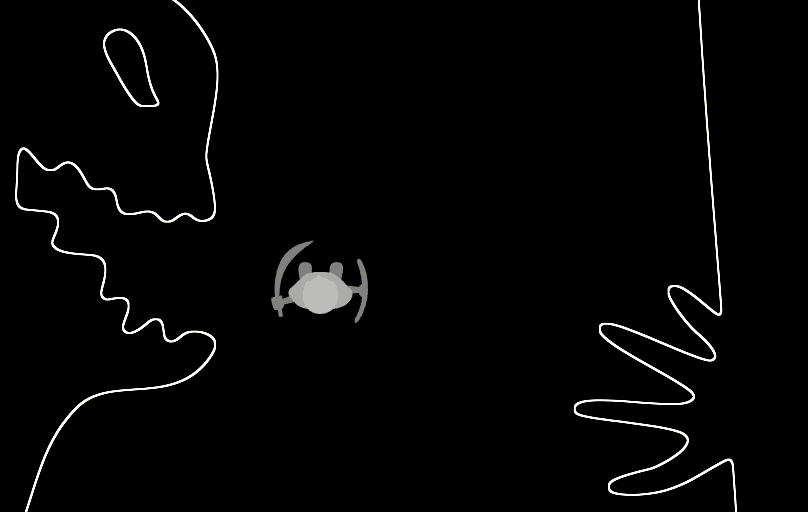
🧠 Description
Experience the spooky charm of Valley of Ghouls, a Halloween-themed animated website built using HTML, CSS, and JavaScript. It features glowing neon text, floating ghost animations, and a dynamic background that transforms with eerie lighting effects. Perfect for learning creative front-end design, CSS animations, and event-based interactivity in JavaScript.
💻 HTML Code
1<!DOCTYPE html>
2<html lang="en">
3
4 <head>
5 <meta charset="UTF-8">
6 <title>Halloween - valley of ghouls ( gooey outline )</title>
7 <link rel="stylesheet" href="./style.css">
8
9 </head>
10
11 <body>
12 <div id="walkerWrapper">
13 <svg id="walker" style="overflow: visible;" width="100" height="100" viewBox="0 0 100 100" version="1.1"
14 xmlns="http://www.w3.org/2000/svg"
15 xmlns:svg="http://www.w3.org/2000/svg">
16
17 <g id="weapon01Wrapper" fill="#AAA" fill-opacity="0.75" stroke="none">
18 <path fill="none" stroke="none" d="M 110,50 A 60,60 0 0 1 50,110 60,60 0 0 1 -10,50 60,60 0 0 1 50,-10 60,60 0 0 1 110,50 L 50,50 Z" />
19 <path id="weapon01" d="M 50,2 C 39,2 30,4 21,9 c -4,3 -2,6 3,4 6,-3 20,-5 20,-5 0,1 1,2 3,3 L 43,52 H 57 L 53,11 c 2,0 4,-2 4,-3 0,-1 15,2 21,6 5,2 7,-1 2,-4 C 72,5 61,2 50,2 Z" />
20 </g>
21
22 <g id="weapon02Wrapper" fill="#AAA" fill-opacity="0.75" stroke="none">
23 <path fill="none" stroke="none" d="M 110,50 A 60,60 0 0 1 50,110 60,60 0 0 1 -10,50 60,60 0 0 1 50,-10 60,60 0 0 1 110,50 L 50,50 Z" />
24 <path id="weapon02" d="m 17,13 1,2 c 0,1 -6,3 -6,3 0,0 0,5 2,4 l 6,-3 c 1,1 2,1 5,1 L 43,52 H 57 L 30,17 c 1,-1 3,-1 3,-2 0,-1 -1,-2 -1,-2 21,-6 37,-3 60,16 5,4 1,-2 1,-2 C 85,10 69,-3 35,7 32,8 30,9 30,9 L 28,6 C 27,5 16,11 17,13 Z" />
25 </g>
26
27 <g id="wMain" fill="#AAA" fill-opacity="0.75" stroke="none">
28 <path fill="none" stroke="none" d="M 110,50 A 60,60 0 0 1 50,110 60,60 0 0 1 -10,50 60,60 0 0 1 50,-10 60,60 0 0 1 110,50 L 50,50 Z" />
29 <path id="rFoot" d="M 65,77 C 54,77 59,65 60,58 60,51 58,42 65,42 c 9,0 4,9 5,16 C 71,65 75,77 65,77 Z" />
30 <path id="lFoot" d="M 33,77 C 23,77 28,65 29,58 c 0,-7 -2,-16 5,-16 9,0 4,9 5,16 C 40,65 44,77 33,77 Z" />
31 <path id="body" fill-opacity="1" d="m 50,29 c 8,0 19,1 24,6 6,7 12,11 3,18 -5,4 -8,9 -13,12 -8,2 -7,2 -14,2 C 45,67 42,67 38,66 33,63 28,60 22,52 14,47 17,39 26,33 32,30 42,29 50,29 Z" />
32 <path id="head" fill="#BBB" fill-opacity="1" d="m 54,62 c -2,0 -2,2 -3,2 -1,0 0,-1 -3,-2 -3,-1 -7,-3 -9,-4 -2,-1 -2,0 -3,-1 -3,-3 -6,-11 -3,-21 3,-7 9,-11 17,-11 9,0 15,6 17,14 -1,0 2,12 -4,19 -1,1 -1,0 -3,0 0,0 -4,3 -7,4 z" />
33 </g>
34
35 </svg>
36 </div>
37
38<svg id="svgWorld" style="overflow:hidden;" width="1000" height="8000" viewBox="0 0 1000 8000" version="1.1" xmlns="http://www.w3.org/2000/svg" xmlns:svg="http://www.w3.org/2000/svg"><!-- -->
39
40 <g id="walls" fill="#FFFFFF" stroke="none" filter="url(#goo) url(#outline)"><!-- url(#iosShadow) -->
41
42 <g id="wall01">
43
44 <use href="#wall" fill="#FFFFFF" />
45
46 <g id="p0" class="pointer" transform="translate(-520, -100)">
47 <use class="center" href="#pointerCenter" />
48 <use class="hand" fill="#FFFFFF" href="#pointerFace2Flip" />
49 </g>
50
51 </g>
52
53 </g>
54
55 <defs>
56
57 <filter id="goo" x="-10%" y="-10%" width="120%" height="120%">
58 <feGaussianBlur in="SourceGraphic" stdDeviation="4" result="feBlur" />
59 <feColorMatrix in="feBlur" mode="matrix" values="1 1 1 1 0 1 1 1 1 0 1 1 1 1 0 0 0 0 19 -9" />
60 </filter>
61
62 <filter id="outline" x="-10%" y="-10%" width="120%" height="120%">
63
64 <feColorMatrix in="SourceAlpha" values="1 1 1 1 1 1 1 1 1 1 1 1 1 1 0 0 0 0 1 0" result="mx" />
65 <feMorphology in="mx" operator="dilate" radius="2" result="mor1" />
66 <feComposite in="mor1" in2="SourceGraphic" operator="out" result="com1" />
67 <feOffset in="com1" dx="0" dy="0" />
68
69 </filter>
70 <!-- <filter id="outline2" filterUnits="userSpaceOnUse" x="-20%" y="-20%" width="140%" height="140%">
71 <feMorphology operator="dilate" in="SourceAlpha" radius="4" result="e1" />
72 <feMorphology operator="dilate" in="SourceAlpha" radius="0" result="e2" />
73 <feComposite in="e1" in2="e2" operator="xor" result="outline"/>
74 <feColorMatrix type="matrix" in="outline" values="1 1 1 1 1 1 1 1 1 1 1 1 1 1 1 0 0 0 1 0" result="outline2"/>
75 <feComposite in="outline2" in2="SourceAlpha" operator="out" result="output" />
76
77 </filter> -->
78
79 <filter id="iosShadow" x="0%" y="0%">
80 <feOffset in="SourceGraphic" result="offset-graphic" dx="0" dy="0"/>
81 <feGaussianBlur in="offset-graphic" result="blur-graphic" stdDeviation="2"/>
82 <feColorMatrix in="blur-graphic" result="color-graphic" type="matrix" values="
83 1 1 1 1 0
84 1 1 1 1 0
85 1 1 1 1 0
86 0 0 0 1 0"/>
87 <feMerge>
88 <feMergeNode in="color-graphic"/>
89 <feMergeNode in="SourceGraphic"/>
90 </feMerge>
91 </filter>
92
93
94 </defs>
95
96</svg>
97
98
99<svg width="0" height="0" style="position:absolute" role="none" xmlns="http://www.w3.org/2000/svg">
100 <defs>
101
102 <path id="wall" d="M -730,-51 V 8050 H 121 C 89,7823 42,7557 51,7330 c 10,-248 49,-637 57,-900 -5,-262 -69,-692 -52,-1032 3,-353 20,-635 22,-984 2,-251 -45,-629 -41,-878 5,-327 67,-632 68,-869 1,-205 -38,-574 -42,-859 -5,-319 51,-609 47,-756 C 105,889 36,637 38,438 27,265 48,224 60,-51 Z m 1719,0 c -61,134 -87,342 -82,501 -1,172 43,370 40,555 -5,248 -64,604 -64,799 -3,212 56,652 49,936 -12,339 -60,498 -56,831 4,336 61,420 47,851 -13,411 -62,779 -67,1000 -6,266 75,681 85,1016 -4,356 -65,709 -64,953 -13,330 32,444 66,659 h 787 V -51 Z" />
103
104 <path id="pointerCenter" fill-opacity="0" d="M 1000,500 C 1000,632 947,759 854,853 760,947 633,999 500,999 367,999 240,947 146,853 53,759 0,632 0,500 0,368 53,241 146,147 c 195,-195 512,-195 707,0 C 947,241 1000,368 1000,500 Z" />
105 <path id="pointerHand" d="m 414,194 c 13,15 31,31 41,25 13,-7 -17,-119 -7,-120 23,-1 25,116 47,116 12,0 24,-114 41,-115 14,5 -12,117 -1,123 7,5 19,-16 21,-21 8,-21 34,-50 37,-46 9,10 -8,35 -23,77 -7,19 -64,47 -63,75 C 511,385 492,620 826,657 550,732 79,671 170,661 486,626 466,370 466,305 c 0,-35 -37,-57 -57,-80 -26,-29 -32,-69 -26,-71 8,-3 31,40 31,40 z" />
106 <path id="pointerFace" d="m 399,201 c 9,-19 -7,-27 14,-41 16,-10 12,-12 19,-12 11,0 17,5 28,18 6,7 -16,21 -7,30 2,2 6,2 13,-1 11,-5 35,3 23,33 -2,4 9,13 13,10 9,-6 12,-10 21,-17 11,-9 38,17 31,26 -12,16 12,25 20,15 10,-12 17,18 40,4 7,-4 8,-9 5,-13 -7,-7 -9,-31 -25,-27 -10,2 -26,-10 -18,-14 10,-4 1,-20 -13,-20 -14,0 -10,-14 -9,-21 2,-14 15,0 16,-13 1,-11 -13,-6 -8,-21 3,-7 -3,-14 4,-17 15,-7 17,-4 17,-11 C 584,98 567,100 564,94 c -4,-10 -10,-15 14,-18 16,-2 41,7 71,-2 52,-16 53,16 76,9 45,-13 41,12 61,22 32,16 62,35 61,54 0,6 4,19 9,27 15,22 -14,24 -10,35 5,16 -1,35 2,52 C 850,285 865,284 884,282 c 15,-1 26,-1 29,7 9,21 -38,55 -6,55 11,0 -3,-18 10,-12 27,12 -22,40 -35,9 C 878,331 874,328 886,317 c 33,-31 -36,-11 -35,-5 3,16 -2,52 0,63 1,5 14,2 17,7 C 881,400 858,482 858,505 c 2,100 19,227 -188,213 -6,22 -357,47 -356,24 2,-37 138,-261 82,-288 -37,-18 -47,-80 -28,-111 5,-9 5,-15 -2,-25 -14,-19 -16,-53 -5,-75 19,-11 28,-21 38,-42 z m 239,-47 c 17,0 35,55 77,51 29,-3 26,-38 6,-56 -9,-8 -46,-16 -64,-14 -17,2 -38,18 -19,19 z" />
107 <path id="pointerFace2" d="M 613,516 C 585,513 543,473 511,455 478,436 384,614 353,682 321,753 204,643 201,630 196,609 470,364 465,346 c -16,-55 -33,-91 -41,-140 -5,-20 1,-35 19,-46 12,-6 16,0 14,13 -3,13 -17,7 -14,17 5,15 12,-6 24,5 6,6 -11,18 -1,22 15,5 12,-20 22,-18 11,2 -5,27 12,27 19,-2 -5,-25 12,-33 15,-8 12,30 26,18 9,-6 -17,-25 -5,-33 13,-9 17,25 28,10 7,-13 -21,-20 -12,-30 10,-12 19,17 26,2 5,-7 -19,-14 -15,-24 5,-10 23,9 25,-1 5,-7 -21,-6 -19,-17 5,-24 110,0 110,0 -15,25 30,16 32,3 2,-8 5,-7 8,2 35,64 111,67 113,92 31,332 -211,305 -216,304 z M 809,253 c 3,-16 -5,-22 -22,-33 -57,-43 -129,-64 -130,2 2,36 22,65 50,69 19,4 97,-15 100,-37 z" />
108 <path id="pointerFace3" d="m 713,119 c -25,-5 -85,12 -97,8 -7,-2 -50,-14 -54,-8 -11,17 3,18 4,24 3,14 -21,18 -5,28 19,13 -15,39 15,43 29,3 1,22 15,29 17,9 35,18 15,35 -14,12 61,40 -4,38 -17,0 -38,4 -38,-6 -3,-34 3,-45 -30,-30 -13,6 -14,-28 -14,-35 3,-45 -54,6 -44,-27 12,-39 -32,3 -34,-15 -3,-23 44,-35 -6,-38 -7,-19 11,-15 10,-31 0,-8 -5,-25 -15,-20 -64,32 -26,101 -61,136 -45,44 -100,38 -173,75 -71,36 -90,230 -74,258 171,69 341,75 512,17 -27,-33 -62,-90 -54,-133 0,0 20,-42 43,-61 16,-15 64,-15 110,-56 26,-24 23,44 9,46 -9,2 -18,31 -26,28 -88,-27 -79,15 -62,31 20,19 63,31 106,26 38,-4 66,-14 83,-48 23,-48 15,-124 -3,-181 -11,-33 -55,-71 -62,-85 -14,-24 -53,-47 -66,-48 z m -42,51 c 11,11 26,15 44,18 15,3 26,9 32,20 3,7 1,17 -5,22 -12,9 -29,-5 -40,-11 -15,-8 -31,-20 -33,-24 2,-9 1,-17 1,-26 z" />
109
110 <use id="pointerHandFlip" href="#pointerHand" />
111 <path id="pointerFaceFlip" d="m 602,201 c -9,-19 7,-27 -14,-41 -16,-10 -12,-12 -19,-12 -11,0 -17,5 -28,18 -6,7 16,21 7,30 -2,2 -6,2 -13,-1 -11,-5 -35,3 -23,33 2,4 -9,13 -13,10 -9,-6 -12,-10 -21,-17 -11,-9 -38,17 -31,26 12,16 -12,25 -20,15 -10,-12 -17,18 -40,4 -7,-4 -8,-9 -5,-13 7,-7 9,-31 25,-27 10,2 26,-10 18,-14 -10,-4 -1,-20 13,-20 14,0 10,-14 9,-21 -2,-14 -15,0 -16,-13 -1,-11 13,-6 8,-21 -3,-7 3,-14 -4,-17 -15,-7 -17,-4 -17,-11 -1,-11 16,-9 19,-15 4,-10 10,-15 -14,-18 -16,-2 -41,7 -71,-2 -52,-16 -53,16 -76,9 -45,-13 -41,12 -61,22 -32,16 -62,35 -61,54 0,6 -4,19 -9,27 -15,22 14,24 10,35 -5,16 1,35 -2,52 -2,12 -17,11 -36,9 -15,-1 -26,-1 -29,7 -9,21 38,55 6,55 -11,0 3,-18 -10,-12 -27,12 22,40 35,9 4,-10 8,-13 -4,-24 -33,-31 36,-11 35,-5 -3,16 2,52 0,63 -1,5 -14,2 -17,7 -13,18 10,100 10,123 -2,100 -19,227 188,213 6,22 357,47 356,24 -2,-37 -138,-261 -82,-288 37,-18 47,-80 28,-111 -5,-9 -5,-15 2,-25 14,-19 16,-53 5,-75 -19,-11 -28,-21 -38,-42 z m -239,-47 c -17,0 -35,55 -77,51 -29,-3 -26,-38 -6,-56 9,-8 46,-16 64,-14 17,2 38,18 19,19 z" />
112 <path id="pointerFace2Flip" d="m 386,516 c 28,-3 70,-43 102,-61 33,-19 127,159 158,227 32,71 149,-39 152,-52 5,-21 -269,-266 -264,-284 16,-55 33,-91 41,-140 5,-20 -1,-35 -19,-46 -12,-6 -16,0 -14,13 3,13 17,7 14,17 -5,15 -12,-6 -24,5 -6,6 11,18 1,22 -15,5 -12,-20 -22,-18 -11,2 5,27 -12,27 -19,-2 5,-25 -12,-33 -15,-8 -12,30 -26,18 -9,-6 17,-25 5,-33 -13,-9 -17,25 -28,10 -7,-13 21,-20 12,-30 -10,-12 -19,17 -26,2 -5,-7 19,-14 15,-24 -5,-10 -23,9 -25,-1 -5,-7 21,-6 19,-17 -5,-24 -110,0 -110,0 15,25 -30,16 -32,3 -2,-8 -5,-7 -8,2 -35,64 -111,67 -113,92 -31,332 211,305 216,304 z m -196,-263 c -3,-16 5,-22 22,-33 57,-43 129,-64 130,2 -2,36 -22,65 -50,69 -19,4 -97,-15 -100,-37 z" />
113 <path id="pointerFace3Flip" d="m 289,119 c 25,-5 85,12 97,8 7,-2 50,-14 54,-8 11,17 -3,18 -4,24 -3,14 21,18 5,28 -19,13 15,39 -15,43 -29,3 -1,22 -15,29 -17,9 -35,18 -15,35 14,12 -61,40 4,38 17,0 38,4 38,-6 3,-34 -3,-45 30,-30 13,6 14,-28 14,-35 -3,-45 54,6 44,-27 -12,-39 32,3 34,-15 3,-23 -44,-35 6,-38 7,-19 -11,-15 -10,-31 0,-8 5,-25 15,-20 64,32 26,101 61,136 45,44 100,38 173,75 71,36 90,230 74,258 -171,69 -341,75 -512,17 27,-33 62,-90 54,-133 0,0 -20,-42 -43,-61 -16,-15 -64,-15 -110,-56 -26,-24 -23,44 -9,46 9,2 18,31 26,28 88,-27 79,15 62,31 -20,19 -63,31 -106,26 -38,-4 -66,-14 -83,-48 -23,-48 -15,-124 3,-181 11,-33 55,-71 62,-85 14,-24 51,-48 66,-48 z m 42,51 c -11,11 -26,15 -44,18 -15,3 -26,9 -32,20 -3,7 -1,17 5,22 12,9 29,-5 40,-11 15,-8 31,-20 33,-24 -2,-9 -1,-17 -1,-26 z" />
114
115 </defs>
116</svg>
117 <script src='https://unpkg.com/gsap@3/dist/gsap.min.js'></script>
118<script src='https://unpkg.com/gsap@3/dist/ScrollTrigger.min.js'></script>
119<script src='https://cdn.jsdelivr.net/npm/onscreen@1.4.0/dist/on-screen.umd.min.js'></script><script src="./script.js"></script>
120
121 </body>
122
123</html>
124The HTML file forms the structure of the Halloween scene. It contains:
A main container (div class="container") that centers the content both vertically and horizontally.
A heading (
Valley of Ghouls
) — the glowing main title of the page.Two ghost elements (div class="ghost") representing the floating ghosts that animate independently.
A button (button id="next") that triggers the theme transformation via JavaScript.
This HTML acts as the base layout — simple, clean, and designed for the CSS and JS to add life to it.
CSS Code
1* { 2 box-sizing: border-box; 3} 4 5html, body { 6 margin:0; 7 background:#000; 8} 9body { 10 display: flex; 11} 12#dataText { 13 position: fixed; 14 left: 0px; 15 top: 0px; 16 z-index: 100; 17 padding: 50px; 18 width: 100vw; 19} 20#walkerWrapper { 21 22 position: fixed; 23 display: block; 24 left: 0px; 25 top: 55vh; 26 top: calc( 50vh - 40px ); 27 z-index: 100; 28 padding: 0px; 29 width: 100vw; 30 text-align: center; 31 color: #FFF; 32 overflow: visible; 33 34 #walker { 35 position: relative; 36 display: block; 37 width: 100px; 38 height: 100px; 39 border-radius: 50%; 40 margin: auto; 41 overflow: visible; 42 43 } 44 #walker.up, #walker.down { 45 #lFoot { animation: walkingAnim1 1s infinite; } 46 #rFoot { animation: walkingAnim2 1s infinite; } 47 } 48} 49#weapon01Wrapper, #weapon02Wrapper { 50 overflow: visible; 51} 52 53 54@keyframes walkingAnim1 { 55 0% { transform: translateY(-5px); } 56 50% { transform: translateY(0px); } 57 100% { transform: translateY(-5px); } 58} 59@keyframes walkingAnim2 { 60 0% { transform: translateY(0px); } 61 50% { transform: translateY(-5px); } 62 100% { transform: translateY(0px); } 63} 64 65#svgWorld { 66 position: relative; 67 width: 90%; 68 max-width: 1000px; 69 margin-left: auto; 70 margin-right: auto; 71 height: auto; 72 overflow: hidden; 73 /* will-change: transform, opacity; 74 transform-box: fill-box; */ 75 76 .pointer { 77 pointer-events: none; 78 } 79} 80
The CSS is where the magic and spookiness come to life.
Key styling concepts:
Background Design:
A dark, gradient-based background simulates a Halloween night sky (background: radial-gradient(circle, #111 0%, #000 100%)).
Smooth transitions are added for a glowing, eerie feel.
Typography & Title Effects:
The title text uses text-shadow to create a neon glow (orange by default).
The font is set to something clean but bold for visibility.
The title subtly pulses using the @keyframes glow animation.
Ghost Animation:
Each ghost is styled as a white circular shape with opacity to simulate transparency.
The @keyframes float animation makes them gently move up and down infinitely.
Positioning is absolute, allowing them to hover freely within the screen.
Button Styling:
The “Next” button has a hover effect and matches the Halloween theme (red or orange color).
The rounded corners and glow on hover make it appear interactive and playful.
Responsiveness:
The design remains centered and balanced using flexbox.
Media queries ensure consistent layout across screen sizes.
Overall, the CSS adds motion, color, and emotion, transforming a static layout into an immersive spooky interface.
Javascipt Code
1let select = e => document.querySelector(e);
2let selectAll = e => document.querySelectorAll(e);
3
4const svgWorld = select("#svgWorld"),
5feOffsetAll = selectAll("#outline feOffset[in='com2']"),
6wall01 = select("#wall01"),
7handType = ["#pointerHand", "#pointerFace", "#pointerHand", "#pointerFace2", "#pointerHand", "#pointerFace3"],
8handTypeSpace = [130, 260, 130, 260, 130, 260],
9pointElm = select("#p0"),
10numReq = 22;
11
12let oldPageYOffset = 0;
13let scrollTimer = null;
14let isTurning = false;
15
16window.addEventListener("scroll", (event) => {
17
18 if( scrollTimer !== null )
19 {
20
21 clearTimeout(scrollTimer);
22
23 newPageYOffset = window.pageYOffset;
24 if( isTurning == false )
25 {
26 if( oldPageYOffset - newPageYOffset < 0 )
27 {
28 walker.classList.remove("up");
29 walker.classList.add("down");
30 gsap.to(wMain, { rotate: 0, transformOrigin: "50% 50%" });
31 }
32 else if( oldPageYOffset - newPageYOffset > 0 )
33 {
34 walker.classList.add("up");
35 walker.classList.remove("down");
36 gsap.to(wMain, { rotate: 180, transformOrigin: "50% 50%" });
37 }
38 }
39 oldPageYOffset = newPageYOffset;
40
41 }
42 scrollTimer = setTimeout(function() {
43 walker.classList.remove("up");
44 walker.classList.remove("down");
45 }, 250);
46
47});
48
49/* Random ghoul generator */
50let ySum = -150;
51for( let index = 1; index < numReq; index++ )
52{
53
54 let handTypeStr = gsap.utils.random(handType);
55 let handTypeIndex = handType.indexOf(handTypeStr);
56
57 let point = pointElm.cloneNode(true);
58 point.id = "p" + index;
59 let x = 520;
60 ySum += handTypeSpace[handTypeIndex];
61 let flipPath = "";
62 if( index % 2 === 0 )
63 {
64 x = -520;
65 flipPath = "Flip";
66 }
67 point.setAttribute("transform", "translate("+x+", "+ySum+")");
68 point.querySelector(".hand").setAttribute( "href", handTypeStr + flipPath );
69 wall01.appendChild( point );
70
71}
72pointElm.setAttribute("transform", "translate(-520, -100)");
73gsap.set(pointElm, { rotate: 90, transformOrigin: "50% 50%" });
74
75ySum += 1500;
76svgWorld.setAttribute("height", ySum );
77svgWorld.setAttribute("viewBox", "0 0 1000 " + ySum );
78const pointers = selectAll(".pointer");
79
80
81/* rotate and move pointers towards walker */
82
83rotatePointers();
84addEventListener("scroll", (event) => { rotatePointers(); });
85
86function rotatePointers() {
87
88 /* get the walker position */
89 var elem = (document.compatMode === "CSS1Compat") ?
90 document.documentElement :
91 document.body;
92
93 var svgOffsets = svgWorld.getBoundingClientRect();
94
95 let centerX = svgOffsets.width / 2;
96 let centerY = Math.round( window.scrollY + ( elem.clientHeight / 2 ) );
97
98 let distanceMem01 = 6000,
99 distanceMem02 = 6000,
100 degreesMem01 = 0,
101 degreesMem02 = 0;
102
103 /* set all on screen pointer positions based on walker */
104 pointers.forEach( ( pointer, index ) => {
105
106 var center = pointer.querySelector(".center");
107 var hand = pointer.querySelector(".hand");
108
109 var offsets = center.getBoundingClientRect();
110
111 if( OnScreen.check(center) )
112 {
113
114 var halfWidth = offsets.width / 2;
115 var halfHeight = offsets.height / 2;
116 var pointerX = Math.round( offsets.left - svgOffsets.left + halfWidth );
117 var pointerY = Math.round( offsets.top + window.scrollY + halfHeight );
118
119 var xAxis = ( centerX - pointerX ) * 1;
120 var yAxis = ( centerY - pointerY ) * -1;
121
122 let radians = Math.atan2( xAxis, yAxis );
123 let degrees = ( radians * 180 / Math.PI ).toFixed(2);
124 let distance = Math.hypot( xAxis, yAxis ).toFixed(2);
125 let distanceAbs = Math.abs( yAxis );
126
127 gsap.to( pointer, 0.5, { rotation: degrees, transformOrigin:"50% 50%" } );
128 if( distanceAbs < 300 )
129 {
130 let inverseDistance = halfWidth * distanceAbs / 300;
131 gsap.to( hand, 0.5, { y: inverseDistance } );
132 }
133 else
134 gsap.to( hand, 0.5, { y: halfWidth } );
135
136 /* get two closest pointers */
137 if( distanceAbs < distanceMem01 )
138 {
139 distanceMem02 = distanceMem01;
140 degreesMem02 = degreesMem01;
141 distanceMem01 = distanceAbs;
142 degreesMem01 = degrees;
143 }
144 else if( distanceAbs < distanceMem02 )
145 {
146 distanceMem02 = distanceAbs;
147 degreesMem02 = degrees;
148 }
149
150 }
151
152 });
153
154 /* rotate weapons towards nearest pointers */
155 degreesMem01 = ( degreesMem01 + 180 ) % 360;
156 degreesMem02 = ( degreesMem02 + 180 ) % 360;
157 gsap.to( "#weapon01Wrapper", 0.5, { rotation: degreesMem01, transformOrigin:"50% 50%" } );
158 gsap.to( "#weapon02Wrapper", 0.5, { rotation: degreesMem02, transformOrigin:"50% 50%" } );
159
160
161}
162
163/* animate walker at the bottom of page */
164ScrollTrigger.create({
165 trigger: svgWorld,
166 start: 'bottom-=100px bottom',
167 onEnter: function () {
168 isTurning = true;
169 walker.classList.remove("up");
170 walker.classList.remove("down");
171 gsap.timeline()
172 //.set( "#weapon01Wrapper", { rotation: 90, transformOrigin:"50% 50%" } )
173 //.set( "#weapon02Wrapper", { rotation: -90, transformOrigin:"50% 50%" } )
174 .to( wMain, { rotate: 0, transformOrigin: "50% 50%" })
175 .to( "#weapon01Wrapper", 1, { rotation: 90, transformOrigin:"50% 50%" } )
176 .to( "#weapon02Wrapper", 1, { rotation: -90, transformOrigin:"50% 50%" }, "<" )
177 .fromTo( ["#weapon01Wrapper","#weapon02Wrapper"], 1, { y: -15 }, { y: 0, duration: 0.25, easing: "none", repeat :3, repeatDelay: 0, onComplete() { isTurning = false; } });
178 },
179});
180The JavaScript introduces interactivity and dynamic transformation to the page.
Main logic:
Selecting Elements:
The script selects the main title, ghosts, and the button using document.querySelector or getElementById.
Event Handling:
When the “Next” button is clicked, an event listener triggers a function.
Dynamic Effects:
The background gradient and text glow color change from orange to cyan, giving a “midnight magic” transition.
The ghosts’ animations speed up or their opacity and glow colors adjust to match the new theme.
The button text changes to “Happy Haunting!” as a final interactive message.
Transitions:
Smooth CSS transitions (e.g., transition: background 2s) help the color changes feel natural rather than abrupt.
In short, the JavaScript adds user-triggered animation and atmosphere change, making the website interactive and alive — not just a static Halloween display.