🧠 Description
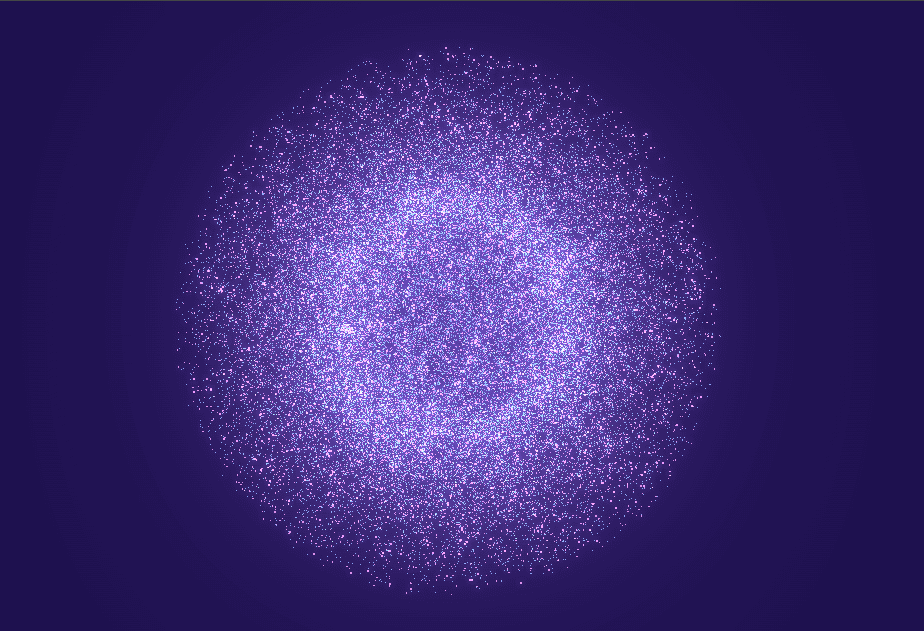
This project is an interactive bloom-powered particle field created using Three.js and Unreal Bloom post-processing.
Thousands of particles float in layered spherical formations and dynamically react to mouse movement and click-generated ripples, creating a living, breathing cosmic environment.
What Makes This Project Stand Out
- 45,000+ GPU-accelerated particles
- Unreal Bloom glow post-processing
- Mouse-driven force fields
- Click-based ripple shockwaves
- Smooth particle spring physics
- Color-shifting HSL gradients
- Cinematic camera drift
- Fully procedural (no models)
Core Concept
The scene is built using:
- Layered particle spheres
- Spring-damper physics to return particles to base positions
- Mouse proximity forces
- Expanding ripple waves
- Additive blending + bloom for glow
All motion emerges from math and interaction — no pre-baked animations.
💻 Step 1: HTML Structure
Complete HTML Code
1<!DOCTYPE html>
2<html lang="en">
3
4 <head>
5 <meta charset="UTF-8">
6 <title>Interactive Bloom Particle Field</title>
7
8
9 </head>
10
11 <body>
12 <style>
13 * {
14 margin: 0;
15 padding: 0;
16 box-sizing: border-box;
17 }
18 html, body {
19 width: 100%;
20 height: 100%;
21 overflow: hidden;
22 }
23 #container {
24 position: fixed;
25 width: 100%;
26 height: 100%;
27 background: radial-gradient(circle at 50% 50%,
28 #1a0632 0%,
29 #140426 25%,
30 #0c021a 50%,
31 #06020e 75%,
32 #020108 100%
33 );
34 }
35 canvas {
36 display: block;
37 width: 100%;
38 height: 100%;
39 }
40 .glow-overlay {
41 position: fixed;
42 top: 0;
43 left: 0;
44 width: 100%;
45 height: 100%;
46 pointer-events: none;
47 background: radial-gradient(circle at 50% 50%,
48 rgba(120, 50, 255, 0.05) 0%,
49 rgba(80, 40, 200, 0.03) 40%,
50 transparent 70%);
51 mix-blend-mode: screen;
52 }
53</style>
54
55<div id="container"></div>
56<div class="glow-overlay"></div>
57
58<script type="importmap">
59{
60 "imports": {
61 "three": "https://cdn.jsdelivr.net/npm/three@0.166.1/build/three.module.js",
62 "three/addons/": "https://cdn.jsdelivr.net/npm/three@0.166.1/examples/jsm/"
63 }
64}
65</script>
66
67<script type="module">
68 import * as THREE from 'three';
69 import { EffectComposer } from 'three/addons/postprocessing/EffectComposer.js';
70 import { RenderPass } from 'three/addons/postprocessing/RenderPass.js';
71 import { UnrealBloomPass } from 'three/addons/postprocessing/UnrealBloomPass.js';
72
73 let scene, camera, renderer, composer;
74 let particleLayers = [];
75 let time = 0;
76 const mouse = new THREE.Vector3(0, 0, 0);
77 const targetMouse = new THREE.Vector3(0, 0, 0);
78 const mouseRadius = 40;
79 let ripples = [];
80
81 const layersConfig = [
82 {
83 count: 20000,
84 size: 0.3,
85 colorRange: { hue: [0.75, 0.9], sat: [0.7, 1], light: [0.5, 0.7] },
86 rotationSpeed: 0.001
87 },
88 {
89 count: 25000,
90 size: 0.2,
91 colorRange: { hue: [0.45, 0.6], sat: [0.6, 0.8], light: [0.4, 0.6] },
92 rotationSpeed: 0.0005
93 }
94 ];
95
96 function createParticleSystem(config) {
97 const geometry = new THREE.BufferGeometry();
98 const positions = new Float32Array(config.count * 3);
99 const colors = new Float32Array(config.count * 3);
100 const basePositions = new Float32Array(config.count * 3);
101 const baseColors = new Float32Array(config.count * 3);
102
103 for (let i = 0; i < config.count; i++) {
104 const i3 = i * 3;
105
106 const radius = 25 + Math.random() * 30;
107 const theta = Math.random() * Math.PI * 2;
108 const phi = Math.acos(2 * Math.random() - 1);
109
110 const x = radius * Math.sin(phi) * Math.cos(theta);
111 const y = radius * Math.sin(phi) * Math.sin(theta);
112 const z = radius * Math.cos(phi);
113
114 positions[i3] = x;
115 positions[i3 + 1] = y;
116 positions[i3 + 2] = z;
117
118 basePositions[i3] = x;
119 basePositions[i3 + 1] = y;
120 basePositions[i3 + 2] = z;
121
122 const dist = Math.sqrt(x * x + y * y + z * z) / 55;
123 const hue = THREE.MathUtils.lerp(config.colorRange.hue[0], config.colorRange.hue[1], dist);
124 const sat = THREE.MathUtils.lerp(config.colorRange.sat[0], config.colorRange.sat[1], dist);
125 const light = THREE.MathUtils.lerp(config.colorRange.light[0], config.colorRange.light[1], dist);
126
127 const color = new THREE.Color().setHSL(hue, sat, light);
128 colors[i3] = color.r;
129 colors[i3 + 1] = color.g;
130 colors[i3 + 2] = color.b;
131
132 baseColors[i3] = color.r;
133 baseColors[i3 + 1] = color.g;
134 baseColors[i3 + 2] = color.b;
135 }
136
137 geometry.setAttribute('position', new THREE.BufferAttribute(positions, 3));
138 geometry.setAttribute('color', new THREE.BufferAttribute(colors, 3));
139
140 const textureLoader = new THREE.TextureLoader();
141 const particleTexture = textureLoader.load('https://placehold.co/32x32/ffffff/ffffff.png?text=+');
142
143 const material = new THREE.PointsMaterial({
144 size: config.size,
145 vertexColors: true,
146 transparent: true,
147 opacity: 0.8,
148 blending: THREE.AdditiveBlending,
149 depthWrite: false,
150 sizeAttenuation: true,
151 map: particleTexture
152 });
153
154 const points = new THREE.Points(geometry, material);
155 points.userData = {
156 velocities: new Float32Array(config.count * 3),
157 basePositions,
158 baseColors,
159 colorVelocities: new Float32Array(config.count * 3),
160 rotationSpeed: config.rotationSpeed
161 };
162
163 return points;
164 }
165
166 function createRipple(x, y) {
167 ripples.push({
168 x, y,
169 radius: 0,
170 strength: 2.5,
171 maxRadius: mouseRadius * 4,
172 speed: 4,
173 color: new THREE.Color(0xffffff)
174 });
175 }
176
177 function init() {
178 const container = document.getElementById('container');
179
180 scene = new THREE.Scene();
181 scene.fog = new THREE.FogExp2(0x020108, 0.008);
182
183 camera = new THREE.PerspectiveCamera(75, window.innerWidth / window.innerHeight, 0.1, 1000);
184 camera.position.z = 100;
185
186 renderer = new THREE.WebGLRenderer({ antialias: true });
187 renderer.setPixelRatio(window.devicePixelRatio);
188 renderer.setSize(window.innerWidth, window.innerHeight);
189 renderer.setClearColor(0x020108);
190 container.appendChild(renderer.domElement);
191
192 const renderScene = new RenderPass(scene, camera);
193 const bloomPass = new UnrealBloomPass(new THREE.Vector2(window.innerWidth, window.innerHeight), 1.5, 0.4, 0.85);
194 bloomPass.threshold = 0;
195 bloomPass.strength = 1.2;
196 bloomPass.radius = 0.5;
197
198 composer = new EffectComposer(renderer);
199 composer.addPass(renderScene);
200 composer.addPass(bloomPass);
201
202 layersConfig.forEach(config => {
203 const particles = createParticleSystem(config);
204 particleLayers.push(particles);
205 scene.add(particles);
206 });
207
208 document.addEventListener('mousemove', onMouseMove);
209 document.addEventListener('click', onClick);
210 window.addEventListener('resize', onWindowResize);
211 }
212
213 function updateParticles() {
214 mouse.lerp(targetMouse, 0.05);
215
216 ripples = ripples.filter(ripple => {
217 ripple.radius += ripple.speed;
218 ripple.strength *= 0.96;
219 return ripple.radius < ripple.maxRadius;
220 });
221
222 particleLayers.forEach(layer => {
223 const positions = layer.geometry.attributes.position.array;
224 const colors = layer.geometry.attributes.color.array;
225 const { velocities, basePositions, baseColors, colorVelocities } = layer.userData;
226 const totalParticles = positions.length / 3;
227
228 for (let i = 0; i < totalParticles; i++) {
229 const i3 = i * 3;
230 const px = positions[i3];
231 const py = positions[i3 + 1];
232 const pz = positions[i3 + 2];
233
234 let totalForce = new THREE.Vector3();
235 let colorShift = new THREE.Vector3();
236
237 const mouseDist = mouse.distanceTo(new THREE.Vector3(px, py, pz));
238 if (mouseDist < mouseRadius) {
239 const forceStrength = (1 - mouseDist / mouseRadius) * 0.1;
240 const forceDirection = new THREE.Vector3(px, py, pz).sub(mouse).normalize();
241 totalForce.add(forceDirection.multiplyScalar(forceStrength));
242
243 const colorIntensity = (1 - mouseDist / mouseRadius) * 0.8;
244 colorShift.set(colorIntensity, colorIntensity, colorIntensity);
245 }
246
247 ripples.forEach(ripple => {
248 const rippleDist = Math.sqrt(Math.pow(ripple.x - px, 2) + Math.pow(ripple.y - py, 2));
249 const rippleWidth = 15;
250 if (Math.abs(rippleDist - ripple.radius) < rippleWidth) {
251 const falloff = 1 - Math.abs(rippleDist - ripple.radius) / rippleWidth;
252 const rippleForce = ripple.strength * falloff * 0.1;
253 const forceDirection = new THREE.Vector3(px, py, pz).sub(new THREE.Vector3(ripple.x, ripple.y, pz)).normalize();
254 totalForce.add(forceDirection.multiplyScalar(rippleForce));
255
256 const rippleColor = new THREE.Vector3(ripple.color.r, ripple.color.g, ripple.color.b);
257 colorShift.add(rippleColor.multiplyScalar(falloff * ripple.strength));
258 }
259 });
260
261 velocities[i3] += totalForce.x;
262 velocities[i3 + 1] += totalForce.y;
263 velocities[i3 + 2] += totalForce.z;
264
265 const returnForce = 0.02;
266 velocities[i3] += (basePositions[i3] - px) * returnForce;
267 velocities[i3 + 1] += (basePositions[i3 + 1] - py) * returnForce;
268 velocities[i3 + 2] += (basePositions[i3 + 2] - pz) * returnForce;
269
270 const damping = 0.94;
271 velocities[i3] *= damping;
272 velocities[i3 + 1] *= damping;
273 velocities[i3 + 2] *= damping;
274
275 positions[i3] += velocities[i3];
276 positions[i3 + 1] += velocities[i3 + 1];
277 positions[i3 + 2] += velocities[i3 + 2];
278
279 colorVelocities[i3] += colorShift.x;
280 colorVelocities[i3 + 1] += colorShift.y;
281 colorVelocities[i3 + 2] += colorShift.z;
282
283 const colorReturnForce = 0.05;
284 colorVelocities[i3] += (baseColors[i3] - colors[i3]) * colorReturnForce;
285 colorVelocities[i3 + 1] += (baseColors[i3 + 1] - colors[i3 + 1]) * colorReturnForce;
286 colorVelocities[i3 + 2] += (baseColors[i3 + 2] - colors[i3 + 2]) * colorReturnForce;
287
288 const colorDamping = 0.9;
289 colorVelocities[i3] *= colorDamping;
290 colorVelocities[i3 + 1] *= colorDamping;
291 colorVelocities[i3 + 2] *= colorDamping;
292
293 colors[i3] += colorVelocities[i3];
294 colors[i3 + 1] += colorVelocities[i3 + 1];
295 colors[i3 + 2] += colorVelocities[i3 + 2];
296 }
297
298 layer.geometry.attributes.position.needsUpdate = true;
299 layer.geometry.attributes.color.needsUpdate = true;
300 });
301 }
302
303 function animate() {
304 requestAnimationFrame(animate);
305 time += 0.01;
306
307 updateParticles();
308
309 particleLayers.forEach(layer => {
310 layer.rotation.y += layer.userData.rotationSpeed;
311 layer.rotation.x = Math.sin(time * 0.1) * 0.05;
312 });
313
314 camera.position.x = Math.sin(time * 0.2) * 2;
315 camera.position.y = Math.cos(time * 0.3) * 2;
316 camera.lookAt(scene.position);
317
318 composer.render();
319 }
320
321 function onMouseMove(event) {
322 targetMouse.x = (event.clientX / window.innerWidth) * 2 - 1;
323 targetMouse.y = -(event.clientY / window.innerHeight) * 2 + 1;
324
325 const vector = new THREE.Vector3(targetMouse.x, targetMouse.y, 0.5);
326 vector.unproject(camera);
327 const dir = vector.sub(camera.position).normalize();
328 const distance = -camera.position.z / dir.z;
329 const pos = camera.position.clone().add(dir.multiplyScalar(distance));
330 targetMouse.copy(pos);
331 }
332
333 function onClick(event) {
334 const clickMouse = new THREE.Vector2();
335 clickMouse.x = (event.clientX / window.innerWidth) * 2 - 1;
336 clickMouse.y = -(event.clientY / window.innerHeight) * 2 + 1;
337
338 const vector = new THREE.Vector3(clickMouse.x, clickMouse.y, 0.5);
339 vector.unproject(camera);
340 const dir = vector.sub(camera.position).normalize();
341 const distance = -camera.position.z / dir.z;
342 const pos = camera.position.clone().add(dir.multiplyScalar(distance));
343
344 createRipple(pos.x, pos.y);
345 }
346
347 function onWindowResize() {
348 camera.aspect = window.innerWidth / window.innerHeight;
349 camera.updateProjectionMatrix();
350 renderer.setSize(window.innerWidth, window.innerHeight);
351 composer.setSize(window.innerWidth, window.innerHeight);
352 }
353
354 init();
355 animate();
356</script>
357
358 </body>
359
360</html>HTML Breakdown
#container → WebGL mount point
.glow-overlay → CSS-based ambient glow
Import maps → Clean ES module imports
No UI clutter — full immersive canvas
🎨 Step 2: CSS – Atmosphere & Visual Styling
CSS Code working
1* { 2 margin: 0; 3 padding: 0; 4 box-sizing: border-box; 5} 6 7html, body { 8 width: 100%; 9 height: 100%; 10 overflow: hidden; 11} 12 13#container { 14 position: fixed; 15 width: 100%; 16 height: 100%; 17 background: radial-gradient(circle at 50% 50%, 18 #1a0632 0%, 19 #140426 25%, 20 #0c021a 50%, 21 #06020e 75%, 22 #020108 100% 23 ); 24} 25 26canvas { 27 display: block; 28 width: 100%; 29 height: 100%; 30} 31 32.glow-overlay { 33 position: fixed; 34 inset: 0; 35 pointer-events: none; 36 background: radial-gradient(circle at 50% 50%, 37 rgba(120, 50, 255, 0.05) 0%, 38 rgba(80, 40, 200, 0.03) 40%, 39 transparent 70%); 40 mix-blend-mode: screen; 41}
CSS Breakdown
Radial gradients → Deep space feel
Fixed canvas → Zero layout shift
Glow overlay → Enhances bloom perception
Mix-blend-mode: screen → Natural light blending
⚙️ Step 3: JavaScript – Particles, Physics & Bloom
Scene & Renderer Setup
1scene = new THREE.Scene(); 2scene.fog = new THREE.FogExp2(0x020108, 0.008); 3 4camera = new THREE.PerspectiveCamera(75, aspect, 0.1, 1000); 5camera.position.z = 100; 6 7renderer = new THREE.WebGLRenderer({ antialias: true }); 8renderer.setPixelRatio(window.devicePixelRatio); 9renderer.setSize(window.innerWidth, window.innerHeight);
Bloom Post-Processing
1const renderPass = new RenderPass(scene, camera); 2const bloomPass = new UnrealBloomPass( 3 new THREE.Vector2(window.innerWidth, window.innerHeight), 4 1.2, 0.4, 0.85 5); 6 7composer = new EffectComposer(renderer); 8composer.addPass(renderPass); 9composer.addPass(bloomPass);
Particle System Generation
1const geometry = new THREE.BufferGeometry(); 2geometry.setAttribute('position', new THREE.BufferAttribute(positions, 3)); 3geometry.setAttribute('color', new THREE.BufferAttribute(colors, 3)); 4 5const material = new THREE.PointsMaterial({ 6 size: 0.3, 7 vertexColors: true, 8 transparent: true, 9 blending: THREE.AdditiveBlending, 10 depthWrite: false 11}); 12 13const points = new THREE.Points(geometry, material);
Interaction Forces
Mouse Attraction
Particles repel when cursor enters radius
Force strength fades with distance
Ripple System
Click creates expanding shockwave
Particles receive outward impulse
Ripple fades naturally over time
Physics Model Used
Velocity-based movement
Spring force → returns particles to origin
Damping → prevents infinite oscillation
Color velocities → glowing pulse reactions
Animation Loop
1function animate() {
2 requestAnimationFrame(animate);
3
4 updateParticles();
5
6 particleLayers.forEach(layer => {
7 layer.rotation.y += layer.userData.rotationSpeed;
8 });
9
10 camera.lookAt(scene.position);
11 composer.render();
12}