Back to Components
Jelly Squish Button – Interactive Drag & Squash Animation with GSAP
Component

Jelly Squish Button – Interactive Drag & Squash Animation with GSAP

CodewithLord
December 18, 2025

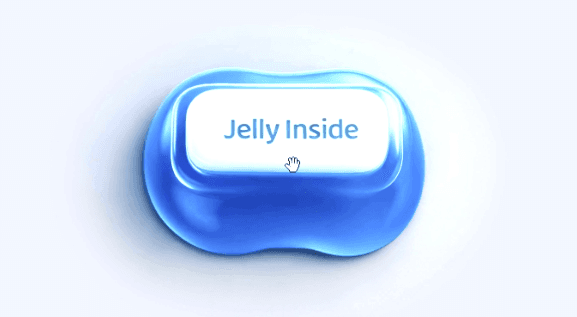
A premium jelly-like squish interaction built using HTML Canvas, GSAP Draggable, and inertia physics, featuring frame-by-frame image animation, smooth dampening, and optional mouse-follow behavior.


🧠 Description


This project recreates a high-quality jelly squish interaction using HTML Canvas and GSAP Draggable.
The illusion of soft, elastic deformation is achieved through frame-by-frame image animation, controlled by vertical drag input and enhanced with inertia, smoothing, and dampening physics.


Why This Interaction Feels Real


  • Ultra-smooth drag-based squish effect
  • 215 high-resolution image frames
  • Inertia-powered elastic motion
  • Realistic dampening & easing
  • Optional mouse-follow mode
  • Mobile-friendly touch support
  • Premium UI polish & loader animation

Core Concept


Instead of deforming vectors or meshes, this technique uses:

  • Pre-rendered image sequences
  • GSAP Draggable Y-axis control
  • Frame interpolation with smoothing
  • Physics-based dampening

The result feels soft, organic, and physically believable — perfect for buttons, product previews, or playful UI elements.


💻 Step 1: HTML Structure


Complete HTML Code


1<!DOCTYPE html> 2<html lang="en"> 3 4 <head> 5 <meta charset="UTF-8"> 6 <title>Jelly Squish Button</title> 7 <meta name="viewport" content="width=device-width, initial-scale=1"> 8<meta name="theme-color" content="#111317" /> 9<meta property="og:image" content="https://www.cerpow.com/jelly/jelly_00085.jpg" /><link rel="stylesheet" href="https://public.codepenassets.com/css/normalize-5.0.0.min.css"> 10<link rel="stylesheet" href="./style.css"> 11 12 </head> 13 14 <body> 15 <main> 16 <div class="bottom-controls"> 17 <h1>Drag vertically to squeeze</h1> 18 19 <div class="controls-container"> 20 <label class="checkbox-label"> 21 <input type="checkbox" id="followMouseCheckbox" /> 22 <span class="checkmark-icon"></span> 23 Follow mouse 24 </label> 25 </div> 26 </div> 27 28 <div class="canvas-wrapper"> 29 <canvas width="1280" height="960"></canvas> 30 <div class="drag-trigger"></div> 31 </div> 32 <div class="loader"><span></span></div> 33</main> 34 <script src='https://unpkg.com/gsap@3/dist/gsap.min.js'></script> 35<script src='https://unpkg.com/gsap@3/dist/Draggable.min.js'></script> 36<script src='https://unpkg.com/gsap@3/dist/InertiaPlugin.min.js'></script> 37<script src='https://cdn.jsdelivr.net/npm/ismobilejs@1/dist/isMobile.min.js'></script><script src="./script.js"></script> 38 39 </body> 40 41</html>

HTML Breakdown


<canvas> → Renders the jelly animation frames

.drag-trigger → Invisible drag hit-area

.bottom-controls → UI instructions & toggle

.loader → Preload progress feedback

GSAP plugins loaded via CDN


🎨 Step 2: CSS – Layout & Visual Polish


CSS Code


1* { 2 margin: 0; 3 padding: 0; 4 box-sizing: border-box; 5} 6 7html { 8 /* background-color: #111317; */ 9 background-color: #b1b3c0; 10 -webkit-user-select: none; 11 -moz-user-select: none; 12 -ms-user-select: none; 13 user-select: none; 14 -webkit-touch-callout: none; 15} 16 17body { 18 -webkit-font-smoothing: antialiased; 19 -moz-osx-font-smoothing: grayscale; 20 min-height: 100%; 21 min-height: 100svh; 22 font-family: system-ui, -apple-system, BlinkMacSystemFont, "Segoe UI", Roboto, Oxygen, Ubuntu, Cantarell, "Open Sans", "Helvetica Neue", sans-serif; 23 overflow: hidden; 24 text-align: center; 25 line-height: 1.8; 26 min-width: 380px; 27} 28 29main { 30 display: flex; 31 flex-direction: column; 32 justify-content: center; 33 align-items: center; 34 min-height: 100%; 35 min-height: 100svh; 36 width: 100%; 37 margin: 0 auto; 38 /* padding: 20px; */ 39} 40 41h1 { 42 position: relative; 43 font-size: 17px; 44 font-weight: 450; 45 /* text-transform: uppercase; */ 46 /* letter-spacing: 1.6px; */ 47 letter-spacing: -0.01em; 48 color: #464e60; 49} 50 51h1 span { 52 display: inline-flex; 53} 54 55.canvas-wrapper { 56 position: relative; 57 width: 100%; 58 max-width: 640px; 59 min-width: 380px; 60 aspect-ratio: 4/3; 61 /* margin-bottom: -2vw */ 62 /* margin-bottom: clamp(20px, 5vw, 40px); */ 63} 64 65canvas { 66 width: 100%; 67 height: 100%; 68 -webkit-user-select: none; 69 -moz-user-select: none; 70 -ms-user-select: none; 71 user-select: none; 72 z-index: 100; 73 transition: opacity 1.1s ease, transform 1.3s ease; 74 transform: translate3d(0px, 0px, 0px) scale3d(0.92, 0.92, 1) !important; 75 border-radius: clamp(22px, 6vw, 42px); 76 opacity: 0; 77} 78 79.drag-trigger { 80 position: absolute; 81 top: 50%; 82 left: 50%; 83 transform: translate(-50%, -49%); 84 width: 56%; 85 height: 52%; 86 border-radius: 999px; 87 cursor: -webkit-grab; 88 cursor: grab; 89 z-index: 101; 90 /* background-color: rgba(255, 0, 0, 0.3); */ 91} 92 93.drag-trigger:active { 94 cursor: -webkit-grabbing; 95 cursor: grabbing; 96} 97 98canvas.fadeIn { 99 opacity: 1; 100 transform: scale3d(1, 1, 1) !important; 101} 102 103.loader { 104 position: absolute; 105 background-color: rgba(255, 255, 255, 0.2); 106 width: 90%; 107 max-width: 150px; 108 height: 2px; 109 left: 50%; 110 top: 50%; 111 transform: translate(-50%, -50%); 112 transition: opacity 500ms ease, visibility 500ms ease; 113} 114 115.loader.hide { 116 opacity: 0 !important; 117 visibility: 0 !important; 118} 119 120.loader span { 121 display: flex; 122 background-color: white; 123 height: 100%; 124 -webkit-animation: loader 1.3s infinite alternate ease-in-out; 125 animation: loader 1.3s infinite alternate ease-in-out; 126 width: 25%; 127} 128 129@-webkit-keyframes loader { 130 0% { 131 opacity: 0; 132 transform: translateX(0%); 133 } 134 50% { 135 opacity: 1; 136 } 137 100% { 138 opacity: 0; 139 transform: translateX(300%); 140 } 141} 142@keyframes loader { 143 0% { 144 opacity: 0; 145 transform: translateX(0%); 146 } 147 50% { 148 opacity: 1; 149 } 150 100% { 151 opacity: 0; 152 transform: translateX(300%); 153 } 154} 155.bottom-controls { 156 position: absolute; 157 bottom: 10px; 158 width: 100%; 159 display: flex; 160 justify-content: center; 161 gap: 14px; 162 z-index: 100; 163 pointer-events: none; 164 opacity: 0; 165 transition: opacity 1.3s ease; 166 transition-delay: 400ms; 167} 168 169.bottom-controls.fadeIn { 170 opacity: 1; 171} 172 173.controls-container { 174 display: flex; 175 align-items: center; 176 pointer-events: auto; 177} 178 179@media (hover: none) and (pointer: coarse) { 180 .controls-container { 181 display: none !important; 182 } 183} 184.checkbox-label { 185 display: flex; 186 align-items: center; 187 gap: 6px; 188 cursor: pointer; 189 font-size: 17px; 190 font-weight: 450; 191 letter-spacing: -0.01em; 192 color: #464e60; 193 -webkit-user-select: none; 194 -moz-user-select: none; 195 -ms-user-select: none; 196 user-select: none; 197} 198 199.checkbox-label input { 200 position: absolute; 201 opacity: 0; 202 cursor: pointer; 203 height: 0; 204 width: 0; 205} 206 207.checkmark-icon { 208 position: relative; 209 height: 16px; 210 width: 16px; 211 border: 1.5px solid #464e60; 212 border-radius: 4px; 213 display: flex; 214 align-items: center; 215 justify-content: center; 216 transition: background-color 0.2s, border-color 0.2s; 217} 218 219.checkmark-icon:after { 220 content: ""; 221 position: absolute; 222 display: none; 223 left: 3px; 224 top: 0px; 225 width: 5px; 226 height: 8px; 227 border: solid white; 228 border-width: 0 2px 2px 0; 229 transform: rotate(45deg); 230} 231 232.checkbox-label input:checked ~ .checkmark-icon { 233 background-color: #464e60; 234} 235 236.checkbox-label input:checked ~ .checkmark-icon:after { 237 display: block; 238} 239

CSS Breakdown


Aspect-ratio: 4/3 → Matches animation frames

Rounded corners → Soft, tactile feel

Fade-in animation → Premium loading experience

Hidden overflow → Prevents layout jitter

Pointer control zones → UX-focused interaction


⚙️ Step 3: JavaScript – Canvas, Drag & Physics


Image Sequence Setup


let totalFrames = 215; let startFrame = 70; let images = new Array();

Uses 215 pre-rendered images

Starts from a neutral squish state

Images are loaded dynamically


Preloading System


1 2function preloadImages(callback) { 3 let loaded = 0; 4 5 for (let i = 0; i < totalFrames; i++) { 6 const img = new Image(); 7 img.src = `https://www.cerpow.com/jelly/jelly_${i 8 .toString() 9 .padStart(5, "0")}.jpg`; 10 img.onload = () => { 11 if (++loaded === totalFrames) callback(); 12 }; 13 images[i] = img; 14 } 15}

GSAP Draggable Control


1Draggable.create(canvas, { 2 trigger: ".drag-trigger", 3 type: "y", 4 inertia: true, 5 bounds: { minY: 0, maxY: (totalFrames - 1) / dragSensitivity }, 6 onDrag: function () { 7 dragFrame = this.y * dragSensitivity; 8 }, 9 onThrowUpdate: function () { 10 dragFrame = this.y * dragSensitivity; 11 } 12});

Physics & Dampening Logic


const dampening = 1.0 - Math.exp(-smoothing * 60 * dt); displayFrame += (dragFrame - displayFrame) * dampening;


Why This Works:

Simulates soft elastic resistance

Prevents jitter

Creates natural jelly motion

Adapts smoothly to fast or slow input


Canvas Rendering Loop


1ctx.drawImage( 2 images[newFrame], 3 0, 4 0, 5 canvas.clientWidth, 6 canvas.clientHeight 7);

Only redraws when frame changes

Optimized for performance

Image smoothing enabled for realism


🖱️ Interaction Modes


Drag Mode

Vertical drag controls squish

Inertia continues motion

Resistance feels physical


Follow Mouse Mode

Frame follows cursor Y-position

Draggable disabled automatically

Great for demos & hero interactions


Love this component?

Explore more components and build amazing UIs.

View All Components