Back to Components
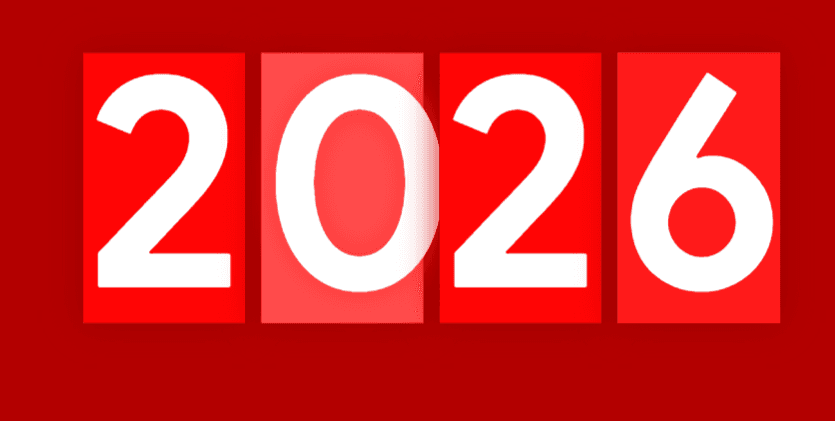
3D Year Flip Animation – CSS Hover Transition (2025 → 2026)
Component

3D Year Flip Animation – CSS Hover Transition (2025 → 2026)

CodewithLord
January 4, 2026

A pure HTML & CSS 3D hover animation that visually flips the year from 2025 to 2026 using perspective transforms, layered pseudo-elements, and cinematic hover effects.


🧠 Description


This project is a pure HTML + CSS interactive 3D year transition that visually transforms 2025 → 2026 on hover.
It uses CSS perspective, 3D transforms, pseudo-elements, and hover choreography to create a tactile flip-card illusion — without JavaScript.


The animation feels:

  • Physical 🧱
  • Cinematic 🎥
  • Playful ✨

Perfect for:

  • New Year landing pages
  • Hero animations
  • Creative portfolios
  • CSS experiments


✨ Key Features


  • 🎯 Pure HTML & CSS (no JavaScript)
  • 🧊 3D perspective & depth illusion
  • 🔄 Digit morphing using ::after & ::before
  • 🖱️ Hover-triggered choreography
  • 💥 Bounce micro-interaction
  • 🌑 Full background takeover using :has()


🧱 HTML Structure


Core Markup


1<!DOCTYPE html> 2<html lang="en"> 3 4 <head> 5 <meta charset="UTF-8"> 6 <title>next year --&gt; 2025 --&gt; 2026</title> 7 <link rel="preconnect" href="https://fonts.googleapis.com"> 8<link rel="preconnect" href="https://fonts.googleapis.com"> 9<link rel="preconnect" href="https://fonts.gstatic.com" crossorigin> 10<link href="https://fonts.googleapis.com/css2?family=Google+Sans:ital,opsz,wght@0,17..18,400..700;1,17..18,400..700&display=swap" rel="stylesheet"> 11<link rel="stylesheet" href="./style.css"> 12 13 </head> 14 15 <body> 16 <ul> 17 <li>2</li> 18 <li>0</li> 19 <li>2</li> 20 <li>5</li> 21</ul> 22 23 </body> 24 25</html> 26

HTML Breakdown

<ul> → Container acting as a 3D stage

<li> → Each digit as an independent 3D card

No wrappers, no scripts — minimal & semantic


🎨 CSS – Visual Design & Layout


Base Styling


1body { 2 height: 100%; 3 margin: 0px; 4 background: #222; 5 color: #fff; 6 font-family: "Google Sans", sans-serif; 7 font-optical-sizing: auto; 8 font-weight: 400; 9 font-style: normal; 10 position: relative; 11 transition: all 0.3s ease; 12} 13body:after { 14 content: ""; 15 display: block; 16 width: 0px; 17 height: 0px; 18 position: absolute; 19 background: #111; 20 left: 50%; 21 top: 50%; 22 z-index: 1; 23 transform: translate(-50%, -50%); 24 transition: all 0.3s ease, background 0.9s ease; 25} 26 27ul { 28 display: flex; 29 font: bold 270px/250px "Google Sans"; 30 margin: 5% auto 0px auto; 31 width: auto; 32 border: solid 20px transparent; 33 max-width: 685px; 34 cursor: pointer; 35 position: relative; 36 perspective: 2000px; 37 z-index: 99; 38} 39ul * { 40 transform-style: preserve-3d; 41} 42ul > li { 43 z-index: inherit; 44 list-style: none; 45 background: #b30000; 46 display: block; 47 width: 150px; 48 height: 100%; 49 margin-right: -30px; 50 position: relative; 51 perspective: 300px; 52 box-shadow: 0px 0px 30px #111; 53 overflow: hidden; 54 transform: rotateY(-10deg) translateZ(0px) rotate(-6deg); 55 transition: all 0.3s ease; 56} 57ul > li:after { 58 content: "2"; 59 background: #ff0505; 60 position: absolute; 61 top: -200px; 62 left: 150px; 63 display: block; 64 width: 150px; 65 height: 100%; 66 transition: all 0.3s ease; 67} 68ul > li:nth-child(4) { 69 overflow: Hidden; 70} 71ul > li:nth-child(4):before { 72 content: "6"; 73 background: #ff0505; 74 position: absolute; 75 top: -200px; 76 right: 150px; 77 display: block; 78 width: 150px; 79 height: 100%; 80 transition: all 0.3s ease; 81 z-index: 999999; 82} 83ul > li:nth-child(even) { 84 background: red; 85 background: burgundy; 86 transform: rotateY(-10deg) rotate(7deg); 87} 88ul > li:nth-child(even):after { 89 background: #ff4d4d; 90 text-shadow: 0px 0px 30px #ff3333; 91} 92ul > li:nth-child(2):after { 93 content: "0"; 94} 95ul > li:nth-child(4):after { 96 mix-blend-mode: normal; 97 content: "5"; 98} 99 100ul:hover { 101 transform: scale(1.08); 102 transition: transform 0.3s ease-in; 103} 104ul:hover > li { 105 margin-right: 15px; 106 overflow: visible; 107 box-shadow: 0px 0px 30px #9e0000; 108 transform: rotateY(0deg) rotate(0deg); 109 transition: all 0.2s ease, transform 0.3s ease-in; 110 animation: bounce 0.1s linear; 111 animation-iteration-count: 2; 112} 113ul:hover > li:after { 114 top: 0px; 115 left: 0px; 116 transition: all 0.2s ease, left 0.3s ease; 117} 118ul:hover > li:nth-child(4) { 119 overflow: hidden; 120} 121ul:hover > li:nth-child(4):before { 122 top: 0px; 123 right: 0px; 124 background: #ff1a1a; 125 transition: top 0.6s ease, right 0.3s ease; 126 transition-delay: 0.25s; 127} 128ul:hover > li:nth-child(1) { 129 animation-delay: 0.1s; 130} 131ul:hover > li:nth-child(1):after { 132 transition-delay: 0.03s; 133} 134ul:hover > li:nth-child(2) { 135 animation-delay: 0.2s; 136} 137ul:hover > li:nth-child(2):after { 138 transition-delay: 0.05s; 139} 140ul:hover > li:nth-child(3) { 141 animation-delay: 0.25s; 142} 143ul:hover > li:nth-child(3):after { 144 transition-delay: 0.05s; 145} 146ul:hover > li:nth-child(4) { 147 animation-delay: 0.3s; 148} 149ul:hover > li:nth-child(4):after { 150 transition-delay: 0.08s; 151} 152 153body:has(ul:hover) { 154 overflow: hidden; 155} 156body:has(ul:hover):after { 157 width: 100%; 158 height: 100%; 159 min-height: 200vh; 160 background: #b30000; 161 transition: all 0.4s ease, width 0.5s ease, background 0.8s ease; 162} 163 164@keyframes bounce { 165 0% { 166 margin-top: -4px; 167 } 168 80% { 169 margin-top: 2px; 170 } 171 100% { 172 margin-top: 0px; 173 } 174}

Dark cinematic background

Smooth transitions for full-scene effects

Google Sans for modern typography


Love this component?

Explore more components and build amazing UIs.

View All Components