Back to Components
Flying Bird Animation Game Using Pure CSS | No JavaScript Needed
Component

Flying Bird Animation Game Using Pure CSS | No JavaScript Needed

CodewithLord
October 19, 2025

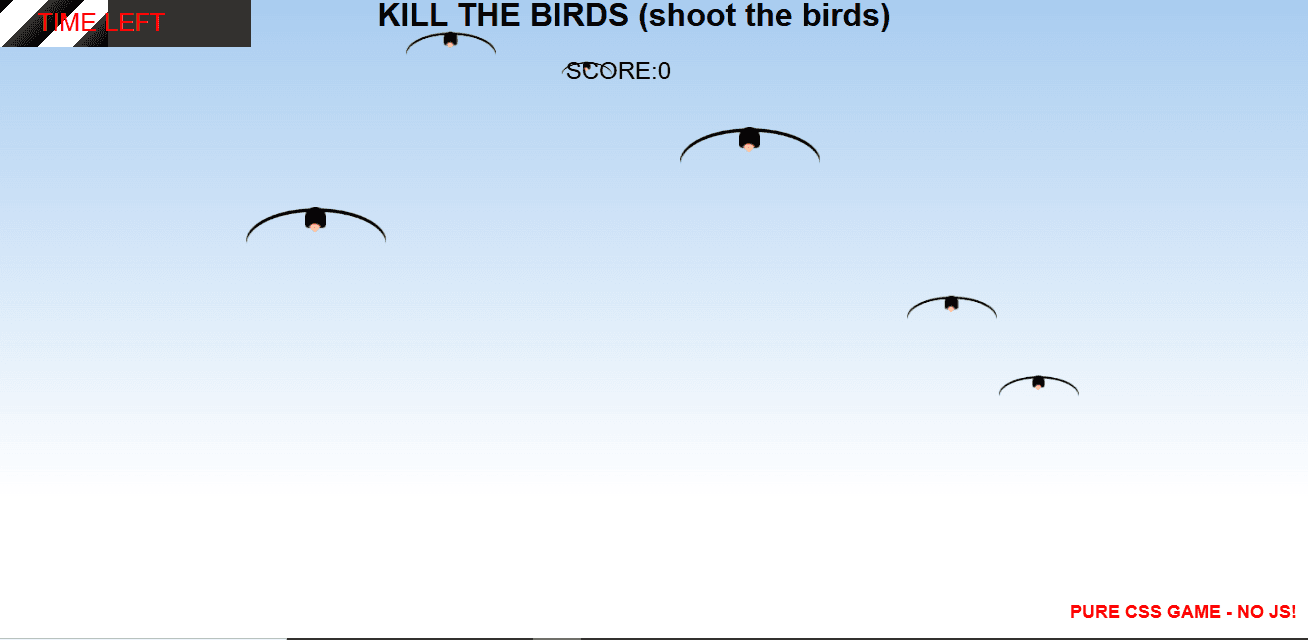
This project demonstrates a fun and interactive bird flying game built entirely with pure CSS — no JavaScript required! 🐥.

🧠 Description

This project demonstrates a fun and interactive bird flying game built entirely with pure CSS — no JavaScript required! 🐥 The game features smooth animations that make the bird flap its wings and move across a beautifully styled background. Using CSS keyframes, transitions, and transforms, the illusion of continuous flight and motion is achieved in a lightweight and responsive design. It’s a perfect example of how powerful CSS animations can be for creating dynamic, game-like experiences without relying on JavaScript. Ideal for beginners learning advanced CSS animation techniques or developers experimenting with creative front-end effects.


💻 HTML Code


1<!DOCTYPE html> 2<html lang="en"> 3 4 <head> 5 <meta charset="UTF-8"> 6 <title>PURE CSS GAME - NO JS</title> 7 <link rel="stylesheet" href="https://public.codepenassets.com/css/normalize-5.0.0.min.css"> 8<link rel="stylesheet" href="./style.css"> 9<script src="https://public.codepenassets.com/js/prefixfree-1.0.7.min.js"></script> 10 11 </head> 12 13 <body> 14 <div class="wrapper"> 15 <div class="timer"> 16 <span></span> 17 </div> 18 <div class="gameover">GAME OVER</div> 19 <h1>KILL THE BIRDS <span>(shoot the birds)</span></h1> 20 <h2>PURE CSS GAME - NO JS!</h2> 21 <input class="input-circle input-circle1" type="radio" id="circle1" > 22 <input class="input-circle input-circle2" type="radio" id="circle2" > 23 <input class="input-circle input-circle3" type="radio" id="circle3" > 24 <input class="input-circle input-circle4" type="radio" id="circle4" > 25 <input class="input-circle input-circle5" type="radio" id="circle5" > 26 <input class="input-circle input-circle6" type="radio" id="circle6" > 27 28 <label for="circle1" class="pajaro pajaro1"><span></span></label> 29 <label for="circle2" class="pajaro pajaro2"><span></span></label> 30 <label for="circle3" class="pajaro pajaro3"><span></span></label> 31 <label for="circle4" class="pajaro pajaro4"><span></span></label> 32 <label for="circle5" class="pajaro pajaro5"><span></span></label> 33 <label for="circle6" class="pajaro pajaro6"><span></span></label> 34 <div class="sum">SCORE:</div> 35</div> 36 <script src="./script.js"></script> 37 38 </body> 39 40</html> 41


The HTML structure creates the foundation of the game interface without using any JavaScript logic. The (div class="wrapper") acts as the main game area, containing all visual elements and gameplay mechanics. Inside it:

A timer bar (div class="timer")(span) (span) (div) visually shows how much time is left before the game ends.

The "GAME OVER" text (div class="gameover") appears at the end of the game using CSS animation.

The game title (h1) and subtitle (h2) display information and credit.

Multiple hidden radio inputs (input class="input-circle" type="radio") represent targets (birds). When clicked, they act as “hits”.

Each bird is represented by a (label) linked to its respective input (for="circle1" etc.), styled with the pajaro class. Clicking on a bird label checks the associated input, triggering CSS effects to simulate shooting the bird.

The score counter (div class="sum")SCORE:(div) uses CSS counters to track how many birds have been shot.

Finally, a (script src="./script.js")(script) tag is present, but no JavaScript logic is required for functionality—this is a pure CSS-based game. The HTML mainly serves to structure the interactive elements and connect labels to hidden inputs for user interaction.

CSS Code


1body{ 2 counter-reset:birds; 3 -webkit-touch-callout: none; 4-webkit-user-select: none; 5-khtml-user-select: none; 6-moz-user-select: none; 7-ms-user-select: none; 8user-select: none; 9 overflow:hidden; 10} 11/*hide checkbox*/ 12input{position:fixed; left:-10px; top:-10px;} 13 14h1{margin:0; text-align:center;} 15h2{position:fixed; right:20px; bottom:0; font-size:18px; color:red;} 16 17/*play area*/ 18.wrapper{ 19 height:500px; 20 background: -webkit-linear-gradient(top, hsla(210,70%,80%,1) 0%,hsla(210,50%,100%,1) 100%); 21 position:relative; 22 cursor:crosshair; 23} 24/*count dead birds*/ 25.input-circle:checked{ 26 counter-increment:birds; 27} 28 29.sum{position:fixed; left:45%; top:60px; font-size:24px; fonot-weight:bold;} 30 31/*print to screen dead birds*/ 32.sum:after{ 33 content: counter(birds); 34} 35 36.input-circle ~ .pajaro{ 37 opacity:0; 38 transition:0.3s cubic-bezier(0,.43,1,0); 39 animation: move 8s infinite alternate; 40} 41.input-circle1:not(:checked) ~ .pajaro1, 42.input-circle2:not(:checked) ~ .pajaro2, 43.input-circle3:not(:checked) ~ .pajaro3, 44.input-circle4:not(:checked) ~ .pajaro4, 45.input-circle5:not(:checked) ~ .pajaro5, 46.input-circle6:not(:checked) ~ .pajaro6 47{ 48 opacity:1; 49} 50 51 52.input-circle1:checked ~ .pajaro1 span, 53.input-circle2:checked ~ .pajaro2 span, 54.input-circle3:checked ~ .pajaro3 span, 55.input-circle4:checked ~ .pajaro4 span, 56.input-circle5:checked ~ .pajaro5 span, 57.input-circle6:checked ~ .pajaro6 span 58{ 59 display:block; 60 61} 62 63.pajaro{ 64 position:absolute; 65 left:0; 66 cursor:crosshair; 67} 68.pajaro>span{ 69 display:none;position:absolute; z-index:2; left:-250%;bottom:-50%; 70 background-color:white; border:solid 2px #000; width:80px; height:30px; padding:10px; border-radius:50%; 71} 72.pajaro>span:before{ 73 content:"I'm Dead!"; color:red; font-weight:bold; 74} 75 76.pajaro1{top:50px; 77 animation-delay: -2s!important; 78 transform:scale(0.9); 79} 80.pajaro2{ 81 top:100px; 82 animation-delay: -1s!important; 83 transform:scale(0.8); 84} 85.pajaro3{ 86 top:200px; 87 animation-delay: -3s!important; 88 transform:scale(1.4); 89} 90 91.pajaro4{top:50px; 92 animation-delay: -12s!important; 93 transform:scale(0.9); 94} 95.pajaro5{ 96 top:100px; 97 animation-delay: -16s!important; 98 transform:scale(0.5); 99} 100.pajaro6{ 101 top:200px; 102 animation-delay: -20s!important; 103 transform:scale(1.4); 104} 105 106@keyframes move{ 1070%{left:0%;} 10820%{left:20%;top:50%; } 10940%{top:30%; left:60%;} 11060%{top:80%;left:80%;} 11180%{top:10%; left:20%:} 112100%{top:30%; left:20%; } 113} 114 115 116.timer{ 117 background-color:#333; width:300px;height:50px; 118 position:fixed; 119} 120 121 122.timer span{ 123 display:block; 124 background:repeating-linear-gradient(-45deg, #000, rgba(0, 0, 0, 0) 25px, #FFF 25px, #FFF 50px); 125 width:300px; height:50px; 126 animation:timer 20s linear; 127} 128 129.timer span:before{ 130 content:"TIME LEFT"; 131 display:block; 132 position:absolute; z-index:3; 133 left:0; 134 right:0; 135 top:0; 136 bottom:0; 137 text-align:center; 138 line-height:50px; 139 font-size:25px; 140 color:red; 141} 142@keyframes timer{ 1430%{width:10px;} 144100%{width:300px; display:block;} 145} 146 147 148.gameover{ 149 position:fixed; z-index:100000; left:0; top:0; bottom:0; right:0; background-color:rgba(0,0,0,0.8); 150 animation:gameover 20s linear forwards; 151 font-size:80px; color:white; font-weight:bold; text-align:center; 152 text-indent:0; 153 line-height:500px; 154} 155 156@keyframes gameover{ 1570%{left:-5000px;bottom:100%;} 15897%{left:-5000px;bottom:100%;} 159100%{ left:0px;} 160} 161 162footer{position:fixed; left:0; bottom:0; padding:10px 20px;} 163footer svg{vertical-align:middle;} 164footer a{text-decoration:none; font-size:20px; color:rgba(29,161,242,1.00); vertical-align:middle;} 165 166 167 168 169/*------------------------------------------------------ body of the bird 170*/ 171 172.pajaro{ 173 background:black; 174 border-radius: 50% 50% 20% 20%; 175 color:white; 176 line-height:20px; 177 letter-spacing: 2px; 178 font-size:0.8em; 179 text-align:center; 180 position:absolute; 181 182 margin-top:-20px; margin-left:-10px; 183 width:15px; height:15px; 184 animation:planeo 0.8s linear infinite; 185 z-index:999; 186} 187 188.pajaro:after, 189.pajaro:before{ 190 content:""; 191 position:absolute; 192 top:50%; left:50%; 193} 194 195/*------------------------------------------------------ bird wings 196*/ 197 198.pajaro:after{ 199 border-radius: 100% 100% 0 0; 200 box-shadow: inset 0px 5px 0 black; 201 width:100px; height:100px; 202 margin-top:-7px; margin-left:-50px; 203 transform-origin: 100% 0%; 204 animation:alas 3s linear infinite; 205} 206 207/*------------------------------------------------------ bird beak 208*/ 209 210.pajaro:before{ 211 background:#FFC37F; 212 border-radius: 100% 0% 20% 0%; 213 margin-top:3px; margin-left:-4px; 214 width:6px; height:6px; 215 transform:rotateZ(45deg); 216} 217 218/*------------------------------------------------------ wings animation 219*/ 220 221@keyframes alas { 222 50%{ 223 transform:rotateX(-1440deg); 224 } 225} 226 227/*------------------------------------------------------ bird animation 228*/ 229 230@keyframes planeo { 231 40%{ 232 transform:rotateZ(2deg) translateX(2px) translateY(10px) translateZ(0); 233 line-height:16px; 234 font-size:0.6em; 235 } 236 80%{ 237 transform:rotateZ(-2deg) translateX(5px) translateY(8px) translateZ(0); 238 } 239} 240

The CSS file is where the entire game logic, animations, and visuals are implemented using advanced CSS features and keyframes—without any JavaScript.

General Setup: The body disables text selection, hides overflow, and resets a custom counter (counter-reset: birds;) that tracks how many birds are shot.

Hidden Inputs: The radio inputs are hidden off-screen but still clickable through their linked labels. When a bird (label) is clicked, its input becomes checked.

Scoring System: Each time a bird’s input (.input-circle:checked) is selected, the counter (birds) is incremented. The .sum:after pseudo-element displays the live score using the counter’s current value.

Game Area (.wrapper): Defines a 500px-high playable area with a blue sky gradient and a crosshair cursor, giving a shooting game feel.

Birds (.pajaro classes): Each bird is absolutely positioned and styled as a small black oval shape with wings and a beak.

The :before pseudo-element forms the beak.

The :after pseudo-element forms the wings.

Both are animated using keyframes for flapping and flying motion (@keyframes alas and @keyframes planeo).

Bird Movement: Each .pajaro uses the move keyframe animation to travel across the screen horizontally and vertically in smooth loops. Birds start at different heights and speeds using animation-delay to make their movement look natural.

Shooting Mechanism: When a bird is clicked (input becomes checked), its label becomes invisible (opacity: 0), simulating it being shot. The label’s element displays “I’m Dead!” text at the clicked position.

Timer Animation: The .timer span element expands its width from 10px to 300px over 20 seconds using the timer keyframe animation. The text “TIME LEFT” overlays the bar, showing the countdown duration visually.

Game Over Screen: The .gameover div stays hidden off-screen initially and moves into view at the end of the 20-second timer animation using the gameover keyframes. It overlays a dark transparent background with large white text saying “GAME OVER”.

Wings and Bird Body Animation: The wings continuously flap with the alas keyframe, rotating the shape to create motion. The planeo keyframe slightly moves and rotates the bird for a gliding effect, giving a lifelike flying motion.

Together, these CSS techniques—counters, transitions, and keyframes—create a fully functional interactive shooting game where players click moving birds to earn points before the timer runs out.

Love this component?

Explore more components and build amazing UIs.

View All Components