🧠 Description
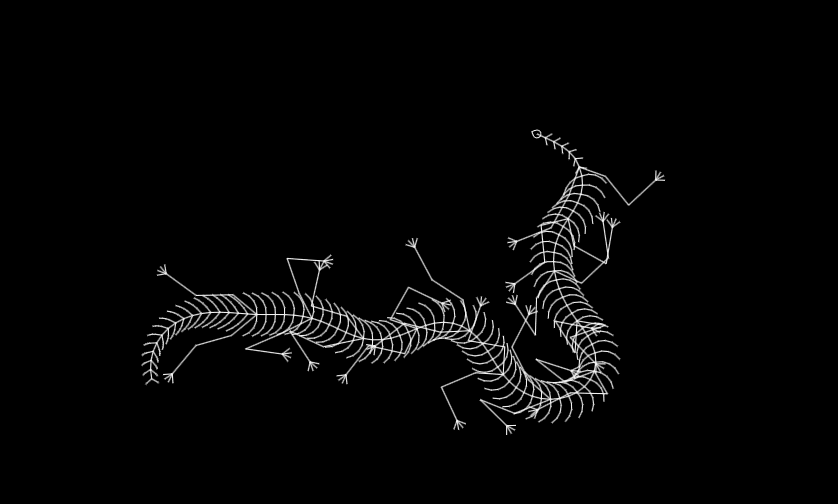
This project showcases an interactive reptile-like cursor animation built entirely with HTML5 Canvas and JavaScript — no libraries or CSS animations required.
The code simulates a realistic creature (like a lizard or tentacle) that dynamically follows your mouse movements.
It uses an advanced procedural animation system based on:
Segment-based joints (Segment class) to form flexible limbs and body parts
Inverse Kinematics (IK) via LimbSystem and LegSystem classes for natural motion
Creature physics (acceleration, rotation, friction) handled by the Creature class
The entire system updates and redraws the creature in real-time using requestAnimationFrame-like logic within timed intervals.
As you move the mouse, the reptile crawls and adapts its direction fluidly — creating a lifelike interactive cursor effect that’s perfect for experimental animations, websites, or game prototypes.
💻 HTML Code
Javascipt Code
Copy // Input handling
var Input = {
keys : [],
mouse : {
left : false ,
right : false ,
middle : false ,
x : 0 ,
y : 0
}
};
// initialize key states
for ( var i = 0 ; i < 230 ; i++) {
Input.keys.push( false );
}
document .addEventListener( "keydown" , function ( event ) {
Input.keys[event.keyCode] = true ;
});
document .addEventListener( "keyup" , function ( event ) {
Input.keys[event.keyCode] = false ;
});
document .addEventListener( "mousedown" , function ( event ) {
// use strict equality, not assignment
if ((event.button = 0 )) {
Input.mouse.left = true ;
}
if ((event.button = 1 )) {
Input.mouse.middle = true ;
}
if ((event.button = 2 )) {
Input.mouse.right = true ;
}
});
document .addEventListener( "mouseup" , function ( event ) {
if ((event.button = 0 )) {
Input.mouse.left = false ;
}
if ((event.button = 1 )) {
Input.mouse.middle = false ;
}
if ((event.button = 2 )) {
Input.mouse.right = false ;
}
});
document .addEventListener( "mousemove" , function ( event ) {
Input.mouse.x = event.clientX;
Input.mouse.y = event.clientY;
});
//Sets up canvas
var canvas = document .createElement( "canvas" );
document .body.appendChild(canvas);
canvas.width = Math .max( window .innerWidth, window .innerWidth);
canvas.height = window .innerHeight;
canvas.style.position = "absolute" ;
canvas.style.left = "0px" ;
canvas.style.top = "0px" ;
document .body.style.overflow = "hidden" ;
var ctx = canvas.getContext( "2d" );
// Segment class (joint)
var segmentCount = 0 ;
class Segment {
constructor ( parent, size, angle, range, stiffness ) {
segmentCount++;
this .isSegment = true ;
this .parent = parent; //Segment which this one is connected to
if ( typeof parent.children == "object" ) {
parent.children.push( this );
}
this .children = []; //Segments connected to this segment
this .size = size; //Distance from parent
this .relAngle = angle; //Angle relative to parent
this .defAngle = angle; //Default angle relative to parent
this .absAngle = parent.absAngle + angle; //Angle relative to x-axis
this .range = range; //Difference between maximum and minimum angles
this .stiffness = stiffness; //How closely it conforms to default angle
this .updateRelative( false , true );
}
updateRelative ( iter, flex ) {
// normalize relative angle around defAngle
this .relAngle =
this .relAngle -
2 *
Math .PI *
Math .floor(( this .relAngle - this .defAngle) / 2 / Math .PI + 1 / 2 );
if (flex) {
// apply stiffness-limited angle toward defAngle
this .relAngle = Math .min(
this .defAngle + this .range / 2 ,
Math .max(
this .defAngle - this .range / 2 ,
( this .relAngle - this .defAngle) / this .stiffness + this .defAngle
)
);
}
this .absAngle = this .parent.absAngle + this .relAngle;
this .x = this .parent.x + Math .cos( this .absAngle) * this .size; //Position
this .y = this .parent.y + Math .sin( this .absAngle) * this .size; //Position
if (iter) {
for ( var i = 0 ; i < this .children.length; i++) {
this .children[i].updateRelative(iter, flex);
}
}
}
draw ( iter ) {
ctx.beginPath();
ctx.moveTo( this .parent.x, this .parent.y);
ctx.lineTo( this .x, this .y);
ctx.stroke();
if (iter) {
for ( var i = 0 ; i < this .children.length; i++) {
this .children[i].draw( true );
}
}
}
follow ( iter ) {
var x = this .parent.x;
var y = this .parent.y;
var dist = (( this .x - x) ** 2 + ( this .y - y) ** 2 ) ** 0.5 ;
this .x = x + this .size * ( this .x - x) / dist;
this .y = y + this .size * ( this .y - y) / dist;
this .absAngle = Math .atan2( this .y - y, this .x - x);
this .relAngle = this .absAngle - this .parent.absAngle;
this .updateRelative( false , true );
//this.draw();
if (iter) {
for ( var i = 0 ; i < this .children.length; i++) {
this .children[i].follow( true );
}
}
}
}
// LimbSystem (IK-like limb)
class LimbSystem {
constructor ( end, length, speed, creature ) {
this .end = end;
this .length = Math .max( 1 , length);
this .creature = creature;
this .speed = speed;
creature.systems.push( this );
this .nodes = [];
var node = end;
for ( var i = 0 ; i < length; i++) {
this .nodes.unshift(node);
//node.stiffness=1;
node = node.parent;
if (!node.isSegment) {
this .length = i + 1 ;
break ;
}
}
this .hip = this .nodes[ 0 ].parent;
}
moveTo ( x, y ) {
this .nodes[ 0 ].updateRelative( true , true );
var dist = ((x - this .end.x) ** 2 + (y - this .end.y) ** 2 ) ** 0.5 ;
var len = Math .max( 0 , dist - this .speed);
for ( var i = this .nodes.length - 1 ; i >= 0 ; i--) {
var node = this .nodes[i];
var ang = Math .atan2(node.y - y, node.x - x);
node.x = x + len * Math .cos(ang);
node.y = y + len * Math .sin(ang);
x = node.x;
y = node.y;
len = node.size;
}
for ( var i = 0 ; i < this .nodes.length; i++) {
var node = this .nodes[i];
node.absAngle = Math .atan2(
node.y - node.parent.y,
node.x - node.parent.x
);
node.relAngle = node.absAngle - node.parent.absAngle;
for ( var ii = 0 ; ii < node.children.length; ii++) {
var childNode = node.children[ii];
if (! this .nodes.includes(childNode)) {
childNode.updateRelative( true , false );
}
}
}
//this.nodes[0].updateRelative(true,false)
}
update ( ) {
this .moveTo(Input.mouse.x, Input.mouse.y);
}
}
// LegSystem (specialized limb)
class LegSystem extends LimbSystem {
constructor ( end, length, speed, creature ) {
super (end, length, speed, creature);
this .goalX = end.x;
this .goalY = end.y;
this .step = 0 ; //0 stand still, 1 move forward,2 move towards foothold
this .forwardness = 0 ;
//For foot goal placement
this .reach =
0.9 *
(( this .end.x - this .hip.x) ** 2 + ( this .end.y - this .hip.y) ** 2 ) ** 0.5 ;
var relAngle =
this .creature.absAngle -
Math .atan2( this .end.y - this .hip.y, this .end.x - this .hip.x);
relAngle -= 2 * Math .PI * Math .floor(relAngle / 2 / Math .PI + 1 / 2 );
this .swing = -relAngle + ( 2 * (relAngle < 0 ) - 1 ) * Math .PI / 2 ;
this .swingOffset = this .creature.absAngle - this .hip.absAngle;
//this.swing*=(2*(relAngle>0)-1);
}
update ( x, y ) {
this .moveTo( this .goalX, this .goalY);
//this.nodes[0].follow(true,true)
if ( this .step == 0 ) {
var dist =
(( this .end.x - this .goalX) ** 2 + ( this .end.y - this .goalY) ** 2 ) **
0.5 ;
if (dist > 1 ) {
this .step = 1 ;
//this.goalX=x;
//this.goalY=y;
this .goalX =
this .hip.x +
this .reach *
Math .cos( this .swing + this .hip.absAngle + this .swingOffset) +
( 2 * Math .random() - 1 ) * this .reach / 2 ;
this .goalY =
this .hip.y +
this .reach *
Math .sin( this .swing + this .hip.absAngle + this .swingOffset) +
( 2 * Math .random() - 1 ) * this .reach / 2 ;
}
} else if ( this .step == 1 ) {
var theta =
Math .atan2( this .end.y - this .hip.y, this .end.x - this .hip.x) -
this .hip.absAngle;
var dist =
(( this .end.x - this .hip.x) ** 2 + ( this .end.y - this .hip.y) ** 2 ) **
0.5 ;
var forwardness2 = dist * Math .cos(theta);
var dF = this .forwardness - forwardness2;
this .forwardness = forwardness2;
if (dF * dF < 1 ) {
this .step = 0 ;
this .goalX = this .hip.x + ( this .end.x - this .hip.x);
this .goalY = this .hip.y + ( this .end.y - this .hip.y);
}
}
}
}
// Creature class (root)
class Creature {
constructor (
x,
y,
angle,
fAccel,
fFric,
fRes,
fThresh,
rAccel,
rFric,
rRes,
rThresh
) {
this .x = x; //Starting position
this .y = y;
this .absAngle = angle; //Staring angle
this .fSpeed = 0 ; //Forward speed
this .fAccel = fAccel; //Force when moving forward
this .fFric = fFric; //Friction against forward motion
this .fRes = fRes; //Resistance to motion
this .fThresh = fThresh; //minimum distance to target to keep moving forward
this .rSpeed = 0 ; //Rotational speed
this .rAccel = rAccel; //Force when rotating
this .rFric = rFric; //Friction against rotation
this .rRes = rRes; //Resistance to rotation
this .rThresh = rThresh; //Maximum angle difference before rotation
this .children = [];
this .systems = [];
}
follow ( x, y ) {
var dist = (( this .x - x) ** 2 + ( this .y - y) ** 2 ) ** 0.5 ;
var angle = Math .atan2(y - this .y, x - this .x);
//Update forward
var accel = this .fAccel;
if ( this .systems.length > 0 ) {
var sum = 0 ;
for ( var i = 0 ; i < this .systems.length; i++) {
sum += this .systems[i].step == 0 ;
}
accel *= sum / this .systems.length;
}
this .fSpeed += accel * (dist > this .fThresh);
this .fSpeed *= 1 - this .fRes;
this .speed = Math .max( 0 , this .fSpeed - this .fFric);
//Update rotation
var dif = this .absAngle - angle;
dif -= 2 * Math .PI * Math .floor(dif / ( 2 * Math .PI) + 1 / 2 );
if ( Math .abs(dif) > this .rThresh && dist > this .fThresh) {
this .rSpeed -= this .rAccel * ( 2 * (dif > 0 ) - 1 );
}
this .rSpeed *= 1 - this .rRes;
if ( Math .abs( this .rSpeed) > this .rFric) {
this .rSpeed -= this .rFric * ( 2 * ( this .rSpeed > 0 ) - 1 );
} else {
this .rSpeed = 0 ;
}
//Update position
this .absAngle += this .rSpeed;
this .absAngle -=
2 * Math .PI * Math .floor( this .absAngle / ( 2 * Math .PI) + 1 / 2 );
this .x += this .speed * Math .cos( this .absAngle);
this .y += this .speed * Math .sin( this .absAngle);
this .absAngle += Math .PI;
for ( var i = 0 ; i < this .children.length; i++) {
this .children[i].follow( true , true );
}
for ( var i = 0 ; i < this .systems.length; i++) {
this .systems[i].update(x, y);
}
this .absAngle -= Math .PI;
this .draw( true );
}
draw ( iter ) {
var r = 4 ;
ctx.beginPath();
ctx.arc(
this .x,
this .y,
r,
Math .PI / 4 + this .absAngle,
7 * Math .PI / 4 + this .absAngle
);
ctx.moveTo(
this .x + r * Math .cos( 7 * Math .PI / 4 + this .absAngle),
this .y + r * Math .sin( 7 * Math .PI / 4 + this .absAngle)
);
ctx.lineTo(
this .x + r * Math .cos( this .absAngle) * 2 ** 0.5 ,
this .y + r * Math .sin( this .absAngle) * 2 ** 0.5
);
ctx.lineTo(
this .x + r * Math .cos( Math .PI / 4 + this .absAngle),
this .y + r * Math .sin( Math .PI / 4 + this .absAngle)
);
ctx.stroke();
if (iter) {
for ( var i = 0 ; i < this .children.length; i++) {
this .children[i].draw( true );
}
}
}
}
// Setup helpers (examples)
var critter;
function setupSimple ( ) {
// create creature and a long chain of segments
var critter = new Creature(
window .innerWidth / 2 ,
window .innerHeight / 2 ,
0 ,
12 ,
1 ,
0.5 ,
16 ,
0.5 ,
0.085 ,
0.5 ,
0.3
);
var node = critter;
//(parent,size,angle,range,stiffness)
for ( var i = 0 ; i < 128 ; i++) {
var node = new Segment(node, 8 , 0 , 3.14159 / 2 , 1 );
}
setInterval ( function ( ) {
ctx.clearRect( 0 , 0 , canvas.width, canvas.height);
critter.follow(Input.mouse.x, Input.mouse.y);
}, 33 );
}
function setupTentacle ( ) {
//(x,y,angle,fAccel,fFric,fRes,fThresh,rAccel,rFric,rRes,rThresh)
critter = new Creature(
window .innerWidth / 2 ,
window .innerHeight / 2 ,
0 ,
12 ,
1 ,
0.5 ,
16 ,
0.5 ,
0.085 ,
0.5 ,
0.3
);
var node = critter;
//(parent,size,angle,range,stiffness)
for ( var i = 0 ; i < 32 ; i++) {
var node = new Segment(node, 8 , 0 , 2 , 1 );
}
//(end,length,speed,creature)
var tentacle = new LimbSystem(node, 32 , 8 , critter);
setInterval ( function ( ) {
ctx.clearRect( 0 , 0 , canvas.width, canvas.height);
critter.follow(canvas.width / 2 , canvas.height / 2 );
ctx.beginPath();
ctx.arc(Input.mouse.x, Input.mouse.y, 2 , 0 , 6.283 );
ctx.fill();
}, 33 );
}
function setupArm ( ) {
//(x,y,angle,fAccel,fFric,fRes,fThresh,rAccel,rFric,rRes,rThresh)
var critter = new Creature(
window .innerWidth / 2 ,
window .innerHeight / 2 ,
0 ,
12 ,
1 ,
0.5 ,
16 ,
0.5 ,
0.085 ,
0.5 ,
0.3
);
var node = critter;
//(parent,size,angle,range,stiffness)
for ( var i = 0 ; i < 3 ; i++) {
var node = new Segment(node, 80 , 0 , 3.1416 , 1 );
}
var tentacle = new LimbSystem(node, 3 , critter);
setInterval ( function ( ) {
ctx.clearRect( 0 , 0 , canvas.width, canvas.height);
critter.follow(canvas.width / 2 , canvas.height / 2 );
}, 33 );
ctx.beginPath();
ctx.arc(Input.mouse.x, Input.mouse.y, 2 , 0 , 6.283 );
ctx.fill();
}
function setupTestSquid ( size, legs ) {
//(x,y,angle,fAccel,fFric,fRes,fThresh,rAccel,rFric,rRes,rThresh)
critter = new Creature(
window .innerWidth / 2 ,
window .innerHeight / 2 ,
0 ,
size * 10 ,
size * 3 ,
0.5 ,
16 ,
0.5 ,
0.085 ,
0.5 ,
0.3
);
var legNum = legs;
var jointNum = 32 ;
for ( var i = 0 ; i < legNum; i++) {
var node = critter;
var ang = Math .PI / 2 * (i / (legNum - 1 ) - 0.5 );
for ( var ii = 0 ; ii < jointNum; ii++) {
var node = new Segment(
node,
size * 64 / jointNum,
ang * (ii == 0 ),
3.1416 ,
1.2
);
}
//(end,length,speed,creature,dist)
var leg = new LegSystem(node, jointNum, size * 30 , critter);
}
setInterval ( function ( ) {
ctx.clearRect( 0 , 0 , canvas.width, canvas.height);
critter.follow(Input.mouse.x, Input.mouse.y);
}, 33 );
}
function setupLizard ( size, legs, tail ) {
var s = size;
//(x,y,angle,fAccel,fFric,fRes,fThresh,rAccel,rFric,rRes,rThresh)
critter = new Creature(
window .innerWidth / 2 ,
window .innerHeight / 2 ,
0 ,
s * 10 ,
s * 2 ,
0.5 ,
16 ,
0.5 ,
0.085 ,
0.5 ,
0.3
);
var spinal = critter;
//(parent,size,angle,range,stiffness)
//Neck
for ( var i = 0 ; i < 6 ; i++) {
spinal = new Segment(spinal, s * 4 , 0 , 3.1415 * 2 / 3 , 1.1 );
for ( var ii = - 1 ; ii <= 1 ; ii += 2 ) {
var node = new Segment(spinal, s * 3 , ii, 0.1 , 2 );
for ( var iii = 0 ; iii < 3 ; iii++) {
node = new Segment(node, s * 0.1 , -ii * 0.1 , 0.1 , 2 );
}
}
}
//Torso and legs
for ( var i = 0 ; i < legs; i++) {
if (i > 0 ) {
//Vertebrae and ribs
for ( var ii = 0 ; ii < 6 ; ii++) {
spinal = new Segment(spinal, s * 4 , 0 , 1.571 , 1.5 );
for ( var iii = - 1 ; iii <= 1 ; iii += 2 ) {
var node = new Segment(spinal, s * 3 , iii * 1.571 , 0.1 , 1.5 );
for ( var iv = 0 ; iv < 3 ; iv++) {
node = new Segment(node, s * 3 , -iii * 0.3 , 0.1 , 2 );
}
}
}
}
//Legs and shoulders
for ( var ii = - 1 ; ii <= 1 ; ii += 2 ) {
var node = new Segment(spinal, s * 12 , ii * 0.785 , 0 , 8 ); //Hip
node = new Segment(node, s * 16 , -ii * 0.785 , 6.28 , 1 ); //Humerus
node = new Segment(node, s * 16 , ii * 1.571 , 3.1415 , 2 ); //Forearm
for (
var iii = 0 ;
iii < 4 ;
iii++ //fingers
) {
new Segment(node, s * 4 , (iii / 3 - 0.5 ) * 1.571 , 0.1 , 4 );
}
new LegSystem(node, 3 , s * 12 , critter, 4 );
}
}
//Tail
for ( var i = 0 ; i < tail; i++) {
spinal = new Segment(spinal, s * 4 , 0 , 3.1415 * 2 / 3 , 1.1 );
for ( var ii = - 1 ; ii <= 1 ; ii += 2 ) {
var node = new Segment(spinal, s * 3 , ii, 0.1 , 2 );
for ( var iii = 0 ; iii < 3 ; iii++) {
node = new Segment(node, s * 3 * (tail - i) / tail, -ii * 0.1 , 0.1 , 2 );
}
}
}
setInterval ( function ( ) {
ctx.clearRect( 0 , 0 , canvas.width, canvas.height);
critter.follow(Input.mouse.x, Input.mouse.y);
}, 33 );
}
// create creature and a long chain of segments
canvas.style.backgroundColor = "black" ;
ctx.strokeStyle = "white" ;
var legNum = Math .floor( 1 + Math .random() * 12 );
setupLizard(
8 / Math .sqrt(legNum),
legNum,
Math .floor( 4 + Math .random() * legNum * 8 )
);
⚙️ JavaScript Explanation
The JavaScript file handles the entire logic for the reptile animation. It begins by defining an input system that tracks keyboard and mouse events, including the state of keys, mouse buttons, and the current mouse position on the screen. This allows the creature to respond interactively as the user moves the cursor.
A canvas element is dynamically created and appended to the document body. Its width and height are set to match the window dimensions, ensuring a full-screen experience. The context from this canvas is used for drawing lines, arcs, and other elements representing the creature.
The foundation of movement is handled by the Segment class. Each segment represents a small part of the reptile’s body or limb. These segments are connected in a parent-child hierarchy to form chains that can bend, rotate, and stretch realistically. Each segment maintains its own angle, length, and stiffness, controlling how naturally it flexes or returns to its default position.
To make the body parts behave like limbs, the LimbSystem class is introduced. It organizes a group of connected segments into a movable structure that can target a specific point. The movement is calculated using inverse kinematics, where each joint adjusts its position to keep the overall limb pointing towards a target — in this case, the mouse cursor. The LegSystem extends this logic further, allowing legs to behave independently, stepping naturally when the creature moves.
The Creature class acts as the main controller. It defines the reptile’s body position, direction, and speed. It applies physics such as acceleration, resistance, and friction to make movements appear smooth and organic. The creature continuously adjusts its angle to face the cursor and moves forward in that direction, while its limbs follow dynamically.
Multiple setup functions allow different types of creatures to be created — for example, simple chains, tentacles, arms, squids, or full lizards. Each setup initializes a different structure of segments and limb systems. The setupLizard function, which runs by default, creates a full reptile with a spine, legs, and tail. The tail and limbs are made up of multiple connected segments to simulate realistic motion.
The animation is handled using a timed interval that continuously clears the canvas, updates positions, and redraws every frame. The mouse coordinates guide the creature’s movement, making it appear as though a reptile is crawling toward and following the user’s cursor in real time.